Get in touch
  • WordPress
  • Payments
  • v1.0.0

Przelewy24 & BLIK Payments for WooCommerce — bank transfer, card and BLIK payments in Poland

Accept payments in Poland through Przelewy24: bank transfers, cards, BLIK. An order is marked paid only after a signed notification and transaction/verify. Pro adds the BLIK code right at checkout, bank choice, refunds and a payment journal.

Download Free
Pro · one-year licence The more sites, the less each one costs
Compatibility
WooCommerce 7.0+ · WordPress 6.2+ · PHP 7.4+ · HPOS · classic and block checkout
Licence
one site, annual
Trial
7 days, no card, one per site
Updated
September 2026
Or all 144 Pro modules with All Access — 4 990 ₴ / year

What Free has,
and what Pro adds

The free version works with no time limit. Pro adds the rest of the features in the table.

Feature Free Pro
Przelewy24 method: bank transfers, cards, BLIK and wallets on the Przelewy24 page (REST API v1) ✔ ✔
A separate BLIK method at checkout — the Przelewy24 page with BLIK only ✔ ✔
A notification is accepted only with a valid SHA-384 signature, your merchant/POS, the order amount and currency ✔ ✔
Payment confirmed with transaction/verify — without it Przelewy24 does not settle the money ✔ ✔
The buyer's return is not proof of payment: the status is checked with Przelewy24 ✔ ✔
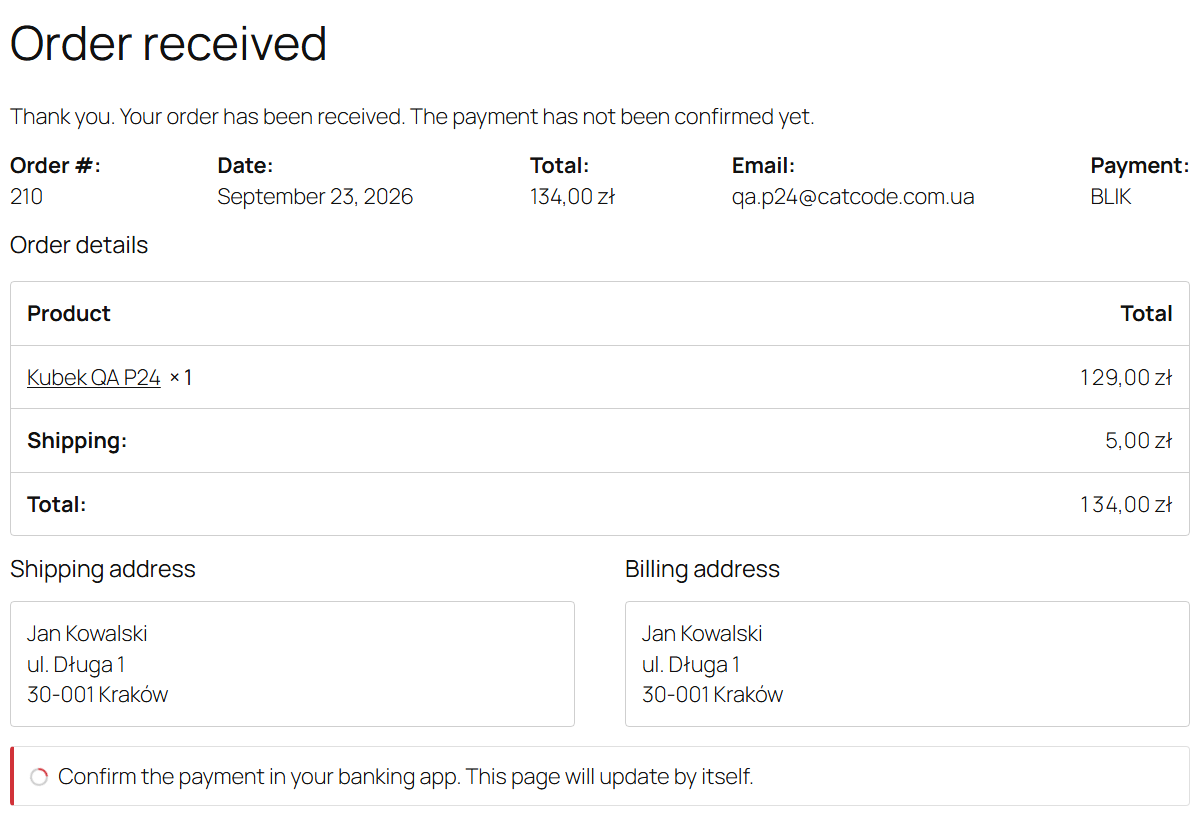
The order page waits for the confirmation and refreshes itself; a cancelled payment gets a "Pay again" button ✔ ✔
Underpayment — "On hold" without confirmation, with a note for the manager ✔ ✔
A repeat attempt checks the earlier ones first — one order is never charged twice ✔ ✔
Protection against the "notification + buyer return" race ✔ ✔
Separate sandbox and live keys with one switch; the order remembers its environment ✔ ✔
One-click connection check ✔ ✔
Przelewy24 page language, time to pay, order status after payment ✔ ✔
WooCommerce classic and block checkout, order-pay page, HPOS ✔ ✔
The CRC key and API key are stored encrypted and never logged ✔ ✔
Plugin languages: English, polski ✔ ✔
BLIK code right at checkout (BLIK level 0) — ✔
Bank choice at checkout from the methods enabled on your Przelewy24 account — ✔
Refunds from the order screen, full and partial — ✔
Payment journal with a one-click status check — ✔

What it looks like

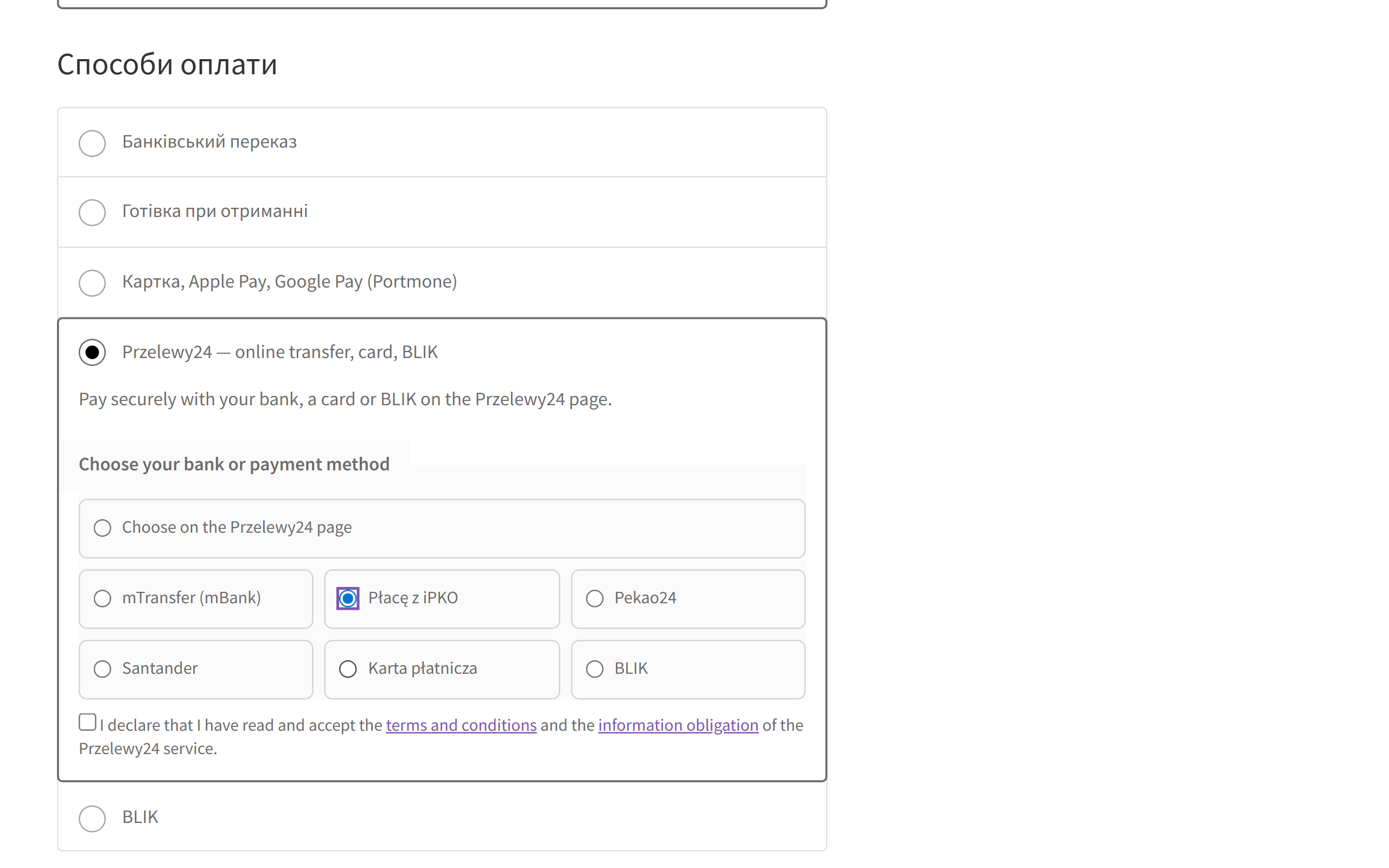
Przelewy24 method on the WooCommerce block checkout with bank choice and the Przelewy24 terms consent
At checkout: “Przelewy24 — online transfer, card, BLIK”. With Pro, a grid of the methods enabled on your Przelewy24 account appears below it: the buyer picks the bank straight away (here Płacę z iPKO) and accepts the Przelewy24 terms.
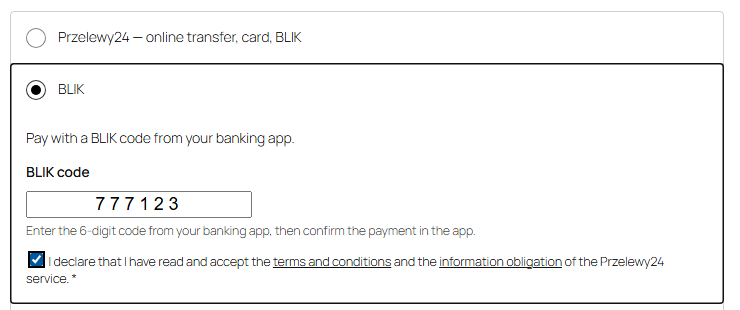
BLIK code field and the Przelewy24 terms consent on the WooCommerce block checkout
Pro: a separate BLIK method with a field for the 6-digit code right at checkout. Without the Przelewy24 terms consent or with an incomplete code the order does not go through. Requires BLIK level 0 on the Przelewy24 account.
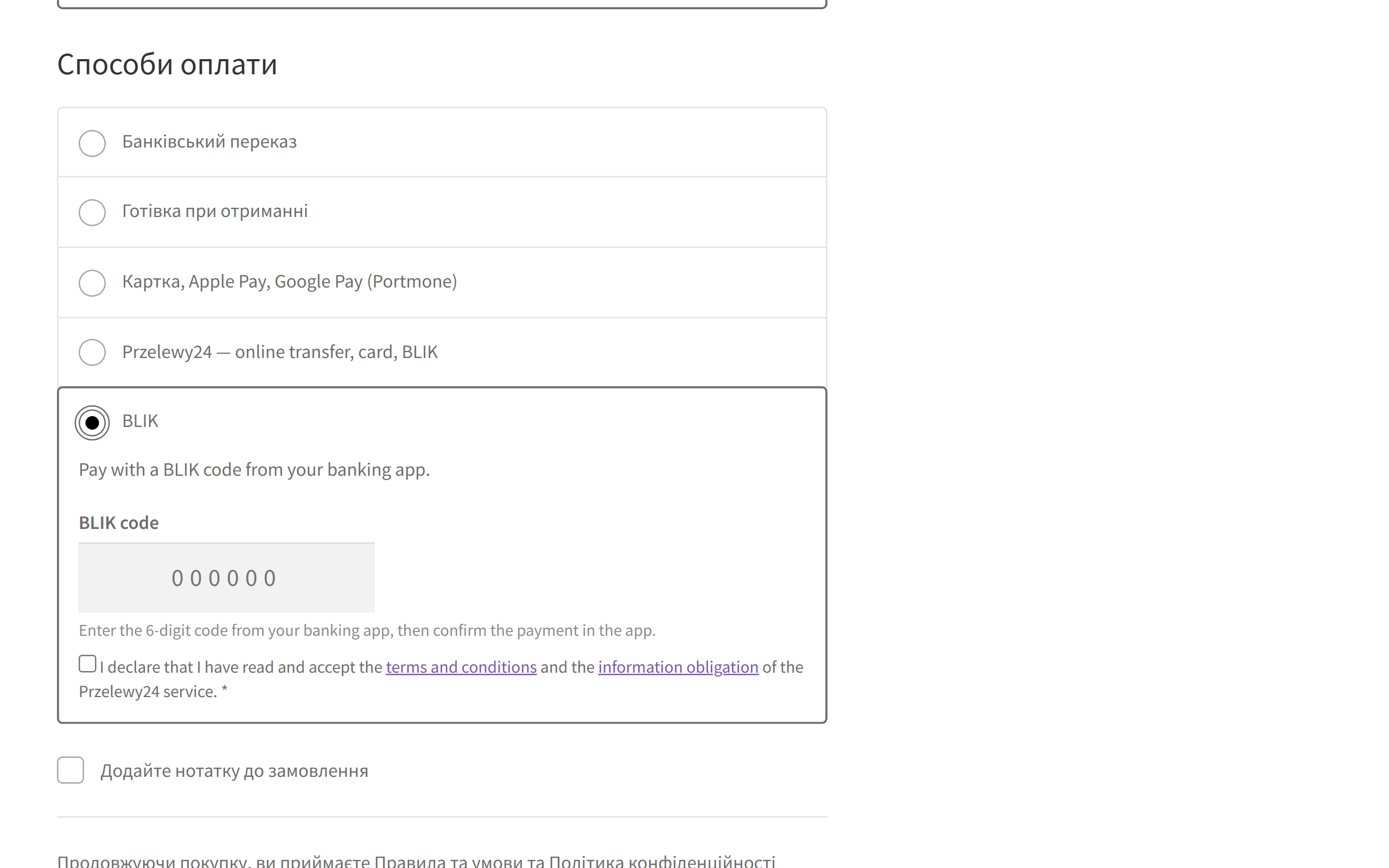
Separate BLIK method with a code field on the WooCommerce block checkout
A separate BLIK method (Pro): the shopper types the 6-digit code from their banking app right at checkout and accepts the Przelewy24 terms — no redirect to the Przelewy24 page.

The trial starts when you ask

A fresh install is the free version, nothing switches on by itself. The “Try Pro for 7 days” button → e-mail → the key right in the window and by e-mail.

One key — one site

Moving the store? Unbind the licence on the old domain and activate it on the new one yourself. If our server is unreachable, Pro keeps working for 14 more days. For studios — keys for 5 or 25 sites, or unlimited.

Technical requirements

  • WooCommerce 7.0+ with the classic or block checkout, HPOS compatible
  • WordPress 6.2+ · PHP 7.4+
  • Shop currency: PLN. With any other currency both methods hide themselves. If Przelewy24 has enabled other currencies for your account, add them with the p24wc_currencies filter. BLIK is PLN only.
  • A Przelewy24 merchant account: merchant ID, POS ID, CRC key and API key. The sandbox is enabled in the Przelewy24 panel for an account that is already active.
  • BLIK code at checkout (Pro) — only if Przelewy24 has enabled BLIK level 0 for the account.
  • Plugin languages: English and Polish.

Version history

v1.0.0 Current September 2026

Przelewy24 REST API v1, a separate BLIK method, notification signature checks and transaction/verify, status reconciliation on the buyer’s return and on the order page, amount and currency…

Frequently bought with Przelewy24 & BLIK Payments for WooCommerce

4 modules in one order — 40% cheaper than separately

“Store starter” bundle Przelewy24 & BLIK Payments Nova Poshta Premium LiqPay Telegram notifications and Viber/SMS for customers Need more — all 144 modules in All Access for 4 990 ₴.
3 490 ₴ / year instead of 5 860 UAH bought separately
Buy the bundle →

Full module description

Przelewy24 & BLIK Payments for WooCommerce is a payment plugin for the Polish market. The buyer pays by bank transfer, card or BLIK through Przelewy24, and the order in your shop is confirmed by itself. The plugin runs on the Przelewy24 REST API v1 and takes neither the buyer’s return nor a notification at its word: a payment counts only after the signature check and a transaction/verify request, as Przelewy24 requires.

What you need. A Przelewy24 merchant account — Przelewy24 issues the merchant ID, CRC key and API key once your shop is registered. The BLIK code right at checkout (Pro) works only if Przelewy24 has enabled that service (BLIK level 0) for your account; otherwise the code field hides itself and BLIK goes through the Przelewy24 page.

What the buyer sees

Without Pro, after “Place order” the buyer lands on the Przelewy24 page, picks a bank, a card or BLIK and comes back to the shop. Card and bank details never pass through your site. If the buyer closes the tab and never returns, the order still becomes paid — from the Przelewy24 notification.

What the admin gets

  • Merchant ID, POS ID, CRC key and API key — everything you need to start. Where to find them in the Przelewy24 panel is explained right in the plugin settings.
  • Sandbox and live side by side. Both sets of keys are stored at once, with one switch. An order remembers the environment it was paid in.
  • “Check connection” — the plugin calls Przelewy24 with your keys and tells you whether they were accepted. You see a wrong key in the admin, not from a buyer.
  • The notification address is sent to Przelewy24 with every payment — nothing to set up in the Przelewy24 panel.
  • Przelewy24 page language, time to pay, order status after payment — your choice.
  • Order notes: payment method, Przelewy24 transaction number, amount, and what confirmed the payment.
  • Debug log in the WooCommerce log: buyer contacts are masked, keys are never written.

How it works — step by step

  1. At checkout the buyer picks Przelewy24 or BLIK. With Pro, also a specific bank from your account’s methods, or types a BLIK code. Works on both the classic and the block checkout.
  2. The plugin registers a transaction with Przelewy24 (transaction/register) with a unique session number, the order amount and currency and a SHA-384 signature on the CRC key.
  3. The buyer pays on the Przelewy24 page. For the BLIK code at checkout (Pro) the plugin passes the code to Przelewy24 (chargeByCode) and the buyer confirms in the banking app.
  4. A notification arrives at the shop. The plugin checks the SHA-384 signature, merchant ID, POS ID, amount and currency. Faking a payment by POSTing to the site does not work.
  5. Confirmation. The plugin calls transaction/verify — without it Przelewy24 does not settle the money to the merchant. Only after a successful verify does the order become paid.
  6. The buyer’s return is not proof of payment. The plugin asks Przelewy24 for the status itself (transaction/by/sessionId). The order page waits for the confirmation and refreshes on its own.
  7. Amount check. If less was paid than the order costs, it does not become paid but goes “On hold” with a note.
  8. The order moves to “Processing” (or the status you chose), stock is reduced, the buyer gets the WooCommerce email.
  9. A repeat attempt (the buyer cancelled and pressed “Pay again”): the plugin checks the earlier sessions first and only then creates a new one.
  10. With Pro you can refund from the order screen (transaction/refund) — in full or in part; the refund result from Przelewy24 is written to the notes.

Under the hood

  • The signature is really checked. SHA-384 over the JSON of the notification fields and your CRC key, plus merchant ID, POS ID, amount and currency matching the order session. An unsigned or foreign notification is not applied — it only prompts the plugin to ask Przelewy24 for the status itself.
  • transaction/verify is mandatory. An order does not become paid until Przelewy24 confirms the verify.
  • No double confirmation: the notification and the buyer’s return often arrive at the same moment. A database lock and re-reading the order (HPOS cache included) give one “payment received” note and one stock reduction.
  • A second payment for an already paid order is not confirmed automatically — the manager sees a note and decides in the Przelewy24 panel.
  • A swapped payment method does not get through: if a method that is not active on the account is injected at checkout, the server refuses it.
  • Own gateway ids (cc_przelewy24, cc_przelewy24_blik) and own settings: no conflict with the official Przelewy24 module.
  • The CRC key and API key are stored encrypted (AES-256) and never reach the logs.
  • A Pro gate that never bricks the shop: when the trial ends, only the Pro features stop, while accepting payments carries on.

How to install

  1. Plugins → Add New → Upload Plugin: choose przelewy24-blik-woocommerce-1.0.0.zip and activate it.
  2. WooCommerce → Settings → Payments → Przelewy24.
  3. Enter the merchant ID, POS ID (if different), CRC key and API key of the sandbox account, save and press “Check connection”.
  4. Place a test order in the sandbox.
  5. Enter the live keys and switch the test mode off.
  6. If you want, enable the separate “BLIK (Przelewy24)” method in the payments list.
  7. For Pro: paste the licence key from the email you get after payment, or start the 7-day trial.

Questions
about the module

Didn't find the answer? Message us on Telegram and we'll reply within a business day.

@catcode_support Setup, compatibility, activation
Do I need a Przelewy24 account?

Yes. Przelewy24 issues the merchant ID, the CRC key and the API key once your shop is registered as a merchant. A sandbox account is enabled in the Przelewy24 panel when the main account is already active.

Will the BLIK code at checkout work straight away?

Only if Przelewy24 has enabled BLIK code payments on the shop's site (BLIK level 0) for your account. If not, the code field hides itself and BLIK goes through the Przelewy24 page. Regular BLIK on the Przelewy24 page works without Pro too.

Will it conflict with the official Przelewy24 plugin?

No. Our plugin has its own gateway ids (cc_przelewy24, cc_przelewy24_blik) and its own settings, nothing is overwritten. Show only one of them at checkout.

The buyer paid but the order is still pending.

The status is requested when the buyer returns, on the order page and on every notification, and Przelewy24 repeats the notification until the payment is verified. The "Check" button in the payment journal (Pro) asks right away.

Which currencies?

PLN by default. Przelewy24 has to enable other currencies for your account; then add them with the p24wc_currencies filter. BLIK is PLN only.

What if I don't want to pay for Pro?

Accepting payments through Przelewy24 and BLIK on the Przelewy24 page, the signature check and the payment confirmation stay free with no time limit.

Not quite what you are looking for?

We build custom modules for WordPress, WooCommerce, OpenCart and Shopify. Tell us about the task and we'll prepare an estimate.

Order a custom module