OpenCart
Conditional Shipping & Payment Rules for OpenCart — show shipping and payment methods by condition
Free + Pro
990 UAH
v1.0.0
Enter at least 2 characters
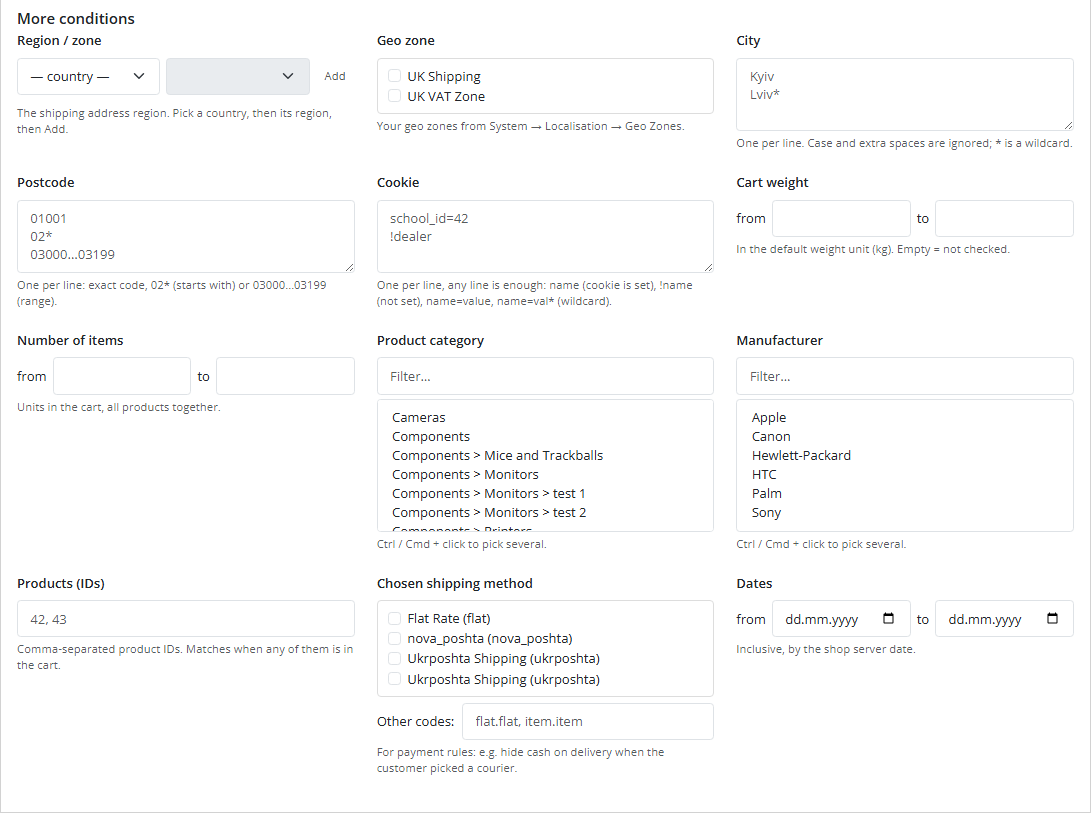
Hide or keep only the shipping and payment methods you want by customer group, region, city, postcode, cookie, cart total, weight and cart contents. OpenCart 4, 3 and 2.3, the standard checkout and One Page.
The free version works with no time limit. Pro adds the rest of the features in the table.


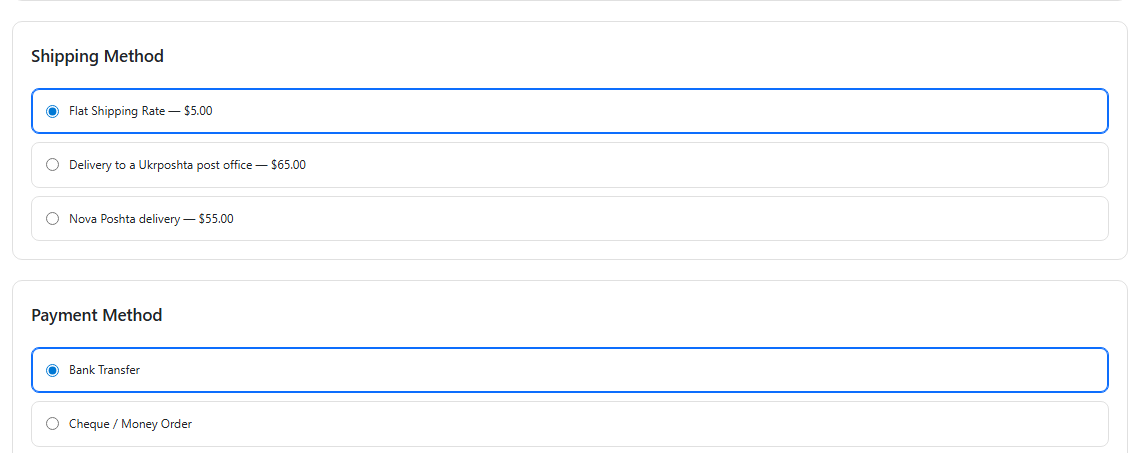
The customer sees nothing special — and that is the point. They simply get a shorter, correct list.

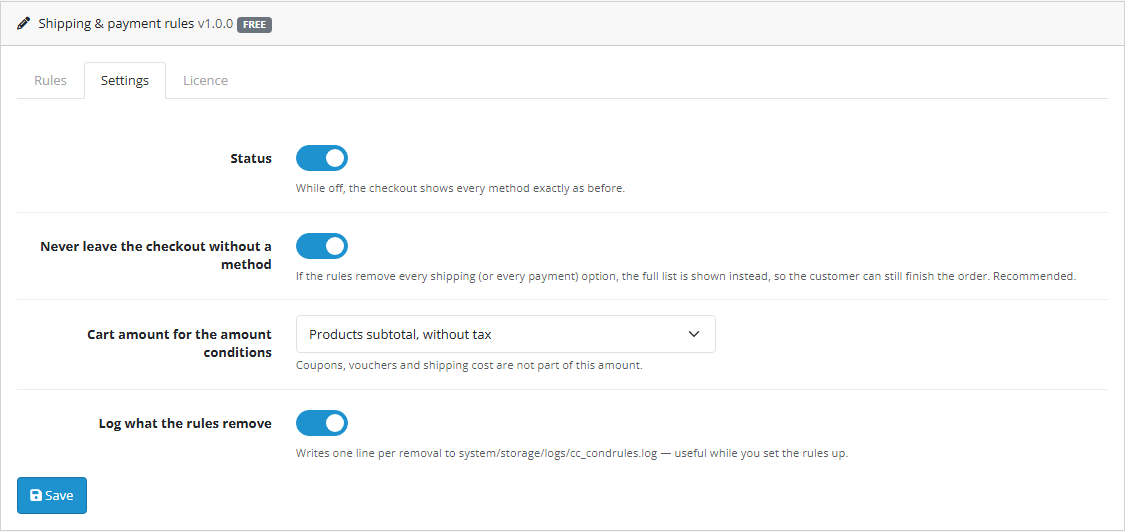
Extensions → Modules → Conditional Shipping & Payment Rules. Three tabs: “Rules”, “Settings”, “Licence”.

UAH 990 — a one-time payment, lifetime licence. No yearly fees: the module and its Pro features stay yours.

A fresh install is the free version, nothing switches on by itself. The “Try Pro for 7 days” button → e-mail → the key right in the window and by e-mail.

Moving the store? Unbind the licence on the old domain and activate it on the new one yourself. If our server is unreachable, Pro keeps working for 14 more days. For studios — keys for 5 or 25 sites, or unlimited.
 OpenCart 4.0.2 – 4.1.x (tested on 4.1.0.3 and 4.0.2.3), 3.0.x (tested on 3.0.5.0) or 2.3.0.2PHP — whatever your OpenCart version needs; the code is checked on PHP 5.6, 7.0 and 8.3No core file edits and no OCMOD modifications: OpenCart events only; no own tablesCheckout: the standard one and One Page Checkout (CatCode). On OpenCart 3 and 2.3 the filter works where the theme renders the stock shipping and payment blocks; third-party checkouts with their own templates (Simple, Journal Quick Checkout) were not testedMulti-store: the rules are shared by all storefrontsLanguages: Ukrainian, Russian, English
For OpenCart 4, 3 and 2.3: “hide / keep only” rules for shipping and payment methods; conditions on customer group, country, region, geo zone, city, postcode, cookie, total, weight,…
4 modules in one order — 40% cheaper than separately



Conditional Shipping & Payment Rules for OpenCart shows each customer only the shipping and payment methods that actually fit them. OpenCart offers everything that matches the geo zone. A real shop needs less than that: no cash on delivery for guests, courier for one region only, no pickup for a heavy basket, one set of options for the wholesale group, its own option for a school or a dealer that arrives through its own link.
The module turns that into rules you can read: hide (or keep only) these shipping methods or these payment methods when the cart and the customer look like this.
The customer sees nothing special — and that is the point. They simply get a shorter, correct list. They change the region in the address and the shipping list is different. They pick the courier and cash on delivery disappears. They pick pickup and it is back, if that is how you set it up.
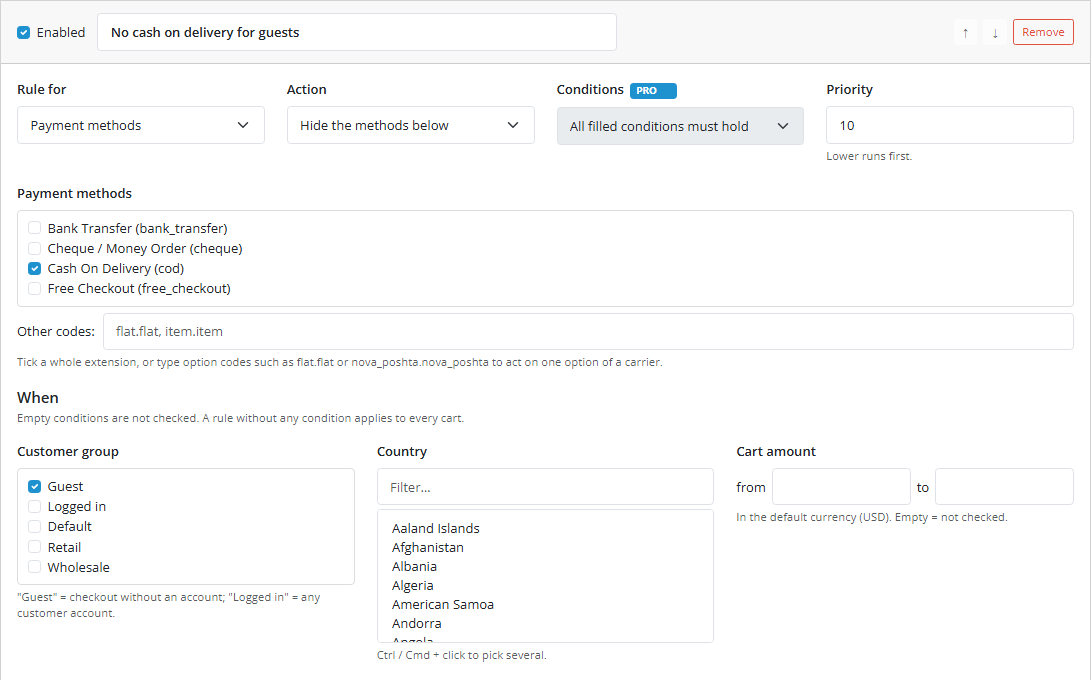
Extensions → Modules → Conditional Shipping & Payment Rules. Three tabs: “Rules”, “Settings”, “Licence”. Each rule is a card: what it is for (shipping or payment), what to do, with which methods, under which conditions.
flat, pickup, cod) or type an option code (flat.flat, nova_poshta.nova_poshta).UAH 990 — a one-time payment, lifetime licence. No yearly fees: the module and its Pro features stay yours. One licence covers all three builds — OpenCart 4.x, 3.x and 2.3.
One key — one domain. Moving the shop? Detach the licence on the old domain with the button on the “Licence” tab and activate it on the new one.
Trial first, payment later. A free 7-day Pro trial starts on the “Licence” tab with your e-mail, no card needed. A fresh install is the plain Free version; nothing switches on by itself.
cc_condrules.ocmod.zip (keep the archive name) and click “Install”. OpenCart 3: Extensions → Installer → cc_condrules-oc3.ocmod.zip. OpenCart 2.3: upload the contents of the upload/ folder from cc_condrules-oc2.ocmod.zip to the store root (FTP or the hosting file manager).Didn't find the answer? Message us on Telegram and we'll reply within a business day.
 @catcode_support
Setup, compatibility, activation
@catcode_support
Setup, compatibility, activation
Check three things: the module is enabled on the Settings tab, the rule itself is enabled, and the conditions really match your test cart. Switch on the log — every removed method is written to system/storage/logs/cc_condrules.log.
Yes, with our One Page Checkout (CatCode) on OpenCart 4, 3 and 2.3 — tested together with the Nova Poshta, Ukrposhta and ROZETKA Delivery widgets. On OpenCart 4 the filter sits on the core model, so any checkout that takes the method list from the core gets it.
The "Never leave the checkout with no method" guard hands the full list back if the rules empty it. It is on by default in the settings — if you switched it off, switch it back on.
Yes, in Pro: "Payment methods" → "Hide" → pick cash on delivery, then in the Region condition pick the country, the region and click "Add".
No. It decides which methods are offered. Prices stay with OpenCart and your shipping modules.
The first enabled rule with the free conditions keeps working. Rules that use Pro conditions are kept but skipped until a licence is active: without its condition such a rule would hide more than you asked for.
No reviews yet. Be the first.
No questions yet. Ask one — we answer within 24 hours.
We build custom modules for WordPress, WooCommerce, OpenCart and Shopify. Tell us about the task and we'll prepare an estimate.
Order a custom module
—

CatCode assistant
Just now


CatCode assistant
Online

I’ll help with your website task
Describe your website task — I’ll find a ready-made module or pass it to a developer for an estimate. Modules, custom features, layout, integrations, speed, migration, technical SEO.
