WordPress
Product Tabs Manager for WooCommerce — custom product tabs, tab library and YIKES import
Free + Pro
890 UAH/year
v1.0.0
Enter at least 2 characters

Custom tabs on the product page, a shared tab library and renamed standard tabs — with a one-click import from YIKES.
The free version works with no time limit. Pro adds the rest of the features in the table.


On the product page your tabs sit in the same row as Description and Reviews and look the same — the plugin adds no styling of its own, the tabs inherit your theme’s design.

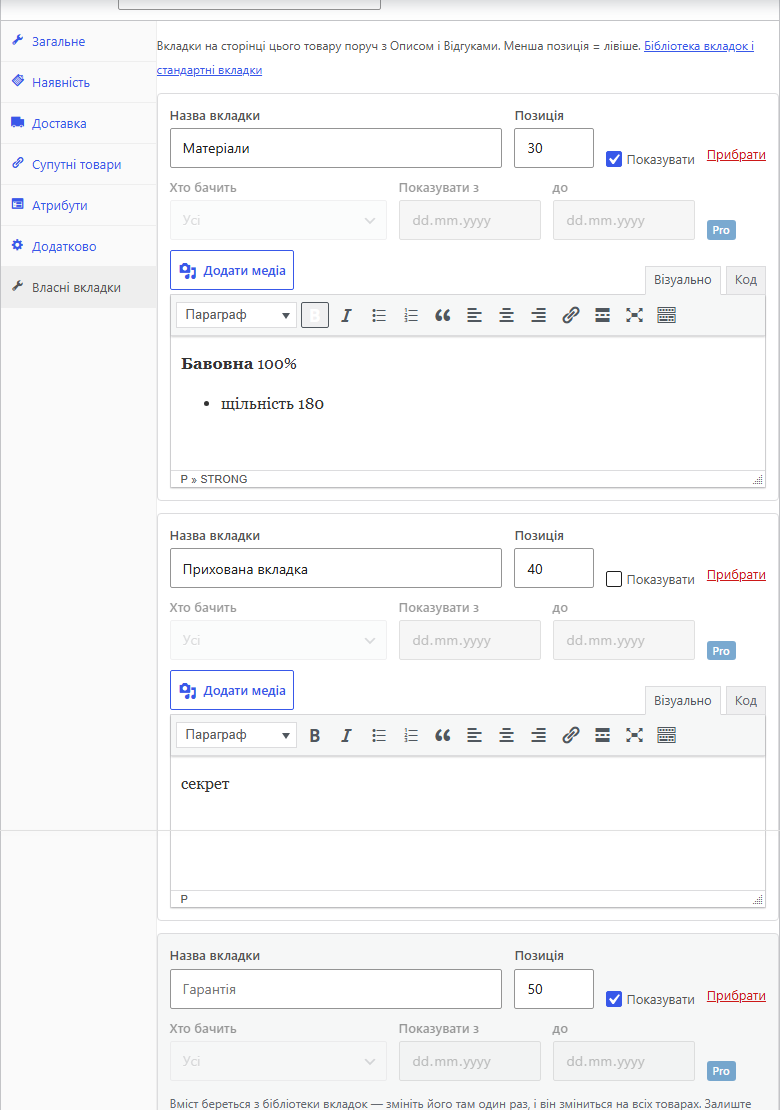
The “Custom tabs” panel in the product editor. In the Product data box, next to Inventory and Shipping, there is one more tab.

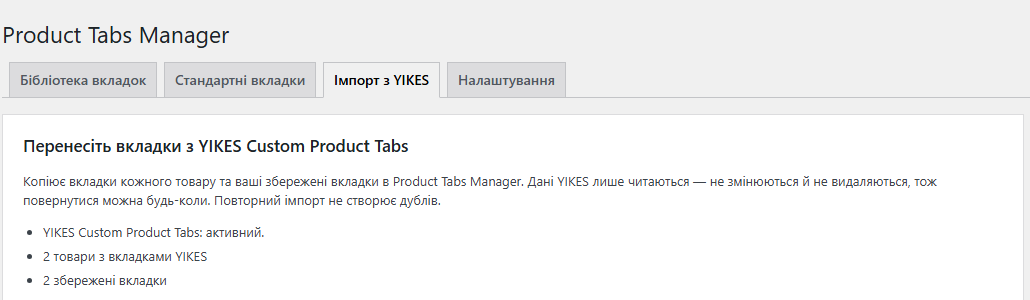
The Import from YIKES section shows how many products with YIKES tabs and how many saved tabs were found in the shop.

A fresh install is the free version, nothing switches on by itself. The “Try Pro for 7 days” button → e-mail → the key right in the window and by e-mail.

Moving the store? Unbind the licence on the old domain and activate it on the new one yourself. If our server is unreachable, Pro keeps working for 14 more days. For studios — keys for 5 or 25 sites, or unlimited.
 WooCommerce 7.0+ (tested up to 11.1), WordPress 6.2+, PHP 7.4+. Compatible with HPOS order storage — the plugin does not work with orders at all, only with product meta. Classic themes (for example Storefront) and block themes (for example Twenty Twenty-Five) with the Product Details block. Interface languages: English, Ukrainian, Russian. No external services or API keys are needed.
Unlimited custom product tabs, a tab library, renaming, hiding and reordering the standard tabs, import from YIKES Custom Product Tabs without duplicates, classic and block theme support,…
4 modules in one order — 40% cheaper than separately



Product Tabs Manager is a WooCommerce plugin that adds your own tabs to the product page: a size guide, shipping and payment, warranty, ingredients, instructions, downloads. Every product can have as many tabs as it needs, and shared tabs are written once in a library and shown on all products at once.
The plugin also manages the standard WooCommerce tabs — Description, Additional information and Reviews: you can rename, hide or reorder them. It works with classic themes and block themes (the Product Details block, both the tab and the accordion version) and is compatible with HPOS. If you currently use YIKES Custom Product Tabs, all your tabs move over with one click.
A shopper who has read the description to the end is usually looking for three more things: what shipping costs, how to return the item and whether the size will fit. When all of that is packed into one long description, nobody reads it. When it sits in separate tabs with short titles, the shopper opens exactly the one they need and finds the answer without writing to your chat.
The second problem is identical text on hundreds of products. Shipping or warranty terms pasted into every product description have to be edited by hand whenever something changes, and an old version always survives somewhere. A library tab is edited in one place and changes at once on every product that shows it.
The third is that the standard tabs are not always named the way your customers expect. For an electronics shop “Additional information” means “Specifications”, for clothing it means “Fabric and care”. WooCommerce offers no setting to rename them without touching the theme or the translation; with the plugin it is one field.
On the product page your tabs sit in the same row as Description and Reviews and look the same — the plugin adds no styling of its own, the tabs inherit your theme’s design. The order is set by a position number: Description is 10 by default, Additional information 20, a new tab 30 and Reviews 90. So without any setup your tabs land between the specifications and the reviews, the order shops coming from YIKES are used to. If you want WooCommerce’s stock order, where Reviews is 30, set the position by hand.
A tab can hold anything a regular WordPress post can: formatted text, images, tables, shortcodes, embedded videos, blocks. Like Description, the tab shows its title as a heading above the content — this can be switched off in the settings. A renamed Reviews tab keeps its counter: call it “Customer opinions” and the shopper sees “Customer opinions (3)”.
In block themes the tabs appear in the Product Details block. In its accordion variant custom tabs are added as separate sections, and renaming and hiding the standard tabs work there too. With Pro you can show the tabs as an accordion in a classic theme as well — always, or only on phones (up to 768 px), where a row of five tabs no longer fits.
The “Custom tabs” panel in the product editor. In the Product data box, next to Inventory and Shipping, there is one more tab. It has an “Add tab” button: title, content in the regular WordPress editor with the media button, position and a “Show” switch. There is also an “add a tab from the library” list: a library tab is added as a linked row, its content comes from the library and its title can be changed for this product. Above the list you see which library tabs are already shown on every product.
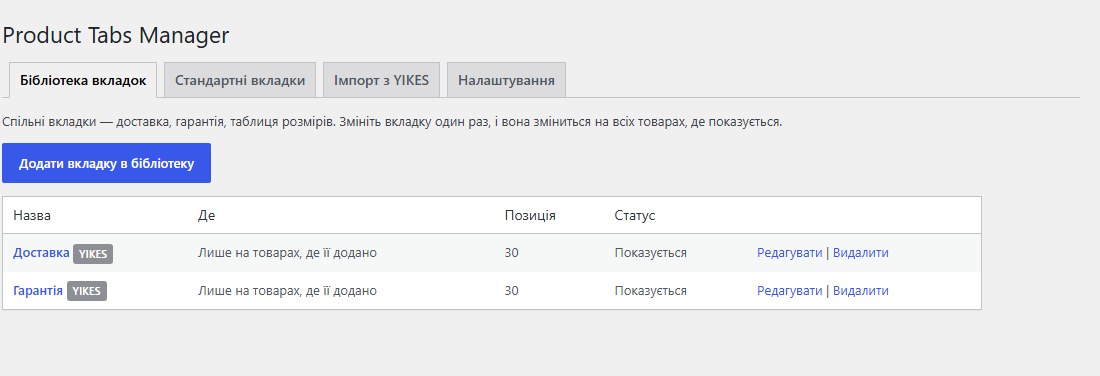
Tab library. The menu item WooCommerce → Product Tabs has four sections: Tab library, Standard tabs, Import from YIKES and Settings. In the library you write a tab once and choose where it appears: “On every product” or “Only on products where it is added”. A third mode, “By categories, tags and products”, is part of Pro. Deleting a library tab removes it from every product, so the plugin asks before deleting.
Standard tabs. A three-row table: Description, Additional information, Reviews. For each one there is a storefront title (an empty field keeps WooCommerce’s own translated name), a position and a “Hide” checkbox. It applies to the whole shop. With Pro you can do the same on a single product — for example, hide Additional information only where there are no attributes.
Settings. “Heading inside the tab”, “Hide YIKES tabs” (so nothing shows twice after the import) and “Delete data on uninstall” — off by default, so reinstalling the plugin loses nothing. The Pro settings, accordion and search inside tabs, are visible in the free version too, but marked Pro and inactive.
1. Library. First move everything that is the same for many products into the library: shipping, payment, returns, warranty. Choose “On every product” and the tab is already on every product page.
2. Product tabs. In a specific product add what concerns only that product: a size chart, instructions, ingredients, certificates. Or add a library tab in “Only on products where it is added” mode — for example, one shared size chart for all T-shirts.
3. Order. Give every tab a position number. A lower number sits further left. The standard tabs have positions too, so a custom tab can even go before Description.
4. Standard tabs. In the Standard tabs section rename or hide whatever does not suit your shop.
5. Check. Open a few products on the storefront. A tab that is switched off (“Show”) is not displayed, but it is not deleted either — one click brings it back.
If a tab has an audience, a schedule or display conditions (all of these are Pro) and there is no licence, the tab is not shown on the storefront at all. This is deliberate: a “logged-in customers only” tab is better hidden from everyone than shown to everyone.
The Import from YIKES section shows how many products with YIKES tabs and how many saved tabs were found in the shop. One “Import tabs” button, and the plugin moves:
— every product’s tabs with the same titles, content and order;
— saved tabs into the library; on products they become links to the library, not copies, so editing in one place still changes every product;
— global saved tabs into the library in “On every product” mode.
YIKES data is only read — the plugin changes and deletes nothing in it, so you can go back at any time. The import works even if YIKES has already been deactivated: its data stays in the database. Products are processed in batches of 100 over AJAX, so a large catalogue does not hit the hosting’s execution time limit. Running it again creates no duplicates: tabs already moved are skipped, and so is a copy of a global tab stored inside a product.
After the import the plugin switches on “Hide YIKES tabs” by itself, so every tab shows once on the storefront even while YIKES is still active. Then it is simple: look through a few products and deactivate YIKES. If the conditions of a saved tab cannot be read, the tab is not lost — it is imported in “Only on products where it is added” mode.
Two things will look different after the move: tabs with Cyrillic titles get a #tab-ptm-… anchor instead of the title, and Reviews sits at position 90 by default, as in YIKES, not 30 as in plain WooCommerce.
Product tabs are stored in the product meta field _catcode_ptm_tabs, the library in a single option catcode_ptm_library, the settings in catcode_ptm_settings. No custom tables. Tabs reach the storefront through the standard woocommerce_product_tabs filter — the same list that classic templates and the Product Details block read, so the plugin does not override theme templates.
Tab content is processed the same way as post content: embeds, blocks, paragraphs, shortcodes, responsive images. The full the_content filter is deliberately not run, so share buttons and other post add-ons do not end up in every tab; you can switch it on with add_filter( 'catcode_ptm_use_the_content', '__return_true' );. For users without the unfiltered_html capability the content is sanitised with wp_kses_post.
The Pro accordion is a small script with no libraries: it adds a toggle button before each panel, and CSS decides whether the tab row or the toggles are shown. Without JavaScript the regular tabs keep working. The script and styles load only on product pages and only when the accordion is on. Pro search looks through the text of a product’s own tabs, and CSV adds a “Custom tabs (Product Tabs Manager)” column to WooCommerce’s standard product export and import; a broken cell in an import does not wipe existing tabs.
Deleting the plugin keeps its settings, product tabs and the library in the database unless you tick “Delete data on uninstall”.
1. Plugins → Add New → Upload Plugin, choose catcode-product-tabs-manager-for-woocommerce-1.0.0.zip and activate it. WooCommerce must be active.
2. Open any product → Product data → Custom tabs → Add tab.
3. Shared tabs and the standard tabs: WooCommerce → Product Tabs.
4. Coming from YIKES: WooCommerce → Product Tabs → Import from YIKES → Import tabs. Check a few products, then deactivate YIKES.
Didn't find the answer? Message us on Telegram and we'll reply within a business day.
 @catcode_support
Setup, compatibility, activation
@catcode_support
Setup, compatibility, activation
No. YIKES data is only read — nothing is changed or deleted. Whether to deactivate or delete YIKES afterwards is up to you.
The import switches on "Hide YIKES tabs" in the plugin settings. If you turned that setting off, turn it back on or deactivate YIKES.
By default Reviews has position 90, as in YIKES, so custom tabs go before it. If you want WooCommerce's stock order, set Reviews to 30 in the Standard tabs section.
Yes. Custom tabs appear in the Product Details block, and in its accordion variant as separate sections; renaming and hiding the standard tabs work there too.
A Cyrillic title cannot be a valid selector, so such a tab gets a #tab-ptm-… anchor with an internal id. Latin titles give a readable anchor such as #tab-ptm-size-guide.
A purchased Pro keeps working — the term pays for updates and support, not for the right to use it. Pro switches off only after a trial without a purchase or when you move to the free wordpress.org version. Then regular tabs, the library and the standard tabs keep working, while tabs with an audience, schedule or display conditions are not shown — better hidden than shown to everyone.
They stay in the database unless "Delete data on uninstall" is ticked in the settings.
No reviews yet. Be the first.
No questions yet. Ask one — we answer within 24 hours.
We build custom modules for WordPress, WooCommerce, OpenCart and Shopify. Tell us about the task and we'll prepare an estimate.
Order a custom module
—
