
OpenCart
Omnibus Price History for OpenCart — lowest price in the 30 days before a discount
Free + Pro
890 UAH
v1.0.0
Enter at least 2 characters


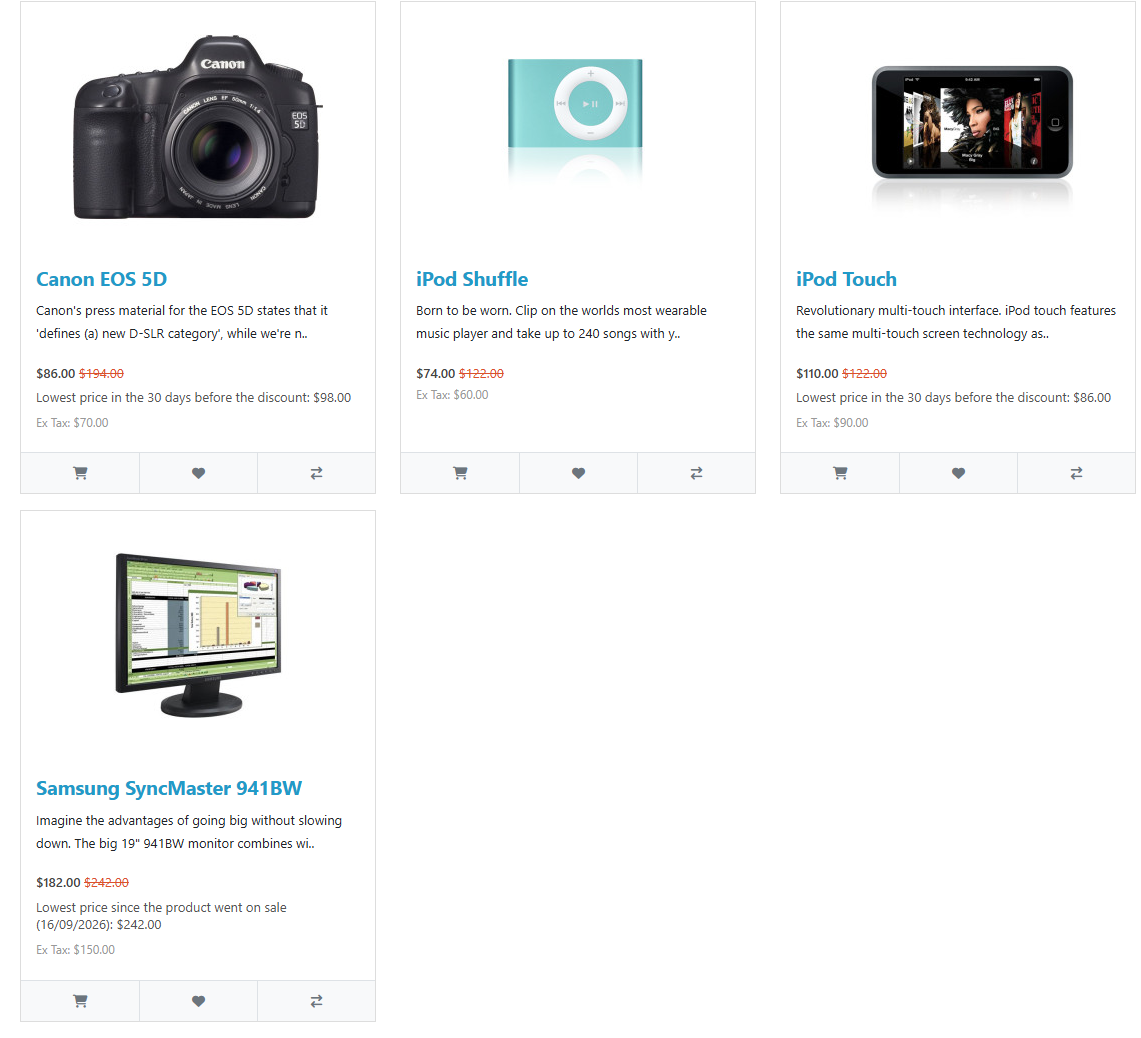
The lowest price in the last 30 days next to every special price — an Omnibus Directive (Art. 6a) requirement for stores in the EU. OpenCart 4.x, 3.x, 2.3.
Clear even without sound: Ukrainian subtitles
The free version works with no time limit. Pro adds the rest of the features in the table.



A fresh install is the free version, nothing switches on by itself. The “Try Pro for 7 days” button → e-mail → the key right in the window and by e-mail.

Moving the store? Unbind the licence on the old domain and activate it on the new one yourself. If our server is unreachable, Pro keeps working for 14 more days. For studios — keys for 5 or 25 sites, or unlimited.
 OpenCart 4.0.2 – 4.1.x (tested on 4.1.0.3), 3.0.x (tested on 3.0.5.0) or 2.3.0.2PHP 8.0+ for OpenCart 4, 7.3+ for OpenCart 3, 7.0+ for OpenCart 2.3No core file edits: OpenCart events only, theme templates are not patchedLanguages: English, German, Polish, Romanian
For OpenCart 4.x, 3.x and 2.3: price history, the lowest price in the 30 days before a discount on the product page and in listings, daily snapshot, en/de/pl/ro texts.
4 modules in one order — 40% cheaper than separately



Omnibus Price History for OpenCart is a module that records the price history of your products and shows the lowest price from the 30 days before the discount next to every special price. That is what Article 6a of Directive 98/6/EC, as amended by Directive (EU) 2019/2161, requires in every EU country since 28 May 2022. Builds for OpenCart 4.x, 3.x and 2.3, with no core file edits.
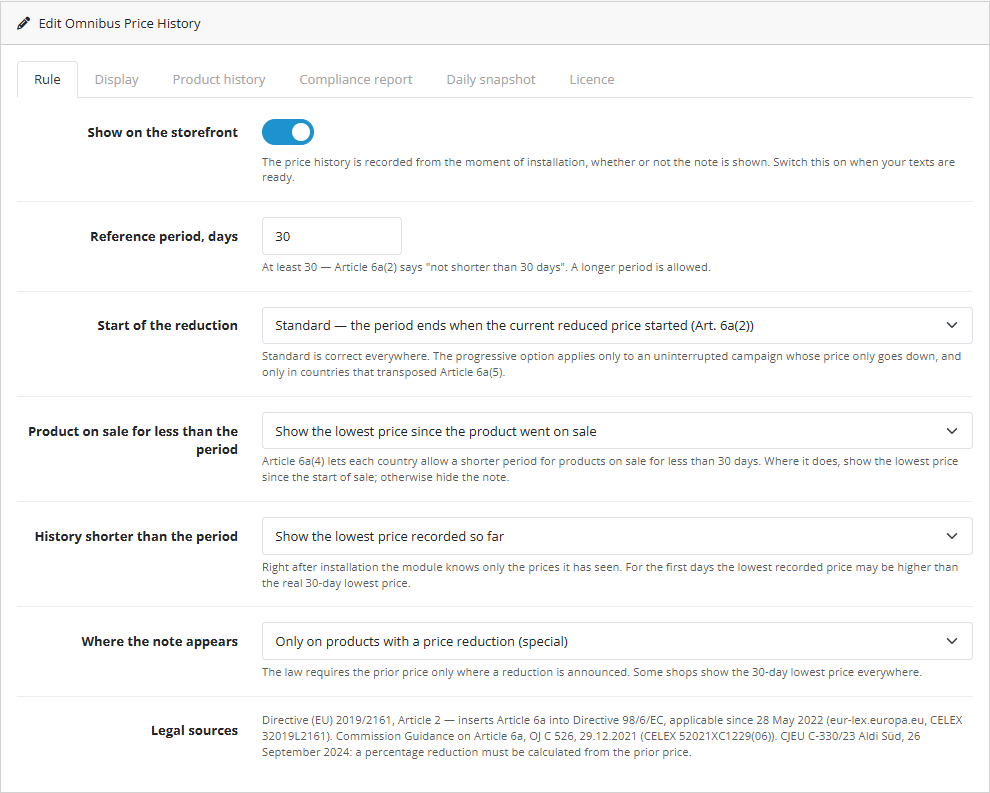
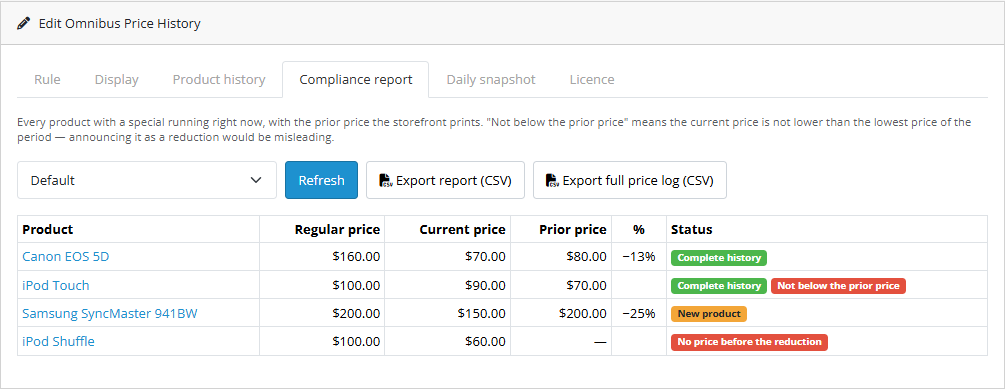
The core version is free. Price history, the note on the product page and in listing cards (categories, search, specials, brands, product modules), your own texts in four languages and the daily price snapshot all work without a license. Pro adds national country rules (a period longer than 30 days, progressive discounts, a shorter period for new arrivals), replaces the struck-through price with the price before the discount and calculates the percentage from it, keeps a separate history per customer group, and adds a compliance report with CSV plus a manual prior price for products with incomplete history.
cc_omnibus.ocmod.zip and click “Install”. OpenCart 3: Extensions → Installer → cc_omnibus-oc3.ocmod.zip. OpenCart 2.3: upload the contents of the upload/ folder from cc_omnibus-oc2.ocmod.zip to the store root (FTP or your hosting file manager).Didn't find the answer? Message us on Telegram and we'll reply within a business day.
 @catcode_support
Setup, compatibility, activation
@catcode_support
Setup, compatibility, activation
No. The module applies Article 6a literally; check the national options against the law of the countries you sell to.
The module does not invent a prior price: there is no note, and the report says "No price before the reduction". In Pro you can enter it manually.
No. For OpenCart the license is a one-time payment and lasts forever.
No. OpenCart events only; disable the module and the storefront is standard again.
No reviews yet. Be the first.
No questions yet. Ask one — we answer within 24 hours.
We build custom modules for WordPress, WooCommerce, OpenCart and Shopify. Tell us about the task and we'll prepare an estimate.
Order a custom module
—

CatCode assistant
Just now


CatCode assistant
Online

I’ll help with your website task
Describe your website task — I’ll find a ready-made module or pass it to a developer for an estimate. Modules, custom features, layout, integrations, speed, migration, technical SEO.
