Get in touch
Payments · OpenCart

EasyPay for OpenCart — Card, Apple Pay and Google Pay Payments

EasyPay module for OpenCart 2.3, 3.x and 4.x: card, Apple Pay and Google Pay, order status verified through the EasyPay API, underpayment protection, test mode without a contract. Pro — payment journal, refunds, status sync, unpaid order reminders and a payment timer.

Download for free
Version
v1.0.0 (OpenCart 4)
v1.0.0 (OpenCart 3.x)
v1.0.0 (OpenCart 2.3)
Compatibility
OpenCart 2.3.0.x, 3.0.x and 4.0.2 – 4.1.x
Platform
OpenCart
EasyPay for OpenCart — Card, Apple Pay and Google Pay Payments

What each licence includes

Feature Free Pro
Visa/Mastercard card, Apple Pay and Google Pay payments on the secure EasyPay page
Order status only from the EasyPay orderState response: a forged notification changes nothing
Requests and notifications signed with the SecretKey, the key stored encrypted
Underpayment protection: the amount from EasyPay is matched against the order total
The order closes even if the notification never arrived — when the customer returns to the store
The bank's decline reason in the order history, cart restored for a new attempt
Test mode with EasyPay's public keys and a one-click key check
Separate statuses for awaiting payment, paid, declined and refunded
The payment method hides for a cart not in hryvnias
Ukrainian and English localisation of the admin and storefront
Payment journal with the EasyPay state next to the order status
Refunds from the admin, full and partial
One-click payment status sync
EasyPay reminder about an unpaid order by email and SMS/Viber
Payment timer: how many minutes the payment page accepts a payment

CatCode EasyPay is an EasyPay payment module for OpenCart 2.3, 3.x and 4.x. The customer pays with a Visa/Mastercard card, Apple Pay or Google Pay on the secure EasyPay page, and the order in your store moves to a paid status by itself. EasyPay sends a signed notification, the module checks the signature, separately asks EasyPay for the payment status and matches the amount. Only then is the order marked as paid, so a payment can’t be faked with a request to your site.

The base version is free with no limit on the number of payments: taking payments, notifications with a status check, underpayment protection and a test mode with EasyPay’s public keys. Pro adds a payment journal, full and partial refunds from the admin, one-click status sync, EasyPay reminders about unpaid orders and a payment timer.

Live demo

You don’t need an EasyPay contract to see the module in action. Install the free version and turn on “Test mode”: the module works with EasyPay’s public test merchant (easypay-test / MERCHANT-TEST). Place an order in your store and you’ll be sent to a real EasyPay test payment page with the order number and amount. No real money moves.

The screenshots below were taken during an end-to-end test on our demo stores OpenCart 4.x, OpenCart 3.x and OpenCart 2.3: checkout, payment page, settings, payment journal and refunds.

What the customer sees

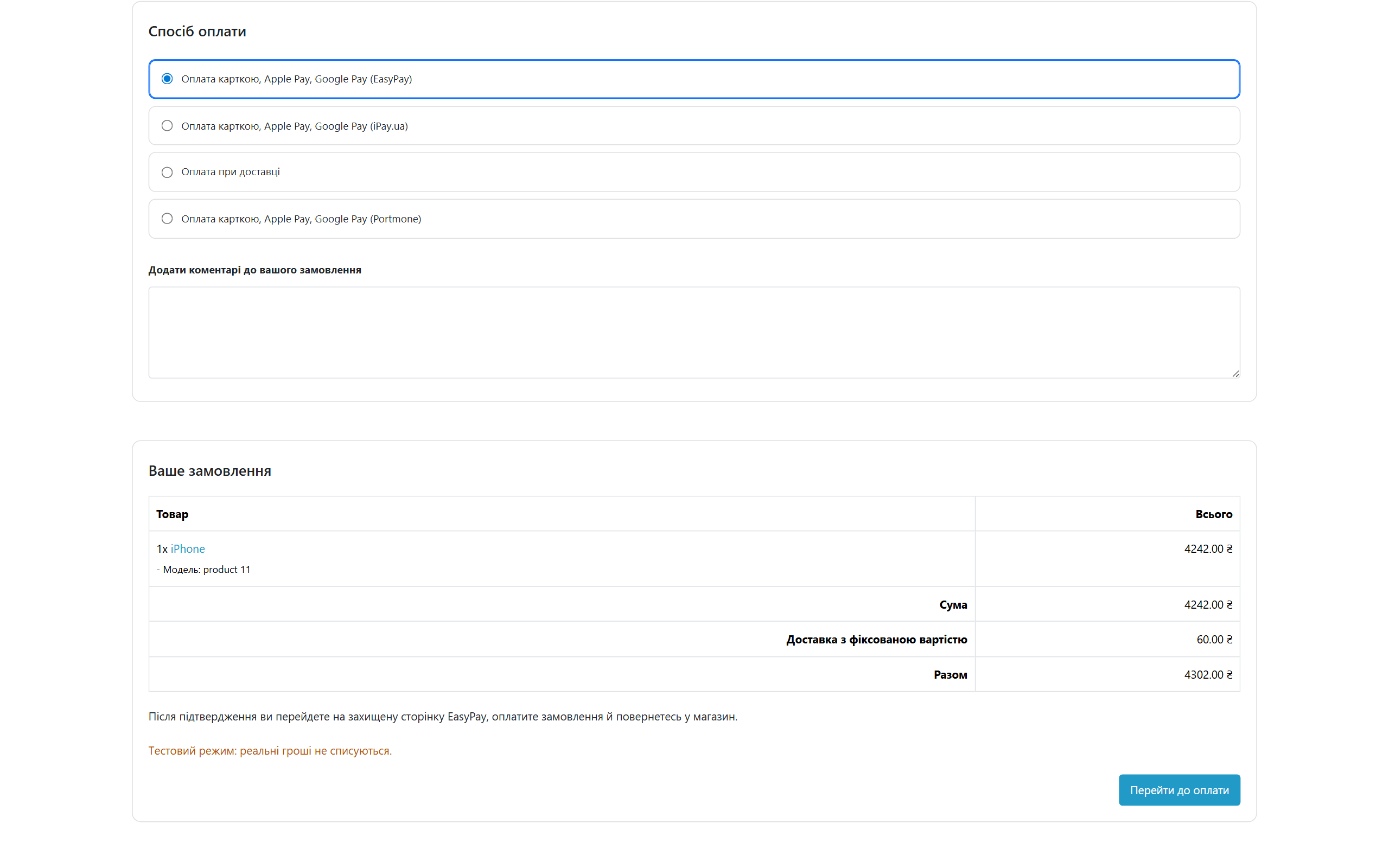
At checkout it’s a regular payment method, “Card, Apple Pay, Google Pay (EasyPay)”. The customer confirms the order and clicks “Proceed to payment”. The module creates an order in EasyPay and opens the payment page.

EasyPay payment method at OpenCart checkout
The payment step in OpenCart 4: EasyPay as a regular payment method with a “Proceed to payment” button. In test mode the customer sees a warning that no money is charged.
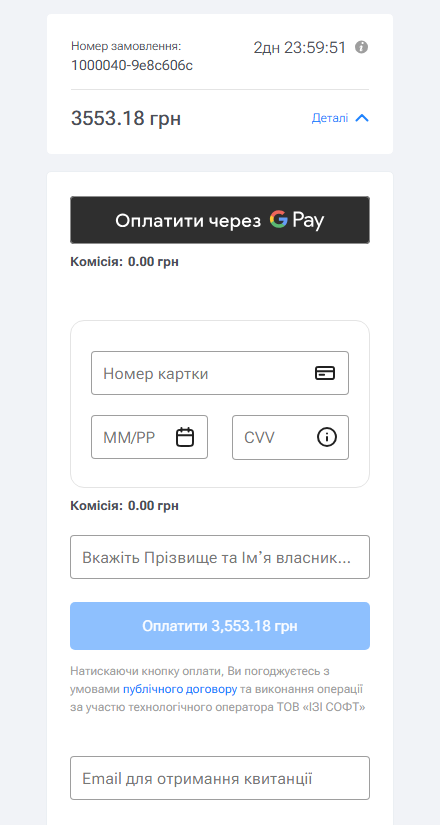
EasyPay payment page with order number and amount
The EasyPay page: order number, amount in hryvnias, Google Pay or Apple Pay if they are enabled. Card details are entered on EasyPay’s side and never pass through your site.

After payment EasyPay sends the customer back to the store. If the payment went through, they land on the “Your order has been placed” page. If not, the order gets a failed payment status with the bank’s reason, the items go back into the cart, and a hint to try again appears at the top. The new attempt goes to EasyPay under a new number, so there are no duplicates.

The module is shown only for a cart in hryvnias. If the customer switches the store currency to dollars or euros, the payment method hides: EasyPay accepts UAH only.

What the admin gets

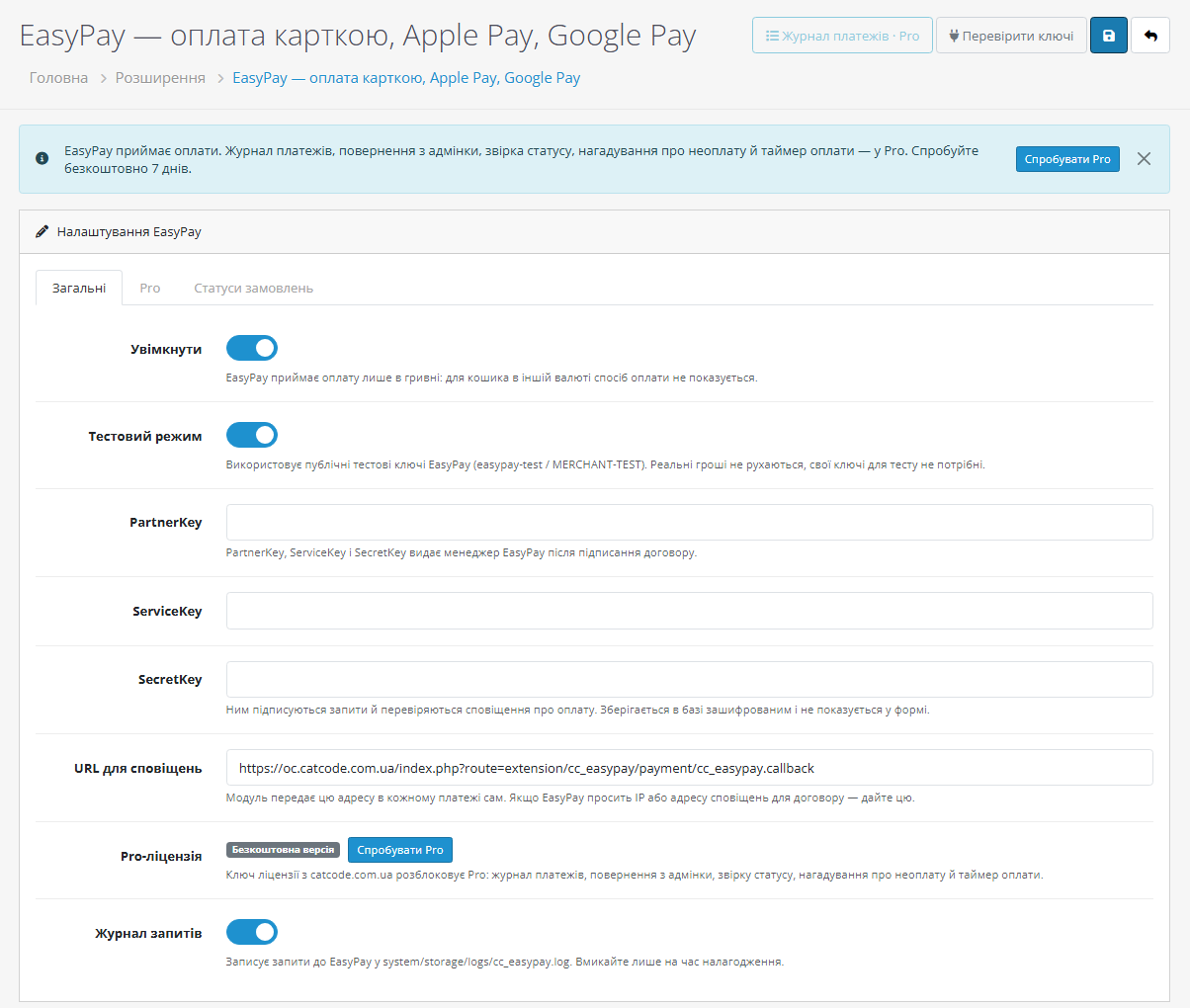
EasyPay module settings for OpenCart
Settings: test mode, PartnerKey, ServiceKey and SecretKey (stored encrypted), a ready notification URL, Pro license and a request log for debugging.
  • “Check keys” sends a signed service request to EasyPay. The module names the error precisely: the SecretKey doesn’t match (EasyPay rejects the signature) or EasyPay doesn’t know the ServiceKey. You find out about a problem in the admin, not from a customer.
  • Separate order statuses for “awaiting payment”, “paid”, “failed payment” and “refunded”, on the “Order statuses” tab.
  • Order history with the EasyPay transaction number and the bank’s decline reason. An underpayment is visible at once: “paid 3552.18 UAH with an order total of 3553.18 UAH — needs checking”, and such an order doesn’t move to paid.
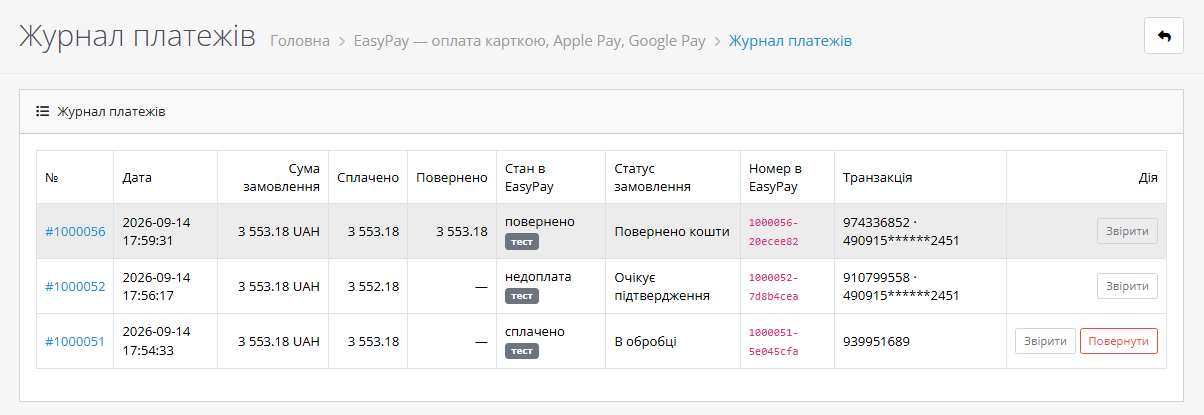
  • Payment journal (Pro): every EasyPay payment in one list — order total, paid, refunded, the EasyPay state next to the order status, transaction number and card. The “Sync” and “Refund” buttons are right there.
EasyPay payment journal for OpenCart
Payment journal (Pro): a paid payment with a “Refund” button, an underpayment waiting to be checked, and a fully refunded payment.
EasyPay Pro settings: reminders and payment time
Pro tab: EasyPay reminds the customer about an unpaid order by email and SMS or Viber after 15–20 minutes, and the timer limits how many minutes the payment page accepts a payment.

How it works, step by step

  1. The customer confirms an order with EasyPay payment. The module creates an order in EasyPay: attempt number, amount, description, notification URL and return pages. Every request is signed with your SecretKey. The order gets the “awaiting payment” status.
  2. The customer pays on the EasyPay page with a card, Apple Pay or Google Pay.
  3. EasyPay sends a notification to your site. The module checks the signature: an unsigned or forged request is rejected and the order stays as it was.
  4. The module asks EasyPay for the status of that payment itself, with an orderState request. The notification body is only needed to find the order.
  5. The amount is matched against the order total. If everything matches, the order becomes paid and the transaction number is written to its history. If less was paid, the order stays under review with a note.
  6. The customer returns to the store and the module checks the status once more. If the notification was late, the order is closed here. A repeated notification doesn’t create a duplicate history entry.

Pricing

The free version is 0 UAH, forever and with no turnover limits. Pro is 990 UAH, paid once. The OpenCart license is perpetual, with no yearly fees. One key works with the 2.3, 3.x and 4.x builds; it has two activations, i.e. the live store and a test copy.

Free 7-day EasyPay Pro trial in the OpenCart admin
The Pro trial starts right from the module settings: enter an email and a key for this site is issued immediately.

Before buying, you can turn Pro on for 7 days: enter an email and get a key for this site. No card needed, nothing renews by itself. After the trial only the Pro features close, and payments keep working.

Requirements

  • OpenCart 2.3.0.x, 3.0.x or 4.0.2 – 4.1.x; PHP 7.0+ for 2.3, and for 3.x and 4.x whatever version your OpenCart requires.
  • PHP cURL extension, outgoing HTTPS requests from the server.
  • The site is reachable from the internet over HTTPS so EasyPay notifications can get through (no basic auth).
  • Cart currency — Ukrainian hryvnia (UAH).
  • An EasyPay contract for real payments: your EasyPay manager issues the PartnerKey, ServiceKey and SecretKey. Test mode needs no keys.

Under the hood

  • Signatures both ways: base64(SHA-256) of the SecretKey and the request body; notifications are verified with a constant-time comparison. The SecretKey is stored encrypted in the database and never shown in the form.
  • The status comes from EasyPay (orderState), not from the notification. The module recognises a bank decline even when EasyPay returns it together with an error block, and writes the reason to the order history.
  • Unique attempt numbers: the order number plus a random suffix. A declined old attempt won’t touch an order that is already paid, and a paid old attempt is still counted even if the customer opened a new one.
  • Safeguards: a late notification won’t roll back a paid order, “Back” after payment won’t create a second payment, an underpayment won’t count as paid, a repeated notification won’t duplicate the record.
  • Refunds (Pro) are cumulative: a negative amount, garbage or an amount above the balance is cut off before any request to EasyPay, and after a full refund the order gets the “Refunded” status.
  • No OpenCart core patches: in 4.x the module installs as a regular extension, in 3.x and 2.3 without ocmod edits. The payments table stays when the module is uninstalled, so you won’t lose the history.

How to install

  1. OpenCart 4.x: Extensions → Installer → upload cc_easypay.ocmod.zip and click “Install”. Then Extensions → Payments → “EasyPay — card, Apple Pay, Google Pay” → “Install” → “Edit”.
  2. OpenCart 3.x: Extensions → Installer → upload cc_easypay-oc3.ocmod.zip, then Extensions → Payments → EasyPay → “Install”.
  3. OpenCart 2.3: the stock 2.3 installer needs FTP, so it’s easier to unpack the contents of the upload/ folder from cc_easypay-oc2.ocmod.zip into the store root. Then Extensions → Payments → EasyPay → “Install”.
  4. To test, turn on “Test mode” and take an order through to the EasyPay payment page.
  5. For real payments turn test mode off, enter the PartnerKey, ServiceKey and SecretKey, click “Check keys” and save. The module sends the notification URL with every payment itself.

Version history

1.0.0 — first release for OpenCart 2.3, 3.x and 4.x. Payments through the EasyPay Merchant API: card, Apple Pay, Google Pay. Signed notifications with a status check via orderState, protection against underpayment and repeated notifications, the bank’s decline reason in the order history, test mode with public keys, key check. In Pro — payment journal, full and partial refunds from the admin, status sync, EasyPay reminders about unpaid orders by email and SMS/Viber, payment timer.

Frequently asked questions

Do I need a license to take payments?

No. Payments, notifications, amount matching and test mode all work in the free version without limits.

Do I need a contract with EasyPay?

For real payments, yes. For testing, test mode with EasyPay's public test merchant is enough, and it's a single switch.

The customer paid, but the order is still "awaiting payment".

Check that the site is reachable from the internet over HTTPS and that "Check keys" shows success. Even without a notification the order picks up its status when the customer returns to the store. In Pro, just click "Sync" in the journal.

Can I refund part of the amount?

In Pro, yes, from the payment journal: several partial refunds, and the rest with one button.

Do card details pass through my site?

No. The card is entered on the EasyPay page, your server only receives a signed notification, and the module takes the status from EasyPay.

Do I have to renew the license every year?

No. For OpenCart the license is perpetual: you pay once.

Questions about the module?

Message us on Telegram — we reply within the working day. We will help with setup, compatibility and key activation.

@catcode_support

Not quite what you are looking for?

We build custom modules for WordPress, WooCommerce, OpenCart and Shopify. Tell us about your task and we will prepare an estimate.

Order a custom module