

KeyCRM Sync — CRM для OpenCart 2.3, 3.x & 4.x
Безкоштовний модуль синхронізації OpenCart 4 з KeyCRM: замовлення йдуть у CRM без дублів, а статуси, ТТН і залишки повертаються назад у магазин. Черга повторних спроб, журнал, шифрований API-ключ.
- Сумісність
- OpenCart 2.3.0.0 – 2.3.0.2 · 3.0.0 – 3.0.5 · 4.0.2 – 4.1.x
- PHP
- 7.4 і новіший
- Версія
-
v1.1.4 (OpenCart 4)
v1.1.3 (OpenCart 3.x)
v1.0.1 (OpenCart 2.3)
Модуль у роботі — 36 секунд
Без звуку теж зрозуміло: субтитри українською
Що вміє модуль

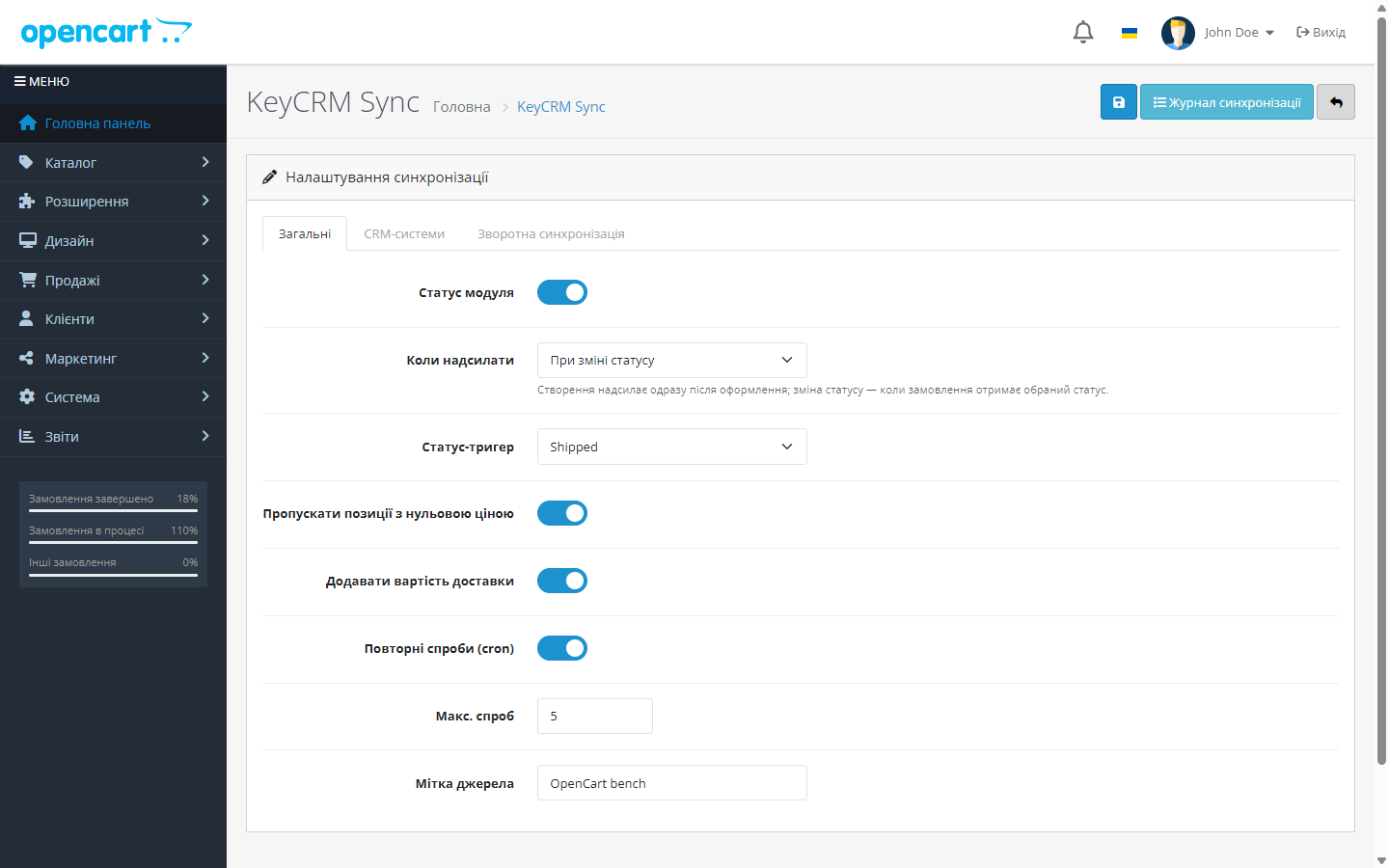
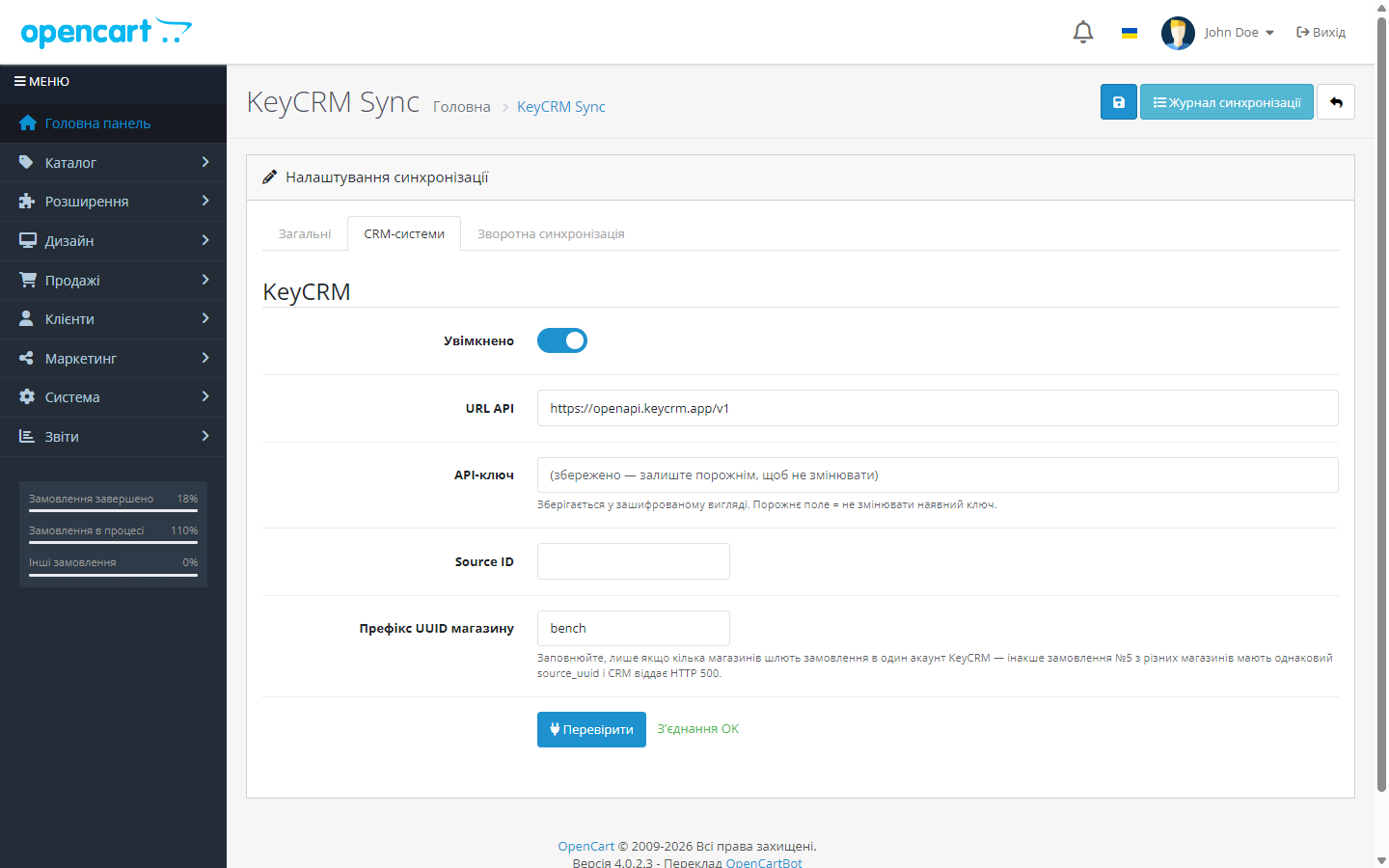
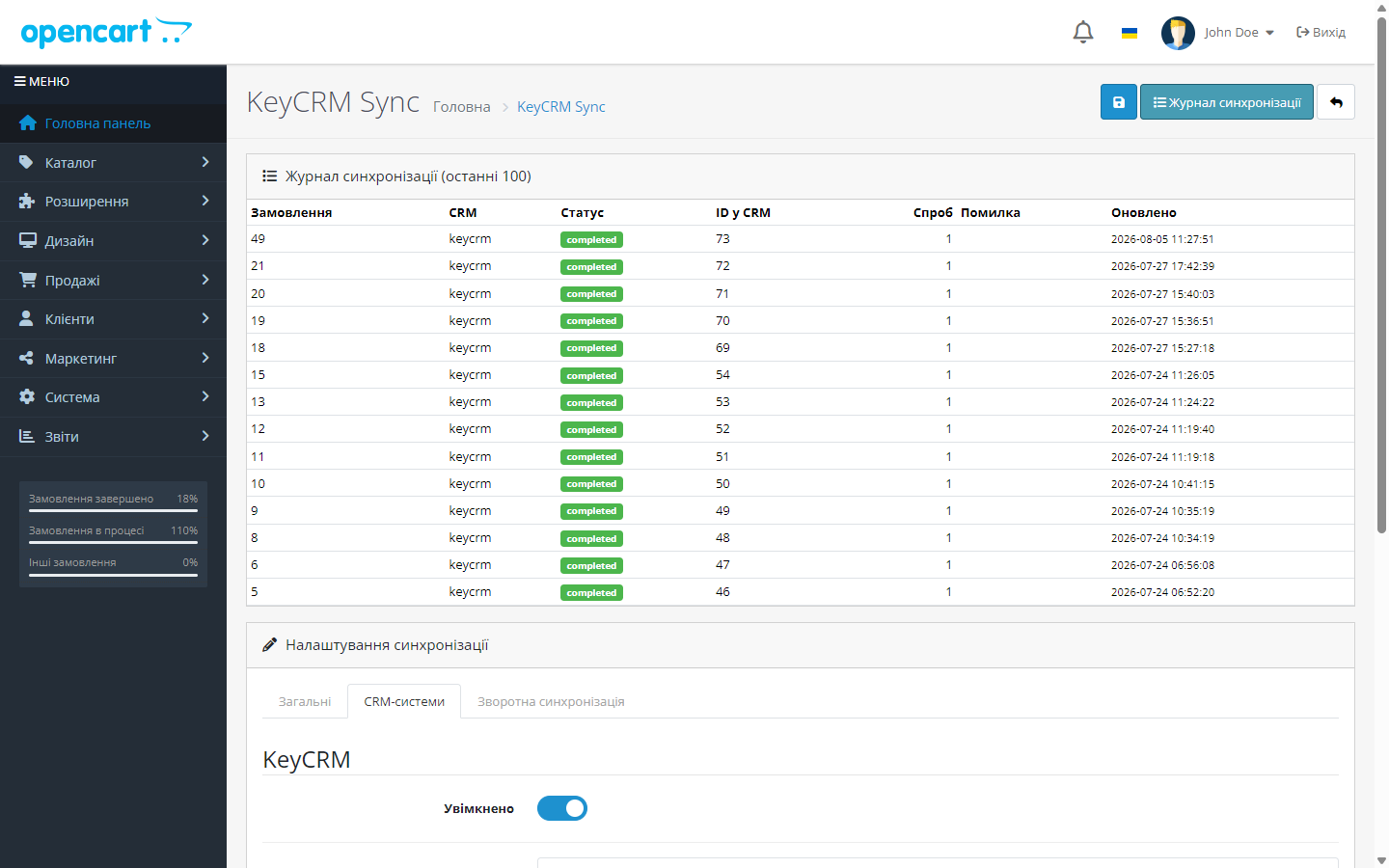
Як це виглядає
Технічні вимоги
 OpenCart 4 4.0.2 – 4.1.x, PHP 7.4+
- OpenCart 3 3.0.0 – 3.0.5, PHP 5.6 – 8.2 — окрема збірка cc_crm-oc3.ocmod.zip
- OpenCart 2.3 2.3.0.0 – 2.3.0.2, PHP 5.6+ — окрема збірка cc_crm-oc2.ocmod.zip
- API-ключ KeyCRM — кабінет KeyCRM → Налаштування → Загальні → API-ключ
- Cron на хостингу — для черги повторних спроб і зворотної синхронізації (пряма відправка замовлень працює і без крона)
Історія версій
Cron-токен зі спецсимволом (&, лапки) більше не відкидається.
Реліз фікса валюти: суми в KeyCRM надсилаються у валюті замовлення (курс замовлення), а не в базовій валюті магазину.
3.x-збірку підтягнуто до рівня 2.3 і 4.x.
Усі версії (8)
Окрема збірка під OpenCart 2.3.
Виправлено сумісність із PHP 7.4.
Виправлено подію замовлення на OpenCart 4.0.2.x (розділювач методу) і перевірку дубля ТТН на драйвері бази PDO.
Зворотна синхронізація KeyCRM → OpenCart.
Відправка замовлень у KeyCRM при оформленні або зміні статусу, ідемпотентність без дублів, черга повторних спроб через cron, мапер полів і оплат, шифрування API-ключа, журнал синхронізації,…
Повний опис модуля
KeyCRM Sync для OpenCart 2.3, 3.x і 4.x — модуль двосторонньої синхронізації магазину з KeyCRM. У прямому напрямку кожне замовлення OpenCart автоматично створюється в CRM — з покупцем, товарами, доставкою і способом оплати. У зворотному (опційно) модуль підтягує з KeyCRM назад в OpenCart статуси замовлень, номери ТТН і навіть залишки товарів. Менеджери ведуть продажі в одному вікні CRM, а магазин залишається актуальним без ручної роботи.
Модуль повністю безкоштовний. Код відкритий на GitHub: github.com/catcodestudio/opencart-keycrm-sync. Для роботи достатньо API-ключа з кабінету KeyCRM — без підписок і додаткових сервісів.
Як це працює — крок за кроком
- Покупець оформлює замовлення в магазині OpenCart.
- Модуль формує дані для CRM: контакти, товари, доставка й оплата. Телефон нормалізується у формат +380, позиції з нульовою ціною пропускаються.
- Замовлення відправляється у KeyCRM — одразу при оформленні або при переході в налаштований статус. Джерело замовлень створюється в CRM автоматично при першій відправці.
- Захист від дублів: унікальний ключ
UNIQUE(order_id, target)у журналі гарантує, що замовлення не задвоїться, навіть якщо подія спрацює повторно. - Невдалі відправки потрапляють у чергу повторних спроб — окрема cron-задача добиває їх з обмеженням кількості спроб.
- Зворотна синхронізація (якщо ввімкнена): друга cron-задача періодично забирає з KeyCRM оновлені статуси (за вашим мапінгом «статус KeyCRM → статус OpenCart»), додає в історію замовлення коментар з ТТН і, окремим чекбоксом, оновлює залишки товарів за SKU.
Що під капотом
- Ідемпотентність на рівні БД —
UNIQUE(order_id, target)у таблиці журналу: дублікат неможливий навіть при повторному спрацюванні події OpenCart. - API-ключ зашифрований у БД — sodium з HMAC-фолбеком, у відкритому вигляді не зберігається.
- Журнал синхронізації з постатусним записом по кожному замовленню і фрагментами запиту/відповіді API — зручно розбирати, чому конкретне замовлення не пішло.
- Зворотна синхронізація без петель: читає KeyCRM тільки на отримання, а під час запису історії замовлення глушить подію прямої синхронізації — назад у CRM нічого не відправляється. Кожен прогін пересканує 10-хвилинне перекриття, щоб не загубити граничні оновлення; час — в UTC.
- Адаптерна архітектура — мапер замовлень і диспетчер відокремлені від конкретної CRM, KeyCRM реалізована як адаптер.
Як встановити
- Завантажте
cc_crm.ocmod.zipчерез Розширення → Інсталятор в адмінці OpenCart. Для OpenCart 3.x — збіркуcc_crm-oc3.ocmod.zip.
Для OpenCart 2.3 візьміть збіркуcc_crm-oc2.ocmod.zip. Штатний інсталятор 2.3 копіює файли лише по FTP, тож якщо FTP не налаштований — розпакуйте архів і залийте вміст текиupload/у корінь магазину. - Перейдіть у Розширення → Модулі, знайдіть KeyCRM Sync і натисніть «Встановити».
- Відкрийте налаштування модуля і вставте API-ключ з кабінету KeyCRM.
- Увімкніть відправку і оберіть тригер: одразу при оформленні або при зміні статусу.
- За потреби ввімкніть зворотну синхронізацію на вкладці «Зворотна синхронізація»: налаштуйте мапінг статусів (список статусів KeyCRM підвантажується прямо в адмінці) і додайте cron-задачі.
- OpenCart 2.3 і 3.x: планувальника в цих версіях немає взагалі, тому обидві cron-адреси (черга повторних спроб і зворотна синхронізація) показані просто в налаштуваннях модуля — додайте їх у системний crontab. Поруч є поле «Cron-токен»: заповніть його, щоб адреси не міг смикати хтось сторонній.
Питання
про модуль
Не знайшли відповідь? Напишіть у Telegram — відповімо протягом робочого дня.
 @catcode_support
Налаштування, сумісність, активація
@catcode_support
Налаштування, сумісність, активація
Чи змінює модуль checkout або тему магазину?
Ні. Модуль слухає події замовлень на боці сервера — жодних змін у вітрині чи checkout-і покупець не побачить.
Чи створяться дублікати замовлень у CRM?
Ні. Ідемпотентність гарантується унікальним ключем у БД по парі «замовлення + CRM», а KeyCRM додатково отримує source_uuid = oc-{order_id}.
Що буде, якщо KeyCRM тимчасово недоступна?
Замовлення потрапить у чергу повторних спроб — cron-задача відправить його пізніше. Результат кожної спроби видно в журналі синхронізації.
Чи обов’язкова зворотна синхронізація?
Ні, вона вимкнена за замовчуванням. Пряма відправка замовлень у KeyCRM працює сама по собі; статуси, ТТН і залишки — окрема опція для тих, кому потрібно.
Як модуль оновлює залишки товарів?
Через GET /offers/stocks KeyCRM: пропозиції зіставляються з товарами OpenCart за SKU, кількість оновлюється, а підсумок прогону пишеться в лог. Опція вмикається окремим чекбоксом.
Чи потрібно щось налаштовувати в самій KeyCRM?
Мінімум: лише API-ключ. Джерело замовлень модуль створить автоматично при першій відправці, якщо ви не вказали Source ID вручну.
Поки що жодного відгуку. Будьте першим.
Поки питань немає. Запитай — ми відповімо протягом 24 годин.
Не той варіант, що шукаєте?
Робимо кастомні модулі під WordPress, WooCommerce, OpenCart і Shopify. Розкажіть про задачу — підготуємо оцінку.
Замовити кастомний модуль
Купівля модуля
—



