
WordPress
Nova Post Global для WooCommerce — міжнародна доставка з тарифом у кошику
Free + Pro
990 грн/рік
v1.0.0
 All Access4 990 ₴ на рік
 Аудит сайтуPDF-звіт на пошту за 3 хвилиниПеревірити сайт
Для щоденних задач
Стиснення фотоРозмір, якість і WebP пачкоюГенератор QRПосилання, Wi-Fi, оплата на IBANКалькулятор ПДВ20, 14, 7 % і сума прописомТранслітераціяЗа постановою КМУ № 55Перевірки сайту
PHP і плагіниВерсія PHP, WordPress, плагіниФід Google MerchantПоля, ціни, GTIN, фотоПошта доменуSPF, DKIM, DMARC, чорні спискиГотовність до AI-пошукуllms.txt, боти, розміткаУсі 9 інструментівВведіть щонайменше 2 символи

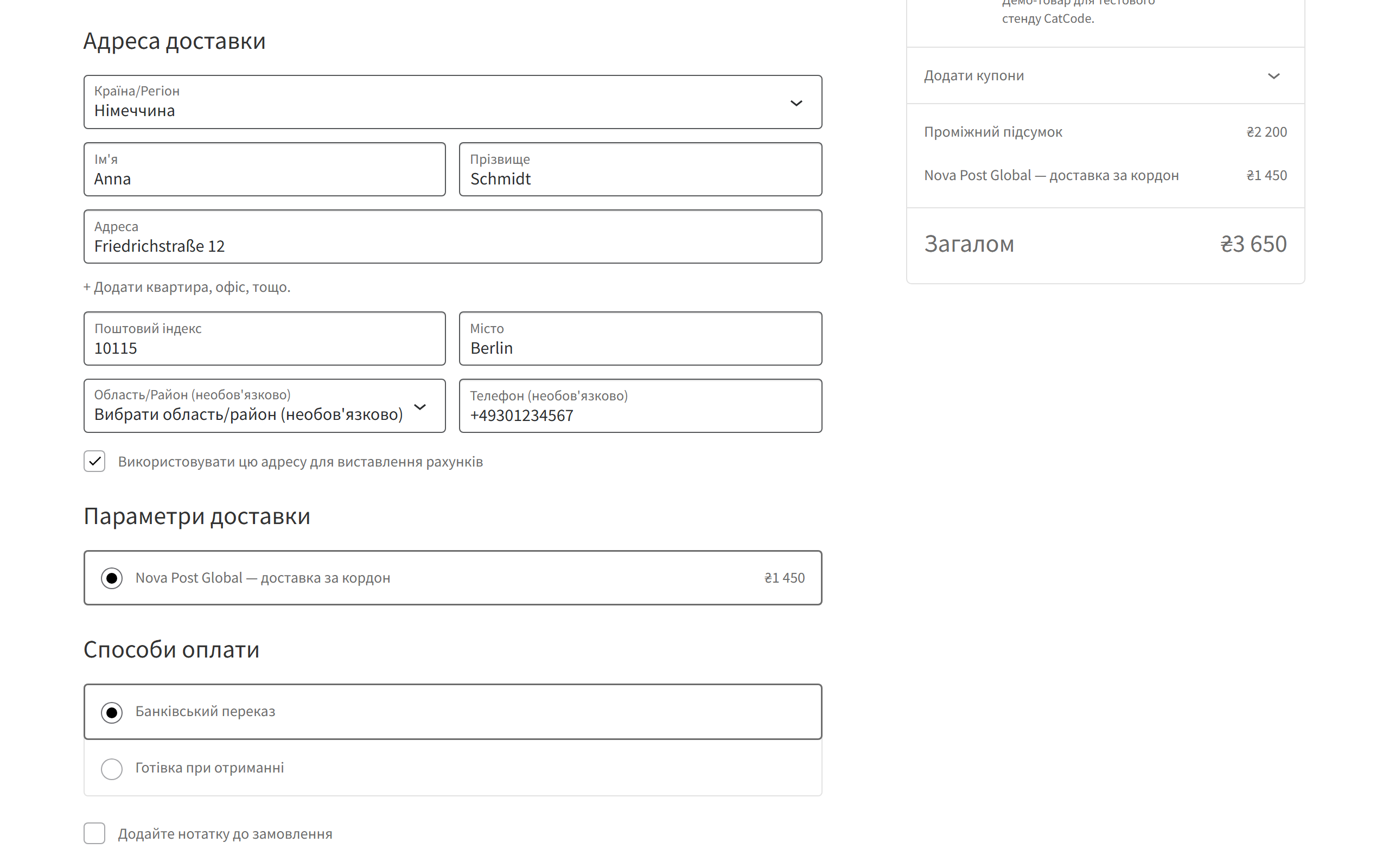
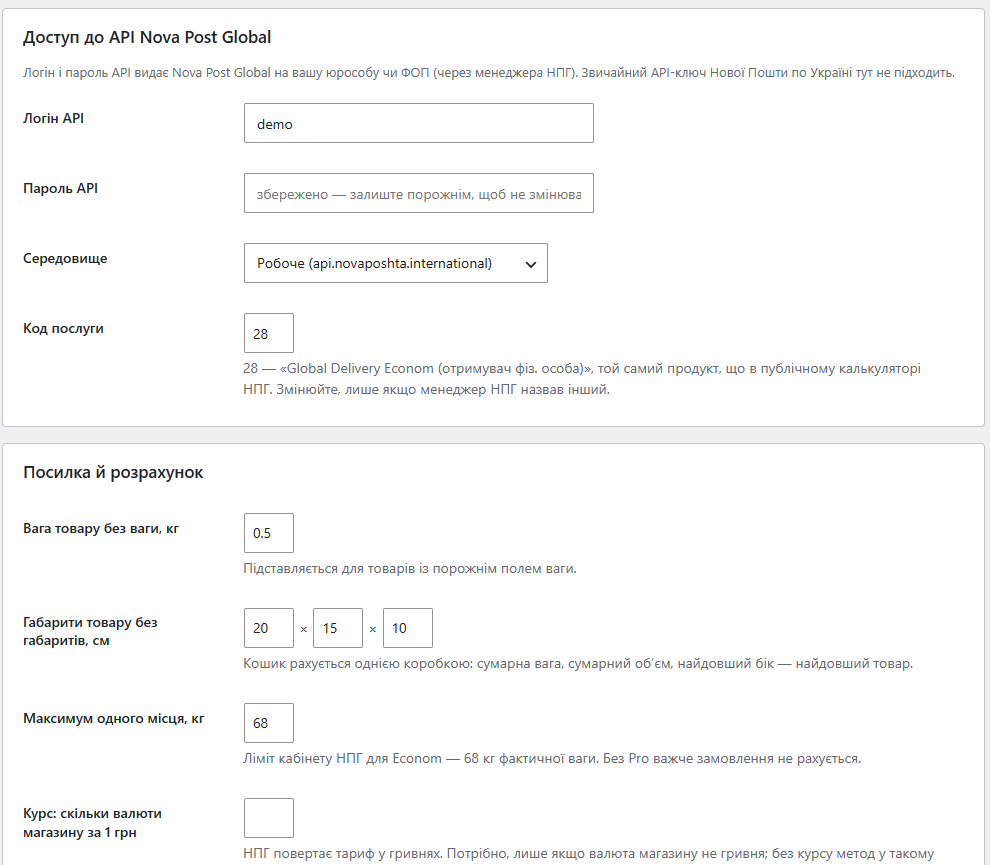
Міжнародна доставка Нової Пошти у WooCommerce: ціна за кордон рахується в кошику через API Nova Post Global за вагою й габаритами замовлення.
Безкоштовна версія працює без обмеження в часі. Pro додає решту функцій з таблиці.


На чекауті з’являється спосіб доставки «Nova Post Global — доставка за кордон» із ціною.

Окремий екран WooCommerce → Nova Post Global: логін і пароль API, тестове чи робоче середовище, код послуги (за замовчуванням 28 — Global Delivery Econom), вага й габарити для товарів із порожніми полями, ліміт одного місця, курс для магазинів не в гривні, поведінка на випадок збою API, кеш і журнал помилок.

Свіжий інстал — безкоштовна версія, нічого не вмикається само. Кнопка «Спробувати Pro 7 днів» → e-mail → ключ одразу у вікні і листом.

Переносите магазин — відв’яжіть ліцензію на старому домені й активуйте на новому самі. Для студій — ключі на 5, 25 сайтів або без обмежень.
 WordPress 6.2+, WooCommerce 7.0+ (перевірено на 10.7), PHP 7.4+. Сумісний з HPOS, класичним і блоковим чекаутом. Потрібні логін і пароль API Nova Post Global, виданий на вашу компанію чи ФОП, — звичайний API-ключ Нової Пошти по Україні для міжнародних тарифів не підходить. Хостинг має випускати вихідні з’єднання на порт 8243.
Перший випуск: тариф Nova Post Global у кошику через API, поділ на місця, націнка, безкоштовна доставка від суми й доставка у відділення за кордоном у Pro, перевірка підключення з…
4 модулі одним замовленням — на 40% дешевше, ніж окремо



Nova Post Global для WooCommerce — міжнародна доставка Нової Пошти прямо в кошику магазину. Покупець із Німеччини, Польщі чи США вводить адресу й одразу бачить ціну доставки за кордон, а не пише в месенджер «скільки буде до Берліна?». Тариф рахується через офіційний API Nova Post Global за вагою й габаритами саме цього замовлення.
На чекауті з’являється спосіб доставки «Nova Post Global — доставка за кордон» із ціною. Він показується лише для країн, які покриває тариф НПГ, і лише для адрес за межами України — українці бачать звичну Нову Пошту по Україні. Ціна оновлюється, щойно покупець змінює країну чи кошик.
Якщо НПГ не возить у країну (код CALC004) або вага поза тарифом, спосіб просто не з’являється — покупець не натрапить на ціну, яку потім доведеться переписувати вручну.
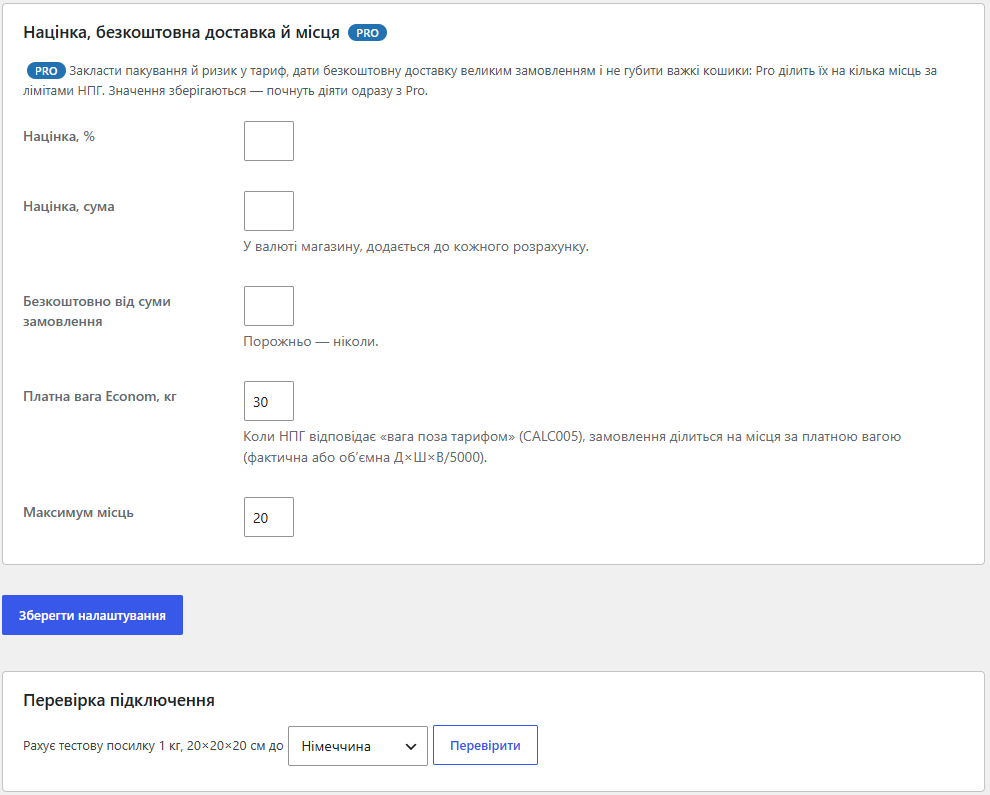
Окремий екран WooCommerce → Nova Post Global: логін і пароль API, тестове чи робоче середовище, код послуги (за замовчуванням 28 — Global Delivery Econom), вага й габарити для товарів із порожніми полями, ліміт одного місця, курс для магазинів не в гривні, поведінка на випадок збою API, кеш і журнал помилок. Кнопка «Перевірити підключення» рахує тестову посилку й людською мовою пояснює, що не так: неправильний пароль, закритий порт 8243 чи країна поза тарифом.
1. Покупець кладе товари в кошик і вводить адресу за кордоном.
2. Модуль складає замовлення в одну коробку: сумарна фактична вага, сумарний об’єм, найдовший бік дорівнює найдовшому товару. Одиниці магазину (г, фунти, дюйми) переводяться в кілограми й сантиметри автоматично.
3. Запит іде в API Nova Post Global (IEW/publicCalculateCost) — той самий продукт Global Delivery Econom, що й у публічному калькуляторі НПГ.
4. НПГ повертає ціну в гривнях. Якщо магазин працює в іншій валюті, модуль перераховує її за вашим курсом; у Pro додає націнку або обнуляє доставку від заданої суми.
5. Ціна кешується: однаковий кошик у ту саму країну не смикає API на кожному оновленні чекауту.
Econom везе одне місце до 68 кг фактичної ваги, а в більшість країн рахує лише до ~30 кг платної ваги. Без Pro таке замовлення просто не отримає тарифу. Pro ділить його на кілька однакових місць — спершу за фактичною вагою, а якщо НПГ відповідає «вага поза тарифом» (CALC005), то за платною (фактична або об’ємна Д×Ш×В/5000) — рахує одне місце і множить.
Звичайний метод доставки WooCommerce в зонах доставки, без переписаного чекауту. Запити — через WordPress HTTP API з Basic-авторизацією, тож їх видно в стандартних інструментах налагодження. Відповідь HTTP 424 з кодами CALC004/CALC005/CALC006 модуль вважає відповіддю тарифу, а не збоєм, і кешує; мережеві збої й помилки авторизації не кешуються, щоб наступне оновлення сторінки спробувало знову.
1. Завантажте архів у «Плагіни → Додати новий → Завантажити плагін» і активуйте.
2. WooCommerce → Nova Post Global: введіть логін і пароль API, збережіть і натисніть «Перевірити підключення».
3. WooCommerce → Налаштування → Доставка: додайте «Nova Post Global» у зони з країнами, куди відправляєте.
4. Оформіть тестове замовлення з адресою за кордоном і переконайтеся, що ціна з’явилась у чекауті.
Не знайшли відповідь? Напишіть у Telegram — відповімо протягом робочого дня.
 @catcode_support
Налаштування, сумісність, активація
@catcode_support
Налаштування, сумісність, активація
Ні. Міжнародні тарифи дає окремий API Nova Post Global зі своїм логіном і паролем. Попросіть доступ у свого менеджера НПГ.
НПГ відповів, що послуга в цю країну не надається (CALC004) або вага поза тарифом (CALC005). Важкі замовлення лікує Pro, а CALC004 модуль виправити не може.
За замовчуванням спосіб не показується. У налаштуваннях можна замість цього показувати фіксовану ціну.
Поки що жодного відгуку. Будьте першим.
Поки питань немає. Запитай — ми відповімо протягом 24 годин.
Робимо кастомні модулі під WordPress, WooCommerce, OpenCart і Shopify. Розкажіть про задачу — підготуємо оцінку.
Замовити кастомний модуль
—

Помічник CatCode
Щойно


Помічник CatCode
Онлайн

Допоможу із задачею по сайту
Опишіть задачу по сайту — підберу готовий модуль або передам розробнику з оцінкою. Модулі, доробки, верстка, інтеграції, швидкість, перенесення, технічне SEO.
