
OpenCart
Nova Poshta Premium — модуль Нова Пошта для OpenCart 2.3, 3.x і 4.x
Free + Pro
2 490 грн
v1.2.29
 All Access4 990 ₴ на рік
 Аудит сайтуPDF-звіт на пошту за 3 хвилиниПеревірити сайт
Для щоденних задач
Стиснення фотоРозмір, якість і WebP пачкоюГенератор QRПосилання, Wi-Fi, оплата на IBANКалькулятор ПДВ20, 14, 7 % і сума прописомТранслітераціяЗа постановою КМУ № 55Перевірки сайту
PHP і плагіниВерсія PHP, WordPress, плагіниФід Google MerchantПоля, ціни, GTIN, фотоПошта доменуSPF, DKIM, DMARC, чорні спискиГотовність до AI-пошукуllms.txt, боти, розміткаУсі 9 інструментівВведіть щонайменше 2 символи
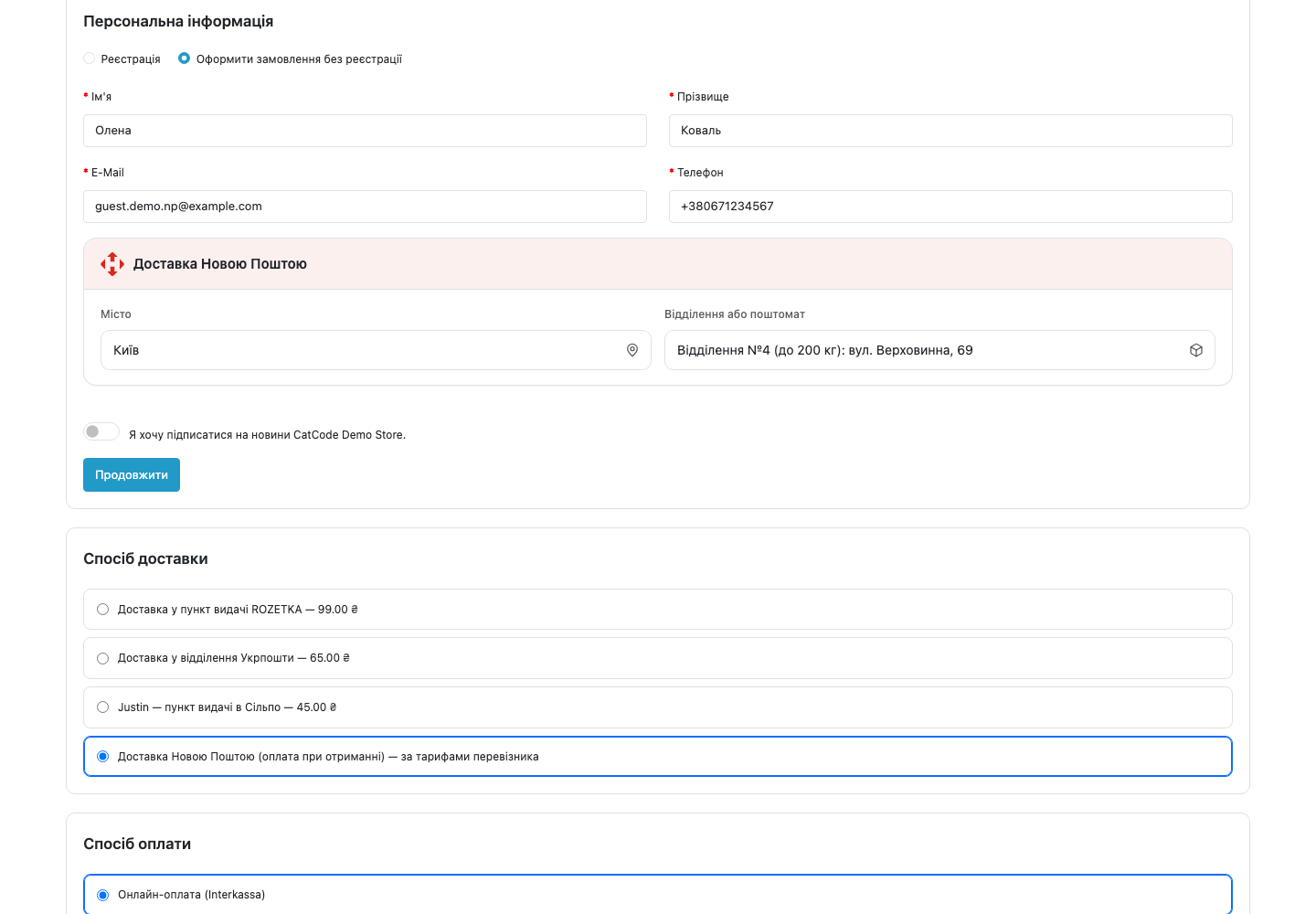
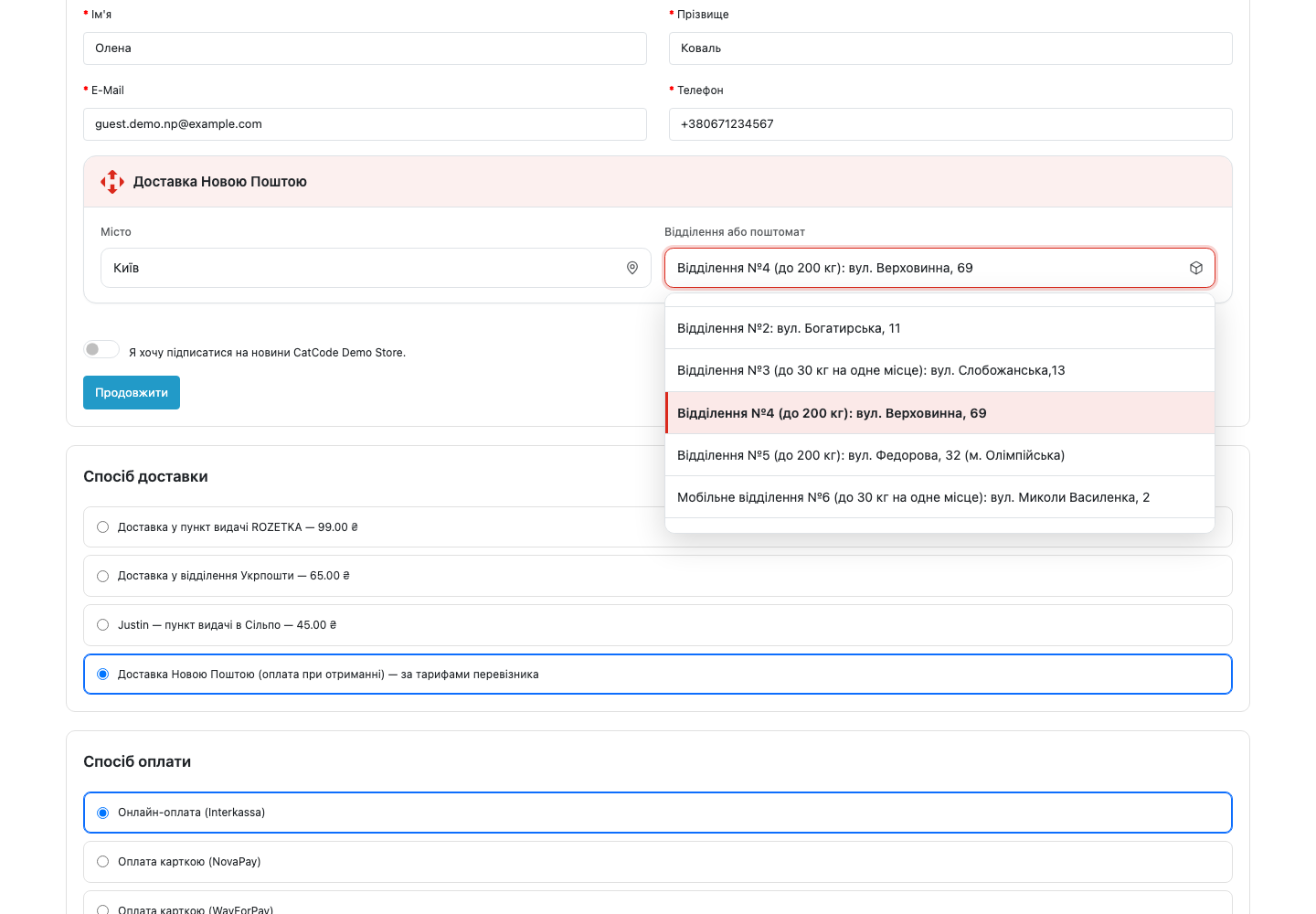
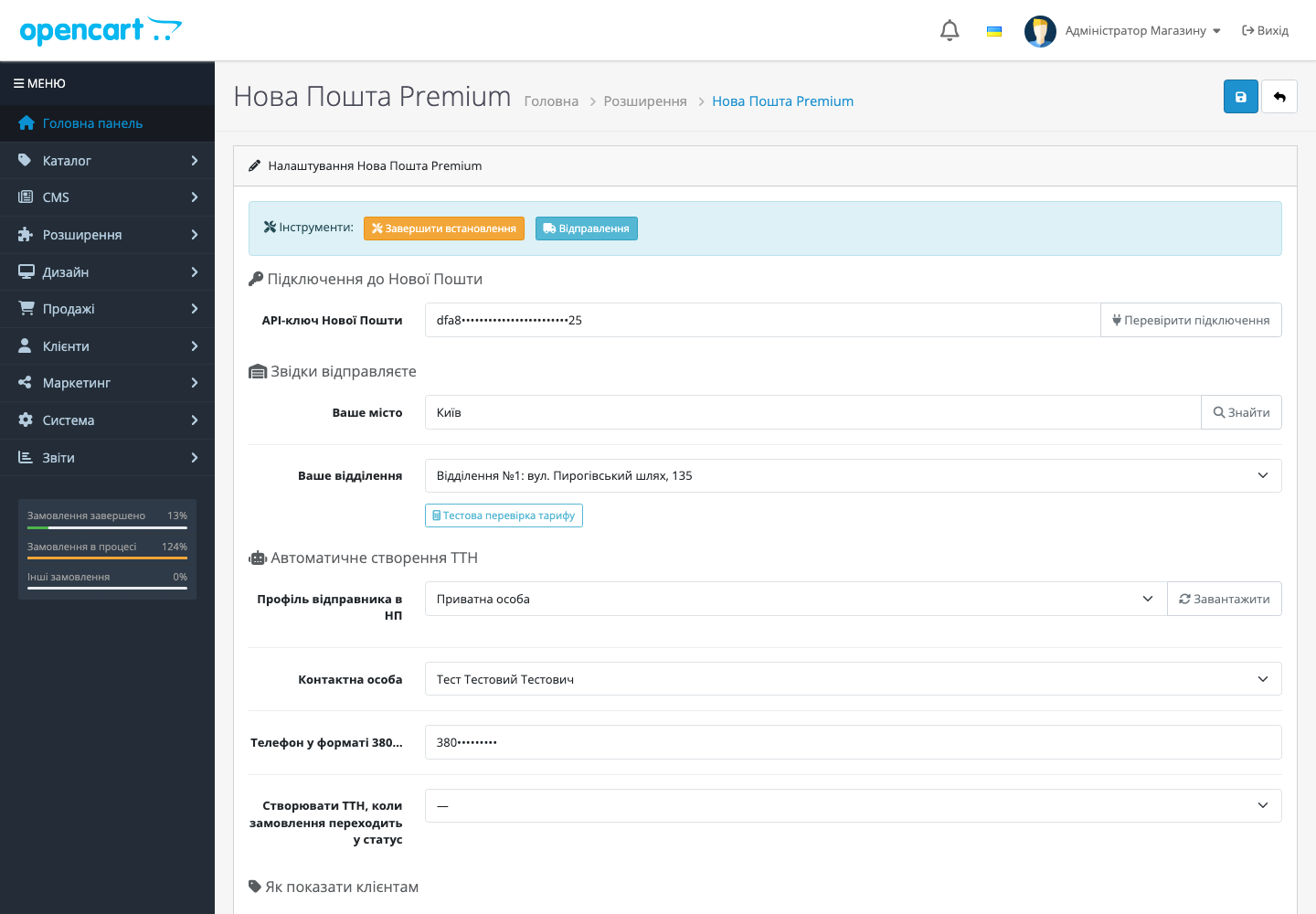
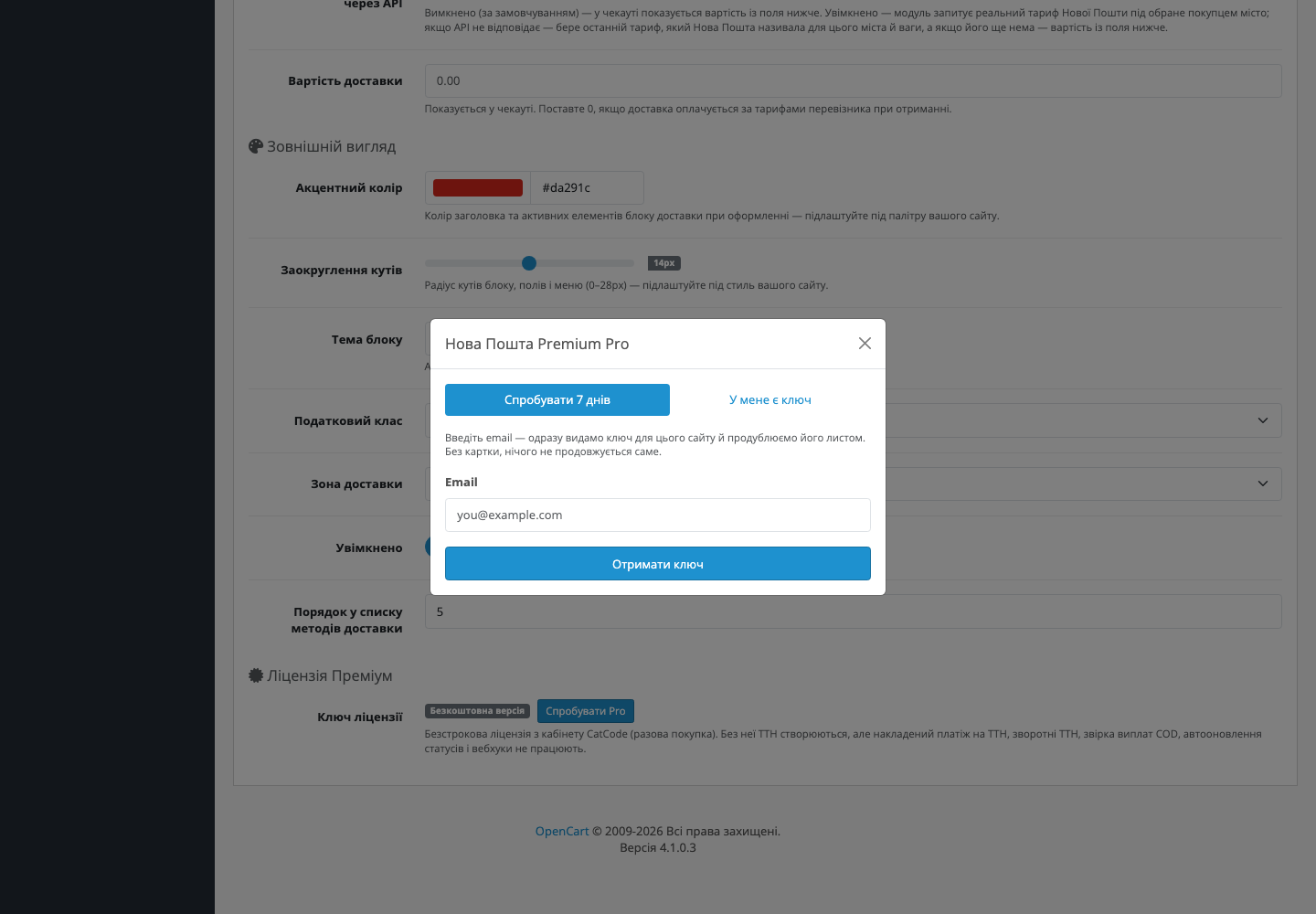
Інтеграція OpenCart 4.x з Новою Поштою: вибір відділення в кошику + автоматичне створення ТТН. Преміум — накладений платіж, поворотні накладні, авто-оновлення статусів, webhooks.
Без звуку теж зрозуміло: субтитри українською
Безкоштовна версія працює без обмеження в часі. Pro додає решту функцій з таблиці.



Свіжий інстал — безкоштовна версія, нічого не вмикається само. Кнопка «Спробувати Pro 7 днів» → e-mail → ключ одразу у вікні і листом.

Переносите магазин — відв’яжіть ліцензію на старому домені й активуйте на новому самі. Для студій — ключі на 5, 25 сайтів або без обмежень.
 OpenCart 4.0.2 – 4.1.x (4.2+ також працює) — або окрема збірка під OpenCart 3.0.2 – 3.0.5.0 чи OpenCart 2.3.0.xPHP 8.1+ (тестовано на 8.5 — захист від нових deprecation warnings всередині JSON-ендпоінтів); збірка для OpenCart 2.3 — PHP 5.6 і новішіMySQL 5.7+ / MariaDB 10.3+API-ключ Нової Пошти — безкоштовний у вашому кабінеті: my.novaposhta.ua → Налаштування → Безпека → APIОдин зареєстрований профіль відправника у бізнес-кабінеті НП — у більшості мерчантів він вже є (без нього НП не дозволяє створювати ТТН з будь-якого джерела)OpenCart 4.1.0.3 · oc.catcode.com.uaOpenCart 2.3.0.2 · oc23.catcode.com.ua
У заголовку блоку «Доставка Новою Поштою» — знак Нової Пошти замість іконки-вантажівки.
Підтримка чекауту Simple.
Магазин більше не лягає разом з API Нової Пошти.
Список відділень, що приходить уже після того, як покупець почав вводити номер, тепер одразу з’являється у відкритому меню.
Виправлено помилку ліцензійного модуля на вітрині OpenCart.
CatCode One Page Checkout: віджет іноді не з’являвся — Нова Пошта обрана, а вибору міста й відділення немає.
Прихована форма адреси більше не отримує індекс-заглушку «00000».
Область у замовленні тепер визначає сервер.
Модуль тепер працює і на сторінці оформлення замовлення в один крок (CatCode One Page Checkout).
API-ключ і ліцензійний ключ у налаштуваннях тепер шифруються AES-256 з перевіркою HMAC замість XOR.
Виправлено створення зворотної ТТН.
Розрахунок вартості через API Нової Пошти став окремою опцією і за замовчуванням вимкнений.
Виправлено фатальну помилку у розрахунку способів доставки.
Виправлено роботу інструментів у налаштуваннях модуля до першого збереження.
Виправлено пошук міст на магазинах, де OpenCart працює через драйвер бази PDO (DB_DRIVER = pdo).
Виправлено пошук міст на хостингах, де не увімкнене розширення PHP mbstring.
Дрібні виправлення адмінки та оновлені скріншоти.
Окрема збірка під OpenCart 3.0.2 – 3.0.5.0 — повний порт 4.x-версії (non-namespaced класи, OC3 events, Bootstrap-3 адмінка).
Кастомізація вигляду чекаут-блоку.
Production-ready реліз: ліцензія перевіряється на сервері CatCode, plain-language локалізація без жаргону, merge-fix у save handler.
Накладений платіж (BackwardDelivery + синхронізація виплат), поворотні ТТН через AdditionalServiceGeneral.save з причиною “відмова від отримання”, транслітерація Latin → Кирилиця у ПІБ…
Кеш міст і відділень: таблиці np_cities + np_warehouses, щотижневий cron syncCities, lazy warehouse cache з TTL 7 днів.
Справжнє створення ТТН: налаштування Counterparty-відправника в адмінці + двоетапний createTTN (Counterparty.save → InternetDocument.save).
Перший повний MVP: install hook з створенням таблиць БД, storefront picker у кошику, чернетка ТТН на нове замовлення, погодинний cron статусів, webhook-система, шифрування API-ключа через…
4 модулі одним замовленням — на 40% дешевше, ніж окремо


Nova Poshta Premium — модуль для OpenCart 2.3, 3.x та 4.x, який під’єднує магазин до Нової Пошти за 10 хвилин. Покупець обирає місто і відділення прямо в кошику, а ТТН створюється автоматично, коли замовлення переходить у статус, який ви обрали в налаштуваннях (наприклад, «В обробці»). Без чужих iframe, без переписування checkout-у, без щоденного копіювання даних у кабінет НП.
X-NP-Signature.nova_poshta_premium.ocmod.zip через Розширення → Інсталятор у вашій OC-адмінці. Для OpenCart 3.0.x використовуйте збірку nova-poshta-premium-oc3-1.3.14.ocmod.zip (доступна у завантаженнях товару), для OpenCart 2.3 — nova-poshta-premium-oc2-1.3.11.ocmod.zip.Не знайшли відповідь? Напишіть у Telegram — відповімо протягом робочого дня.
 @catcode_support
Налаштування, сумісність, активація
@catcode_support
Налаштування, сумісність, активація
Ні. Модуль вставляє свій блок через event у footer, без зміни вашої теми. Якщо колись захочете видалити модуль — checkout залишиться який був.
Журнал відправлень, кеш міст і вже створені ТТН залишаться в БД (на випадок аудиту). Очистити можна вручну через SQL — інструкція в документації.
Ні. Для OpenCart ліцензія назавжди: одна оплата, і Pro-функції лишаються з вами. Закінчується лише 7-денний тріал — після нього Pro вимикається, а безкоштовна версія працює далі.
Так. У налаштуваннях натисніть «Деактивувати ліцензію» на старому домені — слот звільниться, можна вставляти на новому.
Ні. Просто API-ключ зі стандартного бізнес-кабінету. Він безкоштовний для всіх клієнтів Нової Пошти.
Так. Поки тримаємо сумісність з 4.0.2–4.1.x (це 90% поточних магазинів). Як тільки 4.2 / 5.0 досягнуть стабільності — додамо їх у тестову матрицю. Оновлення доступні безкоштовно для всіх клієнтів з активною ліцензією — без додаткових платежів.

Перший раз бачу безкоштовну версію з таким функціоналом ДЯКУЮ!!!!
Дякуємо за відгук, Олексію! Безкоштовна версія й далі отримуватиме оновлення — якщо чогось бракуватиме, напишіть у вкладці «Питання», врахуємо.
Поки питань немає. Запитай — ми відповімо протягом 24 годин.
Робимо кастомні модулі під WordPress, WooCommerce, OpenCart і Shopify. Розкажіть про задачу — підготуємо оцінку.
Замовити кастомний модуль
—

Помічник CatCode
Щойно


Помічник CatCode
Онлайн

Допоможу із задачею по сайту
Опишіть задачу по сайту — підберу готовий модуль або передам розробнику з оцінкою. Модулі, доробки, верстка, інтеграції, швидкість, перенесення, технічне SEO.
