


Market Feeds — Rozetka / Prom для OpenCart 2.3, 3.x і 4.x
Фіди Rozetka XML і Prom.ua YML для OpenCart 2.3, 3 і 4: токен-захищені URL, потокова генерація без перевантаження памʼяті, акційні ціни, фільтри категорій і cron-кеш. Повністю безкоштовно, код відкритий на GitHub.
- Сумісність
- OpenCart 2.3.0.0 – 2.3.0.2 · 3.0.2 – 3.0.5 · 4.0.2 – 4.1.x
- Версія
-
v1.4.1 (OpenCart 4)
v1.4.1 (OpenCart 3.x)
v1.3.1 (OpenCart 2.3) - Оновлено
- 17 жовтня 2026
Модуль у роботі — 36 секунд
Без звуку теж зрозуміло: субтитри українською
Що вміє модуль

Як це виглядає
Головне про модуль

Google Merchant Center і Meta з варіантами
З версії 1.2.0 (OpenCart 4.x і 3.x) та 1.1.0 (OpenCart 2.3) модуль віддає ще два фіди: для Google Merchant Center і для каталогу Meta (реклама у Facebook та Instagram).

Каталог для AI-агентів
Покупці дедалі частіше шукають товар не в пошуковику, а в ChatGPT, Gemini чи Claude.
Технічні вимоги
 OpenCart 4.0.2 – 4.1.x, 3.0.2 – 3.0.5.0 або 2.3.0.0 – 2.3.0.2 — для кожної гілки окрема збірка
- PHP 8.0+ для OpenCart 4, 7.x для OpenCart 3 і 5.6+ для 2.3 — у всіх випадках з розширенням XMLWriter, стандартним для більшості хостингів
- Акаунт продавця на Rozetka та/або Prom.ua — щоб додати URL фіду в кабінеті маркетплейсу
- Для файлового кешу (опційно) — можливість запускати cron на хостингу
Історія версій
Фід Епіцентру у власному XML Епіцентру.
Каталог для AI-агентів — нова вкладка «AI-агенти».
Google-фід за специфікацією даних про товари Google від 14.04.2026.
Усі версії (11)
Фіди Google Merchant Center і Meta (RSS із атрибутами g:).
Токен фідів зі спецсимволом (&, лапки) більше не відкидається.
У підказках адмінки теги , і були написані без екранування, тому браузер їх ковтав і речення «Якщо у товару діє акція.
Збірка під OpenCart 2.3.0.x — порт напряму з 4.x, проміжної 3.x-версії цей модуль не проходив.
🔴 Ціна у фіді не збігалася з ціною на сайті — з двох причин одразу.
🔴 Акції не потрапляли у фід на OpenCart 4.0.x.
Виправлено адмін-AJAX: Twig екранував & в URL запитів, через що кнопки «Перевірити» та «Перебудувати кеш» не працювали в частині збірок OpenCart.
Перший публічний реліз: фіди Rozetka XML і Prom.ua YML, токен-захищені URL, потокова генерація XMLWriter, фільтри категорій і виробників, множник ціни, акційні ціни (price + price_old),…
Повний опис модуля
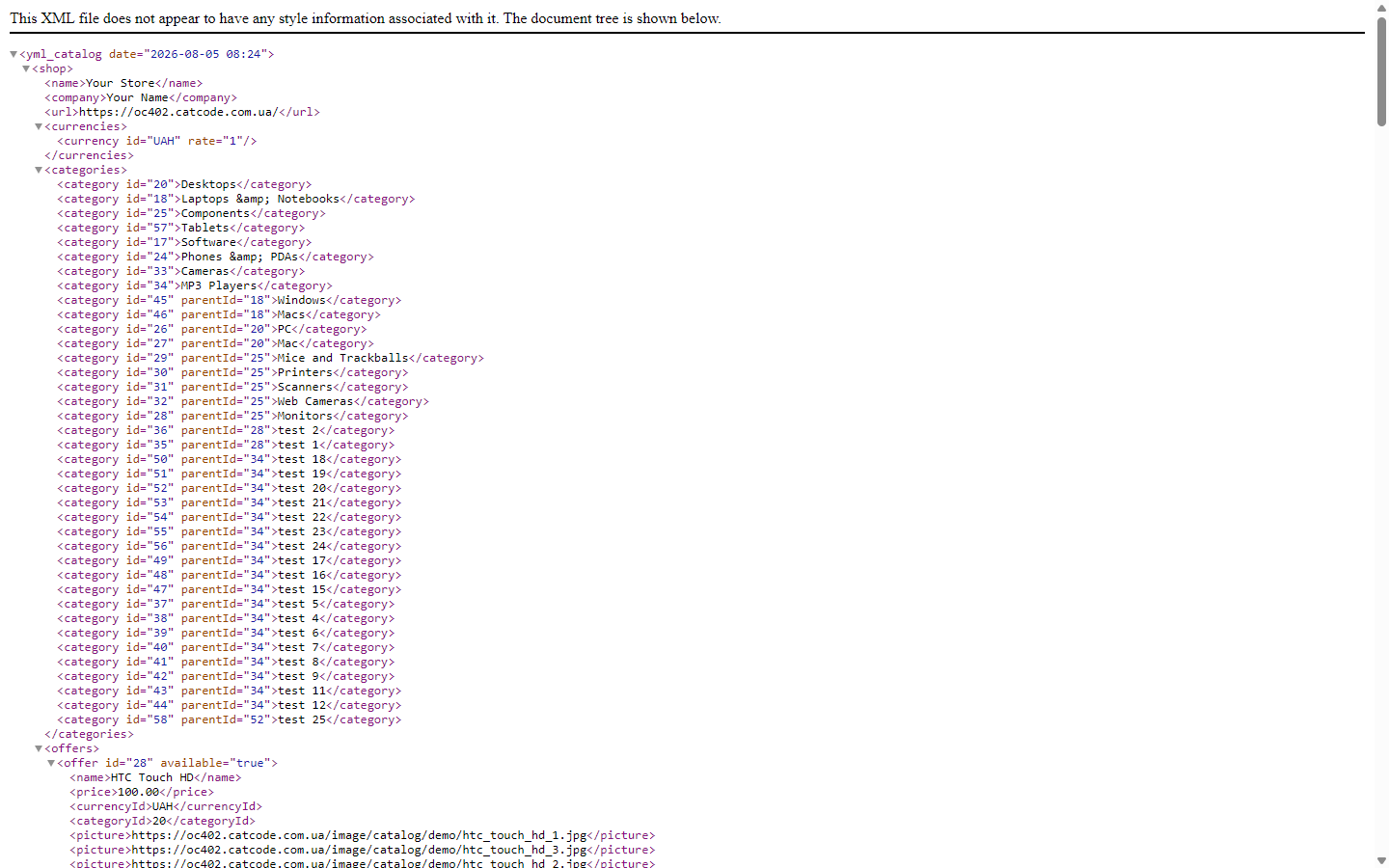
Market Feeds — модуль фідів для OpenCart 2.3, 3.x і 4.x, який вивантажує каталог магазину у два найпопулярніші українські маркетплейси: Rozetka (XML) і Prom.ua (YML). Замість ручного експорту чи самописних скриптів ви отримуєте два постійні URL-фіди, захищені секретним токеном — маркетплейси самі забирають актуальні товари, ціни й залишки за своїм розкладом. Генерація потокова, тому фід не «кладе» сервер навіть на великих каталогах.
Модуль повністю безкоштовний. Код відкритий: github.com/catcodestudio/opencart-market-feeds. Жодних платних версій, лімітів чи ліцензійних ключів — усі функції доступні одразу після встановлення.
Фід Епіцентру у власному XML
Епіцентр не читає YML для Rozetka і Prom: і імпорт товарів у кабінеті, і «Автооновлення залишків» за посиланням чекають структуру yml_catalog → offers → offer без блоку <shop>. На YML кабінет відповідає «Невідомий тег shop у рядку 3». З версії 1.4.1 модуль віддає окремий фід Епіцентру саме в цьому форматі (вмикається на вкладці «Загальні», адреса — extension/cc_feeds/feed.epicentr в OpenCart 4 або extension/feed/cc_feeds/epicentr в 3.x і 2.3).
- Ціна й наявність — короткий файл для «Товари → Імпорт → Автооновлення залишків»:
price,price_old(акційна ціна) іavailability. Артикул у кабінеті = ID товару в OpenCart. - Повна версія — ще й назва українською (і російською, якщо мова є в магазині), опис лише з тегами, які лишає Епіцентр, усі фото одним рядком через кому та EAN як штрихкод — для оновлення товарів, які вже є в кабінеті.
- Товари без залишку завжди потрапляють у файл зі статусом «немає в наявності»: товар, який просто зник із файлу, Епіцентр лишає таким, яким він був.
- Ціни — у гривнях: якщо в магазині є валюта UAH, фід перераховує за її курсом; якщо немає — налаштування про це попереджають.
Нові товари з характеристиками Епіцентру (коди категорій і атрибутів) цей фід не створює — для цього є модуль «Епіцентр: ціни й наявність».
Google Merchant Center і Meta з варіантами
З версії 1.2.0 (OpenCart 4.x і 3.x) та 1.1.0 (OpenCart 2.3) модуль віддає ще два фіди: для Google Merchant Center і для каталогу Meta (реклама у Facebook та Instagram). Формат — RSS 2.0 з атрибутами g:, той самий, який приймають обидва кабінети. Ціни з податком, акції, наявність і фільтри категорій беруться ті самі, що у фідах Rozetka і Prom, тож ціна в рекламі не розходиться з ціною на сторінці товару, а посилання на товар іде з ЧПУ, як його друкує вітрина.
Розміри й кольори — однією карткою, а не дублями. В OpenCart розмір і колір — це опції без власних артикулів, тому звичайний фід віддає один товар, і реклама крутиться на ньому або на копіях. У налаштуваннях ви позначаєте, які опції означають «Розмір», а які — «Колір». Кожне значення, а для двох опцій кожна комбінація розмір × колір, іде окремим товаром зі спільним g:item_group_id, заповненими g:size і g:color. Ціна варіанта рахується так само, як у кошику: ціна товару або акційна плюс надбавка опції, разом із податком. Значення, якого немає на складі, у фід не потрапляє (або йде як «немає в наявності», якщо так налаштовано).
Реальний строк відправки. Товар «в наявності», але відправка за 2–6 днів — звична історія для роботи з постачальником. Задайте типовий строк у робочих днях («0», «2» чи «2-6») і, за потреби, окремий для товару через будь-який атрибут. Google отримує g:min_handling_time і g:max_handling_time і показує покупцеві чесну дату доставки. У фіді Prom.ua статус «Готово до відправки» (in_stock="true") ставиться лише тим товарам, що справді йдуть за один день.
Обидва фіди вимкнені за замовчуванням: після оновлення магазин не публікує нічого нового, поки ви не ввімкнете їх на вкладці «Google і Meta» і не вставите посилання в Merchant Center або Commerce Manager.
Каталог для AI-агентів
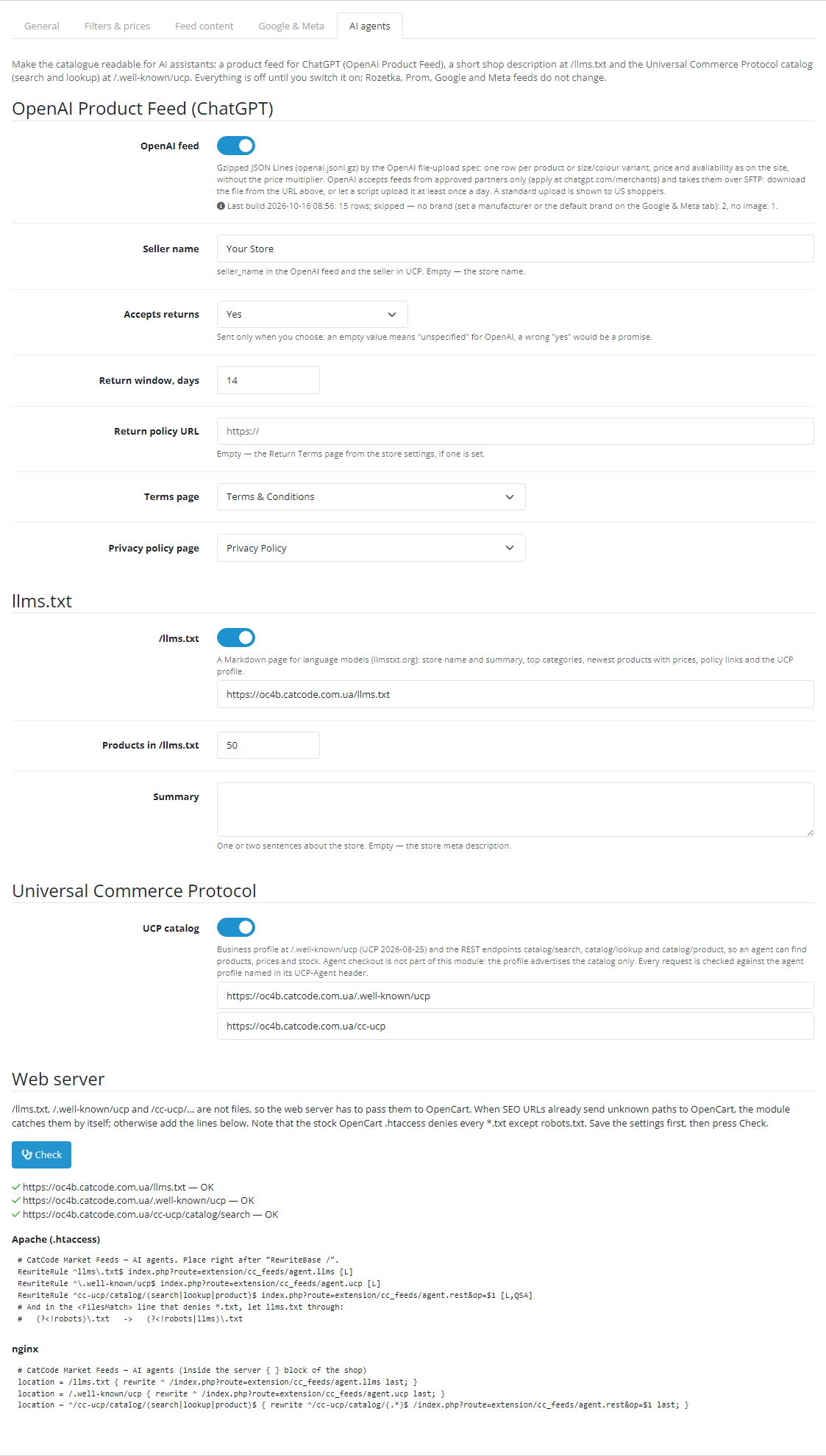
Покупці дедалі частіше шукають товар не в пошуковику, а в ChatGPT, Gemini чи Claude. З версії 1.4.0 (OpenCart 4.x і 3.x) та 1.3.0 (OpenCart 2.3) у модулі є вкладка «AI-агенти»: вона робить каталог магазину читабельним для таких асистентів трьома способами, кожен вмикається окремо. Після оновлення все вимкнено, а фіди Rozetka, Prom, Google і Meta не змінюються ані на байт — ми звірили їх до і після оновлення на OpenCart 4.1, 4.0.2, 3.0 і 2.3.
OpenAI Product Feed. Файл openai.jsonl.gz за специфікацією OpenAI для завантаження каталогу файлом: рядок на товар або на варіант розміру й кольору (group_id, variant_dict), ціна й акція як на вітрині — без множника, який ви ставите для маркетплейсів, GTIN лише з правильною контрольною цифрою, умови повернення і сторінки умов та конфіденційності з налаштувань. Товар без бренду, фото чи ціни у файл не потрапляє, а в адмінці видно, скільки рядків пропущено і чому. Важливо знати: OpenAI приймає фіди лише від схвалених партнерів (заявка — на chatgpt.com/merchants) і забирає їх по SFTP, а стандартне завантаження показується покупцям у США. Модуль готує файл за посиланням із токеном; вивантаження на SFTP налаштовується після схвалення.
/llms.txt. Коротка сторінка про магазин у форматі llmstxt.org: назва й опис, головні категорії з кількістю товарів, нові товари з цінами й наявністю, умови та посилання на профіль UCP.
Universal Commerce Protocol (UCP 2026-08-25). Профіль магазину на /.well-known/ucp і пошук по каталогу для агентів: catalog/search, catalog/lookup, catalog/product — ціни, варіанти, наявність. Лише каталог: оформлення замовлення через агента модуль не обіцяє. Кожен запит перевіряє профіль платформи агента із заголовка UCP-Agent: тільки HTTPS, без редиректів, приватні адреси відхиляються, профіль кешується, кількість запитів обмежена.
Налаштування сервера. /llms.txt і /.well-known/ucp — не файли, тож сервер має передати їх в OpenCart. Якщо в магазині працюють ЧПУ (стандартний .htaccess OpenCart), профіль UCP і пошук модуль ловить сам. Для /llms.txt на Apache потрібен рядок із налаштувань: стандартний .htaccess OpenCart забороняє будь-які *.txt, крім robots.txt. Готові рядки для Apache і nginx показано на вкладці, а кнопка «Перевірити» сама запитує три адреси й пише, що прийшло. На хостингу з панеллю Hestia (nginx + Apache) ми пройшли всі три стани: без .htaccess — три червоні рядки з причиною, зі стандартним .htaccess — UCP працює, а /llms.txt віддає 403, з рядками з налаштувань — три зелені.
Як це працює — крок за кроком
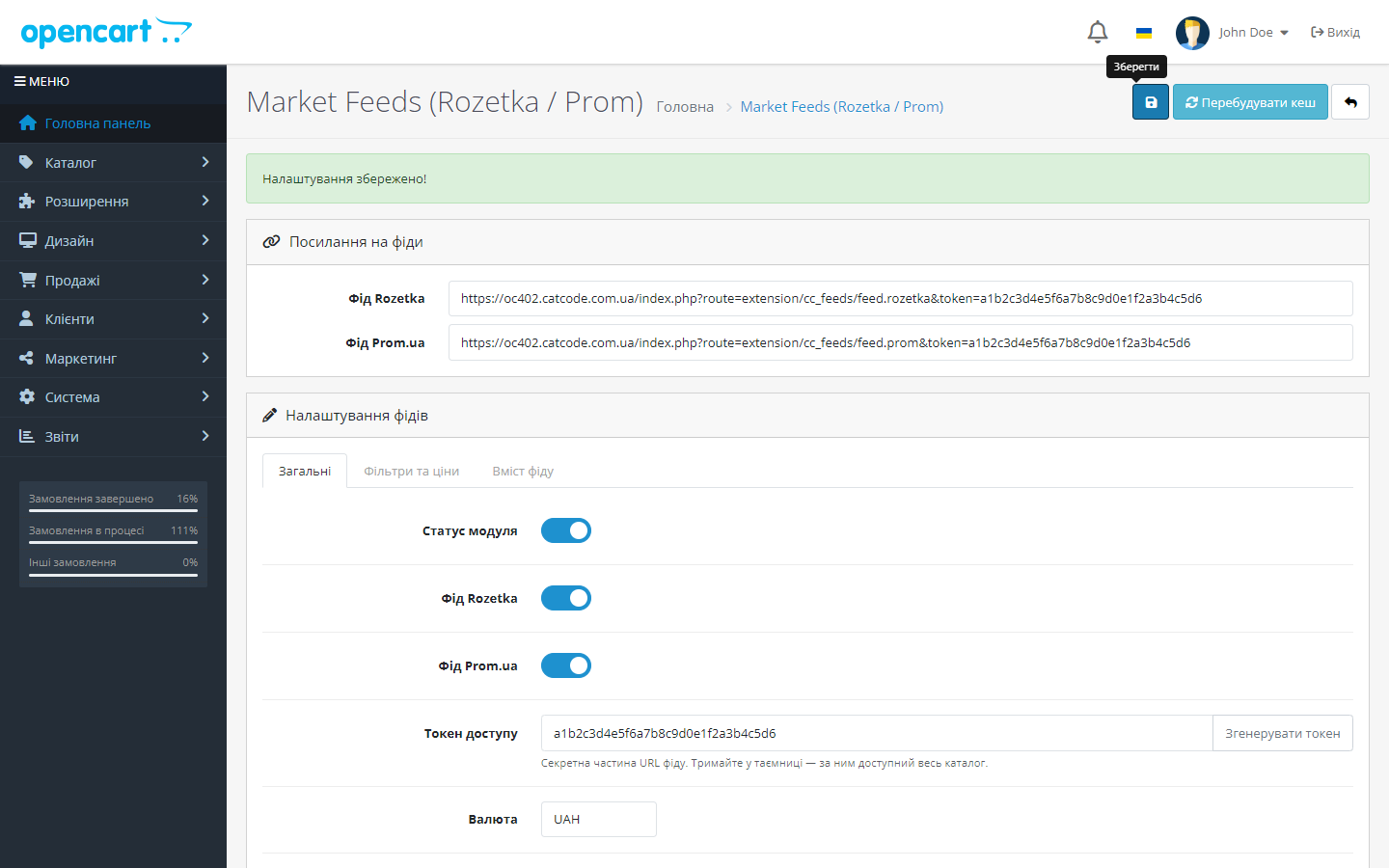
- Встановлюєте модуль і одним кліком генеруєте секретний токен доступу — без нього фід недоступний стороннім.
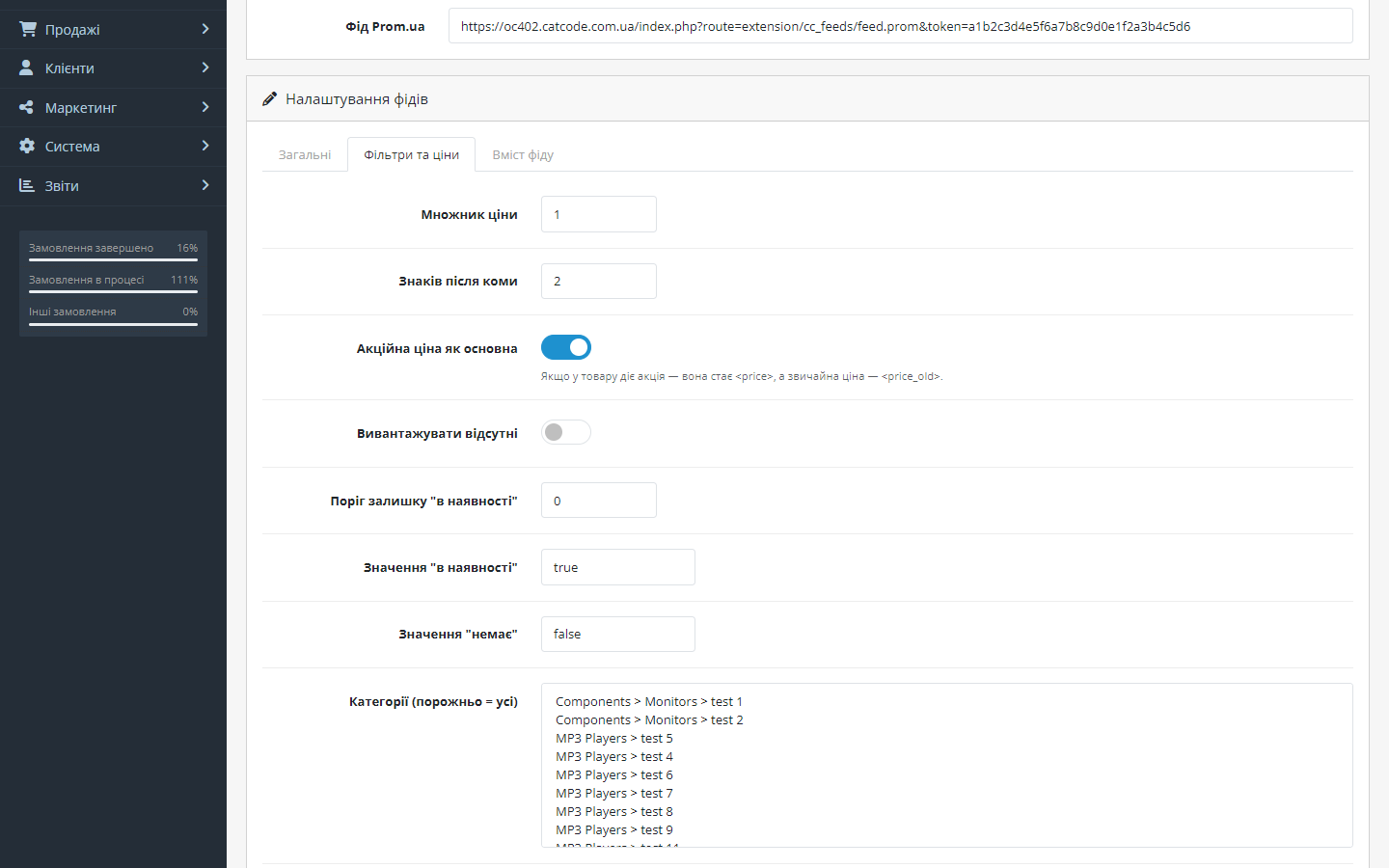
- Налаштовуєте вивантаження: валюта, мова, множник ціни, фільтри за категоріями та виробниками (порожньо = весь каталог).
- Копіюєте готові URL фідів зі сторінки налаштувань — окремо для Rozetka (
feed.rozetka) і Prom.ua (feed.prom). - Вставляєте посилання у кабінетах маркетплейсів — Rozetka і Prom.ua самі періодично читають фід і оновлюють товари, ціни та залишки.
- Акції підхоплюються автоматично: якщо на товар діє спецціна, вона стає
<price>, а звичайна ціна —<price_old>(маркетплейс показує знижку). - Для великих каталогів вмикаєте файловий кеш: фід перебудовується кроном у фоні й віддається маркетплейсу миттєво.
Що під капотом
- Потокова генерація через XMLWriter — товари вибираються посторінково, зображення, атрибути й акції підвантажуються батчами. Стабільне споживання памʼяті незалежно від розміру каталогу.
- Токен-захист URL — фід віддається лише із секретним параметром
token; згенерувати новий можна одним кліком в адмінці. - Акційні ціни через рідну механіку кожної гілки —
product_discountв OpenCart 4.1, окремаproduct_specialу 4.0, 3.x і 2.3; схема визначається автоматично. - Правильні теги залишків для кожної платформи: Rozetka отримує
stock_quantity, Prom —quantity_in_stock, плюс налаштовуваний поріг «в наявності». - Cron-кеш у файл — в OpenCart 4 маршрут
extension/cc_feeds/cron.rebuildперебудовує фід за розкладом, у 3.x і 2.3 те саме робить захищене токеном посилання для crontab хостингу; кнопка «Перевірити» в адмінці показує, скільки товарів потрапить у вивантаження.
Як встановити
- Візьміть збірку під свою версію магазину:
cc_feeds.ocmod.zip(OpenCart 4.0.2–4.1.x),cc_feeds-oc3.ocmod.zip(3.0.2–3.0.5.0) абоcc_feeds-oc2.ocmod.zip(2.3.0.0–2.3.0.2). - В OpenCart 3 і 4 архів ставиться через Розширення → Інсталятор. У 2.3 штатний інсталятор працює лише по FTP, тому надійніше розпакувати архів і залити вміст теки
upload/у корінь магазину. - Розширення → Модулі (в OpenCart 3.x — тип розширень «Фіди») → знайдіть Market Feeds → Встановити → Налаштувати.
- Згенеруйте токен, оберіть валюту, мову й фільтри → Зберегти.
- Скопіюйте URL фідів із секції «Посилання на фіди».
- Додайте посилання у кабінетах Rozetka і Prom.ua як джерело імпорту товарів.
- Опційно: увімкніть «Кешувати у файл» і додайте cron-задачу на перебудову кешу — готовий рядок показано на сторінці налаштувань (в OpenCart 3.x і 2.3 це єдиний спосіб оновлювати кеш, бо планувальника в ядрі немає).
Оновлення з попередньої версії
Перед оновленням запишіть токен доступу (налаштування модуля, вкладка «Загальні», поле «Токен доступу»). Версії до 1.4.0 (для OpenCart 2.3 — до 1.3.0) не зберігають налаштування, коли модуль видаляють: після видалення й повторного встановлення зникають усі налаштування разом із токеном, а з ним змінюються й посилання на фіди в Rozetka, Prom, Google і Meta. Тому оновлюйтеся без видалення модуля:
- OpenCart 3.x: Розширення → Інсталятор → завантажте новий
cc_feeds-oc3.ocmod.zipповерх старого. Налаштування, токен і посилання на фіди лишаються. - OpenCart 2.3: залийте вміст теки
upload/з нового архіву поверх старих файлів. Якщо оновлюєте штатним інсталятором (він працює через FTP), той спершу скопіює файли, а потім напише «Modification … is using the same ID code» — файли на цей момент уже нові. Щоб повідомлення зникло, видаліть стару модифікацію Market Feeds у Розширення → Модифікації і завантажте архів ще раз. - OpenCart 4.x: розпакуйте
cc_feeds.ocmod.zipі скопіюйте його вміст у текуextension/cc_feeds/магазину (FTP або файловий менеджер хостингу) із заміною файлів. Модуль лишається встановленим, налаштування й токен не змінюються. Інсталятор OpenCart 4 не приймає архів поверх уже встановленого розширення. Якщо доступу до файлів нема і ви оновлюєте через адмінку (Розширення → Модулі → видалити Market Feeds, Інсталятор → видалити розширення → завантажити новий архів → встановити), після встановлення вставте записаний токен у поле «Токен доступу», заново виставте налаштування і збережіть — посилання на фіди будуть ті самі.
З версії 1.4.0 (для OpenCart 2.3 — з 1.3.0) налаштування переживають перевстановлення. Модуль тримає копію налаштувань разом із токеном в окремій таблиці бази, яку видалення модуля не чіпає, і повертає її під час встановлення. Тож наступні оновлення на OpenCart 4 можна робити штатно через адмінку: видалити модуль, видалити розширення в Інсталяторі, завантажити новий архів і встановити — токен і посилання на фіди не зміняться. Якщо потрібен чистий старт, перед видаленням натисніть «Скинути збережені налаштування» на вкладці «Загальні».
Питання
про модуль
Не знайшли відповідь? Напишіть у Telegram — відповімо протягом робочого дня.
 @catcode_support
Налаштування, сумісність, активація
@catcode_support
Налаштування, сумісність, активація
Чи потрібні API-ключі Rozetka або Prom?
Ні. Фід — це URL, який маркетплейс читає сам. Єдиний «ключ» — секретний токен, який модуль генерує для захисту фіду від сторонніх.
У мене великий каталог — фід не покладе сервер?
Ні. Генерація потокова (XMLWriter, посторінкова вибірка, батч-підвантаження зображень і атрибутів), а для найбільших каталогів є файловий кеш із перебудовою кроном — маркетплейс отримує готовий файл миттєво.
Чи можна вивантажити лише частину каталогу?
Так: фільтри за категоріями та виробниками, поріг залишку «в наявності» та окреме налаштування — вивантажувати чи ні товари, яких немає в наявності.
Що з акційними цінами?
Якщо на товар діє акція, у фід іде акційна ціна як <price> плюс стара ціна як <price_old> — маркетплейс покаже знижку. Це вмикається одним перемикачем.
Чи змінює модуль тему або checkout?
Ні. Модуль додає лише сторінку налаштувань в адмінці та службові маршрути фідів — вітрина й оформлення замовлення не зачіпаються.
Одна збірка на всі версії OpenCart?
Ні, це три окремі порти в одному комплекті: cc_feeds.ocmod.zip для 4.0.2–4.1.x, cc_feeds-oc3.ocmod.zip для 3.0.2–3.0.5.0 і cc_feeds-oc2.ocmod.zip для 2.3.0.0–2.3.0.2. Набір налаштувань і формат фідів однакові.
Це точно безкоштовно? Де підступ?
Підступу немає: усі функції відкриті, код опублікований на GitHub. Немає Pro-версії, прихованих лімітів чи платних «розблокувань».
Чи підійде фід Prom або Rozetka для Епіцентру?
Ні: на YML з блоком shop кабінет Епіцентру відповідає «Невідомий тег shop у рядку 3». Для Епіцентру в модулі є окремий фід у його власному XML (з версії 1.4.1) — увімкніть його на вкладці «Загальні» й вставте посилання в «Товари → Імпорт → Автооновлення залишків».
Поки що жодного відгуку. Будьте першим.
Поки питань немає. Запитай — ми відповімо протягом 24 годин.
Не той варіант, що шукаєте?
Робимо кастомні модулі під WordPress, WooCommerce, OpenCart і Shopify. Розкажіть про задачу — підготуємо оцінку.
Замовити кастомний модуль
Купівля модуля
—



