


SalesDrive Sync — CRM для OpenCart 2.3, 3.x і 4.x
Автоматична передача замовлень OpenCart 2.3, 3.x і 4.x у CRM SalesDrive: заявка створюється при оформленні з покупцем, товарами, доставкою та коментарем. Ідемпотентність, повторні спроби через cron, перевірка зʼєднання та журнал синхронізації.
- Сумісність
- OpenCart 2.3.0.0 – 2.3.0.2 · 3.0.2 – 3.0.5 · 4.0.2 – 4.1.x
- Версія
-
v1.1.1 (OpenCart 4)
v1.1.1 (OpenCart 3.x)
v1.0.0 (OpenCart 2.3) - Оновлено
- серпень 2026
Що вміє модуль

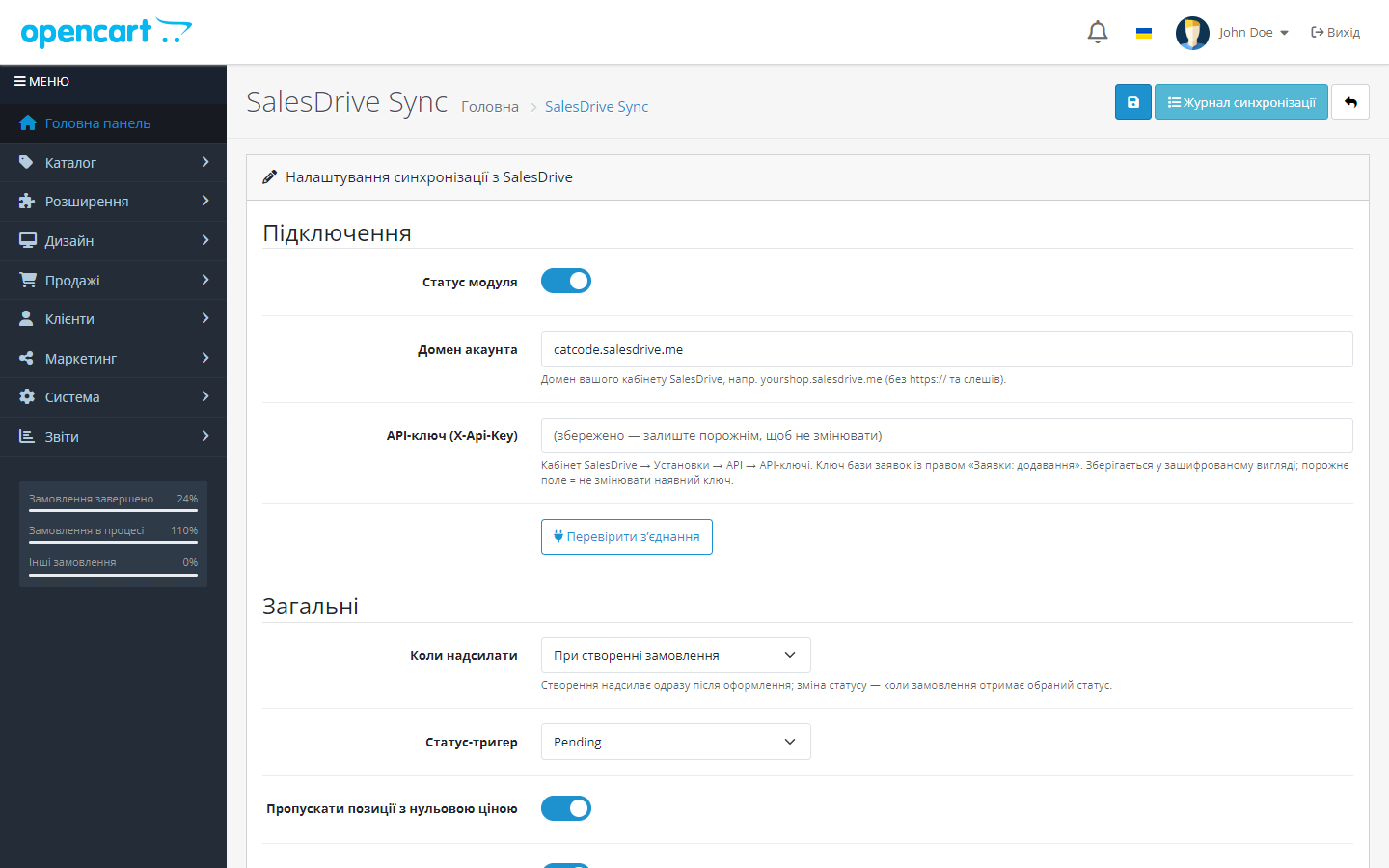
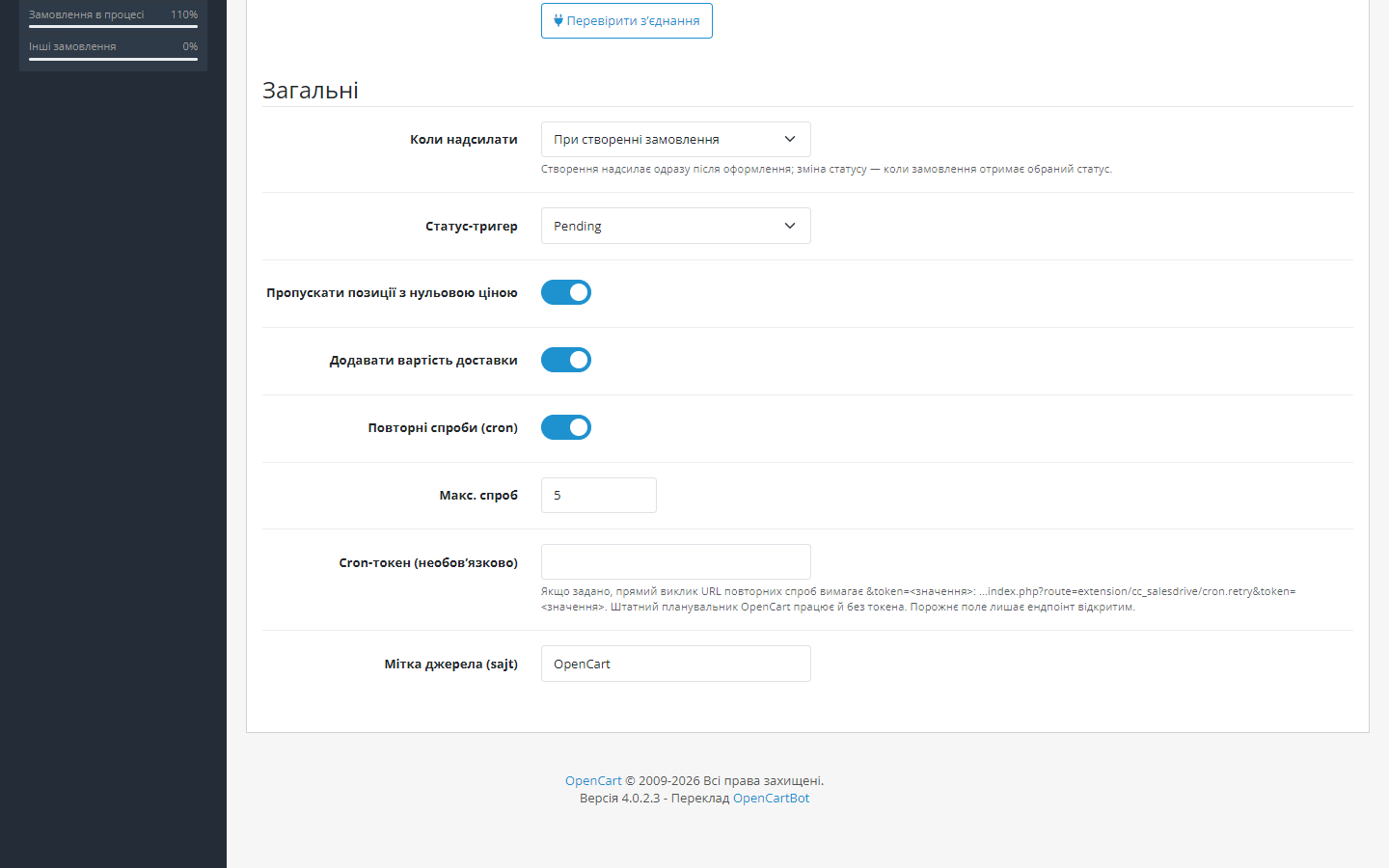
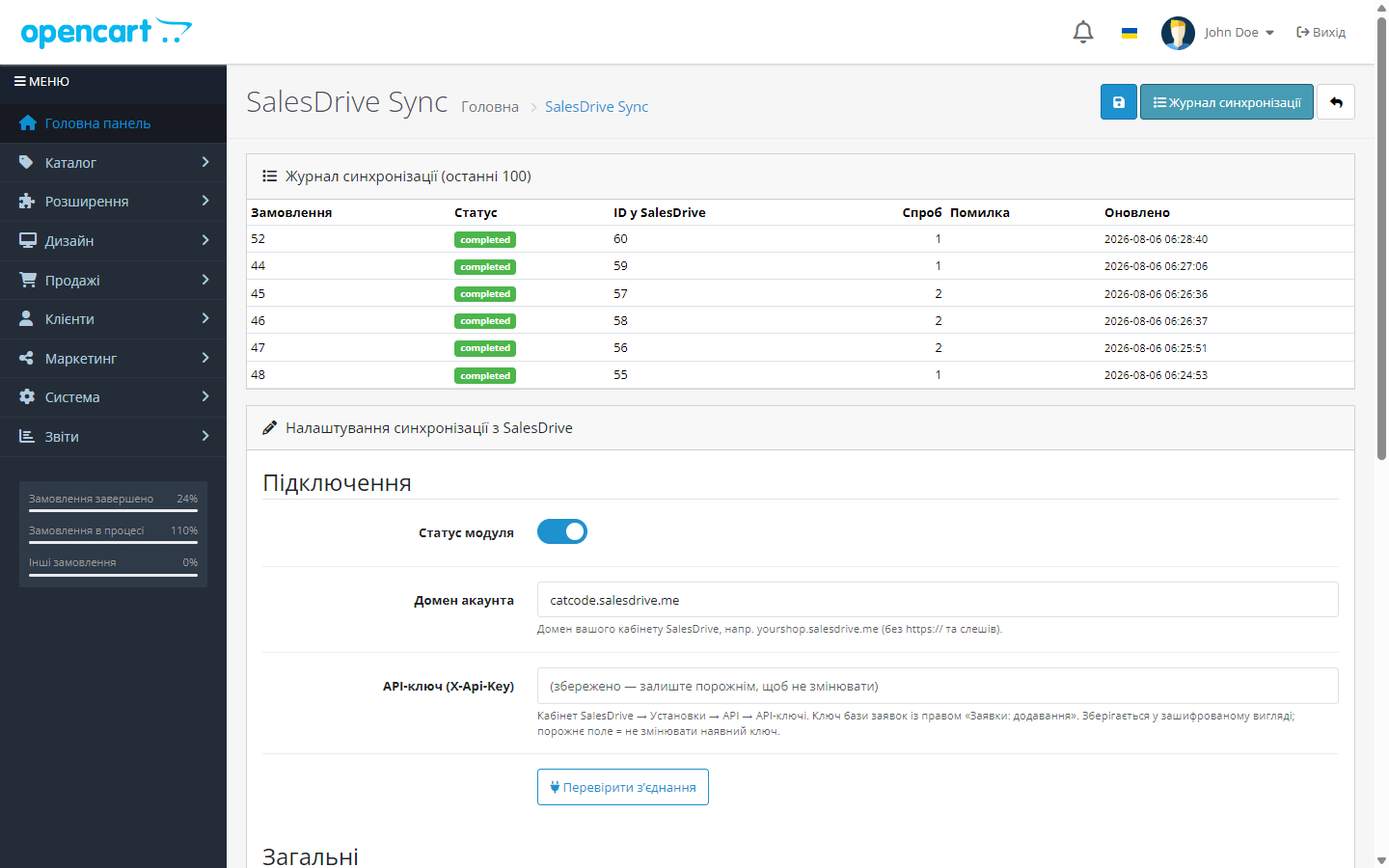
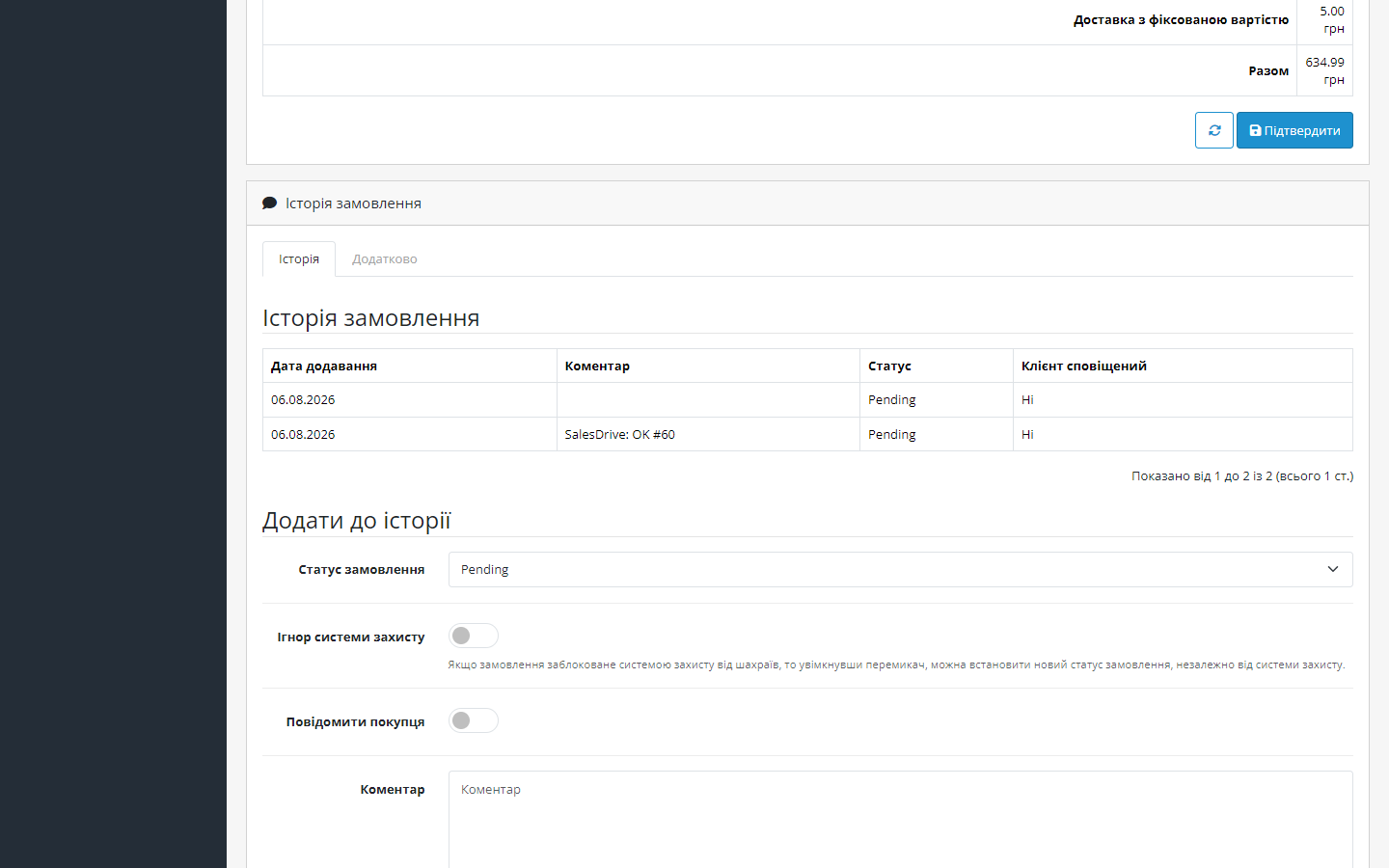
Як це виглядає
Технічні вимоги
 OpenCart 4.0.2 – 4.1.x, 3.0.2 – 3.0.5 або 2.3.0.0 – 2.3.0.2 — для кожної гілки окрема збірка
- PHP 7.4 або новіший для збірок OC4 і OC3; збірка для OpenCart 2.3 працює починаючи з PHP 5.6
- Кабінет SalesDrive: домен виду yourshop.salesdrive.me та API-ключ бази заявок із правом «Заявки: додавання»
- Увімкнений cron OpenCart — для автоматичних повторних спроб при збоях (сама відправка працює і без нього)
Історія версій
Суми заявки й позицій надсилаються у валюті замовлення за його історичним курсом.
Окрема збірка під OpenCart 2.3.0.0–2.3.0.2 і PHP 5.6–7.x.
Виправлено відправку позицій: SalesDrive мовчки викидав товари без поля id, і заявка приходила з порожнім списком і нульовою сумою.
Усі версії (5)
Дрібні виправлення реєстрації події та мапінгу позицій.
Перший публічний реліз: відправка замовлень у SalesDrive при оформленні або за статусом-тригером, ідемпотентний журнал синхронізації (UNIQUE по order_id), retry-черга через погодинний cron,…
Повний опис модуля
SalesDrive Sync для OpenCart — модуль, який з’єднує магазин на OpenCart 2.3, 3.x або 4.x із CRM SalesDrive. Кожне замовлення при оформленні (або при переході в обраний статус) автоматично стає заявкою в SalesDrive — з покупцем, товарами, вартістю доставки та коментарем. Менеджер отримує заявку в CRM за секунди після покупки, без ручного переносу даних із адмінки OpenCart.
Модуль повністю безкоштовний. Завантажити: cc_salesdrive.ocmod.zip для OpenCart 4.x або cc_salesdrive-oc3.ocmod.zip для OpenCart 3.0.2–3.0.5, або cc_salesdrive-oc2.ocmod.zip для OpenCart 2.3.0.0–2.3.0.2 — без ліцензійних ключів і обмежень за кількістю замовлень.
Як це працює — крок за кроком
- Покупець оформлює замовлення у вашому магазині OpenCart.
- Спрацьовує подія catalog/model/checkout/order*addHistory — модуль реагує на оформлення або на перехід замовлення у статус-тригер.
- Формується заявка: покупець із телефоном у форматі +380, товари з SKU, ціною та кількістю, вартість доставки, коментар — і відправляється у SalesDrive через обробник заявок (POST /handler/, заголовок X-Api-Key).
- Номер заявки фіксується у журналі синхронізації. Журнал має унікальний запис на замовлення, тому повторна подія ніколи не створить дубль — завершений запис просто пропускається.
- Якщо SalesDrive недоступний — запис лишається в черзі, і погодинний cron OpenCart повторює відправку (за замовчуванням до 5 спроб).
- Результат видно в адмінці: журнал показує статус, ID заявки, кількість спроб і останню помилку, якщо вона була.
Що під капотом
- Native-розширення для OpenCart 4.x — події (events) і окрема таблиця, без OCMOD-патчів чужих файлів. Подія реєструється у форматі OC4 з роздільником * перед методом — саме так ядро 4.x зіставляє події моделей.
- Ідемпотентність на рівні БД: таблиця cc_salesdrive_sync з UNIQUE-ключем по order_id — фізично неможливо створити дві заявки з одного замовлення.
- API-ключ шифрується перед збереженням у БД — у відкритому вигляді в базі не лежить.
- Retry-черга через штатний cron OpenCart: задача cc_salesdrive_retry виконується щогодини і добирає замовлення зі статусом помилки, а також ті, що зависли в процесі відправки довше години. URL повторів можна закрити власним cron-токеном.
- Журнал з excerpt-ами запиту і відповіді — при розборі проблем видно, що саме модуль відправив і що відповіла CRM.
Як встановити
- В адмінці OpenCart відкрийте Розширення → Інсталятор і завантажте
cc_salesdrive.ocmod.zip. - Перейдіть у Розширення → Розширення → Модулі, знайдіть SalesDrive Sync і натисніть «Встановити» — модуль створить таблицю журналу, подію та cron-задачу.
- Відкрийте налаштування модуля: введіть домен кабінету SalesDrive та API-ключ.
- Натисніть кнопку перевірки з’єднання — переконайтесь, що CRM відповідає.
- Оберіть момент відправки (при оформленні або при переході у статус), збережіть — готово.
OpenCart 2.3. Штатний Інсталятор 2.3 копіює файли тільки по FTP: якщо FTP у магазині не налаштований, розпакуйте cc_salesdrive-oc2.ocmod.zip і залийте вміст теки upload/ у корінь магазину, а далі так само — Розширення → Модулі → SalesDrive Sync → «Встановити».
Повтори в OpenCart 2.3. У 2.3 планувальника немає взагалі, тому чергу повторів запускає звичайна адреса вітрини — додайте її в crontab хостингу (типово раз на 15 хвилин) і закрийте власним cron-токеном із налаштувань модуля:
curl -s "https://ВАШ-МАГАЗИН/index.php?route=extension/module/cc_salesdrive_cron/retry&token=ТОКЕН"Питання
про модуль
Не знайшли відповідь? Напишіть у Telegram — відповімо протягом робочого дня.
 @catcode_support
Налаштування, сумісність, активація
@catcode_support
Налаштування, сумісність, активація
Чи модифікує модуль файли OpenCart або тему?
Ні. Це подієве розширення для OC4: жодних OCMOD-патчів системних файлів, checkout і тема лишаються недоторканими. Після видалення модуля магазин працює як раніше.
Звідки взяти API-ключ SalesDrive?
Кабінет SalesDrive → Установки → Загальні налаштування і інтеграції → Інші сервіси → API → API-ключі. Потрібен ключ бази заявок із правом «Заявки: додавання».
Замовлення змінює статус кілька разів — буде кілька заявок?
Ні. Журнал синхронізації має унікальний запис на замовлення: якщо заявка вже створена, повторні події пропускаються.
Що буде, якщо SalesDrive «ляже» у момент замовлення?
Нічого не загубиться: спроба зафіксується як помилка, і погодинний cron повторюватиме відправку (до 5 спроб за замовчуванням). Замовлення в OpenCart створюється у будь-якому разі.
Що станеться після видалення модуля?
Подія і cron-задача видаляються. Таблиця журналу синхронізації навмисно зберігається — щоб не втратити історію відправлень; за потреби її можна прибрати вручну.
Чи потрібен постійно працюючий cron?
Тільки для автоматичних повторів при збоях. Основна відправка відбувається одразу за подією замовлення, без cron.
Поки що жодного відгуку. Будьте першим.
Поки питань немає. Запитай — ми відповімо протягом 24 годин.
Не той варіант, що шукаєте?
Робимо кастомні модулі під WordPress, WooCommerce, OpenCart і Shopify. Розкажіть про задачу — підготуємо оцінку.
Замовити кастомний модуль
Купівля модуля
—



