


CatCode All to Lat — автоматичні SEO URL транслітерацією для OpenCart 2.x, 3.x і 4.x
SEO URL пишеться з назви сам при кожному збереженні товару, категорії, виробника чи сторінки — включно з імпортом. Плюс масова конвертація каталогу з відкатом і 301 зі старих адрес.
- Сумісність
- OpenCart 2.3.x, 3.0.x та 4.0.2 – 4.1.x
- Версія
-
v1.1.0 (OpenCart 4)
v1.0.0 (OpenCart 3.x)
v1.0.0 (OpenCart 2.3)
Що вміє модуль

Як це виглядає
Головне про модуль

Чому хук на моделі, а не на формі
Модуль слухає подію admin/model/catalog/* add/edit before — останню точку, де масив даних ще можна змінити, і першу, через яку проходить кожен, хто пише в каталог: форма товару, імпорт з CSV, чужий масовий редактор, синхронізація з ERP.

Транслітерація в три шари
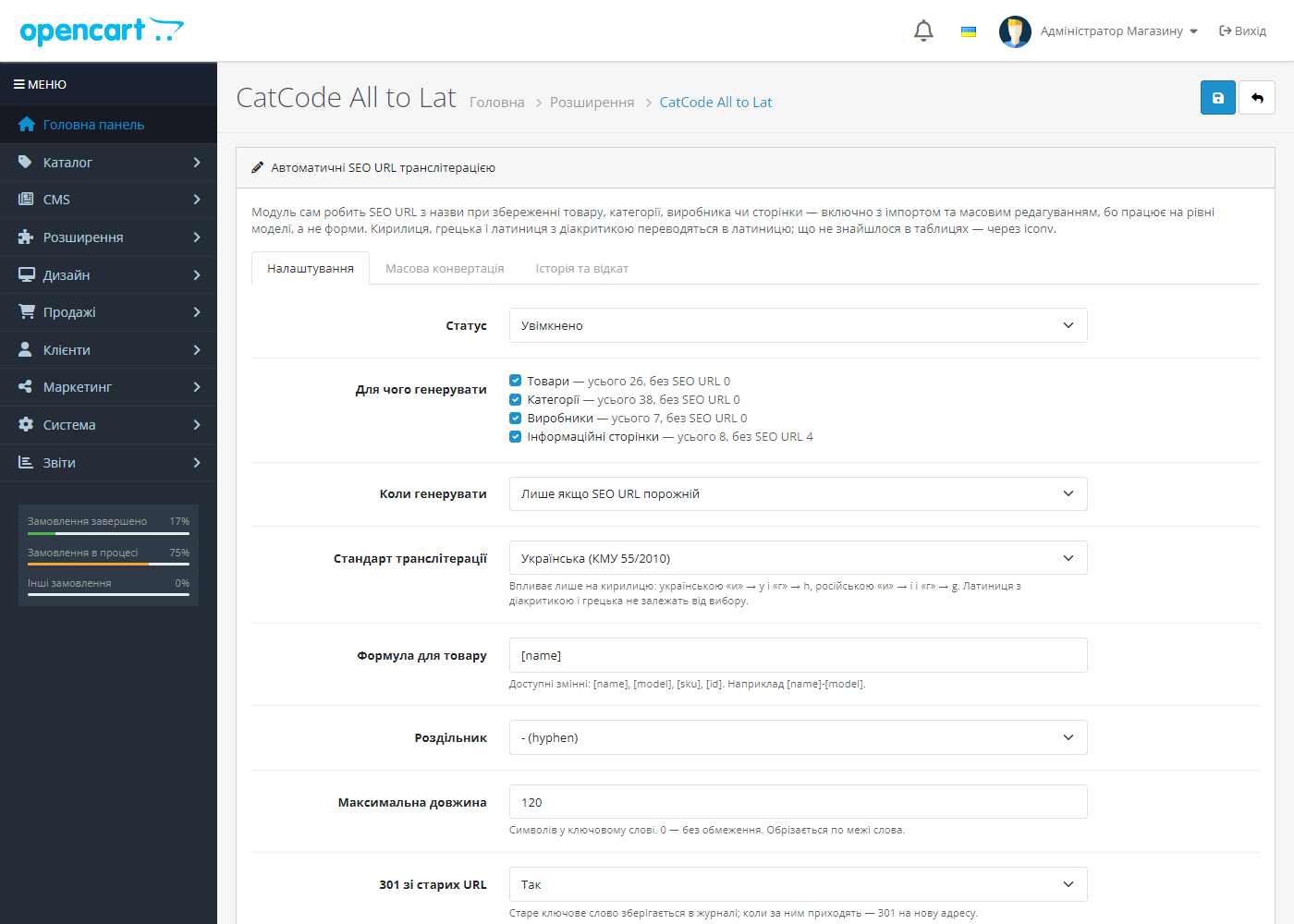
1. Таблиця кирилиці за стандартом. Українська (КМУ 55/2010) дає и→y, г→h, х→kh, зг→zgh і я→ya на початку слова; російська BGN/PCGN — и→i, г→g.

Масова конвертація каталогу
Окрема вкладка для магазину, який уже працює. Два режими: тільки записи без SEO URL (безпечний — може лише додати адреси) і всі записи з перезаписом.
Технічні вимоги
 Підтримуються OpenCart 4.0.2 – 4.1.x, 3.0.x і 2.3.x, а також ocStore на їхній основі — три окремі збірки. Потрібен увімкнений режим ЧПУ в налаштуваннях магазину.
Історія версій
23 вересня 2026.
Перший випуск.
Повний опис модуля
CatCode All to Lat — SEO URL пишеться з назви сам, щоразу коли ви зберігаєте товар, категорію, виробника чи інформаційну сторінку. Ніхто більше не тисне «згенерувати» по кожній позиції, а імпортований уночі каталог не прокидається без адрес.
Чому хук на моделі, а не на формі
Модуль слухає подію admin/model/catalog/* add/edit before — останню точку, де масив даних ще можна змінити, і першу, через яку проходить кожен, хто пише в каталог: форма товару, імпорт з CSV, чужий масовий редактор, синхронізація з ERP. Розширення, що патчить шаблон форми, покриває лише перший випадок — саме тому після нічного імпорту товари стоять без ЧПУ.
На OpenCart 4 поле SEO URL додатково заповнюється просто у формі, поки ви друкуєте назву: там ядро перевіряє це поле у контролері ще до моделі, тож без цього форма просто не збереглася б.
Транслітерація в три шари
1. Таблиця кирилиці за стандартом. Українська (КМУ 55/2010) дає и→y, г→h, х→kh, зг→zgh і я→ya на початку слова; російська BGN/PCGN — и→i, г→g. Прогнати український каталог російською таблицею означає отримати hodinnik замість hodynnyk і випасти з видачі за власними назвами товарів. Болгарська, сербська/македонська і білоруська мають свої таблиці.
2. Універсальна таблиця — грецька і латиниця з діакритикою: польська, чеська, словацька, німецька, французька, іспанська, португальська, турецька, румунська, угорська, балтійські, скандинавські, в’єтнамська. Тут вибір мови не потрібен: ł — це l усюди. Виняток — німецькі умляути, вони вмикаються опцією, бо ü→ue правильно німецькою і неправильно турецькою.
3. iconv ASCII//TRANSLIT для всього, чого не було в таблицях, — невідома абетка зводиться до найближчої латиниці, а не схлопується в дефіси.
Апострофи не розривають слово: О'Хара → okhara, а не o-khara. Ключове слово ріжеться по межі слова на заданій довжині й перевіряється на унікальність у межах магазину.
Масова конвертація каталогу
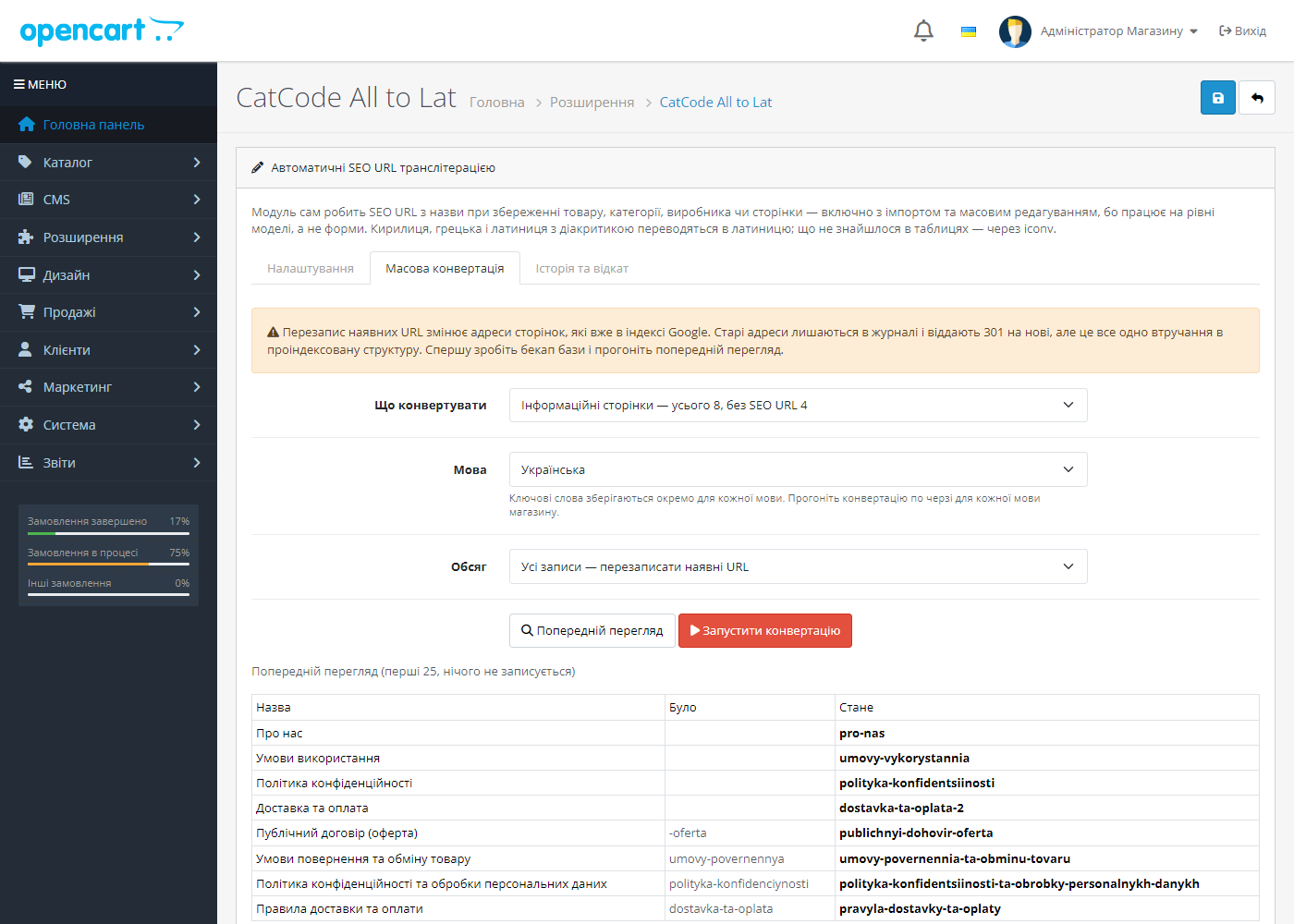
Окрема вкладка для магазину, який уже працює. Два режими: тільки записи без SEO URL (безпечний — може лише додати адреси) і всі записи з перезаписом. Перед запуском — попередній перегляд «було → стане» на 25 рядків, який нічого не пише. Прогон іде батчами по 100 рядків ланцюжком, тож каталог на десятки тисяч позицій не впирається в max_execution_time.
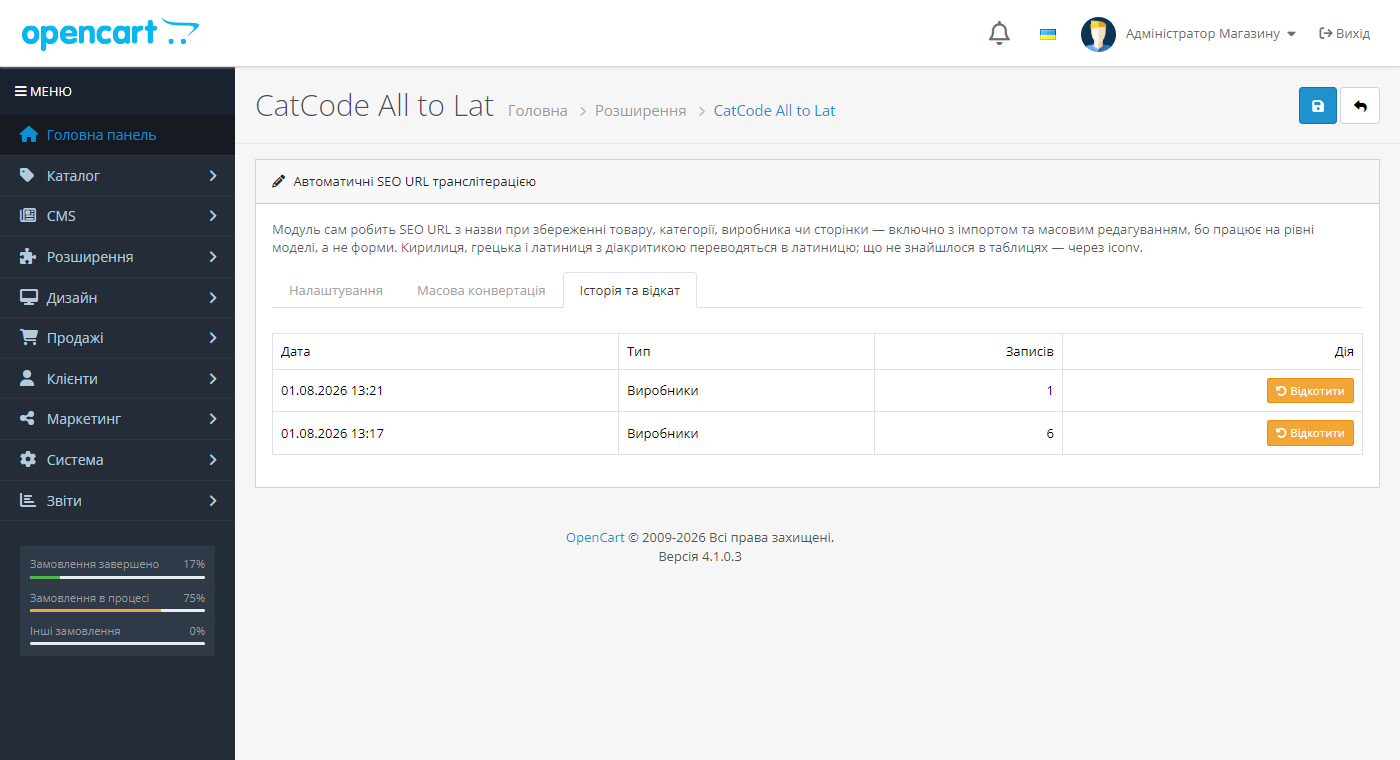
Кожна зміна лягає в журнал cc_translit_log: старе ключове слово, нове, мова, магазин, номер прогону. Звідси працюють дві речі — кнопка «Відкотити» на цілий прогон і 301 зі старої адреси.
301 зі старих адрес
Замінене ключове слово не зникає: коли за старою адресою приходять, магазин віддає 301 на нову. Сторінка, яка й далі відкривається, обробника взагалі не торкається, а адреса, якої ніколи не існувало, як і раніше віддає чесний 404 — модуль не перетворює магазин на пастку для пошукових роботів.
Три збірки в одному місці
- OpenCart 4.0.2 – 4.1.x;
- OpenCart 3.0.x (працює і зі старою схемою
url_aliasверсій 3.0.0–3.0.2, і зseo_urlвід 3.0.3); - OpenCart 2.3.x — cc_translit-oc2.ocmod.zip.
На OpenCart 4 і 3.0.3+ ключові слова зберігаються окремо для кожної мови магазину: українська сторінка отримує українську адресу, англійська — англійську. На OpenCart 4 прогон також досіває службові route-рядки для мов, у яких їх немає, — саме через них ЧПУ на другій мові зазвичай мовчки віддає головну сторінку.
Навіщо це магазину
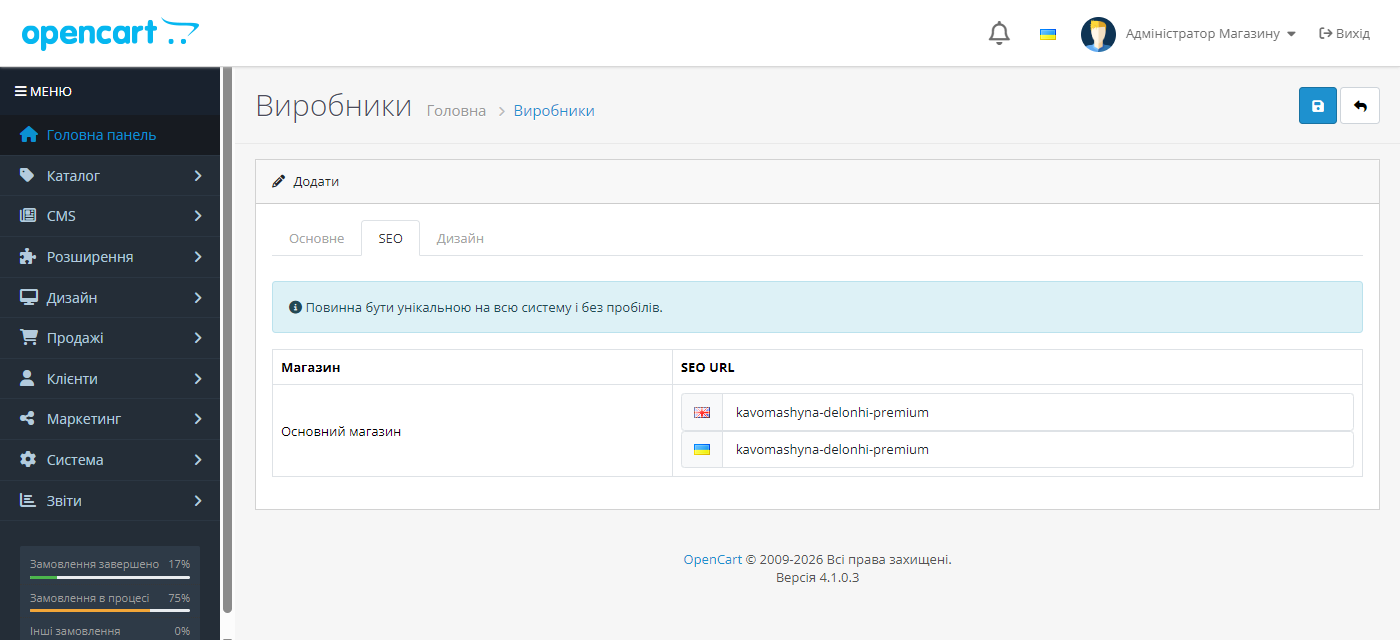
OpenCart формує SEO URL з того, що ви ввели руками, і якщо його не заповнити — адреса лишається технічною, з index.php?route=. Заповнювати вручну тисячі товарів ніхто не буде, тому магазини або живуть з технічними адресами, або отримують кирилицю в URL.
Кирилична адреса при копіюванні перетворюється на екран відсоткових кодів: посилання в месенджері виглядає як спам, а частина зовнішніх сервісів такі адреси ріже.
Як це працює — крок за кроком
1. Модуль перехоплює збереження товару, категорії, інформаційної сторінки чи виробника.
2. Назва транслітерується за обраним стандартом (за замовчуванням — український КМУ 55/2010) й лягає в SEO URL автоматично.
3. Для наявного каталогу є масова конвертація — за один прохід.
4. Зі старих адрес ставиться 301, тож позиції і чужі посилання лишаються живими.
Що під капотом
Модуль вішається на модель, а не на форму в адмінці. Тому SEO URL з’являється і тоді, коли товар створює імпорт прайсу, обмін з 1С або будь-який інший модуль — саме там, де рішення «на JavaScript у формі» не працюють.
Ядро не патчиться: усе через штатні події OpenCart, тому оновлення магазину не затирає модуль.
Як встановити
1. Залийте архів через «Розширення → Установник розширень» і встановіть модуль.
2. Переконайтесь, що в налаштуваннях магазину увімкнено ЧПУ.
3. Створіть тестовий товар і перевірте, що SEO URL заповнився сам.
4. Зробіть бекап бази і запустіть масову конвертацію наявного каталогу.
Питання
про модуль
Не знайшли відповідь? Напишіть у Telegram — відповімо протягом робочого дня.
 @catcode_support
Налаштування, сумісність, активація
@catcode_support
Налаштування, сумісність, активація
Чи змінить модуль адреси, які вже є в індексі Google?
Ні, поки ви самі цього не запустите. За замовчуванням ключове слово створюється лише там, де воно порожнє. Перезапис наявних адрес — окремий режим на вкладці масової конвертації, з попередженням, попереднім переглядом і журналом, який можна відкотити.
Чому SEO URL не з'явився після імпорту чужим модулем?
Має з'явитися — саме заради цього хук стоїть на моделі, а не на формі. Перевірте, що в налаштуваннях увімкнено потрібний тип запису (товари, категорії, виробники, сторінки) і що імпорт справді пише через модель OpenCart, а не прямими SQL-запитами в базу.
Що буде зі старими посиланнями після масової конвертації?
Старе ключове слово лишається в журналі, і запит за ним віддає 301 на нову адресу. Адреса, якої ніколи не існувало, як і раніше віддає 404.
У магазині дві мови — адреси будуть однакові?
Ні. На OpenCart 3 і 4 ключове слово зберігається окремо для кожної мови й будується з назви саме цієї мови. Прогін масової конвертації робиться по черзі для кожної мови.
ЧПУ згенерувалися, а сторінка віддає головну. Чому?
На OpenCart 4 адреса резолвиться посегментно, і без службового route-рядка маршрут лишається порожнім — магазин мовчки віддає головну з кодом 200. OpenCart створює ці рядки лише для мови встановлення; модуль додає їх для решти мов сам під час прогону.
Стоїть SEO Pro або схожий SEF-модуль — не конфліктує?
Ні. Такі розширення кешують усю таблицю ключових слів у файловий кеш, тому після кожного запису модуль скидає цей кеш — інакше магазин віддавав би 404 за адресою, яка вже є в базі.
Скільки коштує?
Безкоштовно, без обмежень за кількістю товарів чи прогонів.
Поки що жодного відгуку. Будьте першим.
Поки питань немає. Запитай — ми відповімо протягом 24 годин.
Не той варіант, що шукаєте?
Робимо кастомні модулі під WordPress, WooCommerce, OpenCart і Shopify. Розкажіть про задачу — підготуємо оцінку.
Замовити кастомний модуль
Купівля модуля
—



