
OpenCart
Імпорт прайсів постачальників для OpenCart 2.3, 3 і 4
Free + Pro
1 790 грн
v1.0.1
 All Access4 990 ₴ на рік
 Аудит сайтуPDF-звіт на пошту за 3 хвилиниПеревірити сайт
Для щоденних задач
Стиснення фотоРозмір, якість і WebP пачкоюГенератор QRПосилання, Wi-Fi, оплата на IBANКалькулятор ПДВ20, 14, 7 % і сума прописомТранслітераціяЗа постановою КМУ № 55Перевірки сайту
PHP і плагіниВерсія PHP, WordPress, плагіниФід Google MerchantПоля, ціни, GTIN, фотоПошта доменуSPF, DKIM, DMARC, чорні спискиГотовність до AI-пошукуllms.txt, боти, розміткаУсі 9 інструментівВведіть щонайменше 2 символи

Оновлення цін і залишків з прайсу постачальника: Excel, CSV, XML/YML з файлу або за посиланням, націнка рівнями, план «було → стане» і відкат будь-якого запуску.
Без звуку теж зрозуміло: субтитри українською
Безкоштовна версія працює без обмеження в часі. Pro додає решту функцій з таблиці.


Модуль читає XLSX (звичайний Excel, без перезбереження в CSV), CSV у UTF-8 або windows-1251 із будь-яким роздільником, а також XML і YML — той формат, у якому прайси віддають Rozetka, Prom і більшість українських дистриб’юторів.

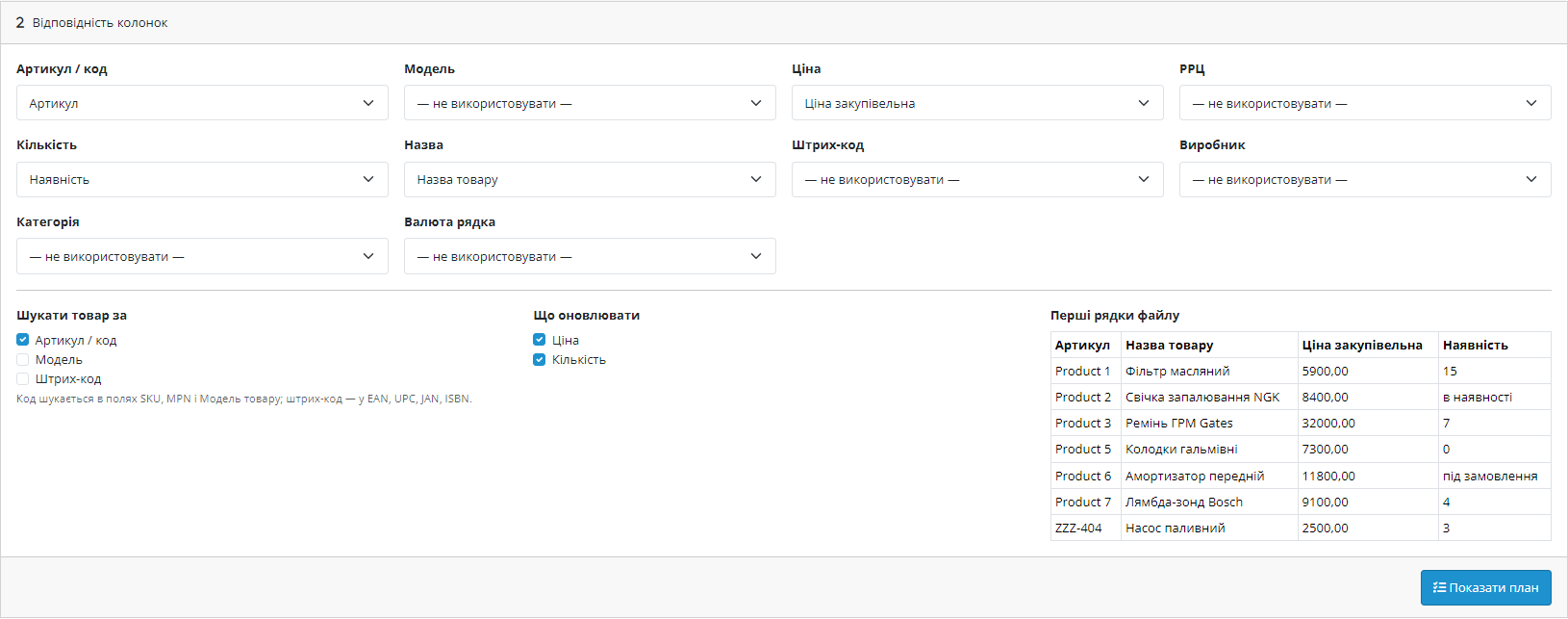
Модуль читає заголовок файлу й сам знаходить, де артикул, де ціна, де залишок: розуміє «Артикул», «Код товара», «Цена закупочная», «Наличие», «vendorCode», «stock_quantity» і десятки інших варіантів написання.

Постачальник один раз вивантажив ціни в копійках або зсунув колонку — і весь каталог поїхав.

Свіжий інстал — безкоштовна версія, нічого не вмикається само. Кнопка «Спробувати Pro 7 днів» → e-mail → ключ одразу у вікні і листом.

Переносите магазин — відв’яжіть ліцензію на старому домені й активуйте на новому самі. Для студій — ключі на 5, 25 сайтів або без обмежень.
 OpenCart 2.3.0.x, 3.0.2 – 3.0.5.0 або 4.0.2 – 4.1.x, PHP 7.0 – 8.3, увімкнені розширення zip і xml, cURL для завантаження прайсу за посиланням. Встановлення штатне: Адмін → Розширення → Інсталятор → Завантажити, далі активація в списку модулів.
Куплена ліцензія лишає Pro назавжди.
Імпорт прайсів у будь-якому форматі постачальника, автовизначення колонок, правила розрахунку ціни, попередній план змін, обробка товарів поза прайсом, журнал і відкат прогону, імпорт за…
4 модулі одним замовленням — на 40% дешевше, ніж окремо



Імпорт прайсів постачальників оновлює ціни й залишки в OpenCart з файлу, який надіслав постачальник — Excel, CSV або XML/YML, з комп’ютера або за посиланням. Є три збірки: для OpenCart 4.0.2 – 4.1.x, 3.0.2 – 3.0.5.0 і 2.3.0.x; функціональність однакова, відрізняється лише пакет. Код відкритий, ionCube не потрібен, файли ядра не змінюються.
Модуль читає XLSX (звичайний Excel, без перезбереження в CSV), CSV у UTF-8 або windows-1251 із будь-яким роздільником, а також XML і YML — той формат, у якому прайси віддають Rozetka, Prom і більшість українських дистриб’юторів. Роздільник, кодування й формат визначаються автоматично; аркуш Excel, кількість службових рядків згори й тег товару в XML за потреби вказуються вручну.
Прайс можна завантажити файлом або дати посилання — тоді модуль сам забирає його з сайту постачальника при кожному запуску.
Модуль читає заголовок файлу й сам знаходить, де артикул, де ціна, де залишок: розуміє «Артикул», «Код товара», «Цена закупочная», «Наличие», «vendorCode», «stock_quantity» і десятки інших варіантів написання. Будь-яку відповідність можна перевизначити вручну — поруч показані перші рядки файлу, щоб було видно, що саме потрапить у магазин.
Товар знаходиться за артикулом (SKU, MPN або модель), окремо за моделлю чи за штрих-кодом (EAN, UPC, JAN, ISBN) — тим полем, яке реально заповнене у вашому каталозі.
Ціна постачальника не потрапляє в магазин напряму. Спочатку вона переводиться з валюти прайсу за курсом магазину або за курсом, який ви вкажете. Далі застосовується націнка рівнями: до 500 грн — 40%, від 500 до 2000 — 25%, вище — 15% плюс фіксована сума, скільки рівнів потрібно. Потім — округлення: до гривні, до десятки або до звичного «…,99», «…,95», «…,50». Є й нижня межа ціни, нижче якої модуль не опускається.
Залишки розуміють не лише числа: «в наявності», «під замовлення», «немає» перетворюються на кількість за вашою таблицею відповідностей. Можна множити залишок на коефіцієнт, обмежувати стелею й автоматично вимикати товар, коли залишок став нулем.
Постачальник один раз вивантажив ціни в копійках або зсунув колонку — і весь каталог поїхав. Щоб такого не сталося, вкажіть ліміт зміни у відсотках: рядки, де ціна змінюється сильніше, ніж дозволено, не записуються, а показуються окремим списком «Підозріла зміна». Ви дивитесь на них і вирішуєте самі.
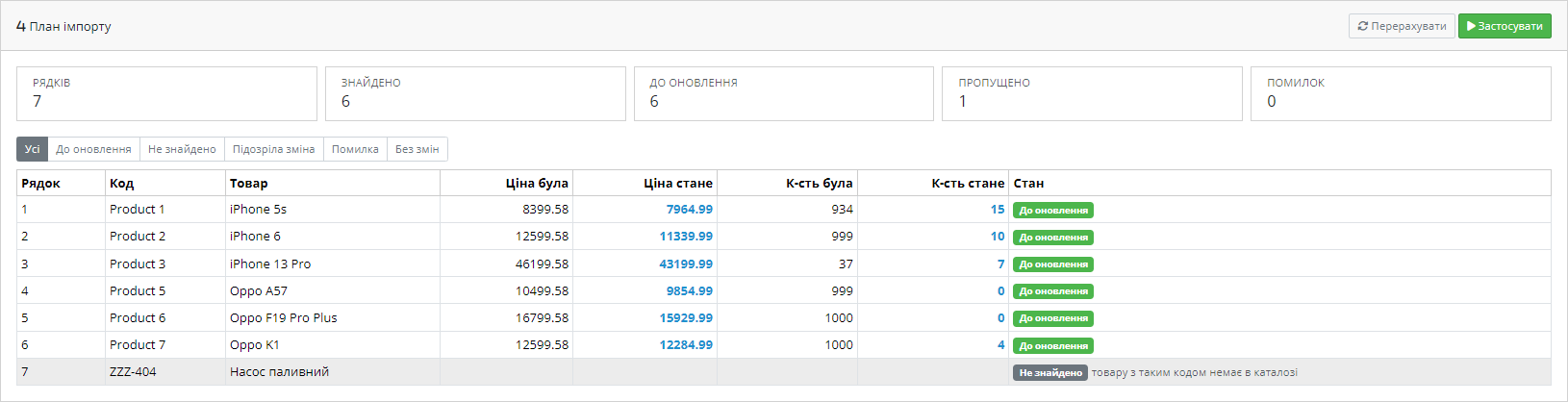
Модуль ніколи не пише в каталог одразу. Спершу він читає файл, зіставляє його з товарами й показує повний план: скільки рядків прочитано, скільки знайдено в каталозі, які ціни й залишки зміняться — таблиця «було → стане» по кожному товару. Окремо видно рядки з невідомими кодами, підозрілі зміни, помилки й ті, де нічого не змінилося.
Лише після вашого підтвердження план застосовується — пакетами, тож 40 тисяч рядків не залежать від того, чи витримає один запит таймаут сервера.
Якщо постачальник більше не возить позицію, її можна автоматично обнулити за залишком, вимкнути або зробити і те, і те. Правило працює лише в межах вибраного виробника або категорії — саме тому частковий прайс одного постачальника не вимикає весь каталог.
Кожен запуск зберігається: коли, з якого файлу, скільки рядків прочитано й скільки товарів оновлено. Усі зміни записуються по полях — стара й нова ціна, старий і новий залишок, — тож будь-який запуск відкочується одним кліком до значень, які були до нього. Це не «відновіть бекап бази», а точне повернення саме тих товарів, яких торкнувся імпорт.
Профіль постачальника з посиланням на прайс можна поставити на розклад — щогодини, кожні 6 годин, щодня або щотижня. Модуль сам забирає файл, рахує ціни за вашими правилами й оновлює каталог; результат кожного запуску лишається в історії з тим самим відкатом. Запуск виконується за адресою cron із секретним токеном, щоб ніхто сторонній не міг запустити імпорт.
Прайс постачальника — це майже завжди чужий Excel з довільними колонками, який приходить раз на тиждень і кожного разу трохи інший. Ручне зведення такого файлу з каталогом займає години і закінчується помилками в цінах.
Модуль забирає цю роботу: сам розпізнає колонки, рахує ціну за вашими правилами і показує план змін до того, як щось запишеться.
1. Залийте архів через «Розширення → Установник розширень» і встановіть модуль.
2. Завантажте один прайс і перевірте, чи правильно визначились колонки.
3. Задайте правила ціни й поведінку для товарів поза прайсом.
4. Подивіться план змін, і лише тоді запускайте запис.
Не знайшли відповідь? Напишіть у Telegram — відповімо протягом робочого дня.
 @catcode_support
Налаштування, сумісність, активація
@catcode_support
Налаштування, сумісність, активація
Ні. Модуль читає .xlsx напряму, включно з формулами (береться пораховане значення) і кількома аркушами.
Ні, кодування визначається автоматично, а за потреби вказується вручну.
Увімкніть ліміт зміни у відсотках — такі рядки не запишуться, а потраплять у список «Підозріла зміна» на перевірку.
Так. Кожен запуск зберігає старі й нові значення по кожному полю, відкат повертає рівно ті товари, яких торкнувся імпорт.
Ні, він оновлює ціни й залишки існуючих. Це свідоме рішення: створення карток без описів і зображень псує каталог і SEO.
Так, у Pro: вкажіть посилання на прайс і розклад, далі модуль забирає файл і оновлює каталог сам.
Так, у ліцензію входять збірки для 2.3, 3.x і 4.x — переїзд магазину на іншу версію нічого не коштує.
Поки що жодного відгуку. Будьте першим.
Поки питань немає. Запитай — ми відповімо протягом 24 годин.
Робимо кастомні модулі під WordPress, WooCommerce, OpenCart і Shopify. Розкажіть про задачу — підготуємо оцінку.
Замовити кастомний модуль
—

Помічник CatCode
Щойно


Помічник CatCode
Онлайн

Допоможу із задачею по сайту
Опишіть задачу по сайту — підберу готовий модуль або передам розробнику з оцінкою. Модулі, доробки, верстка, інтеграції, швидкість, перенесення, технічне SEO.
