
OpenCart
Повідомити коли зʼявиться — підписка на товар для OpenCart 2.3, 3.x і 4.x
Free + Pro
1 290 грн
v1.1.3
 All Access4 990 ₴ на рік
 Аудит сайтуPDF-звіт на пошту за 3 хвилиниПеревірити сайт
Для щоденних задач
Стиснення фотоРозмір, якість і WebP пачкоюГенератор QRПосилання, Wi-Fi, оплата на IBANКалькулятор ПДВ20, 14, 7 % і сума прописомТранслітераціяЗа постановою КМУ № 55Перевірки сайту
PHP і плагіниВерсія PHP, WordPress, плагіниФід Google MerchantПоля, ціни, GTIN, фотоПошта доменуSPF, DKIM, DMARC, чорні спискиГотовність до AI-пошукуllms.txt, боти, розміткаУсі 9 інструментівВведіть щонайменше 2 символи

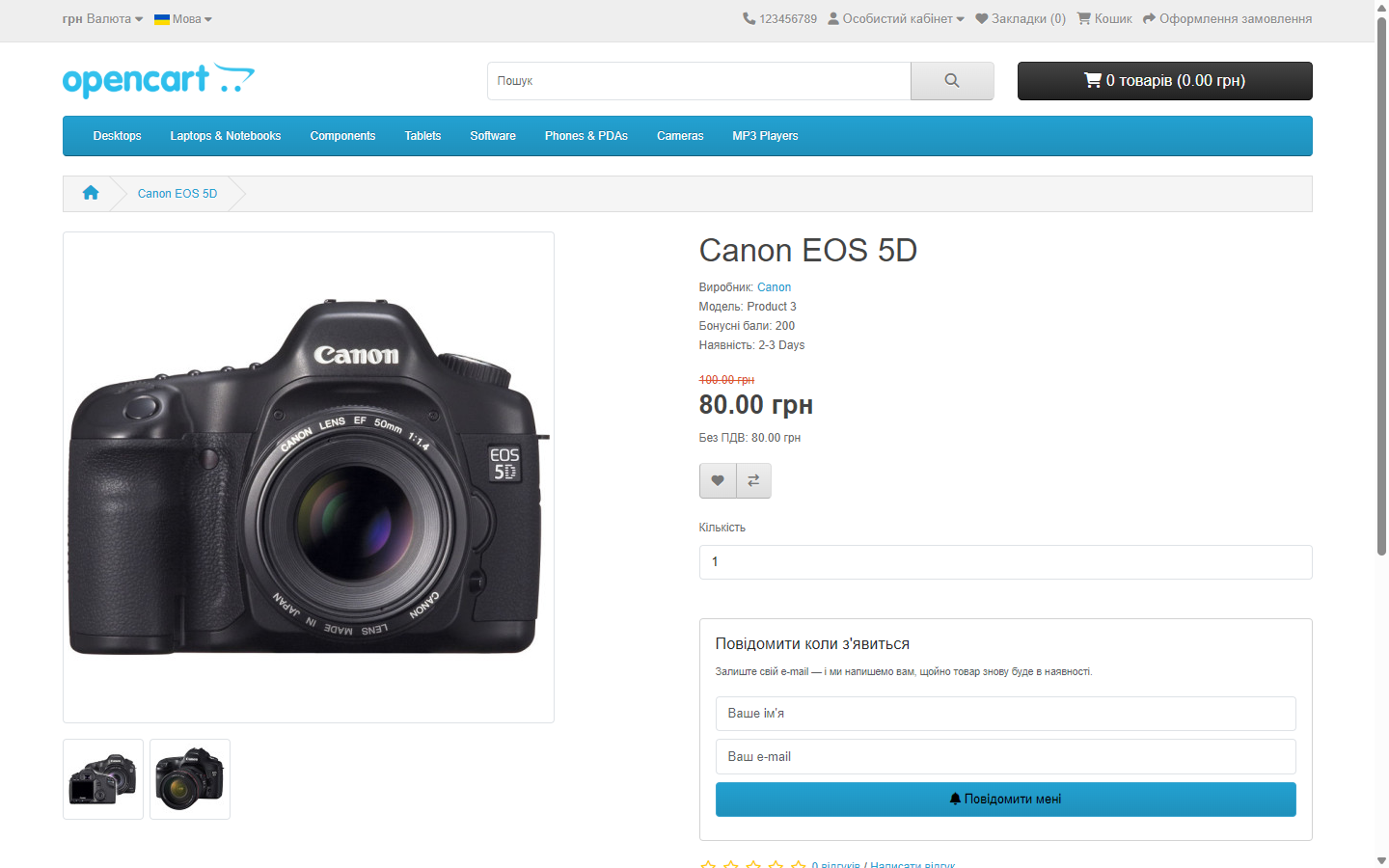
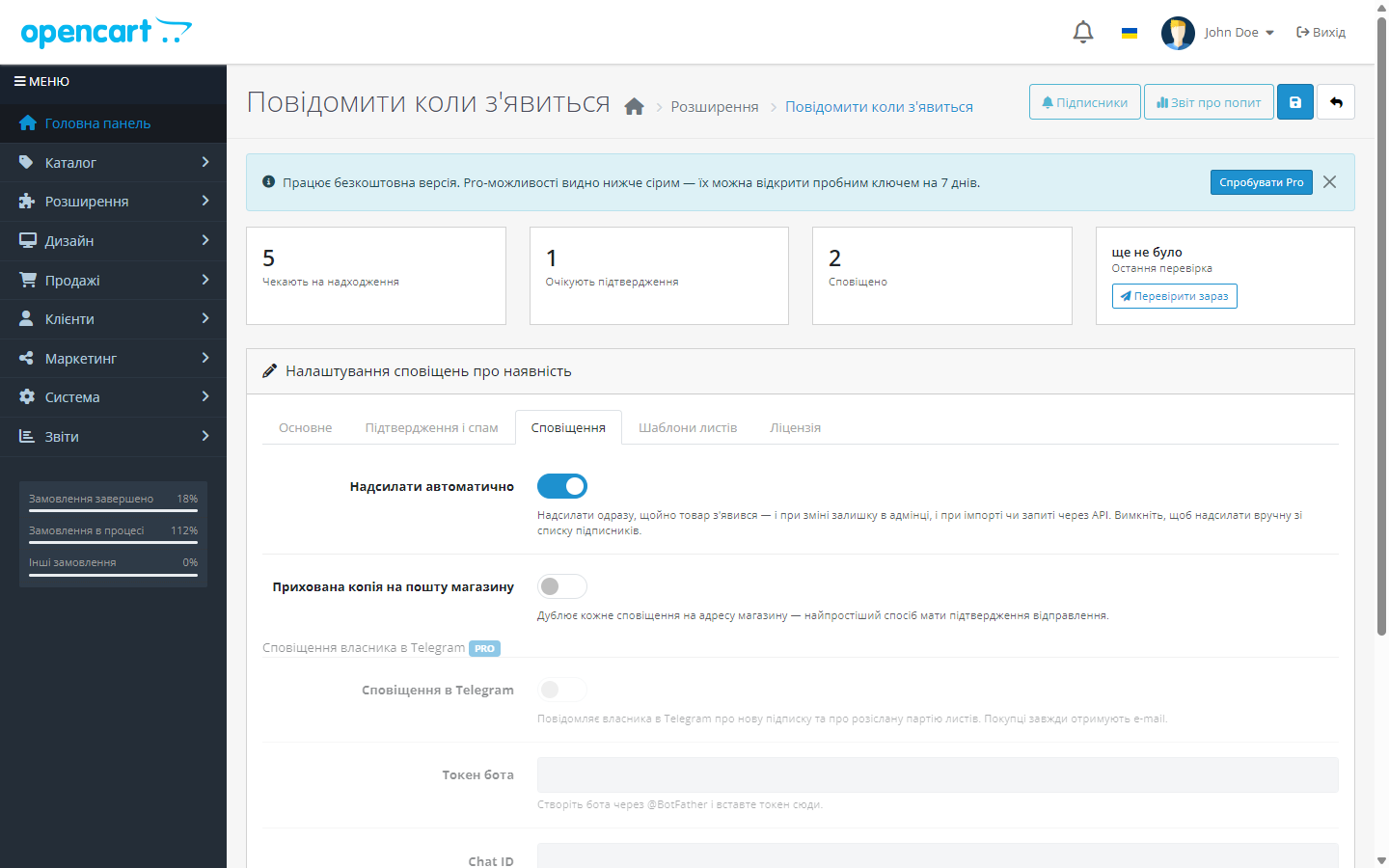
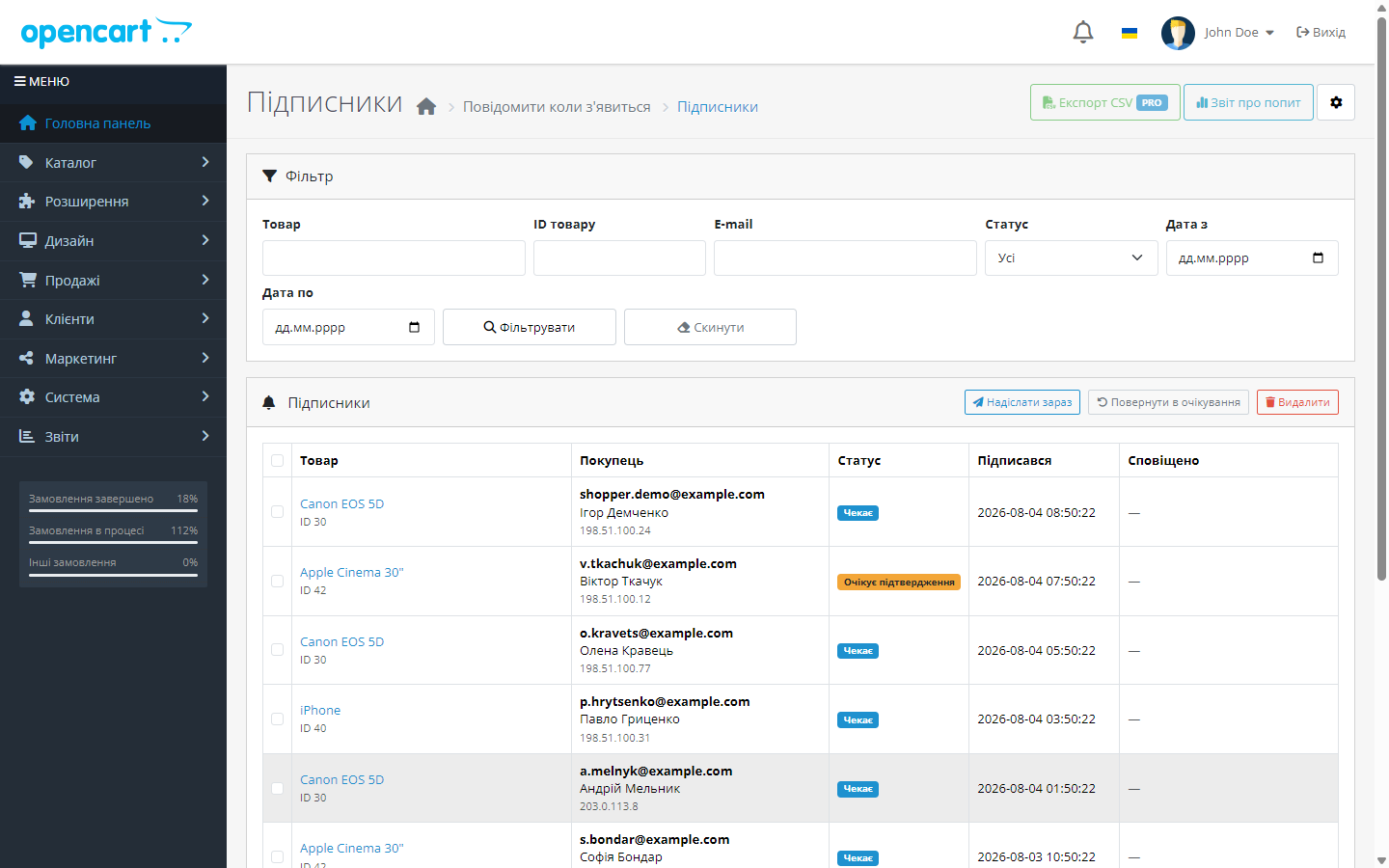
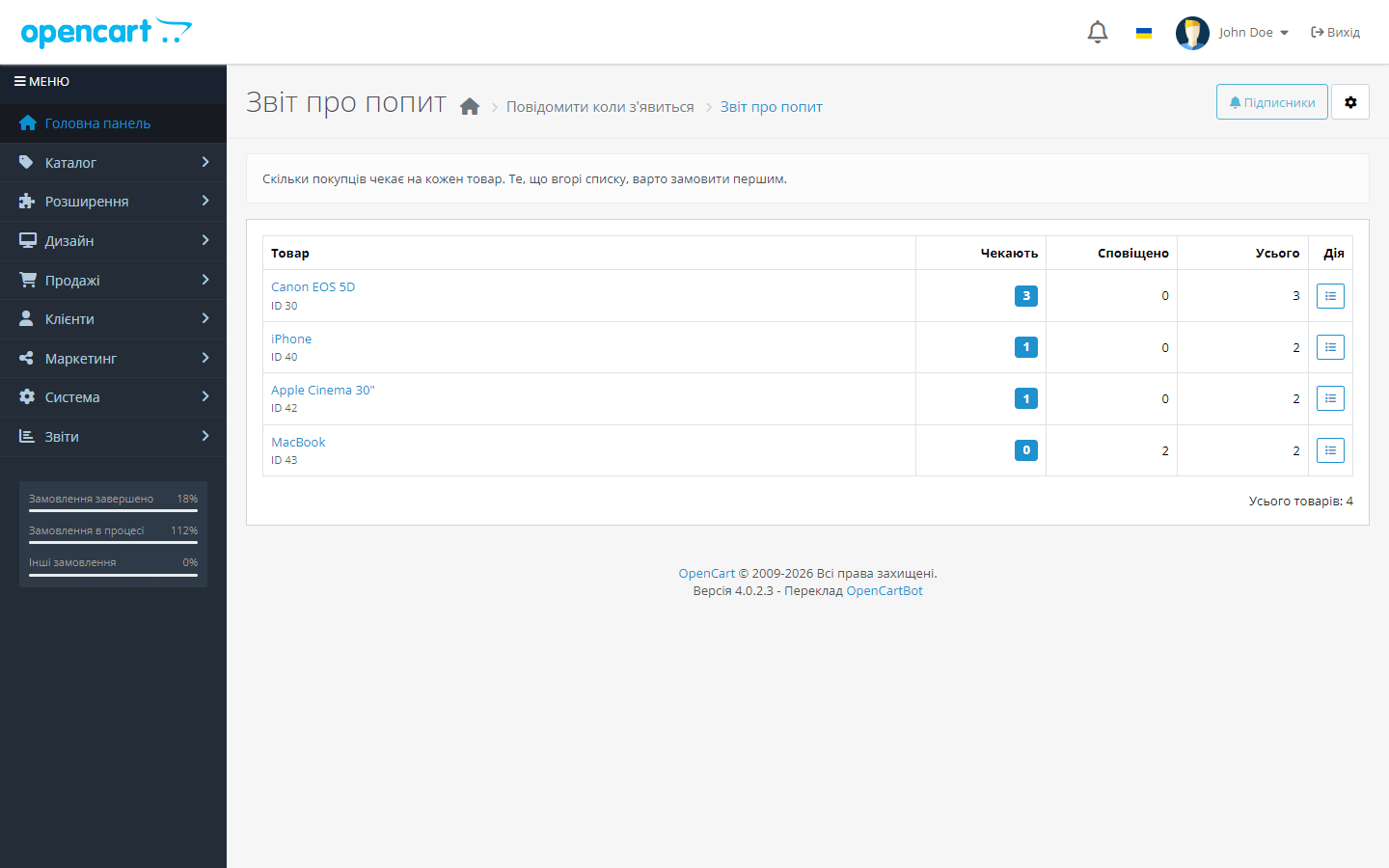
Форма підписки замість кнопки «Купити» на товарах без залишку, автоматичне сповіщення при поверненні товару й звіт про реальний попит.
Без звуку теж зрозуміло: субтитри українською
Безкоштовна версія працює без обмеження в часі. Pro додає решту функцій з таблиці.


Це головна відмінність від простих аналогів. Модуль не намагається відстежити «момент зміни» залишку — він регулярно питає, кого чекає товар, який зараз можна купити.

Форма захищена від ботів прихованим полем і перевіркою часу заповнення, обмежується кількість підписок з однієї адреси за годину, за бажанням вмикається підтвердження підписки листом (Pro).

Покупцю йде лист із назвою товару, ціною у валюті, яку він бачив, посиланням на товар і посиланням на відписку одним кліком.

Свіжий інстал — безкоштовна версія, нічого не вмикається само. Кнопка «Спробувати Pro 7 днів» → e-mail → ключ одразу у вікні і листом.

Переносите магазин — відв’яжіть ліцензію на старому домені й активуйте на новому самі. Для студій — ключі на 5, 25 сайтів або без обмежень.
 Підтримуються OpenCart 4.x, 3.x і 2.3, а також ocStore на їхній основі — три збірки в одному архіві. Потрібна робоча відправка пошти в магазині.
Куплена ліцензія для OpenCart працює безстроково.
Список підписок з фільтром знову відкривається на драйвері бази PDO.
Посилання «підтвердити підписку» і «відписатись» більше не спрацьовують від поштового сканера.
Куплена ліцензія для OpenCart працює безстроково.
Pro вмикається ключем, а пробний період стартує лише за кліком власника.
Збірка для 3.0.x переведена на ту саму модель, що 4.x і 2.3: ліцензія перевіряється на сервері CatCode, пробний період видається лише за вашим кліком.
Окрема збірка для OpenCart 2.3.0.x: та сама функціональність, серверна ліцензія з пробним періодом за кліком, сумісність із PHP 5.6 і 7.0.
Перший випуск.
4 модулі одним замовленням — на 40% дешевше, ніж окремо



Повідомити коли з’явиться перетворює відвідувача, який пішов ні з чим, на замовлення. Якщо товару немає в наявності, замість кнопки «Купити» покупець бачить форму підписки — а коли товар повертається, отримує лист автоматично.
Це головна відмінність від простих аналогів. Модуль не намагається відстежити «момент зміни» залишку — він регулярно питає, кого чекає товар, який зараз можна купити. Тому сповіщення відпрацьовує однаково коректно і при ручній зміні залишку в адмінці, і при імпорті прайса, і при оновленні через API, і навіть при прямій правці бази — випадки, на яких зазвичай ламаються модулі, зав’язані лише на подію збереження товару.
Форма захищена від ботів прихованим полем і перевіркою часу заповнення, обмежується кількість підписок з однієї адреси за годину, за бажанням вмикається підтвердження підписки листом (Pro). Для залогінених покупців дані підставляються автоматично.
Покупцю йде лист із назвою товару, ціною у валюті, яку він бачив, посиланням на товар і посиланням на відписку одним кліком. У Pro шаблони листів редагуються в адмінці для кожної мови магазину, з плейсхолдерами, і можна отримувати сповіщення в Telegram.
В адмінці — повний список підписок із фільтрами за товаром, e-mail, статусом і датою, ручним «надіслати зараз», масовим видаленням та експортом у CSV (Pro). Окремий екран показує, скільки людей чекають кожен товар — це готова відповідь на питання, що саме закуповувати наступним.
Пробний період — тільки за вашим кліком. Свіжий інстал — це чиста безкоштовна версія: нічого Pro не вмикається саме й не гасне через тиждень. Коли захочете подивитись Pro, натискаєте «Спробувати Pro», вказуєте e-mail — і отримуєте ключ на 7 днів.
Товар закінчився — і трафік на його сторінку продовжує йти, але перетворюється на нуль. Людина бачить «немає в наявності» й іде до конкурента, а ви навіть не дізнаєтесь, що на цю позицію був попит.
Форма підписки перетворює цей нуль на два активи: відкладений продаж і дані про реальний попит — що саме довозити першим.
1. На товарі без залишку замість кнопки «Купити» показується форма підписки.
2. Покупець лишає email; модуль відсіює сміттєві підписки ще до запису.
3. Щойно залишок повертається, спрацьовує тригер і всі підписники цієї позиції отримують сповіщення.
4. Список підписників в адмінці працює як звіт про попит — видно, чого людям бракує найбільше.
Ручну зміну залишку в адмінці модуль ловить одразу — подією моделі товару. Імпорт прайсу, обмін з обліковою системою чи пряму правку бази підхоплює регулярний прохід за кроном: він перевіряє, кого чекає товар, який зараз у наявності. На OpenCart 4 це завдання реєструється в «Cron-завданнях» автоматично, на 3.x і 2.3 cron-посилання з налаштувань модуля треба додати на хостингу.
Ядро не патчиться: усе через штатні події OpenCart.
1. Залийте архів через «Розширення → Установник розширень» і встановіть модуль.
2. Перевірте, що на товарі без залишку з’явилась форма замість кнопки «Купити».
3. Підпишіться самі й поверніть залишок — має прийти сповіщення.
4. Якщо не дійшло — перевірте налаштування пошти магазину, це найчастіша причина.
Не знайшли відповідь? Напишіть у Telegram — відповімо протягом робочого дня.
 @catcode_support
Налаштування, сумісність, активація
@catcode_support
Налаштування, сумісність, активація
Так. Модуль не залежить від події збереження товару й регулярно перевіряє, які товари стали доступні.
Ні. Підписка закривається одразу після відправлення.
Одним кліком за персональним посиланням у листі.
Так, окремий екран показує кількість підписок по кожному товару — це готовий звіт про попит.
Так: приховане поле, перевірка часу заповнення, ліміт на адресу й за бажанням підтвердження листом.
Поки що жодного відгуку. Будьте першим.
Поки питань немає. Запитай — ми відповімо протягом 24 годин.
Робимо кастомні модулі під WordPress, WooCommerce, OpenCart і Shopify. Розкажіть про задачу — підготуємо оцінку.
Замовити кастомний модуль
—

Помічник CatCode
Щойно


Помічник CatCode
Онлайн

Допоможу із задачею по сайту
Опишіть задачу по сайту — підберу готовий модуль або передам розробнику з оцінкою. Модулі, доробки, верстка, інтеграції, швидкість, перенесення, технічне SEO.
