
WordPress
SEO-шаблонізатор — масова генерація мета-тегів для WooCommerce
Free + Pro
890 грн/рік
v1.1.0
 All Access4 990 ₴ на рік
 Аудит сайтуPDF-звіт на пошту за 3 хвилиниПеревірити сайт
Для щоденних задач
Стиснення фотоРозмір, якість і WebP пачкоюГенератор QRПосилання, Wi-Fi, оплата на IBANКалькулятор ПДВ20, 14, 7 % і сума прописомТранслітераціяЗа постановою КМУ № 55Перевірки сайту
PHP і плагіниВерсія PHP, WordPress, плагіниФід Google MerchantПоля, ціни, GTIN, фотоПошта доменуSPF, DKIM, DMARC, чорні спискиГотовність до AI-пошукуllms.txt, боти, розміткаУсі 9 інструментівВведіть щонайменше 2 символи

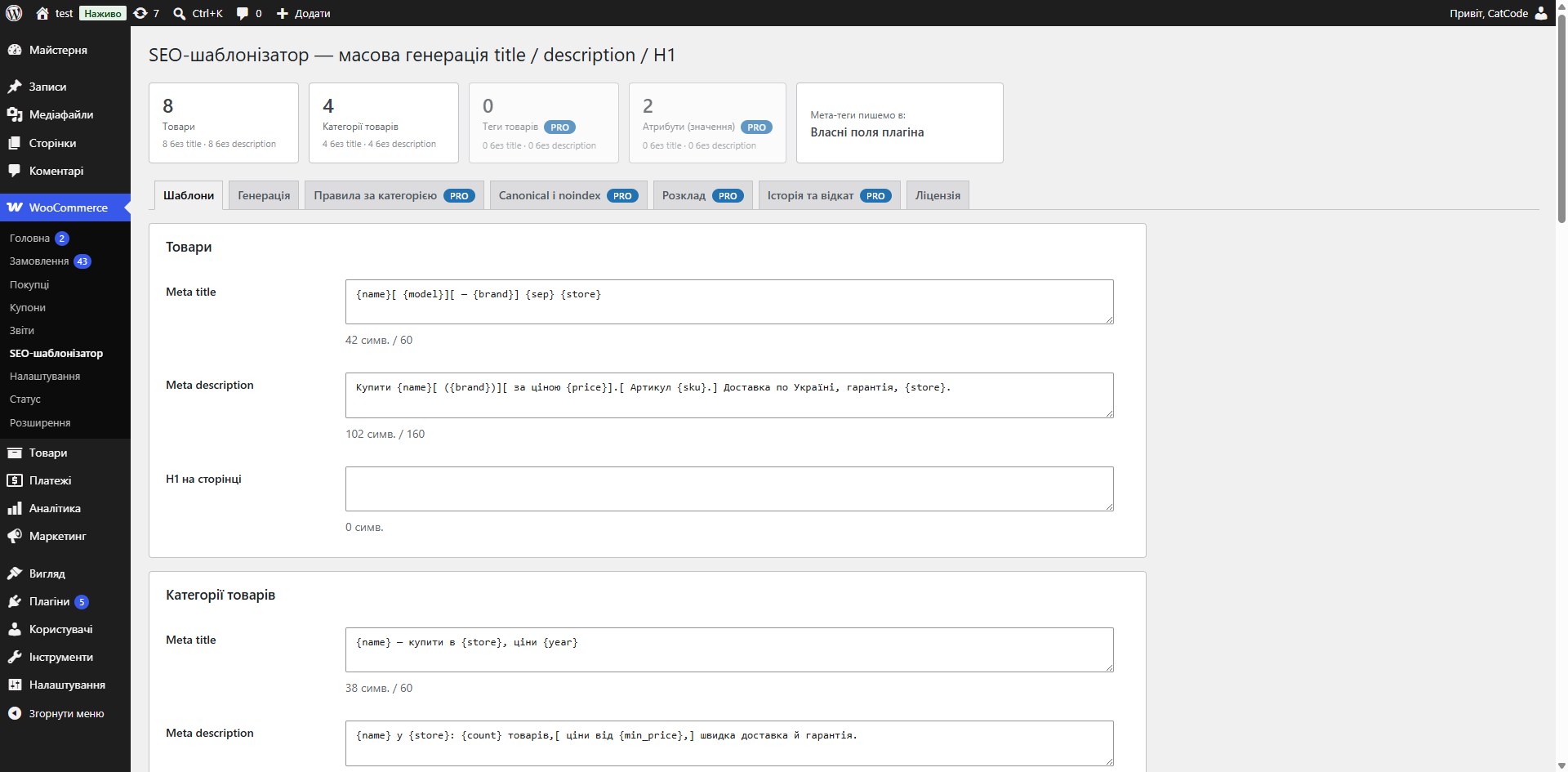
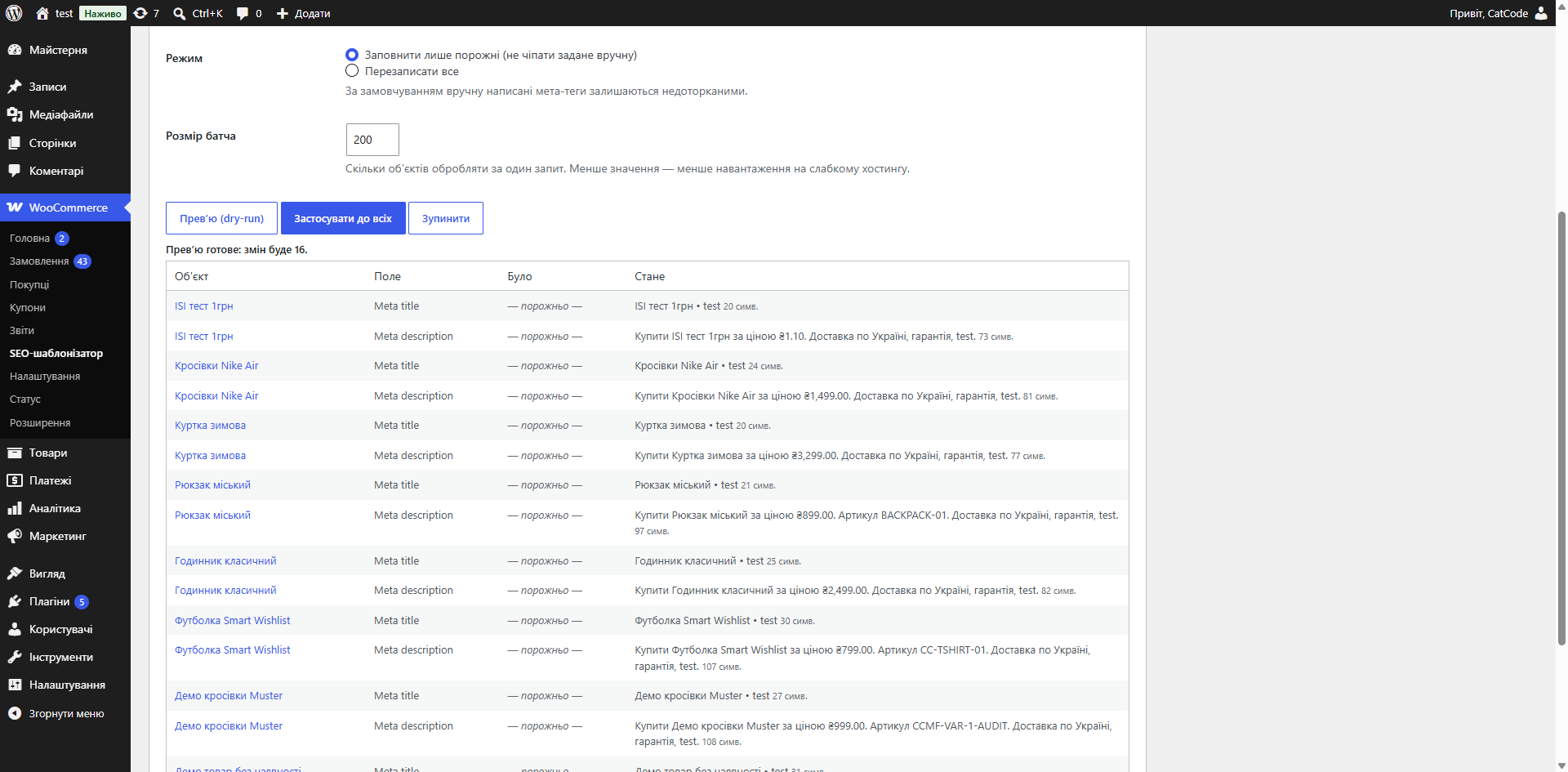
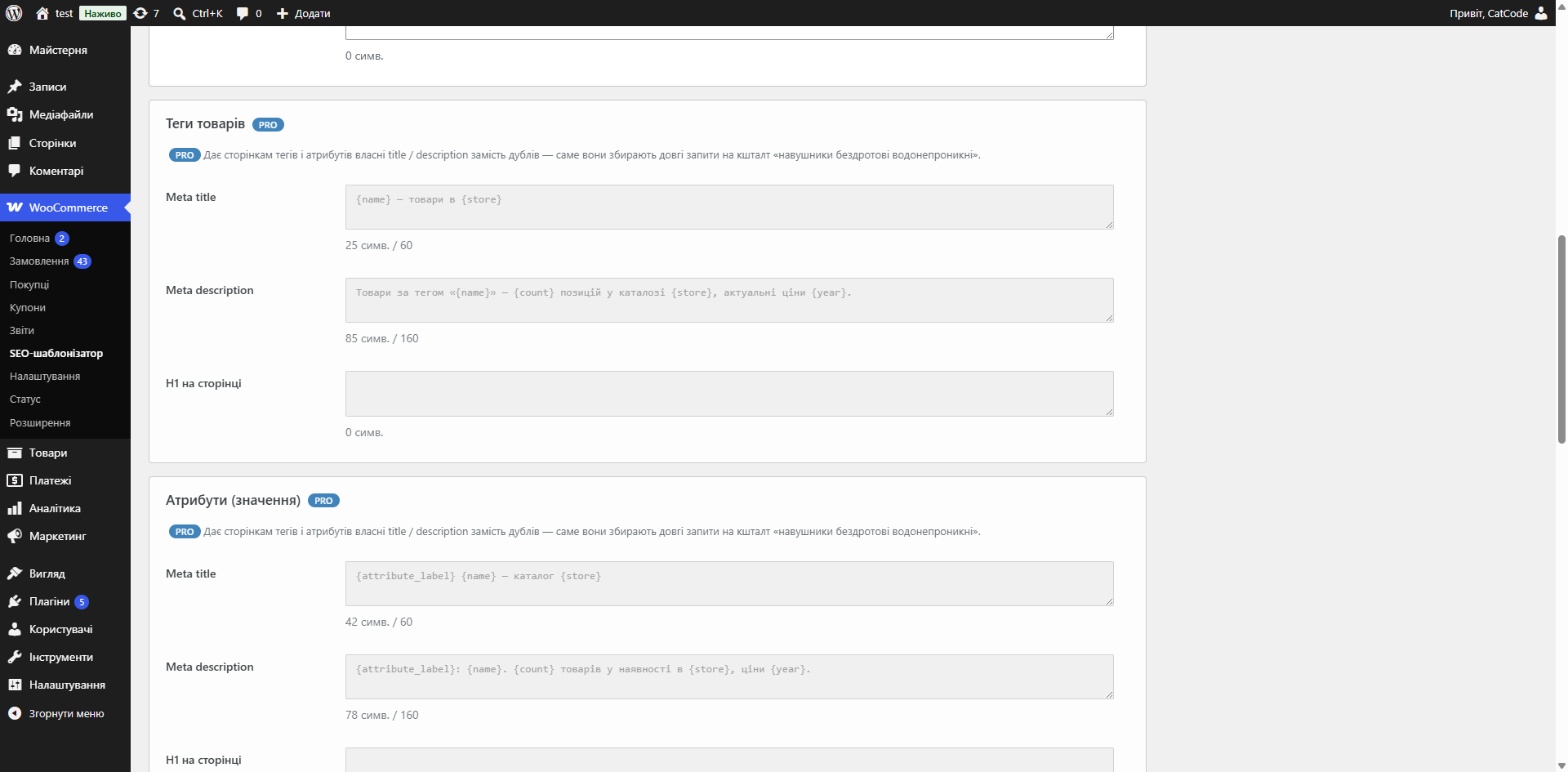
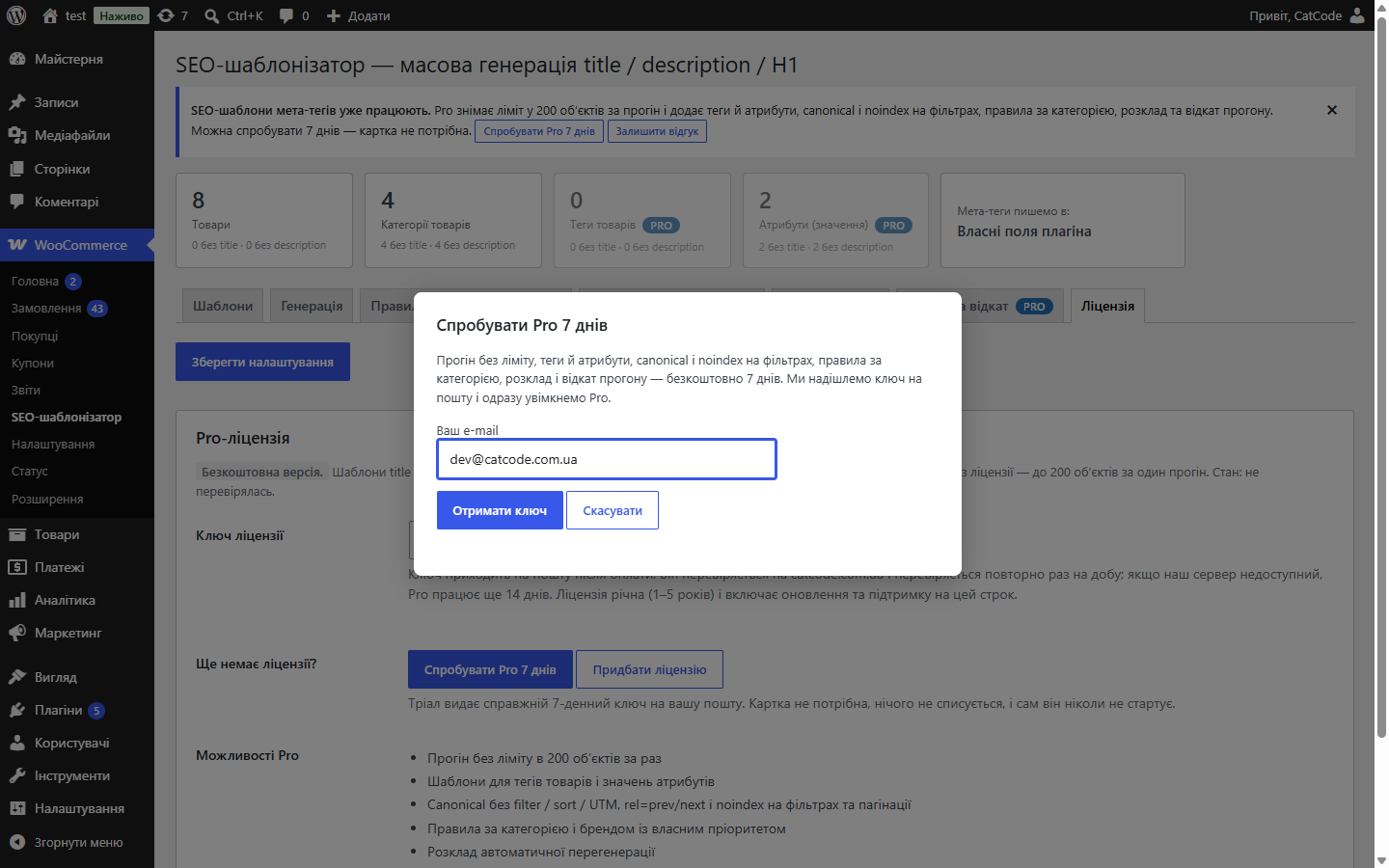
Один шаблон із плейсхолдерами замість тисяч написаних руками мета-тегів: title, description і H1 для товарів і категорій, попередній перегляд «було → стало» і застосування пачками без таймаутів.
Безкоштовна версія працює без обмеження в часі. Pro додає решту функцій з таблиці.


Окремі формули для товарів і категорій товарів, у Pro — ще й для тегів і значень атрибутів.

«Попередній перегляд (dry run)» показує список «було → стало» і підсвічує перевищення довжини — нічого ще не записано.

Якщо активний Yoast SEO або Rank Math — значення пишуться прямо в їхні поля, тож звичні інструменти й перевірки працюють як раніше.

Свіжий інстал — безкоштовна версія, нічого не вмикається само. Кнопка «Спробувати Pro 7 днів» → e-mail → ключ одразу у вікні і листом.

Переносите магазин — відв’яжіть ліцензію на старому домені й активуйте на новому самі. Для студій — ключі на 5, 25 сайтів або без обмежень.
 WordPress 6.2 і новіший, WooCommerce, PHP 7.4 і новіший. Працює разом з Yoast SEO або Rank Math — плагін пише у їхні поля, а не змагається з ними за вивід.
Шаблони title і description зі змінних товару, застосування до товарів і категорій, попередній перегляд до запису, запис у поля Yoast SEO / Rank Math, canonical і технічне SEO у Pro,…
4 модулі одним замовленням — на 40% дешевше, ніж окремо



SEO-шаблонізатор для WooCommerce описує title, description і H1 як формулу з плейсхолдерами — і застосовує її до всього каталогу. Заповнювати мета-теги руками на кілька тисяч товарів нереально, а без них сторінки конкурують між собою у видачі.
Окремі формули для товарів і категорій товарів, у Pro — ще й для тегів і значень атрибутів. Близько 25 плейсхолдерів: назва, категорія, бренд, ціна, артикул, назва магазину, модель, атрибут, опція, кількість товарів, мінімальна ціна, наявність, рік, номер сторінки, роздільник. Шаблони сумісні з OpenCart-версією модуля: {product_name}, {manufacturer}, {store_name}, {attribute:Колір} поводяться однаково.
Порожня змінна не лишає дірку в рядку: вона прибирається разом із роздільником, а опційний блок [ Артикул {sku}. ] зникає цілком. Довжина title і description контролюється з обрізанням по межі слова.
«Попередній перегляд (dry run)» показує список «було → стало» і підсвічує перевищення довжини — нічого ще не записано. Далі застосування йде пачками з прогрес-баром і кнопкою «Стоп». Режим «заповнювати лише порожні» захищає те, що ви писали руками.
Якщо активний Yoast SEO або Rank Math — значення пишуться прямо в їхні поля, тож звичні інструменти й перевірки працюють як раніше. Якщо SEO-плагіна немає — модуль тримає власні поля й сам друкує <title> та <meta name="description">.
Без ліцензійного ключа один прогін обробляє до 200 обʼєктів за раз, а вже згенеровані мета-теги лишаються на місці й після завершення тріалу. Pro-поля лишаються на своїх місцях — сірі, з бейджем Pro і одним рядком про те, що саме вони дають, щоб було видно межу, а не порожнє місце.
rel=canonical очищений від filter_*, orderby, min_price, max_price й UTM-міток; self-canonical або canonical на першу сторінку; rel=prev/rel=next; noindex для фільтрів, сортування, пагінації й пошуку.
Мета-теги для тисячі товарів руками не пише ніхто. Тому в більшості магазинів або порожній title (і Google бере його зі сторінки як вийде), або однаковий на весь каталог — а це дублі, за які пошук ріже видимість.
Шаблон вирішує це один раз: ви описуєте правило, і кожен товар отримує свій унікальний title і description, зібраний з його ж даних.
1. Ви пишете шаблон із змінних: назва товару, категорія, бренд, ціна, назва магазину.
2. Обираєте, до чого його застосувати — до товарів чи до категорій (у Pro ще до тегів і значень атрибутів, а для окремої категорії чи бренду можна задати своє правило).
3. Дивитесь попередній перегляд на реальних товарах: що саме вийде до того, як щось запишеться.
4. Запускаєте запис. Якщо стоїть Yoast SEO чи Rank Math, мета-теги лягають у їхні поля, а не в паралельне сховище.
Помилка в шаблоні на тисячі товарів — це тисячі однакових або обрізаних title. Виправляти доводиться повторним прогоном, а Google за цей час уже переобходить каталог.
Тому запис тут завжди двокроковий: спочатку ви бачите результат на вибірці, і лише потім даєте команду записати.
Якщо стоїть Yoast SEO чи Rank Math, мета-теги записуються в ті самі мета-поля, які читає SEO-плагін. Тому результат видно і в його інтерфейсі, і в аналізі сторінки — а якщо колись приберете шаблонізатор, теги лишаться на місці. Без SEO-плагіна теги живуть у власних полях модуля й видаляються разом із ним.
Прогін іде порціями, а не одним запитом, тому великий каталог не кладе сайт по таймауту.
1. Завантажте архів у «Плагіни → Додати новий → Завантажити плагін» і активуйте.
2. Напишіть шаблон title і description.
3. Подивіться попередній перегляд на десятці товарів.
4. Запустіть запис і перевірте кілька карток у своєму SEO-плагіні.
Не знайшли відповідь? Напишіть у Telegram — відповімо протягом робочого дня.
 @catcode_support
Налаштування, сумісність, активація
@catcode_support
Налаштування, сумісність, активація
Ні, доки ви самі не переключите режим на «перезаписувати все». За замовчуванням заповнюються лише порожні поля.
Вкладка «Історія та відкат» — «Відкотити останній прогін». Попередні значення зберігаються для кожного запуску (Pro).
Так. Генерація йде AJAX-пачками з прогрес-баром, а не одним довгим запитом, тому max_execution_time не має значення.
Якщо активний Yoast SEO або Rank Math — у їхніх полях, тож усі звичні інструменти працюють далі. Без SEO-плагіна плагін тримає власні поля й сам виводить title і description.
У SEO-плагінів немає поля під H1, а переписувати назву товару заради заголовка — ламати каталог, кошик і листи. Тому H1 живе у власному полі й підставляється лише в заголовок сторінки.
Поки що жодного відгуку. Будьте першим.
Поки питань немає. Запитай — ми відповімо протягом 24 годин.
Робимо кастомні модулі під WordPress, WooCommerce, OpenCart і Shopify. Розкажіть про задачу — підготуємо оцінку.
Замовити кастомний модуль
—

Помічник CatCode
Щойно


Помічник CatCode
Онлайн

Допоможу із задачею по сайту
Опишіть задачу по сайту — підберу готовий модуль або передам розробнику з оцінкою. Модулі, доробки, верстка, інтеграції, швидкість, перенесення, технічне SEO.
