


Ukrposhta — доставка Укрпоштою для OpenCart 2.3, 3.x & 4.x
Модуль доставки Укрпоштою для OpenCart 4: віджет вибору відділення у чекауті на базі Адресного класифікатора та живий тариф через eCom API. Без правок теми, безкоштовно.
- Сумісність
- OpenCart 2.3.0.x · 3.0.2 – 3.0.5 · 4.0.2 – 4.1.x
- Версія
-
v1.2.8 (OpenCart 4)
v1.2.4 (OpenCart 3.x)
v1.1.5 (OpenCart 2.3) - Оновлено
- 25 жовтня 2026
Модуль у роботі — 43 секунди
Без звуку теж зрозуміло: субтитри українською
Що вміє модуль

Як це виглядає
Технічні вимоги
 OpenCart 4.0.2 – 4.1.x, 3.0.2 – 3.0.5 або 2.3.0.x — окрема збірка під кожну гілку
- PHP 7.4 і новіші; збірка для OpenCart 2.3 працює і на PHP 5.6
- Договір eCom з Укрпоштою: Bearer-ключ видається в кабінеті eCom після підписання договору — він потрібен для класифікатора адрес і розрахунку тарифу
- Для розрахунку тарифу — поштовий індекс складу відправника
Історія версій
Коли з міжнародною доставкою обрано Нову Пошту чи іншого перевізника, над його блоком більше не висить сірий порожній заголовок «Доставка Укрпоштою / Інша країна».
CatCode One Page Checkout: віджет іноді не з’являвся — Укрпошта обрана, а вибору області, міста й відділення немає.
Прихована форма адреси більше не отримує індекс-заглушку «00000».
Усі версії (17)
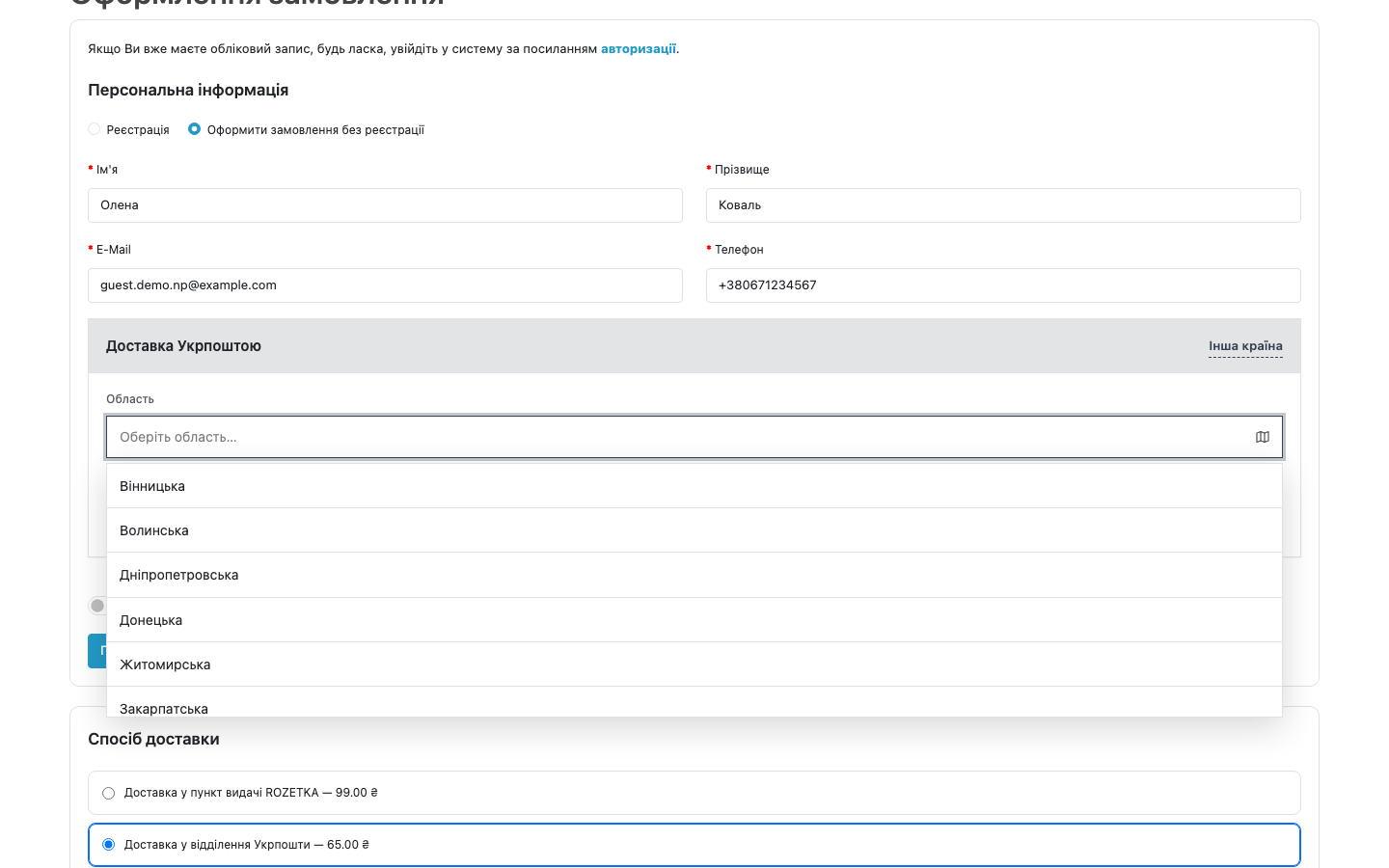
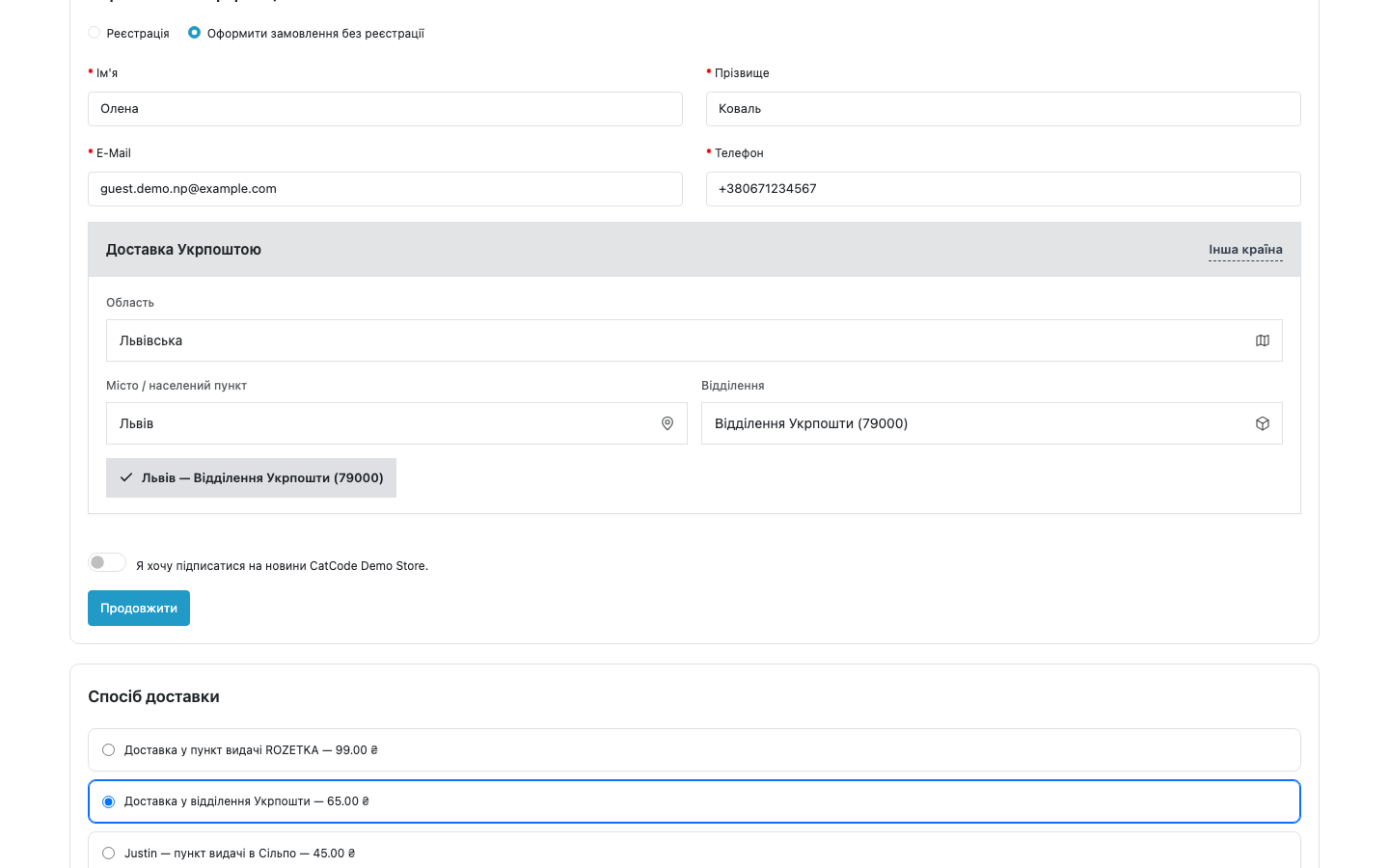
Віджет «область → місто → відділення» підтримує сторінку CatCode One Page Checkout і з’являється в блоці способу доставки; після вибору відділення список тарифів запитується наново.
Заглушка області в прихованому полі адреси більше не «перша зона країни».
Тариф перераховується після вибору відділення.
Працює на CatCode One Page Checkout (маршрут extension/cc_onepage/checkout) так само, як на штатному чекауті.
Зʼявився розрахунок міжнародної доставки.
Живий тариф Укрпошти нарешті рахується.
Збірка для OpenCart 3 підтягнута до рівня 2.3 і 4.x.
Полагоджено мертвий поліфіл PHP 7.4.
Віджет підскролюється у видиму зону, щойно обрано Укрпошту.
Пошук міста більше не падає мовчки без розширення mbstring: mb_strlen / mb_strtolower під гардом, автодоповнення працює на будь-якому хостингу.
Збереження контактних даних більше не скидає вже обраний спосіб доставки й оплати.
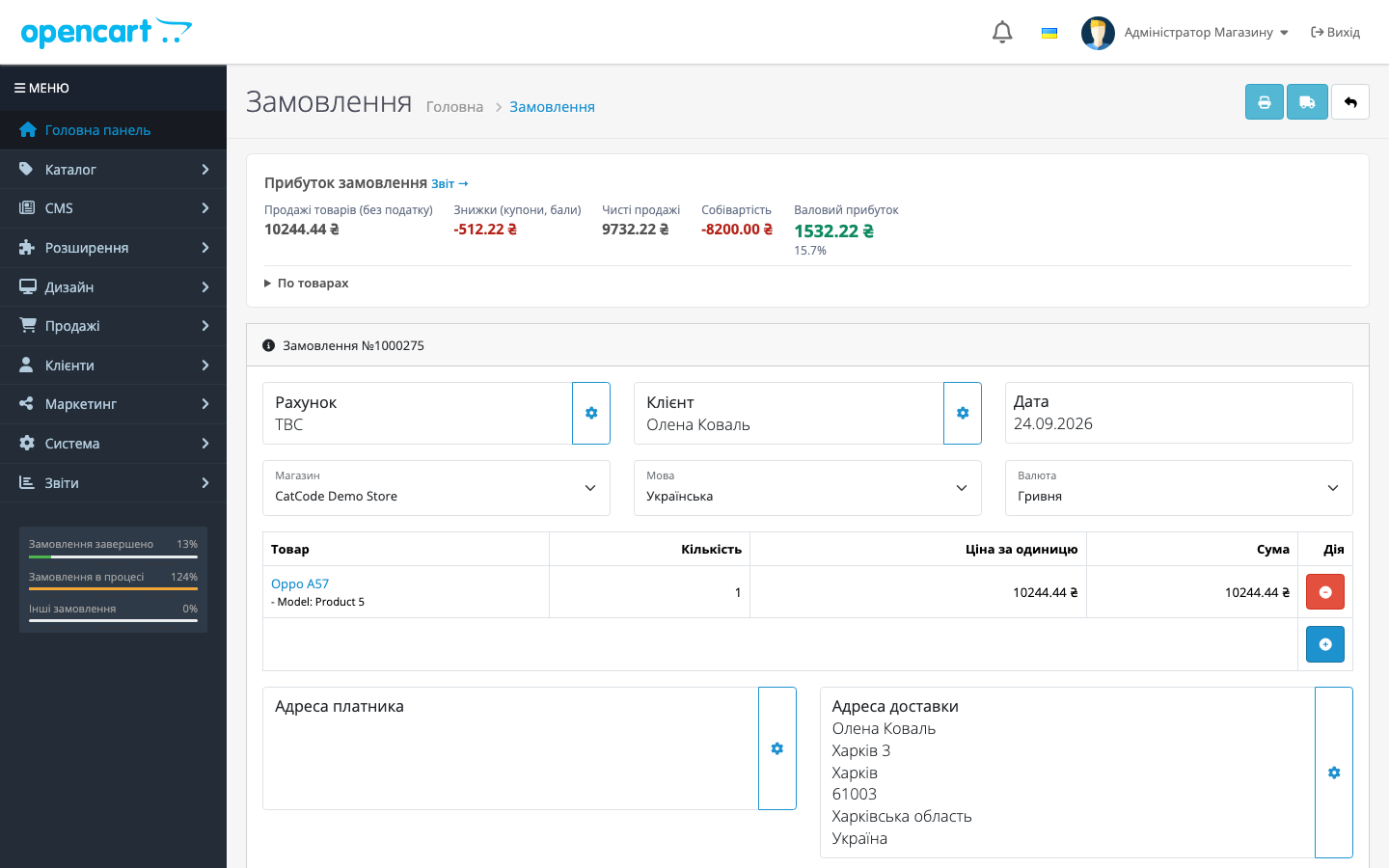
Адреса замовлення заповнюється точно тим, що обрав покупець (місто з класифікатора, область кирилицею, реальний індекс відділення), плюс ручне введення індексу.
Виправлено фатальну помилку у розрахунку способів доставки.
Перший публічний реліз: віджет область → місто → відділення в чекауті, живий тариф по Україні через eCom API, шифрування ключа, щотижнева синхронізація класифікатора через cron.
Повний опис модуля
Ukrposhta Shipping для OpenCart 2.3, 3.x і 4.x — модуль доставки Укрпоштою: віджет вибору відділення (область → місто → відділення) у чекауті на базі офіційного Адресного класифікатора та живий розрахунок вартості доставки по Україні через eCom API. Обране покупцем відділення фіксується в замовленні, тож менеджеру не доводиться перепитувати адресу в месенджері.
Модуль безкоштовний. Встановлюється як стандартне розширення OpenCart (ocmod) і не потребує правок теми — віджет підключається через систему подій.
Як це працює — крок за кроком
- Адмін встановлює розширення, натискає «Встановити» на сторінці налаштувань — модуль створює свої таблиці, події та cron-завдання, — і синхронізує області одним кліком.
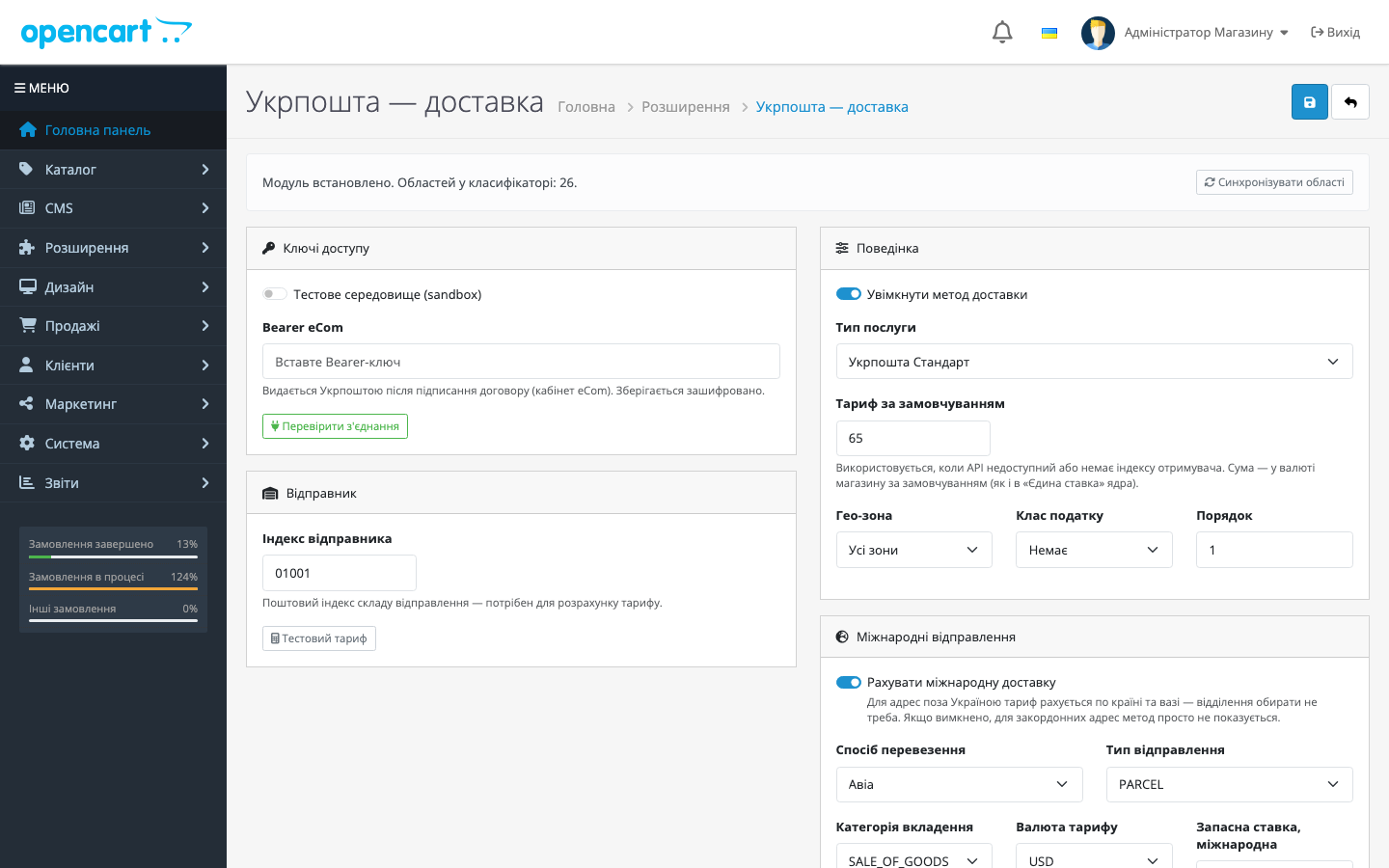
- Вводяться Bearer eCom та індекс відправника; кнопки «Перевірити з’єднання» і «Тестовий тариф» одразу показують, що ключ прийнято і API відповідає.
- Покупець у чекауті обирає доставку Укрпоштою — подія
footer/afterпідключає віджет, і він веде по ланцюжку область → місто → відділення. - Модуль запитує тариф у eCom API за індексами відправника й отримувача; якщо API недоступний — показується тариф за замовчуванням із налаштувань.
- Після оформлення подія
order.addOrder/afterзберігає обране відділення (індекс, місто, назву) разом із замовленням. - Раз на тиждень оновлюється кеш класифікатора областей — довідник не застаріває. В OpenCart 4 це робить вбудований cron, у 3.x і 2.3 — посилання для системного crontab, показане в налаштуваннях модуля.
Що під капотом
- Bearer-ключ шифрується перед записом у базу; у формі налаштувань показується лише маска «збережено», без відкритого значення.
- Класифікатор кешується у власних таблицях (
up_regions,up_cities,up_offices) — чекаут читає локальну базу, а не смикає API на кожен запит. - Інтеграція через події OpenCart (footer inject, order added) — без правок шаблонів теми; OCMOD-патчів контролерів немає у збірках для 4.x і 3.x, а збірка для 2.3 додає невеликий OCMOD-патч збереження адреси в чекауті.
- Стандартні для методів доставки OpenCart налаштування: гео-зона, клас податку, порядок сортування.
- Вигляд віджета налаштовується: акцентний колір, радіус заокруглення, тема (авто/світла/темна).
- У збірці для OpenCart 4 є перемикач sandbox для роботи з тестовим середовищем Укрпошти.
Як встановити
- Завантажте збірку під свою версію та встановіть через «Розширення → Встановлення розширень»:
ukrposhta.ocmod.zipдля 4.x,ukrposhta-oc3-1.2.4.ocmod.zipдля 3.x,ukrposhta-oc2-1.1.5.ocmod.zipдля 2.3. - У «Розширення → Розширення → Доставка» знайдіть «Укрпошта — доставка» і натисніть Install.
- Відкрийте налаштування, натисніть «Встановити» — створяться таблиці, події та cron-завдання.
- Введіть Bearer eCom та індекс відправника, натисніть «Перевірити з’єднання», потім «Синхронізувати області».
- Увімкніть метод доставки та збережіть — віджет вибору відділення з’явиться в чекауті.
Питання
про модуль
Не знайшли відповідь? Напишіть у Telegram — відповімо протягом робочого дня.
 @catcode_support
Налаштування, сумісність, активація
@catcode_support
Налаштування, сумісність, активація
Чи потрібен договір з Укрпоштою?
Так. Адресний класифікатор і тариф авторизуються Bearer-ключем, який видається після підписання договору eCom.
Чи треба правити тему, щоб віджет з’явився в чекауті?
Ні. Віджет підключається подією на footer/after — шаблони теми не змінюються, конфліктів із кастомними чекаутами по коду теми немає.
Чи створює модуль ТТН і наліпки?
Ще ні. Створення відправлення (ТТН) заплановане в наступному оновленні; поточна версія — вибір відділення та розрахунок тарифу.
Що буде, якщо API Укрпошти недоступний?
Метод доставки не зникне з чекаута: покупцю покажеться тариф за замовчуванням, який ви задали в налаштуваннях.
Чи можна протестувати без бойового ключа?
Так, у вкладці «Ключі доступу» є перемикач тестового середовища (sandbox).
Що станеться з даними після видалення модуля?
Події та cron-завдання прибираються, а таблиці з довідником і збереженими виборами відділень навмисно зберігаються — після перевстановлення нічого не втрачається.
Поки що жодного відгуку. Будьте першим.
Поки питань немає. Запитай — ми відповімо протягом 24 годин.
Не той варіант, що шукаєте?
Робимо кастомні модулі під WordPress, WooCommerce, OpenCart і Shopify. Розкажіть про задачу — підготуємо оцінку.
Замовити кастомний модуль
Купівля модуля
—



