Get in touch
OpenCart

AI Product Descriptions for OpenCart 2.3, 3.x and 4.x — description generator

Генеруйте описи товарів в OpenCart кнопкою «AI» прямо в картці товару — без власних API-ключів. Три збірки: 2.3, 3.x і 4.x. Pro додає масову генерацію по каталогу, мета-теги, ключові слова та керування тоном і довжиною тексту.

Download for free
Version
v1.1.0 (OpenCart 4)
v1.1.0 (OpenCart 3.x)
v1.0.0 (OpenCart 2.3)
Compatibility
OpenCart 2.3.0.0 – 2.3.0.2 · 3.0.2 – 3.0.5 · 4.0.2 – 4.1.x
Platform
OpenCart
AI Product Descriptions for OpenCart 2.3, 3.x and 4.x — description generator

What each licence includes

Feature Free Pro
An "AI" button on the product page — manual description generation
A cloud generation service — no API keys of your own LLM needed
Auto-fallback between several LLM providers
Daily generation limit 30 a day 300 a day
Bulk description generation for the whole catalog
Text language — Ukrainian, Russian, English
Control over tone and text length
Meta-tag generation — title and description
Keyword generation

AI Product Descriptions is an AI product-description generator module for OpenCart 2.3, 3.x and 4.x — three separate builds under one licence. An “AI” button appears on the product page: type in the name (and optionally attributes) and the module generates a ready description that’s inserted straight into the editor. No OpenAI or other LLM-provider keys are needed — generation runs through CatCode’s cloud service, and the store only sends the product name and gets back the text.

The basic version is free. Download it from the official OpenCart marketplace: opencart.com/…/extension_id=48685. Free covers manual description generation for one product at a time, within a daily limit (30 generations a day); Pro raises the limit to 300 a day and adds bulk generation for the whole catalog, control over tone and length, meta-tag generation (title + description) and keywords — purchase below. The text language is taken from the product’s language tab and works in both versions.

How it works, step by step

  1. Open a product page in the admin and type in a name — that’s already enough; attributes and a category make the text more accurate.
  2. Click the “AI” button next to the description field.
  3. The module sends a request to the generation service — with no API keys of yours and no sign-ups with LLM providers.
  4. The service generates the text through a chain of LLM providers with automatic fallback: if one is unavailable, the request automatically goes to the next. The output is cleaned of markdown wrappers.
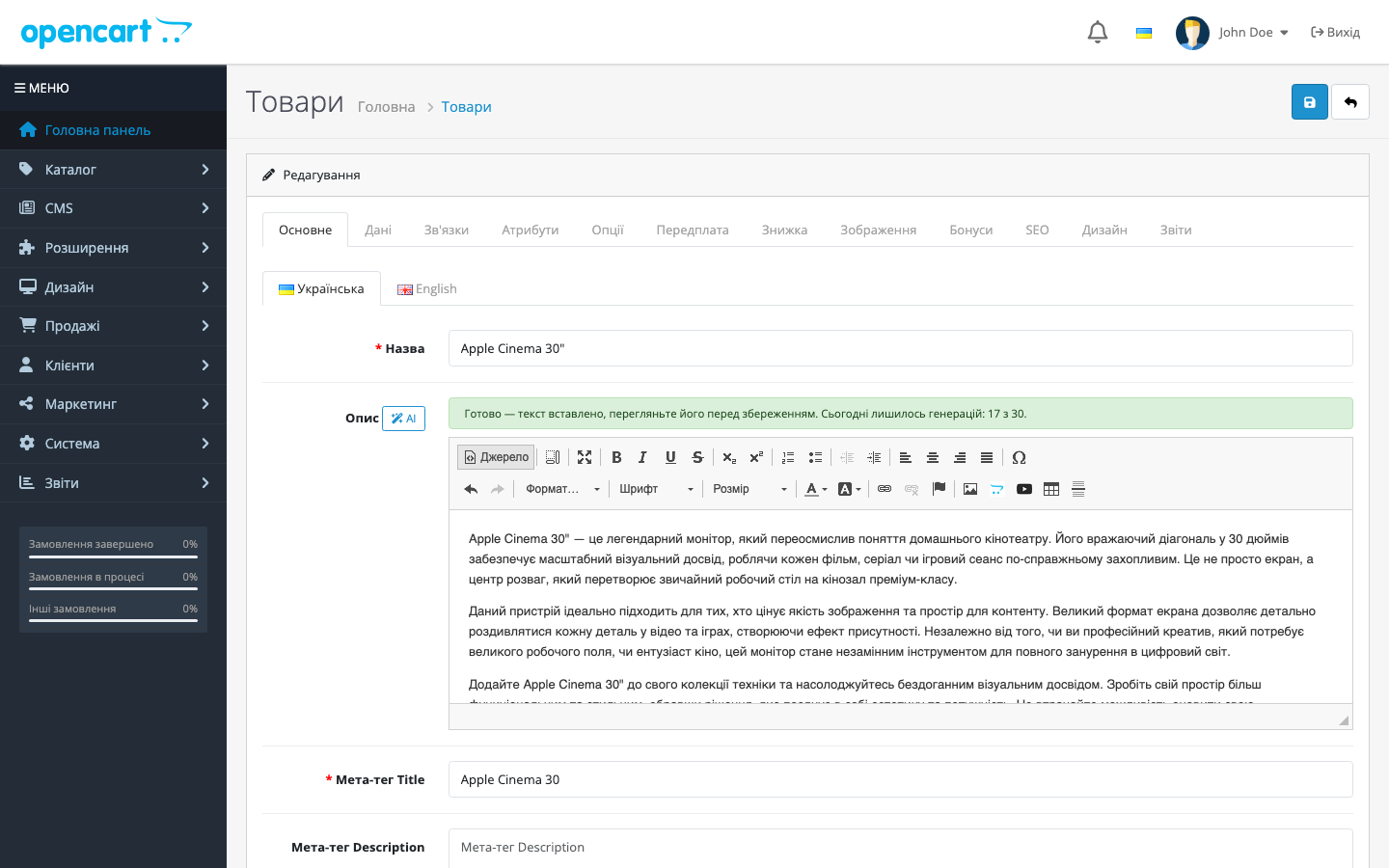
  5. The finished text is inserted into the description editor — review it, edit if needed, and save the product.
  6. With Pro: run bulk generation across the whole catalog from a separate tab, control the tone and length of the text, and generate meta tags (title + description) and keywords.

What it looks like in the admin

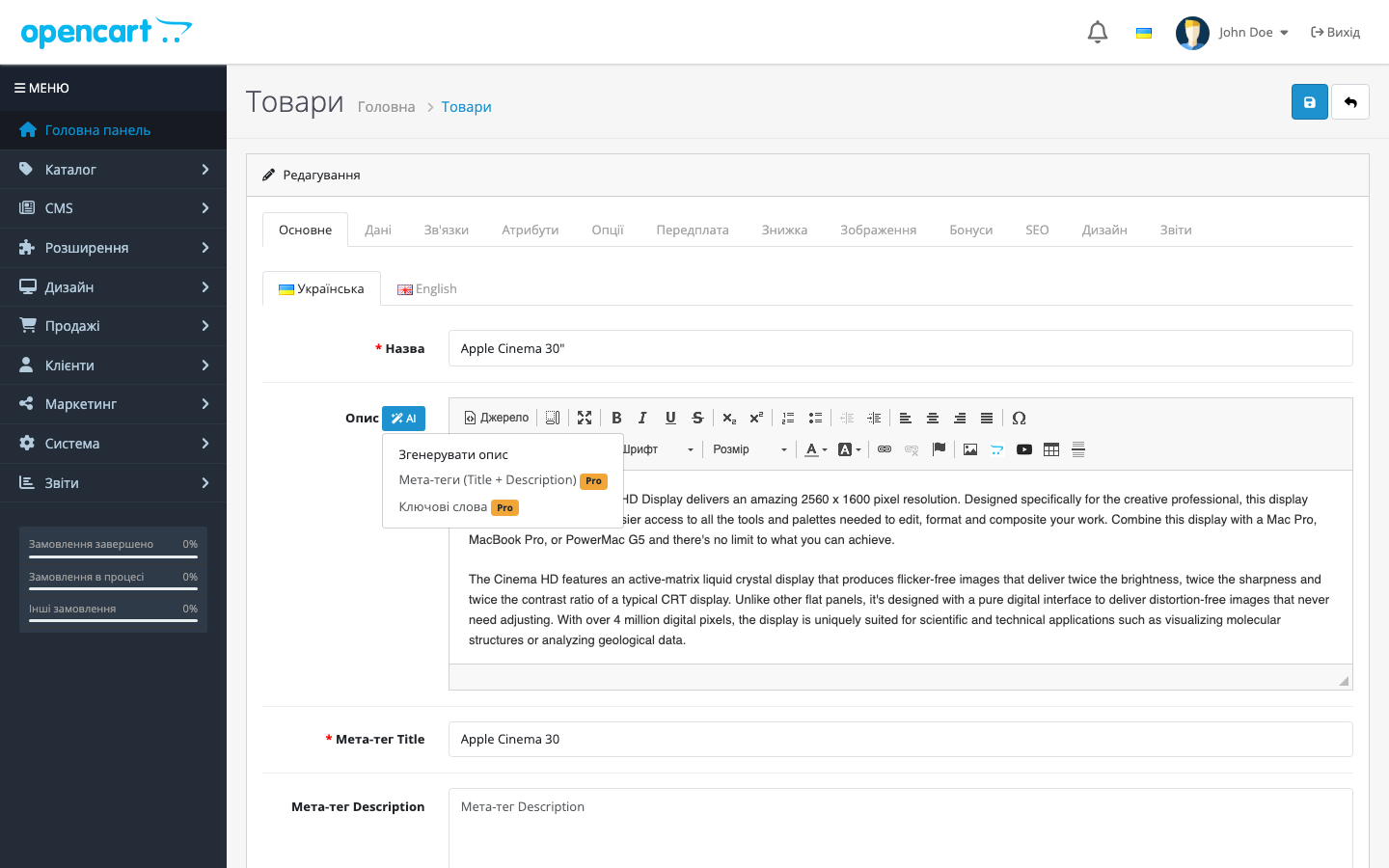
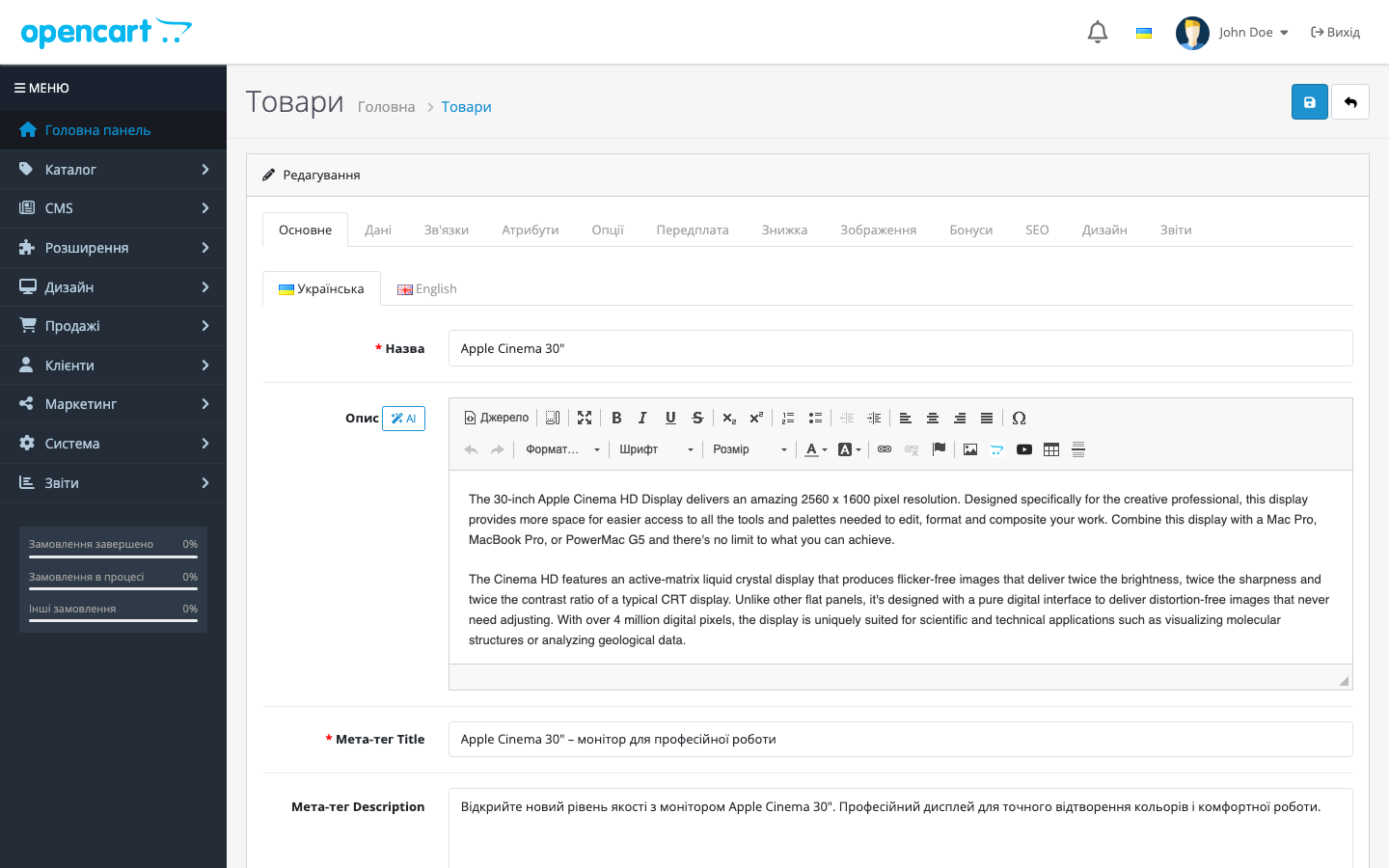
The 'AI' button next to the description field on a standard product page. Pro items are visible right away — greyed out, with a badge.
The “AI” button next to the description field on a standard product page. Pro items are visible right away — greyed out, with a badge.
Settings in the free version: the Pro boundary is shown honestly, nothing switches on by itself.
The trial only starts with a click: an email, and a 7-day key arrives straight into the modal.
With Pro active, tone and text-length controls are unlocked.
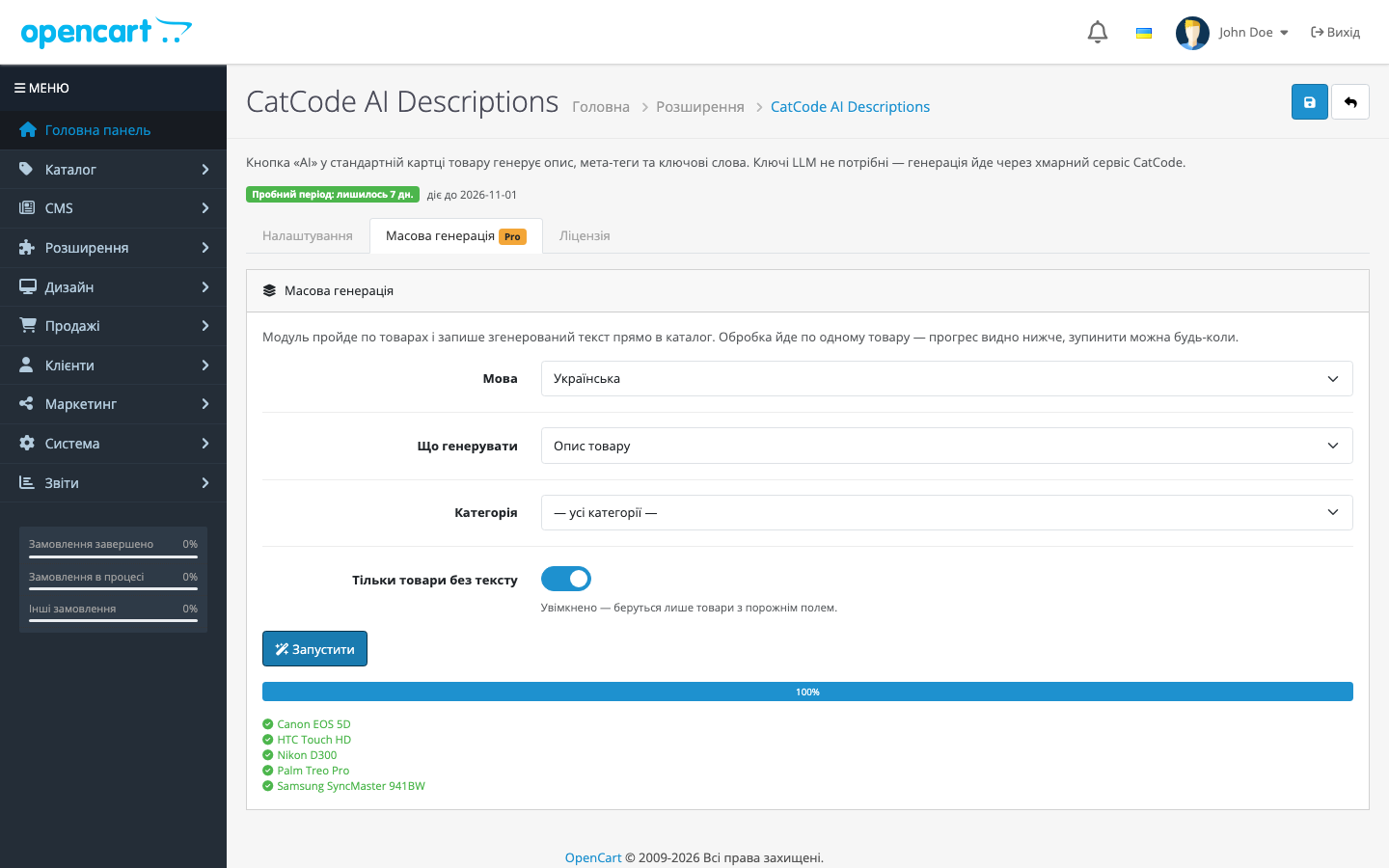
Bulk generation across the catalog: processed one product at a time, with progress and a log visible in place.
Meta tags generated from the product page land straight into their own fields.

Pricing

1,290 UAH — a one-off purchase. The licence is perpetual: pay once, updates and technical support are included in the price. One key, one domain and its subdomains.

Moving your store to another domain? Deactivate the licence on the old one and activate it on the new one yourself in your account.

The licence is perpetual — nothing expires or switches off. One key, one domain; moving your store means deactivating the licence on the old domain and activating it on the new one yourself.

One key, one domain. Moving your store? Deactivate the licence on the old domain and activate it on the new one yourself, no need to contact support.

Trial first, payment later. A fresh install is a clean free version: nothing Pro switches itself on and nothing shuts off after a week. The 7-day trial only starts with your click: in the module’s settings, “Try Pro” → the “Try 7 days” tab → email → the key arrives straight into the modal and is duplicated by email. That’s exactly why refunds after payment aren’t offered — you see the module in action before you pay.

Technical requirements

  • OpenCart 4.0.2 – 4.1.x — PHP 8.0+ (the platform’s own requirement)
  • OpenCart 3.0.2 – 3.0.5 — PHP 7.0–7.4
  • OpenCart 2.3.0.0 – 2.3.0.2 — PHP 5.6 / 7.0 (2.3 relies on mcrypt, which is gone from 7.4)
  • The cURL extension on any branch
  • Outbound HTTPS access from the server to CatCode’s generation service
  • Your own OpenAI / Mistral / other LLM-provider API keys are not needed

Under the hood

  • LLM keys live only on the service side — not in the module’s code, not in the store’s database. Even a full dump of your database won’t reveal any key.
  • A provider chain with auto-fallback — the service runs the request through several LLMs in order of quality for Ukrainian copywriting; one provider being unavailable doesn’t stop generation.
  • Output sanitisation — markdown wrappers and code fences are stripped, so the editor gets clean text.
  • The core isn’t patched — the button is inserted into the finished product-form markup via a standard OpenCart event (admin/view/catalog/product_form/after), not a template modification. That’s why it works on 4.0.x, where the OCMOD engine doesn’t exist, and on 4.1, and survives an admin theme update.
  • Limits are counted per licence key on the service side — the module in the store stays a thin, stateless proxy.

How to install

  1. Take the build for your store’s version: catcode_ai_descriptions.ocmod.zip (OpenCart 4.x), catcode_ai_descriptions-oc3.ocmod.zip (3.x) or catcode_ai_descriptions-oc2.ocmod.zip (2.3).
  2. Upload the archive via Extensions → Installer in your OC admin → Install. On OpenCart 2.3, the built-in installer only works with FTP configured — if there’s no FTP, simply unpack the upload/ folder’s contents to the store root over SSH or the hosting’s file manager.
  3. Extensions → Modules → find CatCode AI Descriptions and click “+” (install). This step registers the button on the product page and grants your user group access to the module.
  4. Open any product — the “AI” button appears next to the “Description” field. It works right away, for free, without a key.
  5. For Pro: “Try Pro” → a 7-day trial, or paste the key you received after payment.

Version history

1.1.0 (OpenCart 3.x) — 11 August 2026
The 3.x branch has finally caught up with the others: previously it had a separate, simplified 0.2.1 build with no licence, no bulk generation and no tone or length control. It’s now the same module as for 4.x and 2.3: the licence is checked on the CatCode server, the 7-day trial starts with a click, and Pro unlocks meta tags, keywords, text style and bulk catalog generation. The “AI” button is no longer inserted by patching the core product template — it’s added via a standard event, so it doesn’t disappear after “Refresh” in Modifications and doesn’t conflict with other extensions.
1.1.0 — 9 August 2026 (OpenCart 4)
Both context fixes from the 2.3 build were ported to the main branch: the product’s SKU is no longer sent in the request as an attribute (it’s now labelled SKU, with the product’s real attributes listed alongside) — so a code like Product 15 no longer turns into “15-inch” in meta tags; the category is no longer picked arbitrarily — all categories are sent, deepest first, so a monitor filed under two categories is no longer described as a computer.
1.0.0 — 9 August 2026 (OpenCart 2.3)
A build for OpenCart 2.3: the “AI” button on a standard product page, bulk generation, tone and length, a server-side licence with a one-click trial — the same set as in 4.x. Also fixed two context bugs present in every build: the product SKU (model) was sent in the request labelled as “attributes” — so a code like Product 15 turned into “15-inch” in meta tags; and the category was picked arbitrarily, so a monitor filed under both “Monitors” and “Computers” was described as a computer. The SKU is now labelled as such, the product’s real attributes are listed alongside it, and all categories are sent, deepest first.
1.0.0 — 5 August 2026
Rebuilt the Free/Pro model: a fresh install is the free version, the trial only starts with a click, and the key is checked on the licence server (with a 14-day grace period in case it’s unreachable). Added a “Bulk generation” tab — descriptions and meta tags for the whole catalog, with progress and the ability to stop; tone and length control; keyword generation. The button on the product page is now inserted via a standard event instead of an OCMOD modification — on OpenCart 4.0.x, which has no OCMOD engine, it previously never appeared at all. The prompt no longer allows inventing specs or numbers that aren’t in the product data.
0.2.0 — July 2026
First public release: an “AI” button on the OpenCart 4 product form, description generation via a cloud service with LLM-provider auto-fallback, output sanitised of markdown, freemium limits per licence key, packaged in the native OC 4.1 structure (install.json + ocmod).

Frequently asked questions

Do I need to sign up with OpenAI and pay for tokens?

No. Generation runs through CatCode's cloud service — the module asks for no API keys, and the cost of generation is already included in the licence.

Is there one build for all OpenCart versions?

No, there are three builds — for 2.3, for 3.x and for 4.x: the platforms differ too much, and 2.3 and 3.x have their own templates and their own description editor. There's one licence, and the key works with any build — just take the file matching your store's version.

Does the module change the theme or checkout?

No. The module only works in the admin — it adds a button to the standard product form. The storefront and checkout aren't touched.

What happens if the generation service is temporarily unavailable?

The module shows an error message, and that's it. The product doesn't change, and previously generated descriptions stay in place.

What happens to descriptions after I delete the module?

Nothing. The generated text is just regular content in the product description field; it's stored in the OpenCart database and doesn't depend on the module.

Can I move the licence to another domain?

Yes. Deactivate the licence on the old domain — the slot frees up, and the same key can be activated on the new one.

Does the licence need renewing?

No. For OpenCart the licence is perpetual: one payment, and the Pro features stay with you. Only the 7-day trial ends — after it Pro switches off and the free version keeps working.

Questions about the module?

Message us on Telegram — we reply within the working day. We will help with setup, compatibility and key activation.

@catcode_support

Not quite what you are looking for?

We build custom modules for WordPress, WooCommerce, OpenCart and Shopify. Tell us about your task and we will prepare an estimate.

Order a custom module