
WordPress
Mono Acquiring — оплата карткою monobank для WooCommerce
Free + Pro
890 грн/рік
v1.1.6
 All Access4 990 ₴ на рік
 Аудит сайтуPDF-звіт на пошту за 3 хвилиниПеревірити сайт
Для щоденних задач
Стиснення фотоРозмір, якість і WebP пачкоюГенератор QRПосилання, Wi-Fi, оплата на IBANКалькулятор ПДВ20, 14, 7 % і сума прописомТранслітераціяЗа постановою КМУ № 55Перевірки сайту
PHP і плагіниВерсія PHP, WordPress, плагіниФід Google MerchantПоля, ціни, GTIN, фотоПошта доменуSPF, DKIM, DMARC, чорні спискиГотовність до AI-пошукуllms.txt, боти, розміткаУсі 9 інструментівВведіть щонайменше 2 символи
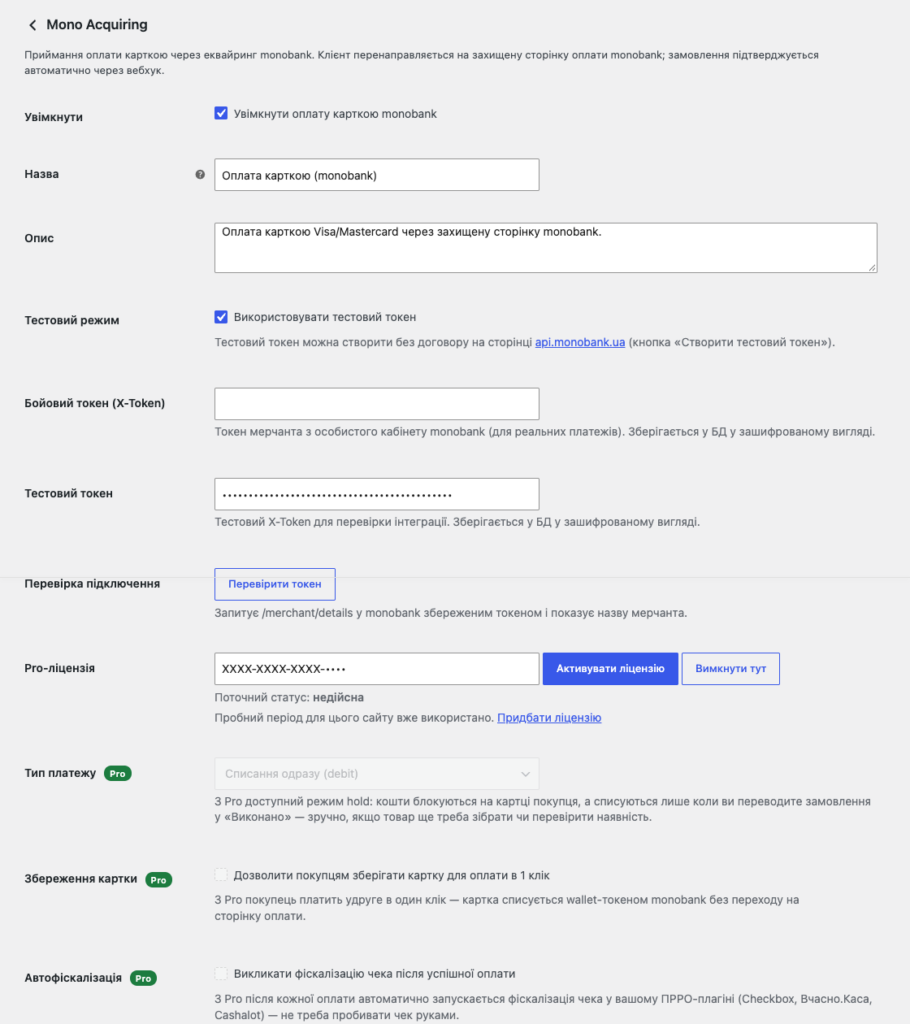
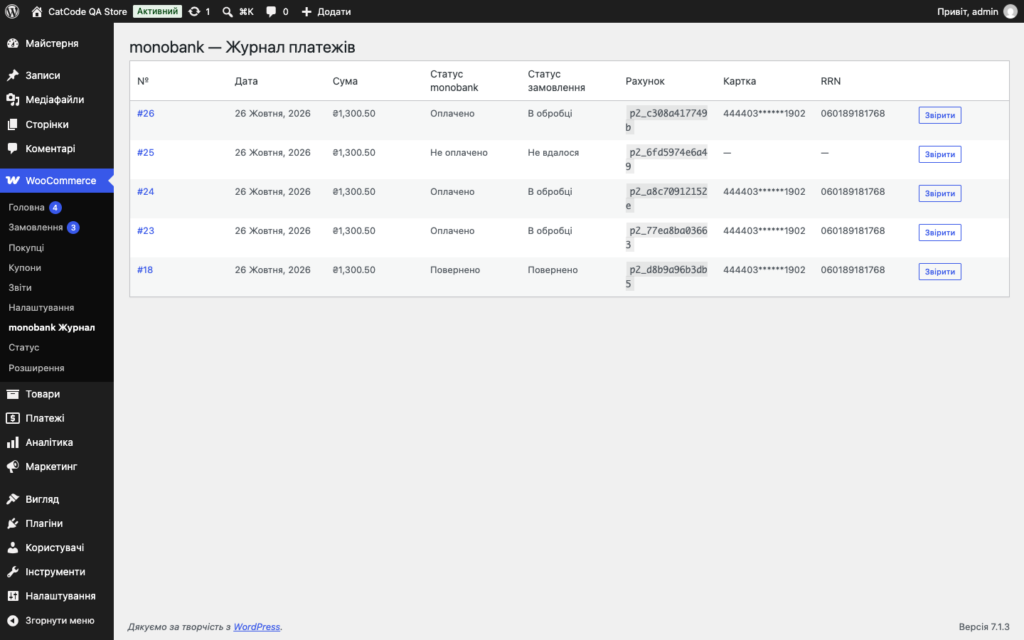
Оплата карткою через еквайринг monobank у WooCommerce: рахунок, редірект на сторінку банку, автопідтвердження вебхуком з ECDSA-підписом. Pro — журнал платежів, hold, повернення, оплата в 1 клік і автофіскалізація для ПРРО.
Без звуку теж зрозуміло: субтитри українською
Безкоштовна версія працює без обмеження в часі. Pro додає решту функцій з таблиці.



Свіжий інстал — безкоштовна версія, нічого не вмикається само. Кнопка «Спробувати Pro 7 днів» → e-mail → ключ одразу у вікні і листом.

Переносите магазин — відв’яжіть ліцензію на старому домені й активуйте на новому самі. Для студій — ключі на 5, 25 сайтів або без обмежень.
 WordPress 6.2+WooCommerce 6.0+ (тестовано до 10.7)PHP 7.4+Токен monobank: бойовий видається у кабінеті мерчанта після підписання договору; тестовий створюється безкоштовно на api.monobank.ua — договір для тесту не потрібен
Якщо monobank не створив рахунок (неправильний токен, збій, таймаут), покупець бачить зрозуміле «Не вдалося перейти до оплати карткою…» замість «forbidden; FORBIDDEN»; технічна відповідь —…
Сайти, де кожна мова має префікс в адресі (Polylang): після оплати покупець повертається на сторінку «Дякуємо», а не на «Сторінку не знайдено».
Pro-версія, активована поруч з безкоштовною копією з WordPress.org, більше не вантажить код безкоштовної копії з попередженнями PHP на кожному запиті.
Кошик, який monobank показує на сторінці оплати і передає у фіскалізацію, не сходився зі списаною сумою.
Free = free: свіжий інстал більше не вмикає Pro сам, тріал стартує кнопкою «Спробувати Pro 7 днів».
Створення рахунку та редірект на сторінку оплати monobank, вебхук з перевіркою ECDSA-підпису, резервний запит статусу, повернення коштів, двоетапна оплата (hold), підтримка Checkout Blocks…
4 модулі одним замовленням — на 40% дешевше, ніж окремо


Mono Acquiring для WooCommerce — платіжний плагін, що під’єднує еквайринг monobank до вашого магазину. Покупець оплачує замовлення карткою Visa або Mastercard на захищеній сторінці monobank, а плагін сам підтверджує оплату: банк надсилає вебхук, плагін перевіряє його ECDSA-підпис і переводить замовлення у потрібний статус. Жодної ручної звірки платежів — статус у WooCommerce завжди відповідає статусу в банку.
mono-acquiring-for-woocommerce-1.1.6.zip через Плагіни → Додати новий → Завантажити плагін і активуйте.Не знайшли відповідь? Напишіть у Telegram — відповімо протягом робочого дня.
 @catcode_support
Налаштування, сумісність, активація
@catcode_support
Налаштування, сумісність, активація
Для реальних платежів — так, бойовий токен видається у кабінеті мерчанта. Для тестування достатньо безкоштовного тестового токена з api.monobank.ua.
Основна — гривня (UAH). Також обробляються USD та EUR, якщо вони підключені у вашого мерчанта.
Ні. Це стандартний платіжний шлюз WooCommerce: він лише додає метод оплати у список. Працює і з класичним чекаутом, і з Checkout Blocks.
Вона вмикається у кабінеті мерчанта monobank і не потребує змін у коді чи налаштуваннях плагіна.
Так. Ліцензія працює на одному активному домені, і перенести її можна самостійно: у налаштуваннях модуля на старому домені натисніть «Деактивувати» — слот звільниться миттєво, після чого активуйте той самий ключ на новому домені. Доплат немає; якщо доступу до старого сайту вже немає — напишіть нам, звільнимо слот вручну.
Pro-функції, приймання оплати й підтвердження замовлень працюють далі, налаштування і дані лишаються на місці — припиняються лише оновлення й підтримка. Продовження тим самим ключем повертає оновлення й підтримку. Нагадаємо на пошту за 14, 7, 3 і 1 день до завершення.
Поки що жодного відгуку. Будьте першим.
Поки питань немає. Запитай — ми відповімо протягом 24 годин.
Робимо кастомні модулі під WordPress, WooCommerce, OpenCart і Shopify. Розкажіть про задачу — підготуємо оцінку.
Замовити кастомний модуль
—

Помічник CatCode
Щойно


Помічник CatCode
Онлайн

Допоможу із задачею по сайту
Опишіть задачу по сайту — підберу готовий модуль або передам розробнику з оцінкою. Модулі, доробки, верстка, інтеграції, швидкість, перенесення, технічне SEO.
