Get in touch
Sales and conversion · OpenCart

One-Click Order — Quick Order for OpenCart 2.3, 3.x and 4.x

Кнопка «Купити в 1 клік» на товарі та в каталозі: покупець залишає лише ім'я й телефон — у магазині створюється справжнє замовлення зі статусом із налаштувань і методом оплати «Дзвінок менеджера». Безкоштовна версія дає модалку, валідацію українського номера, чотири рівні антиспаму, лист менеджеру на кілька адрес і журнал заявок. Pro додає поля e-mail/місто/коментар, маску телефону, UTM-мітки в замовленні та чорний список номерів. Тріал на 7 днів стартує лише кліком.

Download for free
Version
v1.1.1 (OpenCart 4)
v1.1.0 (OpenCart 3.x)
v1.0.0 (OpenCart 2.3)
Compatibility
OpenCart 2.3.0.0 – 2.3.0.2 · 3.0.2 – 3.0.5.0 · 4.0.2 – 4.1.x
Platform
OpenCart
One-Click Order — Quick Order for OpenCart 2.3, 3.x and 4.x

What each licence includes

Feature Free Pro
"Order in one click" button on the product page
Button in the catalogue, search and on the manufacturer page
Modal with "Name" + "Phone" fields
Validation and normalisation of Ukrainian numbers to +380XXXXXXXXX
A real order with a status and payment method name from the settings
E-mail to the manager with the order contents
Request log with the processing result
Anti-spam: token, honeypot, time trap, hourly per-IP limit
All button, modal and thank-you texts are editable
Extra fields — e-mail, city, comment (each switched on separately)
Phone input mask
UTM tags and referrer in the order meta
Phone number blacklist
Manager e-mail to several addresses (comma-separated)

One-Click Order is a module that puts a second button next to “Add to cart”: the customer enters just their name and phone number, clicks “Order” — and a real order appears in the store straight away, which the manager confirms by phone. No registration, no address, no choosing shipping or payment method.

The base version is free and works with no time limit: a button on the product page and in the catalogue, a modal with two fields, validation of Ukrainian phone numbers, four layers of spam protection, an e-mail to the manager and a request log. A fresh install is a clean free version: nothing Pro switches on by itself. The 7-day Pro trial only starts once you click “Try Pro” in the module’s admin. Separate builds exist for OpenCart 4.x, OpenCart 3.x and OpenCart 2.3 — see the links in the “How to install” section.

What the customer sees

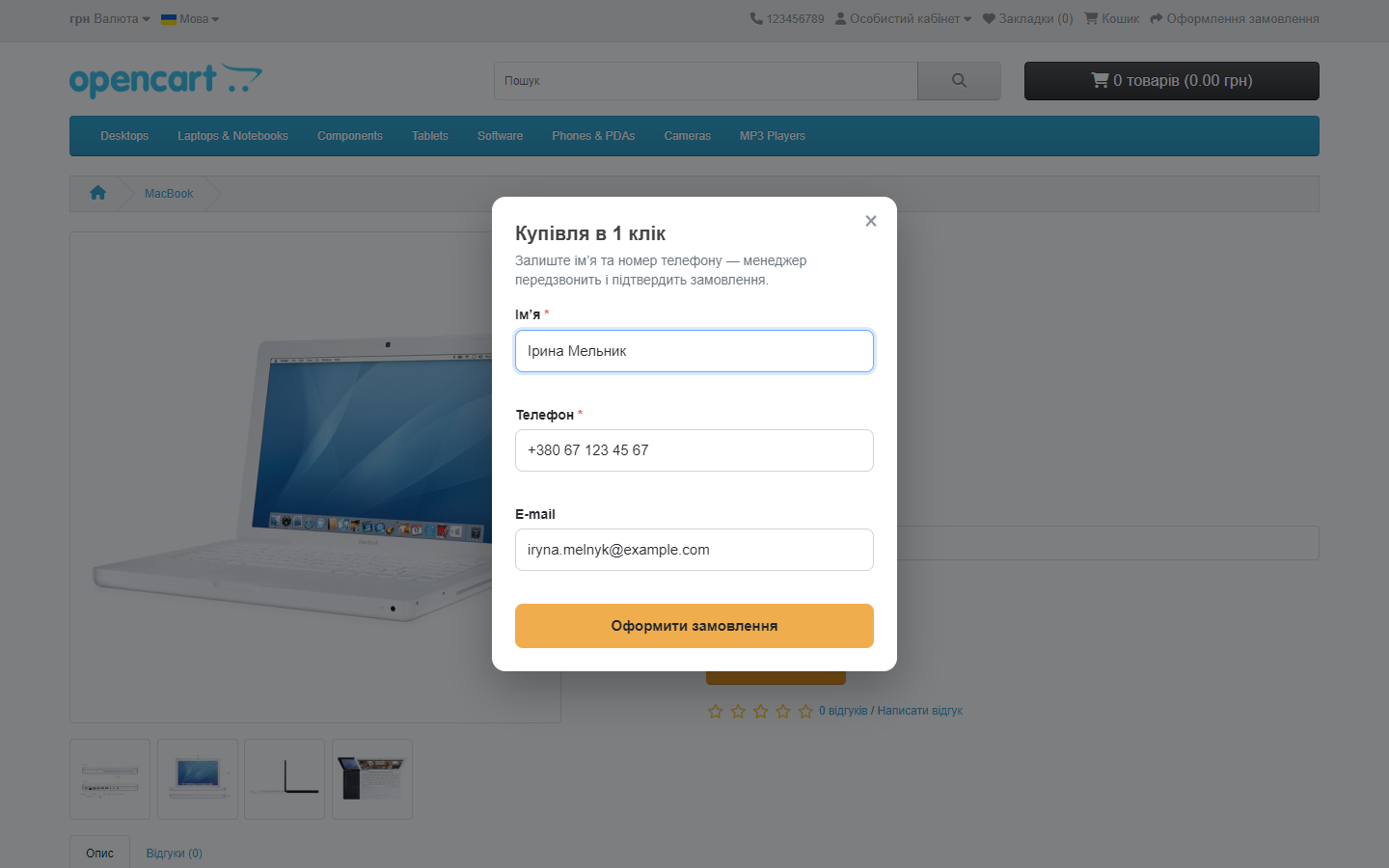
One-Click Order modal on an OpenCart 4 product page
The quick-order form in OpenCart. The markup inherits your theme’s buttons and typography, so the window doesn’t look out of place. Required fields are name and phone; e-mail, city and comment can each be switched on separately in Pro.

What the admin gets

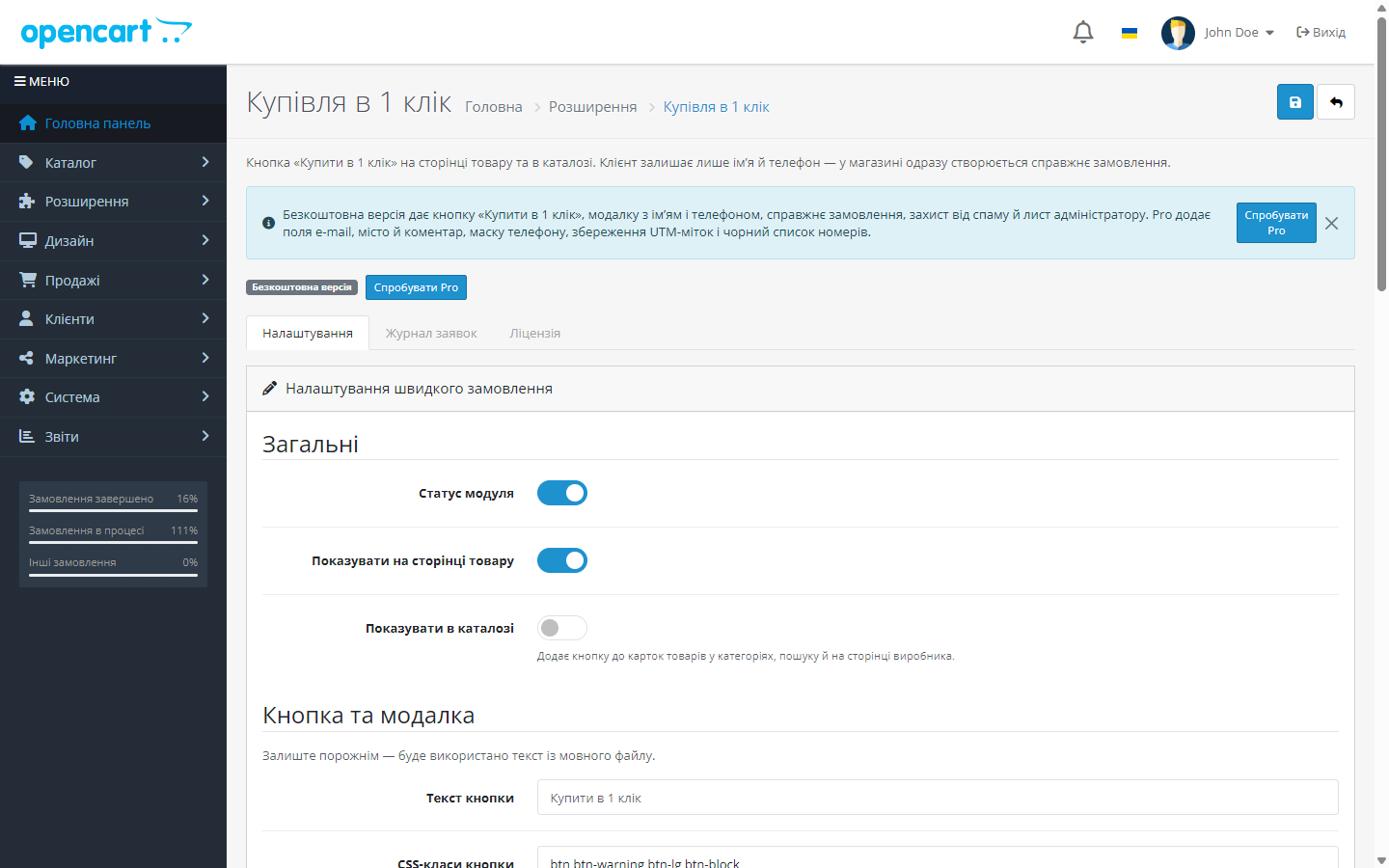
One-Click Order module admin page in OpenCart 4, free version
Fresh install: a “Free version” badge and a “Try Pro” button. Settings are split across three tabs — “Settings”, “Request log” and “License”.
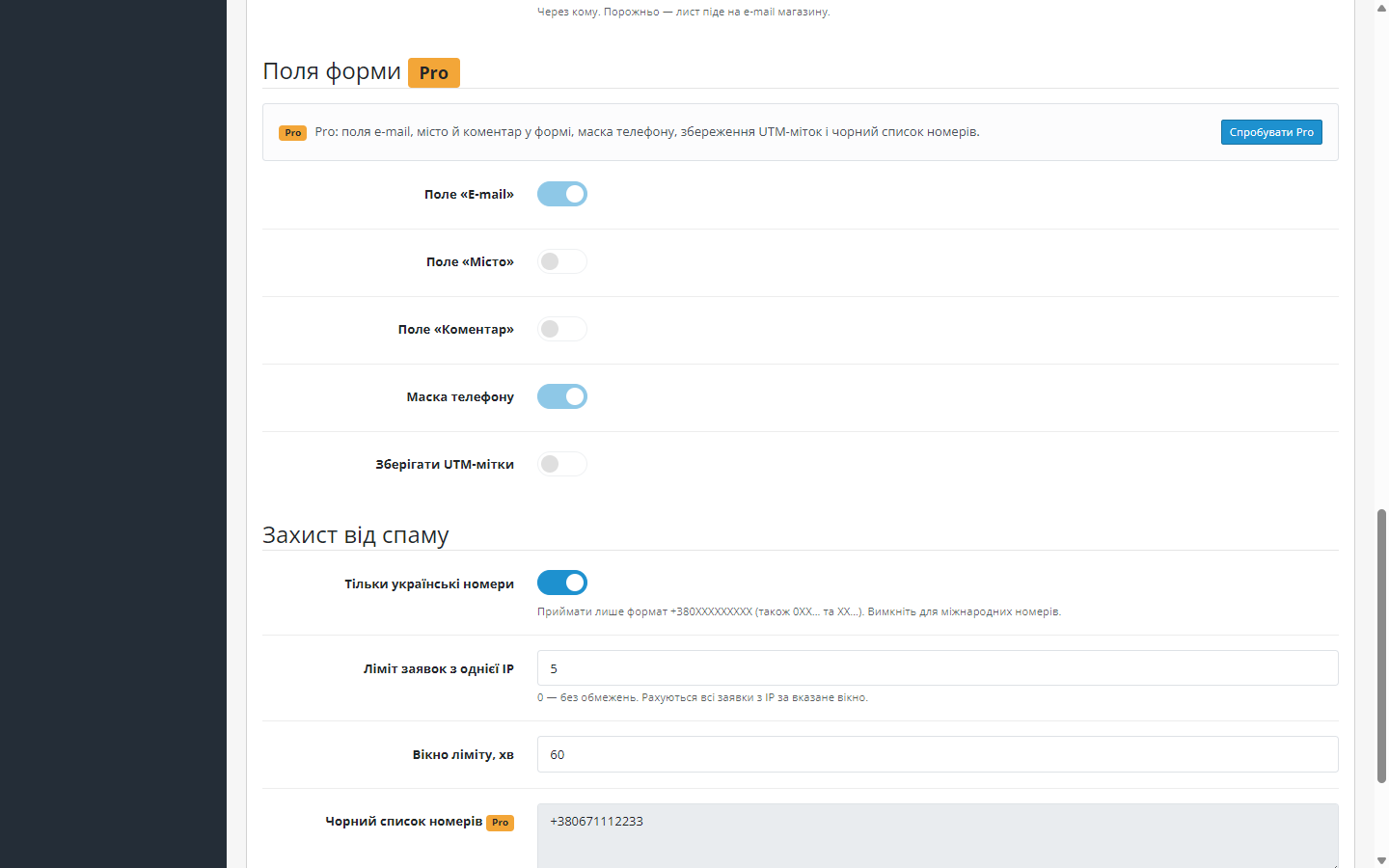
Pro fields of the One-Click Order module shown greyed out with a Pro badge
The Pro boundary is visible right where it applies: the e-mail, city, comment, phone mask, UTM and blacklist fields stay in place, but greyed out, with a Pro badge and one line about what each gives you.
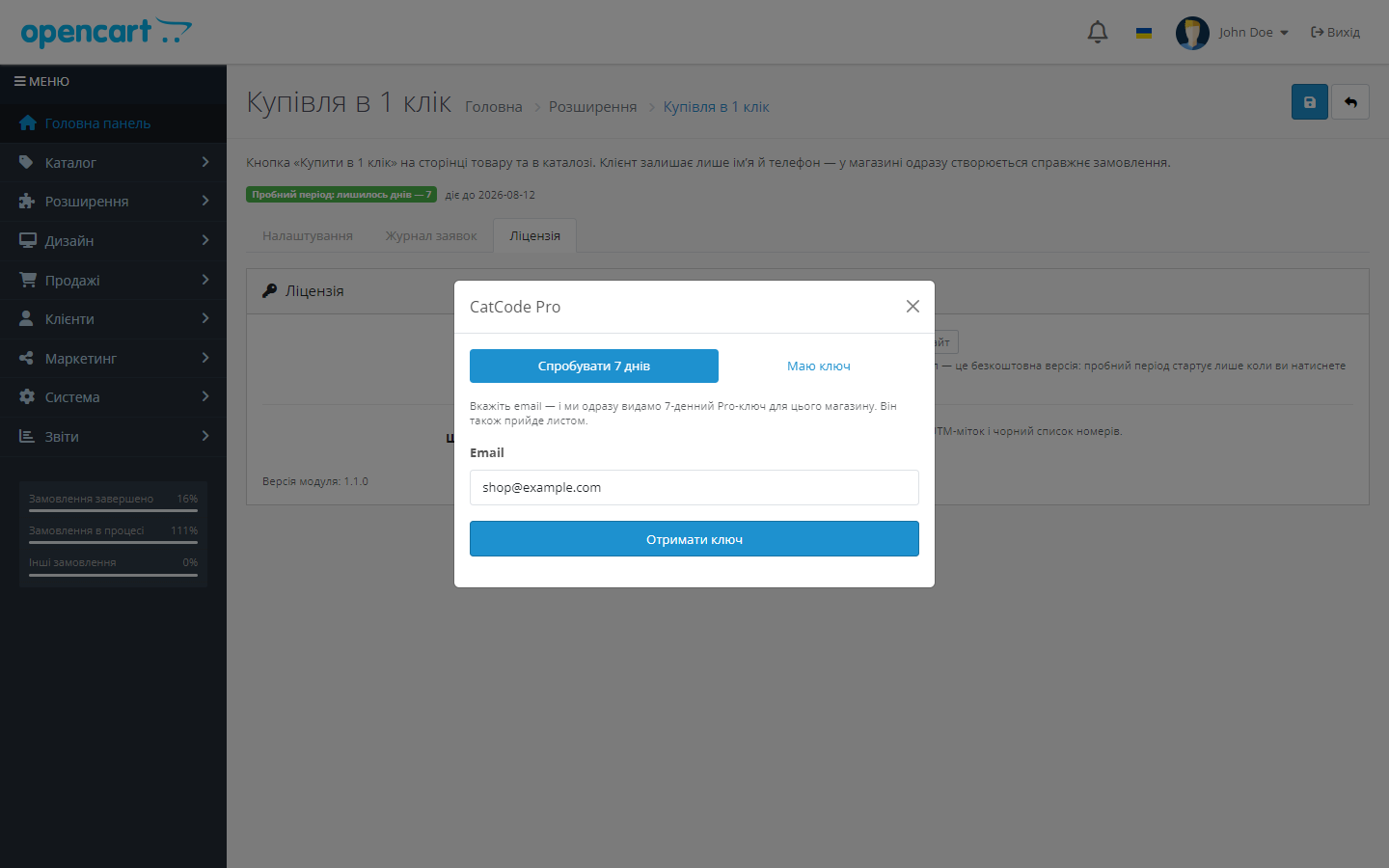
CatCode Pro modal with 'Try 7 days' and 'I have a key' tabs
The trial only starts on a click: “Try 7 days” tab → email → the key is shown right in the modal and duplicated by e-mail. The second tab is for a key received after payment.
One-Click Order request log in the OpenCart 4 admin
Request log: date, name, phone, IP, a link to the order created and the processing result — including filtered-out attempts (blacklist).

How it works, step by step

  1. The customer clicks “Order in one click” on the product page or straight in the catalogue.
  2. A modal opens with the product name and the fields. Only name and phone are required.
  3. The form is checked: CSRF token, a hidden honeypot trap, a minimum fill-in time, a per-IP request limit, and in Pro, a phone blacklist as well.
  4. A real order is created through the standard checkout model, followed by addHistory() into the status set in the settings — so it lands in every report and CRM integration. The payment method is a pseudo-method, “Manager call”, with no payment gateway involved.
  5. The manager gets an e-mail with the contact details and order contents, and the request goes into the log. The customer sees a thank-you message in the modal or is taken to a “Thank you” page, depending on the setting.
  6. With Pro, the form gains e-mail, city and comment fields, the phone field gets an input mask, UTM tags and the referrer are written to the order meta, and a phone blacklist filters out known spammers.

Pricing

1,290 UAH — a one-off purchase. The licence is perpetual: you pay once, updates and technical support are included in the price. One key covers one domain and its subdomains.

Moving the store to a different domain? Deactivate the licence on the old one and activate it on the new one yourself, from your account.

The licence is perpetual — nothing expires or gets switched off. One key, one domain; when you move the store, deactivate the licence on the old domain and activate it on the new one yourself.

Trial first, payment after. The trial only starts on a click: in the module’s admin, click “Try Pro”, enter your email — and a 7-day Pro key is issued right in the modal and arrives by e-mail. You can test the extra fields, phone mask, UTM and blacklist in your own store before buying. That’s exactly why there’s no refund after payment — you see the module at work before you pay.

Technical requirements

  • OpenCart 4.0.2 – 4.1.x — build cc_quickorder.ocmod.zip v1.1.0
  • OpenCart 3.0.2 – 3.0.5.0 — separate build cc_quickorder-oc3.ocmod.zip v1.0.0
  • OpenCart 2.3.0.0 – 2.3.0.2 — separate build cc_quickorder-oc2.ocmod.zip v1.0.0
  • PHP 7.4+ for the OC3 and OC4 builds (tested on 8.1–8.3); the 2.3 build still runs on PHP 5.6 and 7.0
  • No external services or API keys: everything runs inside your own store

Under the hood

  • A real order, not an entry in a separate table. It’s created through the checkout model, so it lands in “Orders”, in reports and in every CRM integration exactly like a normal checkout order.
  • A hidden payment method. So no technical identifier shows up in the admin, the module tags quick orders with a pseudo-method, “Manager call” — it’s never offered to the customer at checkout.
  • Four independent anti-spam layers: a one-time token, a honeypot field, a minimum form-fill time and a per-IP request counter within a set window. Each can be switched off independently; a limit of 0 means no limit.
  • Phone normalisation. 0XXXXXXXXX, 380XXXXXXXXX and +380XXXXXXXXX are all accepted, with spaces, dashes and brackets — the order always stores a single consistent format.
  • Dependency-free frontend: its own CSS and plain JavaScript, no external CDNs. The modal is only rendered after the click, so it has no effect on product page speed.
  • Three separate ports. OC4 — a native extension (PSR-4, events, Twig, system/library/cc_quickorder/); OC3 — a port with an install.xml and a Bootstrap 3 admin; OC 2.3 — a port for PHP 5.6/7.0, where the button and modal are inserted via standard view events, with no core edits at all. The logic, anti-spam and Pro gate are identical across all three branches.

How to install

  1. OpenCart 4.x: download cc_quickorder.ocmod.zip and install it via “Extensions → Installer”, then “Extensions → Modules → One-Click Order” → “Install” → “Edit”.
  2. OpenCart 3.0.x: download cc_quickorder-oc3.ocmod.zip, install it via “Extensions → Installer”, then refresh the modification cache in “Extensions → Modifications”.
  3. OpenCart 2.3.x: download cc_quickorder-oc2.ocmod.zip, unpack it and upload the contents of the upload/ folder to the store root via FTP or your hosting’s file manager. The stock 2.3 Installer only copies files over FTP and doesn’t work on most hosting, so installation is manual. Then go to “Extensions → Modules → Quick Order” → “Install” → “Edit”. The core isn’t patched: the install.xml in the archive only registers the extension in the modifications list.
  4. Enable the module status, choose a status for new orders and enter the manager’s e-mail. If the field is left empty, the e-mail goes to the store’s own address.
  5. Edit the button and modal text if needed, and turn on display in the catalogue.
  6. For Pro: click “Try Pro” → the “I have a key” tab → paste in the key from the payment e-mail → “Activate”. The free trial starts from the same modal, on the “Try 7 days” tab.

Version history

1.1.0 (OpenCart 3.x) — 11 August 2026
The OpenCart 3.0.x build has moved to server-side licensing: previously any non-empty key unlocked Pro, and the trial period was stamped in on install — now a fresh install is the free version, the 7-day trial only starts on a click, and saving settings no longer wipes an activated key.
1.1.1 (OpenCart 4.x) — 11 August 2026
Fixed the phone mask: the number 0670001122 was turning into +380 06 700 01 12, because the mask kept re-printing the prefix into the field and the next keystroke read it back as part of the number. Fixed the blacklist: a number stored with spaces (+380 (67) 000-11-22) fell apart into fragments and a blocked customer could place an order without a hitch. Script URLs now update by file date — otherwise fixed JavaScript never reached a visitor whose browser already had the old version cached.
1.0.0 (OpenCart 2.3) — 9 August 2026
A separate build for OpenCart 2.3.0.0–2.3.0.2, PHP 5.6 and 7.0. The core isn’t modified: the button, modal and assets are inserted through six standard view events (product, category, search, specials, manufacturer page, footer). In the catalogue, the button sits next to the core “Add to cart” button, and also in the related-products block. The client-side JavaScript has been rewritten in ES5 — stores still on 2.3 still see traffic from browsers where modern syntax simply won’t run. Server-side licensing and the 7-day click-to-start trial work the same way as on the newer branches.
1.1.0 — 5 August 2026
Rebuilt Free/Pro model for the OpenCart 4.x build. A fresh install no longer switches anything on: the trial only starts on a click in the modal (“Try 7 days” / “I have a key” tabs), the key is checked against the CatCode licensing server with a 14-day grace period if it’s unreachable, and saving settings no longer starts the trial. Pro fields are shown greyed out with a badge and a one-line benefit note. Two bugs fixed: on a fresh install the form was losing its default values (the first “Save” click switched off the per-IP request limit), and the “Request log” tab, because of an escaped & in the URL, loaded the login page instead of the table.
1.0.0 — 28 July 2026
First release of both builds. OpenCart 4.x: a native extension (PSR-4, events, Twig, system/library/cc_quickorder/). OpenCart 3.x: a separate port with an install.xml and a Bootstrap 3 admin. Both have a “Request log” tab, a trial-period badge, the same anti-spam mechanisms and the same Pro gate.

Frequently asked questions

Is this a real order or just a request?

A real one. The order goes through the standard checkout model followed by addHistory() into the status set in the settings, so it lands in "Orders", in reports and in your CRM integrations.

Which phone formats are accepted?

0XXXXXXXXX, 380XXXXXXXXX and +380XXXXXXXXX — with spaces, dashes and brackets. Everything is normalised to a single +380XXXXXXXXX format.

How is the module protected from spam?

Four independent layers: a one-time token, a hidden honeypot field, a minimum form-fill time and a per-IP request counter. Pro adds a per-minute limit and a phone blacklist.

Is it one build for OpenCart 3 and 4?

No, it's two separate ports in one package: cc_quickorder.ocmod.zip for 4.0.2–4.1.x and cc_quickorder-oc3.ocmod.zip for 3.0.2–3.0.5.0. Settings, the request log and anti-spam are the same.

Does the module change the store's theme?

No. The button is added via an event, and the modal is rendered in the footer only after the click. Theme files aren't edited, so once the module is removed the product page stays exactly as it was.

Where can I see what's come in?

The module's admin has a "Request log" tab: the last 100 requests with date, name, phone, IP, the created order number and the processing result.

Does the licence need renewing?

No. For OpenCart the licence is perpetual: one payment, and the extra fields, the mask, UTM and the "whole cart" button stay with you. Only the 7-day trial ends — after it Pro switches off and the free version keeps working.

Questions about the module?

Message us on Telegram — we reply within the working day. We will help with setup, compatibility and key activation.

@catcode_support

Not quite what you are looking for?

We build custom modules for WordPress, WooCommerce, OpenCart and Shopify. Tell us about your task and we will prepare an estimate.

Order a custom module