
WordPress
Nova Poshta Premium — Нова Пошта для WooCommerce
Free + Pro
1 290 грн/рік
v1.3.0
 All Access4 990 ₴ на рік
 Аудит сайтуPDF-звіт на пошту за 3 хвилиниПеревірити сайт
Для щоденних задач
Стиснення фотоРозмір, якість і WebP пачкоюГенератор QRПосилання, Wi-Fi, оплата на IBANКалькулятор ПДВ20, 14, 7 % і сума прописомТранслітераціяЗа постановою КМУ № 55Перевірки сайту
PHP і плагіниВерсія PHP, WordPress, плагіниФід Google MerchantПоля, ціни, GTIN, фотоПошта доменуSPF, DKIM, DMARC, чорні спискиГотовність до AI-пошукуllms.txt, боти, розміткаУсі 9 інструментівВведіть щонайменше 2 символи


Інтеграція WooCommerce з Новою Поштою: вибір міста й відділення прямо в чекауті, живий розрахунок тарифу та створення ТТН. Преміум — післяплата, авто-оновлення статусів, зворотні ТТН, звірка післяплат, webhooks.
Без звуку теж зрозуміло: субтитри українською
Безкоштовна версія працює без обмеження в часі. Pro додає решту функцій з таблиці.


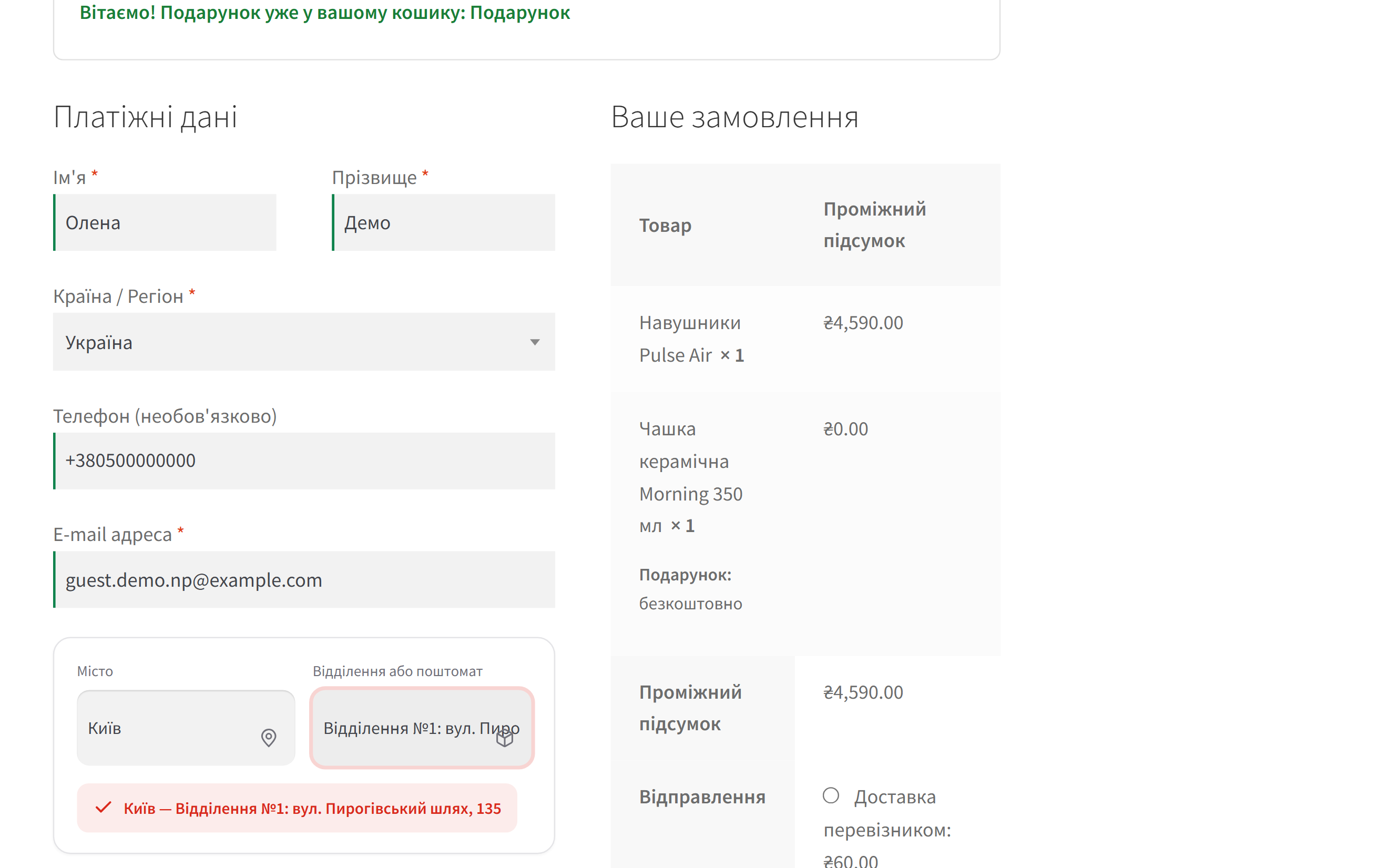
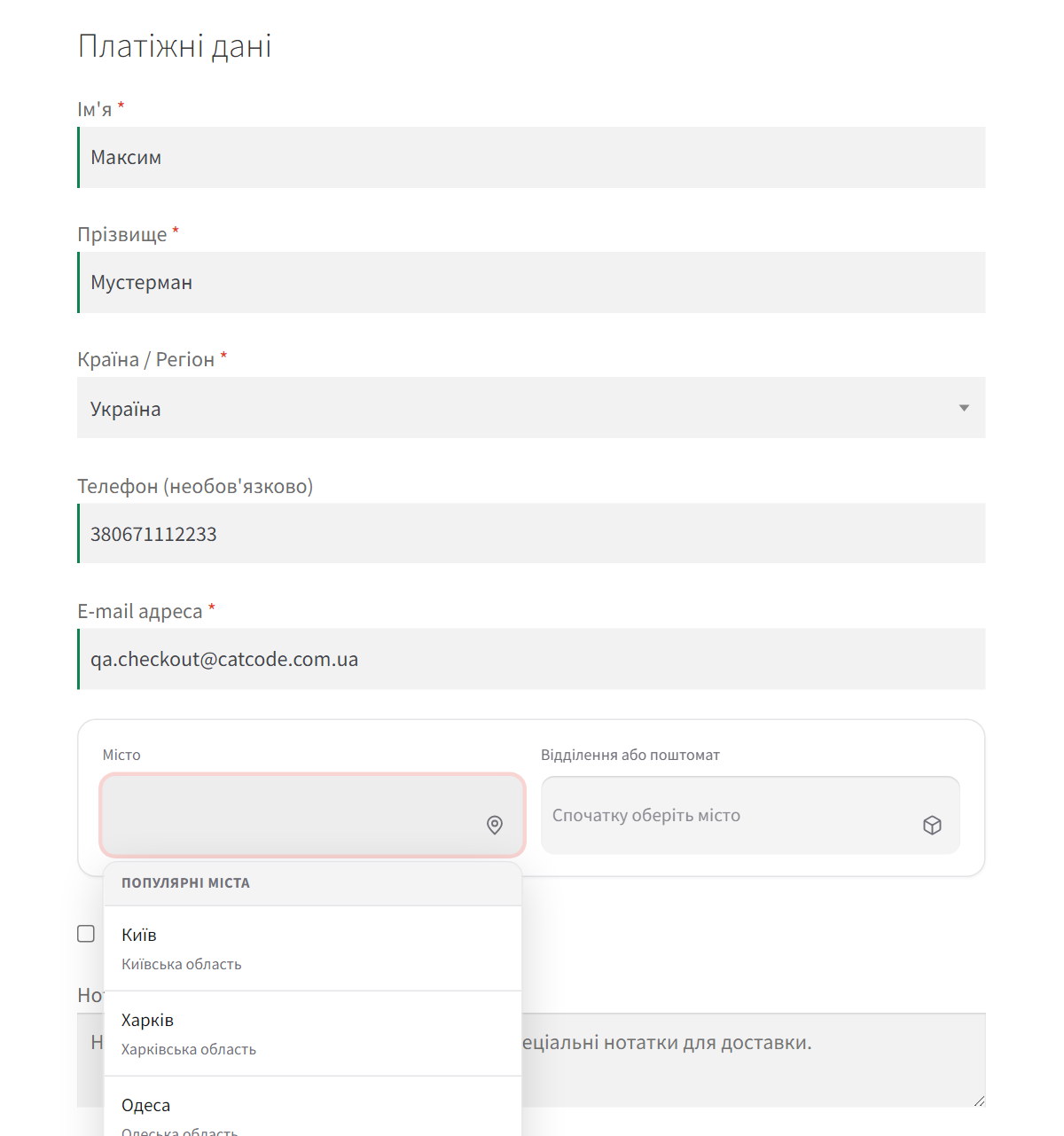
У чекауті замість звичного набору полів адреси покупець бачить один блок: місто з підказками (або список популярних міст в один клік) і список відділень та поштоматів цього міста.

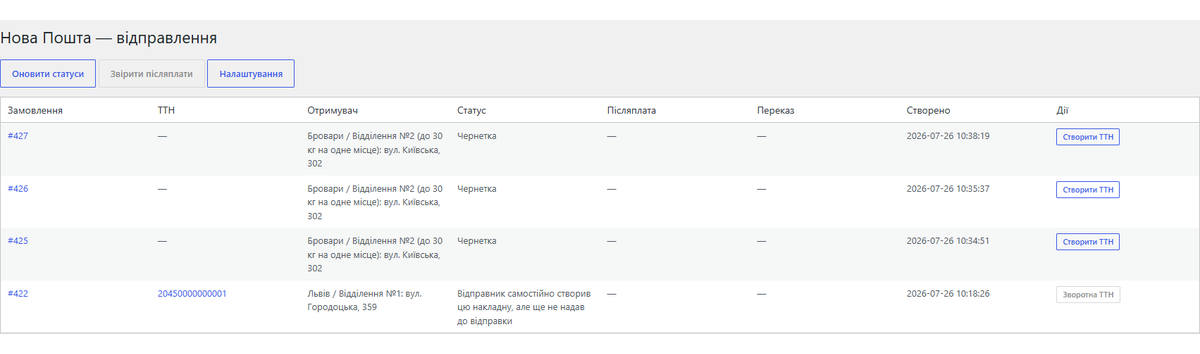
Усі відправлення — в одному журналі: номер ТТН із посиланням на трекінг, отримувач, поточний статус, суми післяплати й номери грошових переказів.

Модуль додається як звичайний метод доставки WooCommerce. Усі налаштування — на одній сторінці: ключ API, профіль відправника, правила ціни, вигляд віджета й автоматизація ТТН.

Свіжий інстал — безкоштовна версія, нічого не вмикається само. Кнопка «Спробувати Pro 7 днів» → e-mail → ключ одразу у вікні і листом.

Переносите магазин — відв’яжіть ліцензію на старому домені й активуйте на новому самі. Для студій — ключі на 5, 25 сайтів або без обмежень.
 WordPress 6.2 або новішийWooCommerce 7.0 або новіший (сумісність з HPOS)PHP 7.4 або новішийAPI-ключ Нової Пошти з особистого кабінету
Збій API Нової Пошти більше не зупиняє магазин.
Pro-версія, активована поруч з безкоштовною копією з WordPress.org, більше не вантажить код безкоштовної копії з попередженнями PHP на кожному запиті.
У замовленні з відділенням більше немає другого рядка адреси з акаунта покупця (квартира, під’їзд): відділення — це вся адреса доставки.
Англомовний сайт: блоковий чекаут більше не зупиняється мовчки, коли в акаунті покупця не вказана область.
Збережена адреса покупця в акаунті більше не замінюється відділенням.
Віджет Нової Пошти з’являється лише тоді, коли обрано саму Нову Пошту: раніше в блоковому чекауті він відкривався й при Укрпошті чи Meest.
Куплена ліцензія лишається вашою: Pro-можливості працюють і після завершення строку ліцензії — строк покриває оновлення й підтримку.
Виправлено створення зворотної ТТН.
Одне замовлення більше не отримує дві ТТН.
Пробний період Преміум на 7 днів за кліком: ключ приходить на e-mail, картка не потрібна.
Розрахунок тарифу через API став опцією і за замовчуванням вимкнений.
Віджет вибору відділення для класичного чекауту й Checkout Blocks, живий тариф, створення ТТН, журнал відправлень, трекінг статусів, ліцензія Преміум.
4 модулі одним замовленням — на 40% дешевше, ніж окремо



Nova Poshta Premium для WooCommerce — модуль, який під’єднує ваш магазин до Нової Пошти за 10 хвилин. Покупець обирає місто і відділення прямо в чекауті, вартість доставки рахується за живим тарифом НП, а ТТН створюється з картки замовлення або автоматично — коли замовлення переходить у потрібний статус.
Віджет не просто додається збоку: він замінює поля адреси. Вулиця, місто, область та індекс заповнюються з обраного відділення, тож покупцю нема чого вводити вручну, а у вас у замовленні лишається коректна адреса доставки.
У чекауті замість звичного набору полів адреси покупець бачить один блок: місто з підказками (або список популярних міст в один клік) і список відділень та поштоматів цього міста. Після вибору вартість доставки в підсумку одразу перераховується за тарифом Нової Пошти.
Блок працює і на класичному чекауті, і на чекауті-блоках (Checkout Blocks): вибір зберігається через сесію WooCommerce, тому обидва варіанти поводяться однаково. Якщо покупець обрав Нову Пошту, але не вибрав відділення — замовлення не оформиться, поки вибір не зроблено.
Усі відправлення — в одному журналі: номер ТТН із посиланням на трекінг, отримувач, поточний статус, суми післяплати й номери грошових переказів.
У картці замовлення видно, яке саме відділення обрав покупець, і є кнопка створення ТТН — без переходів у кабінет НП.
Модуль додається як звичайний метод доставки WooCommerce. Усі налаштування — на одній сторінці: ключ API, профіль відправника, правила ціни, вигляд віджета й автоматизація ТТН. Кнопки «Перевірити підключення» і «Тестова перевірка тарифу» одразу показують, чи все налаштовано правильно.
Модуль працює через офіційний API Нової Пошти (api.novaposhta.ua/v2.0). Довідники міст і відділень зберігаються у власних таблицях: міста повністю оновлюються раз на добу, відділення підтягуються по місту при першому запиті й кешуються на 7 днів, тому чекаут здебільшого не чекає на зовнішній запит. API-ключ зберігається в базі в зашифрованому вигляді й ніколи не показується назад у формі. Жодних чужих iframe і підміни шаблонів чекауту — тільки штатні хуки WooCommerce.
Коли API Нової Пошти не відповідає, ваш чекаут працює далі: міста й відділення — з кешу модуля, вартість — останній відомий тариф, а ТТН стають у чергу й створюються самі, щойно Нова Пошта оживе. На тестовому стенді з «завислим» API оформлення замовлення займало 0,2 секунди замість 30.
Не знайшли відповідь? Напишіть у Telegram — відповімо протягом робочого дня.
 @catcode_support
Налаштування, сумісність, активація
@catcode_support
Налаштування, сумісність, активація
Лише API-ключ із кабінету Нової Пошти (Налаштування → Безпека → Ключі API). Окремий договір із розробником не потрібен.
У Free — вибір відділення в чекауті, розрахунок тарифу, створення ТТН і журнал відправлень. Pro додає післяплату в ТТН, авто-оновлення статусів, зворотні ТТН, звірку післяплат і вебхуки.
Так. Вибір зберігається через сесію WooCommerce, тому класичний чекаут і Checkout Blocks працюють однаково.
Ні. Блок вибору відділення вбудовується у наявну форму, а поля адреси доставки заповнюються автоматично з обраного відділення.
WordPress 6.2+, WooCommerce 7.0+, PHP 7.4+.
Поки що жодного відгуку. Будьте першим.
Поки питань немає. Запитай — ми відповімо протягом 24 годин.
Робимо кастомні модулі під WordPress, WooCommerce, OpenCart і Shopify. Розкажіть про задачу — підготуємо оцінку.
Замовити кастомний модуль
—

Помічник CatCode
Щойно


Помічник CatCode
Онлайн

Допоможу із задачею по сайту
Опишіть задачу по сайту — підберу готовий модуль або передам розробнику з оцінкою. Модулі, доробки, верстка, інтеграції, швидкість, перенесення, технічне SEO.
