OpenCart
Знижки від суми та N+1 для OpenCart
Free + Pro
990 грн
v1.0.2
 All Access4 990 ₴ на рік
 Аудит сайтуPDF-звіт на пошту за 3 хвилиниПеревірити сайт
Для щоденних задач
Стиснення фотоРозмір, якість і WebP пачкоюГенератор QRПосилання, Wi-Fi, оплата на IBANКалькулятор ПДВ20, 14, 7 % і сума прописомТранслітераціяЗа постановою КМУ № 55Перевірки сайту
PHP і плагіниВерсія PHP, WordPress, плагіниФід Google MerchantПоля, ціни, GTIN, фотоПошта доменуSPF, DKIM, DMARC, чорні спискиГотовність до AI-пошукуllms.txt, боти, розміткаУсі 9 інструментівВведіть щонайменше 2 символи
Модуль для OpenCart 2.3–4.x: знижка від суми замовлення сходинками та акції «купи 2 — третій безкоштовно» на товари й категорії, прогрес до знижки в кошику, коректний ПДВ.
Без звуку теж зрозуміло: субтитри українською
Безкоштовна версія працює без обмеження в часі. Pro додає решту функцій з таблиці.


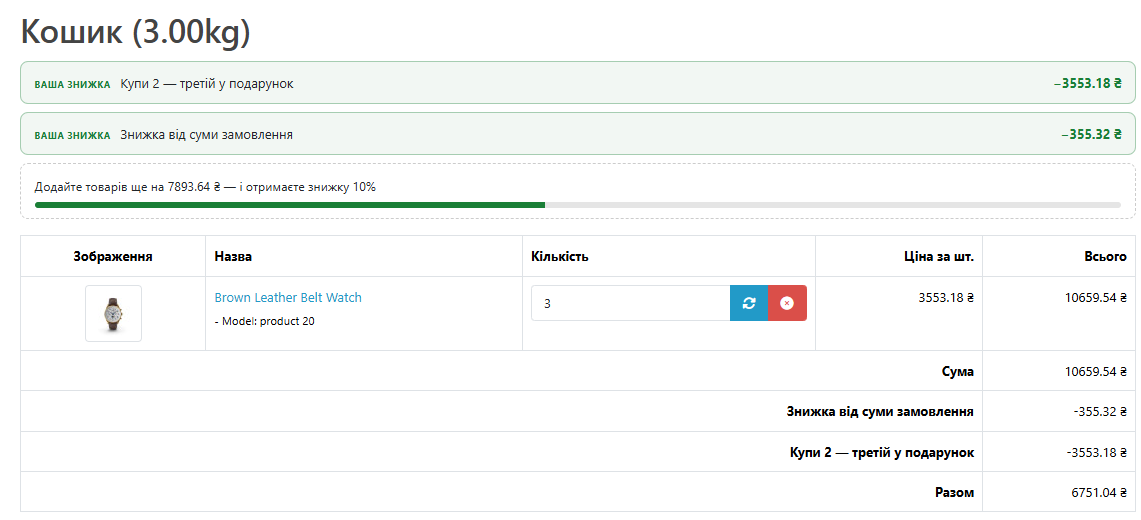
Над таблицею кошика модуль виводить знижки, які вже діють, і рядок «Додайте товарів ще на … — і отримаєте знижку …» зі смужкою прогресу.

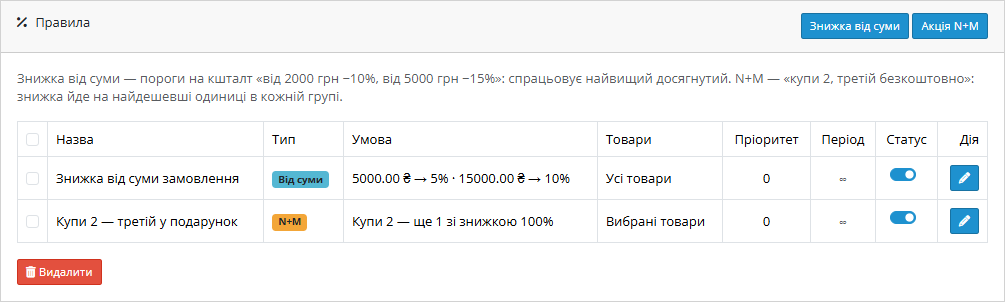
Одна сторінка в «Розширення → Модулі»: список правил, налаштування й ліцензія.

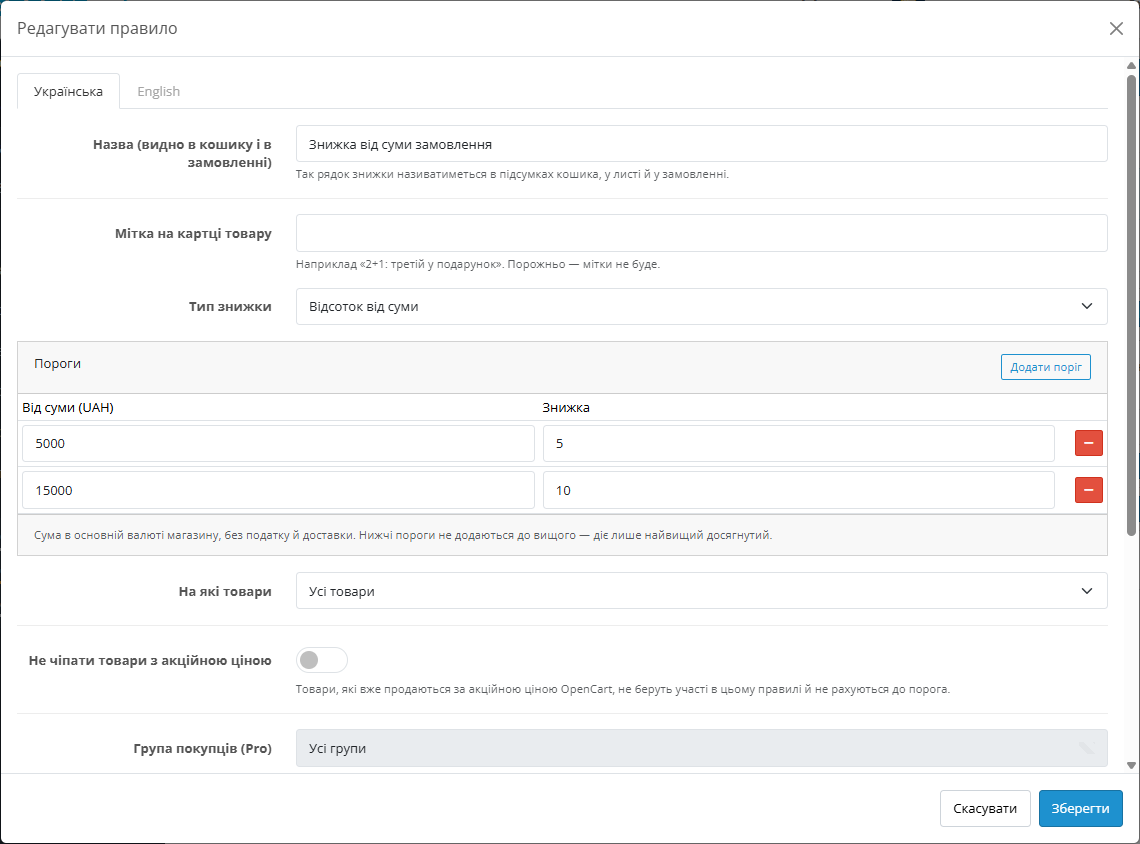
Правило складається з порогів: від якої суми і яка знижка. Спрацьовує найвищий досягнутий поріг, нижчі до нього не додаються.

Свіжий інстал — безкоштовна версія, нічого не вмикається само. Кнопка «Спробувати Pro 7 днів» → e-mail → ключ одразу у вікні і листом.

Переносите магазин — відв’яжіть ліцензію на старому домені й активуйте на новому самі. Для студій — ключі на 5, 25 сайтів або без обмежень.
 Підтримуються OpenCart 4.x, 3.x і 2.3 та ocStore на цих версіях — окремі архіви під кожну гілку. PHP — від 7.0 для 2.3, для 3.x і 4.x — той, на якому працює ваш OpenCart. Модуль протестовано на OpenCart 4.1.0.3, 4.0.2.3, 3.0.5.0 і 2.3.0.2.Модуль працює зі стандартним кошиком OpenCart. Якщо у вас сторонній модуль оформлення замовлення, знижки в підсумках з’являться, якщо він рахує підсумки штатними засобами OpenCart.
Куплена ліцензія для OpenCart працює безстроково.
Кошик і оформлення замовлення знову працюють на драйвері бази PDO, коли правило виключає акційні товари.
Перший випуск.
4 модулі одним замовленням — на 40% дешевше, ніж окремо



Знижки від суми та N+1 — модуль для OpenCart 2.3, 3.x і 4.x, який дає покупцю знижку автоматично: від суми замовлення сходинками («від 5000 грн −5%, від 15000 грн −10%») і за кількість товарів («купи 2 — третій у подарунок»). Без купонів, без правки цін у картках і без коду, який покупець має десь знайти.
Кошик сам показує, яку знижку покупець уже отримав і скільки лишилось додати до наступного порога. У замовленні кожна знижка — окремий рядок зі своєю назвою, тож менеджер і бухгалтер бачать, за що саме зменшилась сума.
Найпростіший спосіб підняти середній чек — пообіцяти більше за більшу покупку. «Від 3000 грн — знижка 10%» працює, тільки якщо покупець про неї знає в ту мить, коли вирішує, чи додати ще один товар. Банер на головній він давно пролистав, а в кошику про акцію нічого не нагадує.
Акції «2+1» так само популярні в одязі, косметиці, товарах для дому. У стандартному OpenCart їх роблять купоном або вручну ставлять ціну — і те, і інше ламається, щойно покупець кладе в кошик різні товари за різною ціною.
Модуль закриває обидва сценарії. Правила налаштовуються один раз, а знижка рахується в кошику для кожного покупця сама.
Над таблицею кошика модуль виводить знижки, які вже діють, і рядок «Додайте товарів ще на … — і отримаєте знижку …» зі смужкою прогресу. Змінив кількість — рядок оновився разом із кошиком. У підсумках кожне правило стоїть окремим рядком, а податок перерахований уже зі знижкою.
Одна сторінка в «Розширення → Модулі»: список правил, налаштування й ліцензія. У списку видно тип правила, умову одним рядком («5000 грн → 5% · 15000 грн → 10%» або «Купи 2 — ще 1 зі знижкою 100%»), на які товари воно діє, період і перемикач. Вимкнене правило не видаляється — наступного сезону його досить знову ввімкнути.
Правило складається з порогів: від якої суми і яка знижка. Спрацьовує найвищий досягнутий поріг, нижчі до нього не додаються. Знижка задається відсотком або фіксованою сумою, а сума рахується без податку й доставки — так само, як «Сума» в підсумках кошика.
Правило можна обмежити категоріями (підкатегорії враховуються самі) або окремими товарами, а товари з акційною ціною OpenCart — виключити, щоб не давати знижку на знижку.
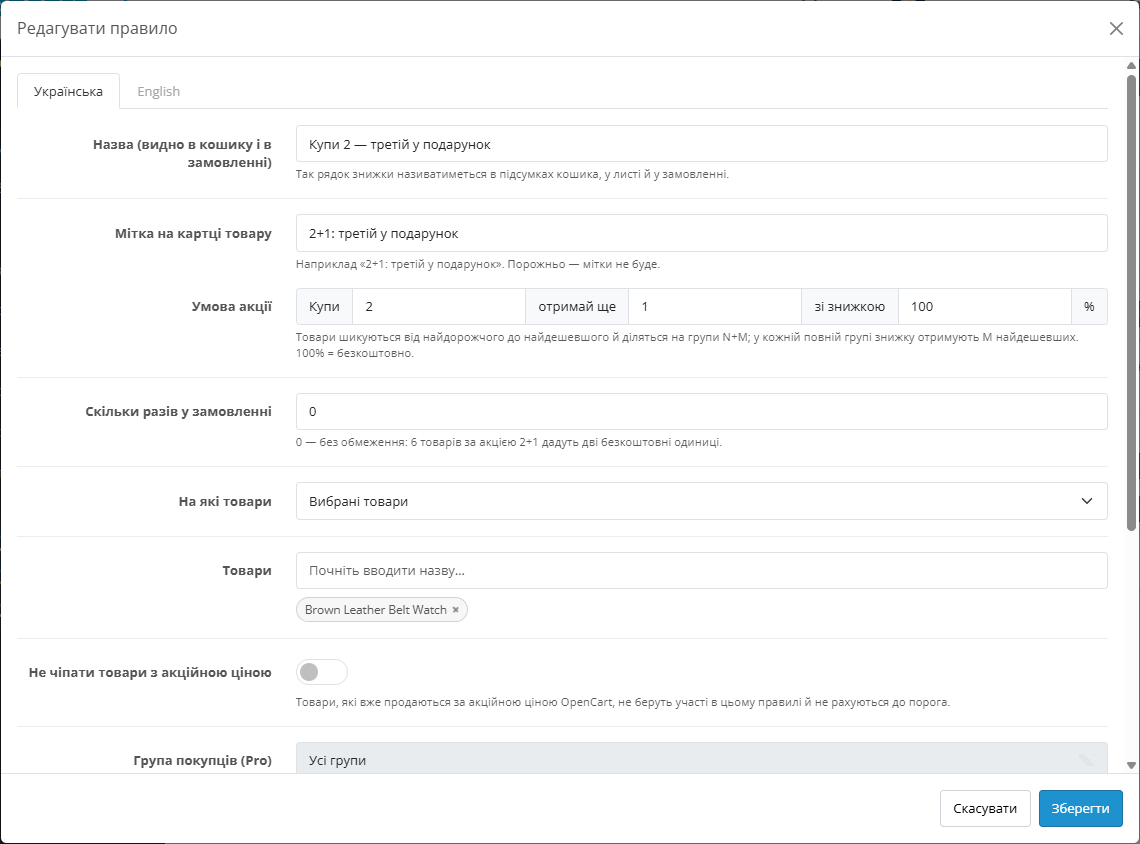
Умова задається трьома числами: скільки купити, скільки отримати і з якою знижкою — 100% означає безкоштовно, 50% — за пів ціни. Можна обмежити, скільки разів акція спрацьовує в одному замовленні.
Якщо товари в акції різні за ціною, модуль шикує їх від найдорожчого до найдешевшого й ділить на групи. У кожній повній групі знижку отримують найдешевші одиниці. Так акцію неможливо «обіграти», поклавши в кошик дорогий товар поруч із дешевим.
За замовчуванням спершу спрацьовують акції N+M, а знижка від суми рахується з того, що лишилось. Одна одиниця товару не отримує дві знижки: подарований товар не рахується до порога суми.
Якщо акції не мають складатися, режим перемикається на «лише одне правило — те, що дає найбільшу знижку».
1. Ви створюєте правило: знижку від суми з порогами або акцію N+M, обираєте товари чи категорії.
2. Покупець кладе товари в кошик. Модуль перевіряє, які правила діють для цього магазину і цього кошика.
3. Спершу рахуються акції N+M, потім найвигідніший поріг знижки від суми на решту кошика.
4. Кожна знижка додається в підсумки окремим рядком, податок зменшується пропорційно товарам, на які вона пішла.
5. Під час оформлення ті самі рядки записуються в замовлення, лист покупцю й рахунок.
Знижка — це окремий «підсумок замовлення» (Order Total) з порядком 4, тобто перед податком: так само влаштований ядровий купон. Модуль не змінює ціни товарів у кошику і не правит файли ядра — ні OCMOD-модифікацій, ні перезапису шаблонів.
Блок у кошику й мітка на товарі додаються подіями OpenCart поверх того, що вже рендерить тема. Правила зберігаються в окремих таблицях; видалення модуля їх не стирає, щоб випадковий клік не забрав у магазину всі акції.
1. Завантажте архів під свою версію: в OpenCart 4.x і 3.x — через «Розширення → Установник розширень». В OpenCart 2.3 установник працює лише через FTP, тому вміст папки upload заливається в корінь магазину.
2. «Розширення → Модулі» → «CatCode Знижки від суми та N+1» → «Встановити». Рядок знижки в підсумках замовлення встановлюється разом із модулем.
3. Відкрийте модуль, на вкладці «Налаштування» увімкніть його і збережіть.
4. На вкладці «Правила» створіть знижку від суми або акцію N+M і перевірте її в кошику.
Не знайшли відповідь? Напишіть у Telegram — відповімо протягом робочого дня.
 @catcode_support
Налаштування, сумісність, активація
@catcode_support
Налаштування, сумісність, активація
Ядрові знижки OpenCart прив'язані до одного товару і кількості цього ж товару, а купон покупець має ввести сам. Модуль дає знижку автоматично: від суми всього кошика або за кількість товарів із категорії, без коду і без правки цін у картках.
Товари шикуються від найдорожчого до найдешевшого й діляться на групи по три. У кожній повній групі безкоштовним стає найдешевший. Так акцію неможливо «обіграти», поклавши в кошик дорогий товар і дешевий.
За замовчуванням так, але одна одиниця товару не отримує дві знижки: товар, що вже пішов в акцію N+M, не рахується до порога суми. Можна перемкнути режим на «лише найвигідніше правило».
Так. Податок зменшується разом зі знижкою пропорційно товарам, на які вона пішла, як це робить ядровий купон. Фіксовані збори на кшталт екоподатку не змінюються.
Так. Кожне правило, що спрацювало, записується в замовлення окремим рядком зі своєю назвою — у листі, рахунку й адмінці видно, за що саме знижка.
Правила лишаються в базі. Після повторного встановлення вони на місці — треба лише знову ввімкнути модуль.
4.x, 3.x і 2.3, а також ocStore на цих версіях.
Для OpenCart — назавжди: одна оплата, без щорічних платежів.
Поки що жодного відгуку. Будьте першим.
Поки питань немає. Запитай — ми відповімо протягом 24 годин.
Робимо кастомні модулі під WordPress, WooCommerce, OpenCart і Shopify. Розкажіть про задачу — підготуємо оцінку.
Замовити кастомний модуль
—

Помічник CatCode
Щойно


Помічник CatCode
Онлайн

Допоможу із задачею по сайту
Опишіть задачу по сайту — підберу готовий модуль або передам розробнику з оцінкою. Модулі, доробки, верстка, інтеграції, швидкість, перенесення, технічне SEO.
