WordPress
Оплата частинами ПриватБанк, monobank і A-Bank для WooCommerce
Free + Pro
990 грн/рік
v1.1.6
 All Access4 990 ₴ на рік
 Аудит сайтуPDF-звіт на пошту за 3 хвилиниПеревірити сайт
Для щоденних задач
Стиснення фотоРозмір, якість і WebP пачкоюГенератор QRПосилання, Wi-Fi, оплата на IBANКалькулятор ПДВ20, 14, 7 % і сума прописомТранслітераціяЗа постановою КМУ № 55Перевірки сайту
PHP і плагіниВерсія PHP, WordPress, плагіниФід Google MerchantПоля, ціни, GTIN, фотоПошта доменуSPF, DKIM, DMARC, чорні спискиГотовність до AI-пошукуllms.txt, боти, розміткаУсі 9 інструментівВведіть щонайменше 2 символи
Плагін оплати частинами для WooCommerce: ПриватБанк, monobank і A-Bank в одному способі оплати, вибір банку покупцем, звірка з банком, журнал заявок і повернення.
Без звуку теж зрозуміло: субтитри українською
Безкоштовна версія працює без обмеження в часі. Pro додає решту функцій з таблиці.


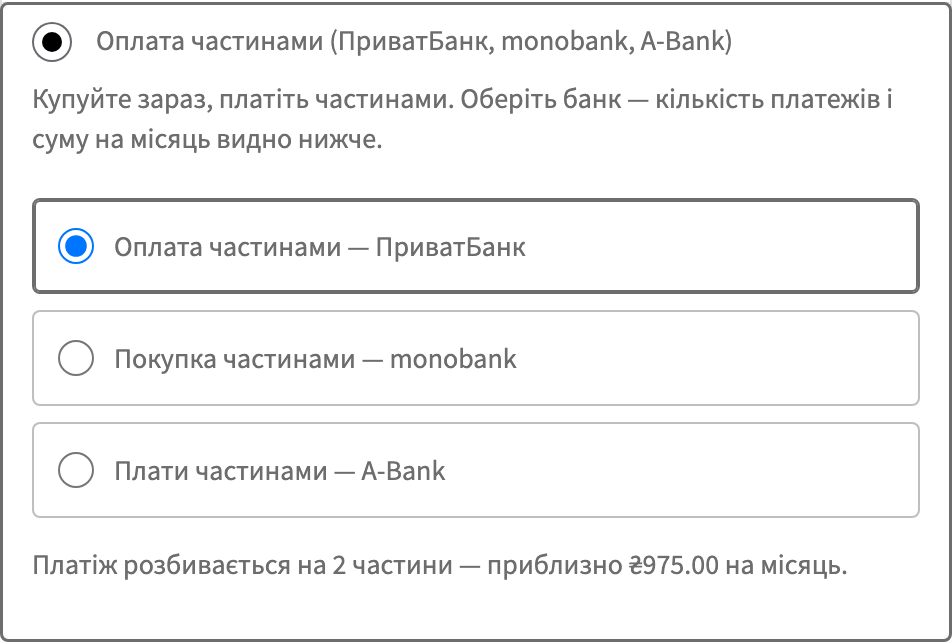
У чекауті з’являється один спосіб оплати — «Оплата частинами». Обравши його, покупець бачить вибір банку: ПриватБанк, monobank або A-Bank.

У налаштуваннях способу оплати вмикаються потрібні банки. Можна лишити один банк, два або всі три — покупець побачить рівно те, що ви ввімкнули.

Сповіщення від банку може не дійти: сайт лежав хвилину, хостинг віддав 502, фаєрвол зрізав запит.

Свіжий інстал — безкоштовна версія, нічого не вмикається само. Кнопка «Спробувати Pro 7 днів» → e-mail → ключ одразу у вікні і листом.

Переносите магазин — відв’яжіть ліцензію на старому домені й активуйте на новому самі. Для студій — ключі на 5, 25 сайтів або без обмежень.
 WordPress 6.2 і новіший, WooCommerce, PHP 7.4 і новіший. Обов’язковий HTTPS — без нього банки не приймуть адресу для сповіщень.Модуль сумісний з HPOS (окремі таблиці замовлень WooCommerce) і працює як зі старим сховищем, так і з новим. Чекаут на блоках підтримується нарівні з класичним.
Monobank і A-Bank у чекауті показують кількість платежів і суму на місяць так само, як ПриватБанк, і без Pro; у блоковому чекауті сума рахується з поточного кошика разом із доставкою.
На сайтах, де кожна мова має префікс в адресі (Polylang), сповіщення ПриватБанку, monobank і A-Bank, перевірки екрана очікування й повернення покупця з ПриватБанку потрапляли на «Сторінку…
Кнопка «Придбати ліцензію» і посилання в адмінці тепер ведуть на сторінку модуля для WooCommerce, а не для OpenCart.
ПриватБанк більше не відхиляє заявку, коли в замовленні є знижка (купон або від’ємна комісія від іншого плагіна).
Виправлено підписи програм ПриватБанку в налаштуваннях: платник комісії був указаний навпаки.
Реквізити банків у налаштуваннях тепер шифруються через libsodium замість XOR.
A-Bank «Плати частинами» третім банком: заявка з підтвердженням у застосунку Abank24, сторінка очікування, звірка статусу з банком.
Перший випуск.
4 модулі одним замовленням — на 40% дешевше, ніж окремо



Оплата частинами ПриватБанк, monobank і A-Bank — один спосіб оплати у WooCommerce, у якому покупець сам обирає банк. ПриватБанк веде його на свою сторінку й дає 2–25 платежів, monobank нікуди не веде взагалі: пуш у застосунку, підтвердження, і покупець уже на сторінці подяки. Магазин нічого не кредитує: всю суму виплачує банк — одразу, а в програмі ПриватБанку PB («Гроші в періоді») частинами протягом строку.
Це не «кнопка розстрочки» з банерів. Це повний цикл: перевірка підпису сповіщень ПриватБанку й monobank, звірка статусу з банком, резерв із підтвердженням, підтвердження видачі товару й повернення.
Розстрочка — найдешевший спосіб підняти середній чек у категоріях, де людина вагається через суму: техніка, меблі, велосипеди, інструмент, дитячі товари. Замість «дорого, подумаю» покупець бачить «приблизно 1 200 грн на місяць» і купує сьогодні.
Магазин при цьому нічого не кредитує й нічим не ризикує: банк виплачує всю суму замовлення (одразу, а в програмі PB ПриватБанку — частинами протягом строку), а платежі покупця далі — це вже стосунки покупця з банком.
Проблема зазвичай не в бажанні підключити розстрочку, а в тому, що у ПриватБанку й monobank різні API, різні сценарії й різна логіка комісій. Тому магазини або підключають щось одне, або тримають два різні модулі, які не знають один про одного. Тут усі три банки — один спосіб оплати з одним журналом.
У чекауті з’являється один спосіб оплати — «Оплата частинами». Обравши його, покупець бачить вибір банку: ПриватБанк, monobank або A-Bank. Поруч показується підказка «приблизно N грн на місяць», порахована від підсумку замовлення, а не від ціни одного товару.
ПриватБанк. Після оформлення покупця перекидає на сторінку банку, там він обирає кількість платежів і підтверджує. Далі повертається в магазин.
monobank. Нікуди не перекидає. Покупець отримує пуш у застосунку monobank і підтверджує там, а магазин у цей час показує сторінку очікування, яка сама доводить замовлення до успіху, щойно банк відповість. Для покупця це виглядає так, ніби оплата пройшла прямо на сайті.
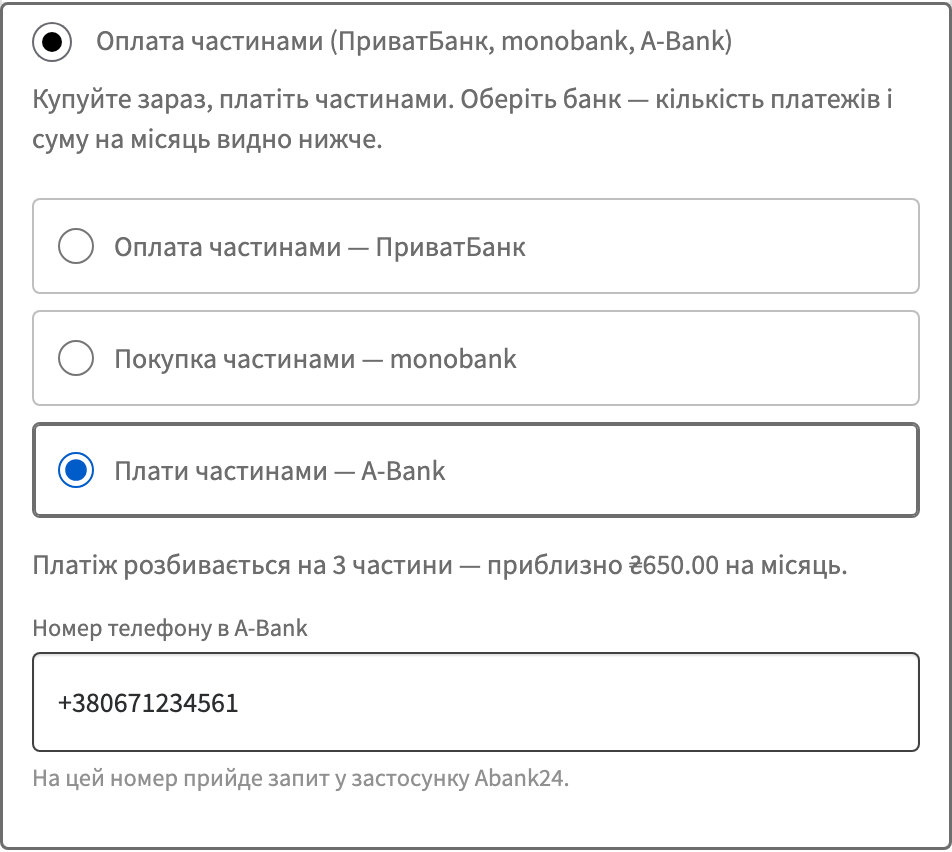
A-Bank. Так само, як monobank, нікуди не перекидає: покупець вказує номер телефону, отримує запит у застосунку Abank24 і підтверджує там, а магазин чекає на своїй сторінці й сам доводить замовлення до результату.
Працює і класичний чекаут, і чекаут на блоках — окремого налаштування для блоків не потрібно.
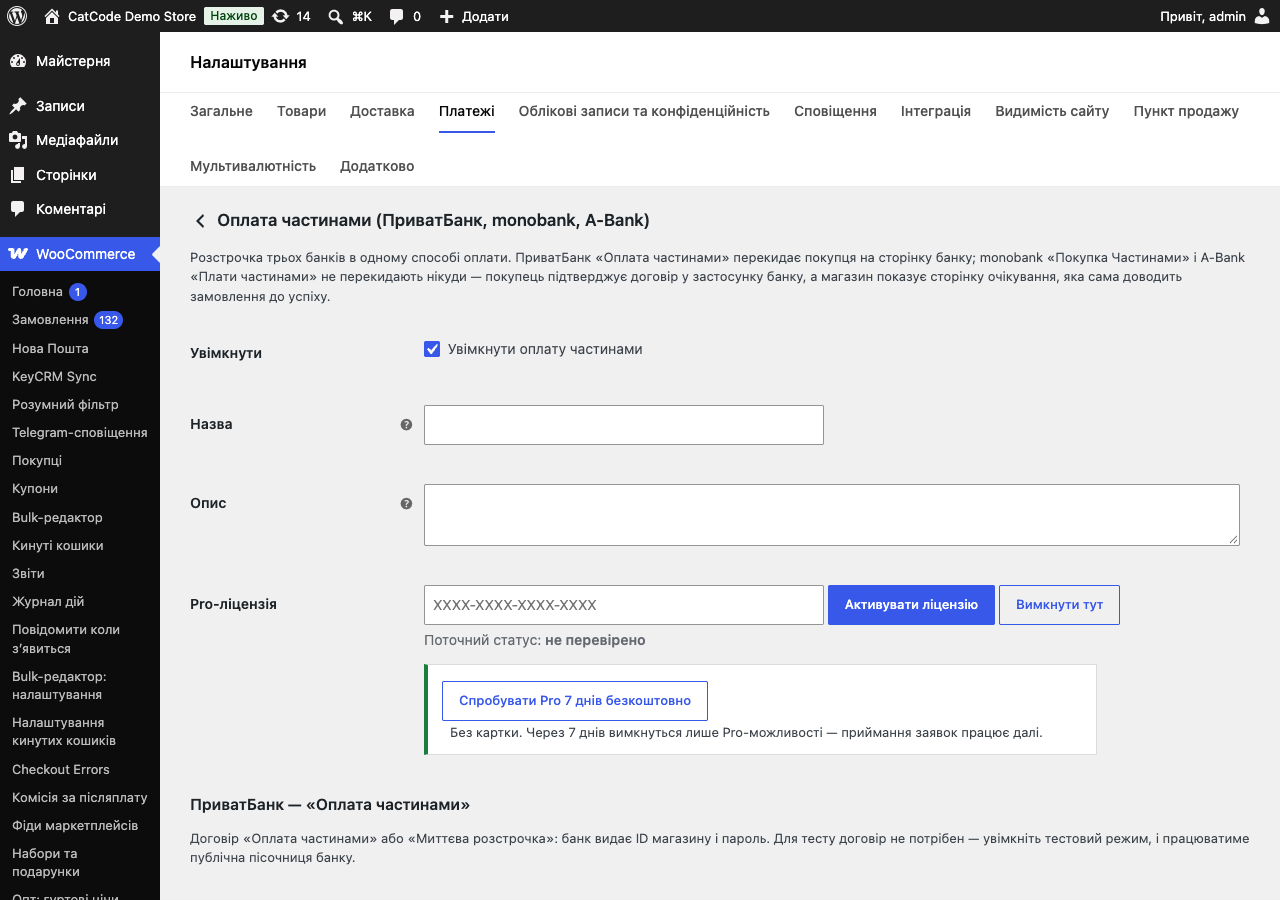
У налаштуваннях способу оплати вмикаються потрібні банки. Можна лишити один банк, два або всі три — покупець побачить рівно те, що ви ввімкнули.
Для ПриватБанку обирається програма під ваш договір: II, PP, IA або PB. Від програми залежить, хто платить комісію банку: у II («Миттєва розстрочка») — покупець, у PP («Оплата частинами») і PB («Оплата частинами. Гроші в періоді», сума надходить частинами протягом строку) — магазин, в IA («Миттєва розстрочка. Акційна») комісію ділять навпіл магазин і покупець. Модуль не вирішує це за вас, він просто працює за тією програмою, яка у вас у договорі.
Для monobank задається store-id і секретний ключ, і вибирається діапазон платежів у межах 3–25.
У Pro-версії до цього додається журнал заявок по всіх банках: хто, коли, на скільки платежів, у якому стані заявка й що відповів банк.
Сповіщення від банку може не дійти: сайт лежав хвилину, хостинг віддав 502, фаєрвол зрізав запит. Модуль, який покладається лише на сповіщення, у цей момент лишає замовлення в «Очікує оплати», хоча гроші вже списані.
Тут інакше. Після повернення покупця (ПриватБанк) або під час очікування (monobank) модуль сам питає банк, що зі заявкою. Тому замовлення закривається навіть тоді, коли сповіщення загубилось дорогою.
Повторне сповіщення нічого не дублює: якщо банк надішле той самий результат двічі, модуль обробить його один раз. І оплачене замовлення не можна відправити в банк удруге — заявка на вже оплачене замовлення просто не створюється.
Потрібен договір. Для ПриватБанку це «Оплата частинами» або «Миттєва розстрочка» — банк видає ID магазину й пароль. Для monobank — договір «Покупка частинами», за ним видають store-id і секретний ключ. Для A-Bank — договір «Плати частинами»: ідентифікатор магазину, секретний ключ і торгова точка.
Для тестів ПриватБанку й monobank договір не потрібен: у них є публічні пісочниці, і модуль має тестові режими під них. Тобто ви можете повністю прогнати чекаут, сповіщення й звірку ще до того, як підпишете договір, і йти в банк уже з робочим магазином. У A-Bank є тестовий контур із тестовим магазином, але він працює з реальним застосунком Abank24: номер покупця має бути клієнтом A-Bank.
ПриватБанк виплачує суму замовлення після схвалення заявки за умовами вашої програми.
monobank списує перший платіж і виплачує магазину всю суму одразу після схвалення. Сама розстрочка стає активною після того, як магазин підтвердить видачу товару — у Pro це робиться кнопкою в журналі або автоматично за обраним статусом замовлення.
A-Bank виплачує суму за умовами вашого договору «Плати частинами»; розстрочка активується після того, як магазин підтвердить видачу товару.
Підпис кожного сповіщення ПриватБанку й monobank перевіряється до того, як модуль щось зробить із замовленням — це не опція, яку можна вимкнути; сповіщення A-Bank підпису не має й лише запускає звірку з банком. Ключі зберігаються в базі в зашифрованому вигляді.
Статус замовлення міняє тільки звірений із банком результат. Сповіщення для модуля — це сигнал «піди перевір», а не команда «зроби оплаченим».
Модуль не чіпає інші способи оплати й не перевизначає чекаут: він реєструється як звичайний платіжний шлюз WooCommerce і живе поруч із рештою.
1. Завантажте архів у «Плагіни → Додати новий → Завантажити плагін» і активуйте.
2. WooCommerce → Налаштування → Платежі → «Оплата частинами».
3. Увімкніть потрібні банки й введіть реквізити: для ПриватБанку — ID магазину, пароль і програму, для monobank — store-id і секретний ключ, для A-Bank — ідентифікатор магазину, ключ і торгову точку.
4. Увімкніть тестовий режим і прогоніть замовлення в тестовому режимі кожного банку.
5. Вимкніть тестовий режим — і можна приймати.
Не знайшли відповідь? Напишіть у Telegram — відповімо протягом робочого дня.
 @catcode_support
Налаштування, сумісність, активація
@catcode_support
Налаштування, сумісність, активація
Так. Для ПриватБанку — договір «Оплата частинами» або «Миттєва розстрочка» (банк видає ID магазину й пароль), для monobank — договір «Покупка частинами» (store-id і секретний ключ). Для тестових режимів договір не потрібен: обидва банки мають публічні пісочниці.
ПриватБанк перекидає покупця на свою сторінку. monobank не перекидає нікуди: покупець отримує пуш у застосунку, а магазин показує сторінку очікування, яка сама доводить замовлення до успіху, щойно банк відповість.
Одразу після схвалення заявки — банк списує перший платіж і магазину виплачується вся сума. Розстрочка стає активною після того, як магазин підтвердить видачу товару: кнопкою в журналі або автоматично за обраним статусом замовлення.
У ПриватБанку залежить від програми: у II («Миттєва розстрочка») — покупець, у PP («Оплата частинами») і PB («Оплата частинами. Гроші в періоді») — магазин, в IA («Миттєва розстрочка. Акційна») — навпіл, 50/50. У monobank комісію платить магазин, для покупця розстрочка без переплат; комісію з покупця банк бере лише тоді, коли той сам збільшує кількість платежів понад ті, що дав магазин.
Модуль не покладається на сповіщення: після повернення покупця (ПриватБанк) або під час очікування (monobank) він сам запитує стан заявки в банку, тож оплачене замовлення не залишиться в статусі «очікує оплати».
Ні. ПриватБанк підписує сповіщення паролем магазину, monobank — HMAC-SHA256 за секретним ключем. З невірним підписом сповіщення відхиляється з кодом 400 і нічого не змінює.
Так. Вибір банку, кількості платежів і поле телефону monobank працюють і в класичному чекауті, і в блоковому.
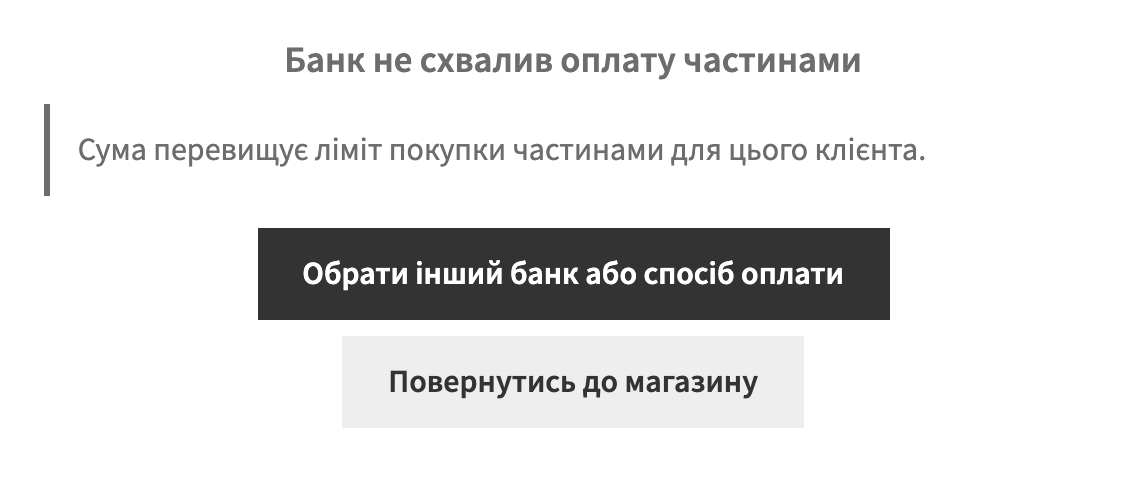
У ПриватБанку — ні, це обмеження банку, і модуль просто не показує цей банк. У monobank верхньої межі немає, ліміт визначає банк для конкретного покупця.
Як і monobank: покупець вводить номер телефону й підтверджує заявку в застосунку Abank24, магазин чекає на своїй сторінці. Потрібен договір «Плати частинами» — банк видає ідентифікатор магазину, секретний ключ і торгову точку.
Поки що жодного відгуку. Будьте першим.
Поки питань немає. Запитай — ми відповімо протягом 24 годин.
Робимо кастомні модулі під WordPress, WooCommerce, OpenCart і Shopify. Розкажіть про задачу — підготуємо оцінку.
Замовити кастомний модуль
—

Помічник CatCode
Щойно


Помічник CatCode
Онлайн

Допоможу із задачею по сайту
Опишіть задачу по сайту — підберу готовий модуль або передам розробнику з оцінкою. Модулі, доробки, верстка, інтеграції, швидкість, перенесення, технічне SEO.
