WordPress
Catcode PRRO Connector — фіскалізація чеків (Вчасно.Каса, Checkbox) для WooCommerce
Free + Pro
1 490 грн/рік
v1.2.3
 All Access4 990 ₴ на рік
 Аудит сайтуPDF-звіт на пошту за 3 хвилиниПеревірити сайт
Для щоденних задач
Стиснення фотоРозмір, якість і WebP пачкоюГенератор QRПосилання, Wi-Fi, оплата на IBANКалькулятор ПДВ20, 14, 7 % і сума прописомТранслітераціяЗа постановою КМУ № 55Перевірки сайту
PHP і плагіниВерсія PHP, WordPress, плагіниФід Google MerchantПоля, ціни, GTIN, фотоПошта доменуSPF, DKIM, DMARC, чорні спискиГотовність до AI-пошукуllms.txt, боти, розміткаУсі 9 інструментівВведіть щонайменше 2 символи
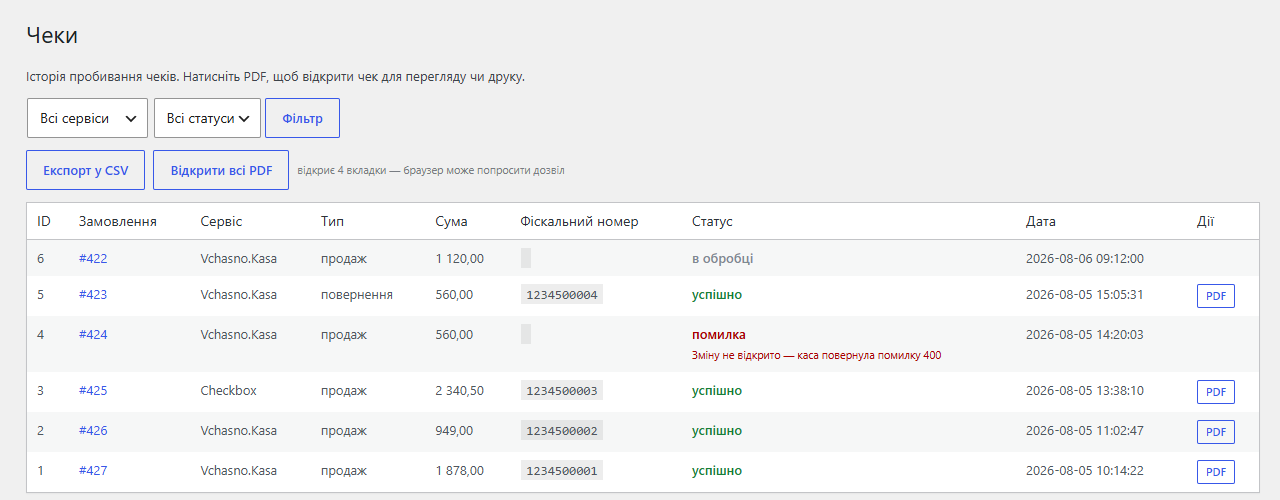
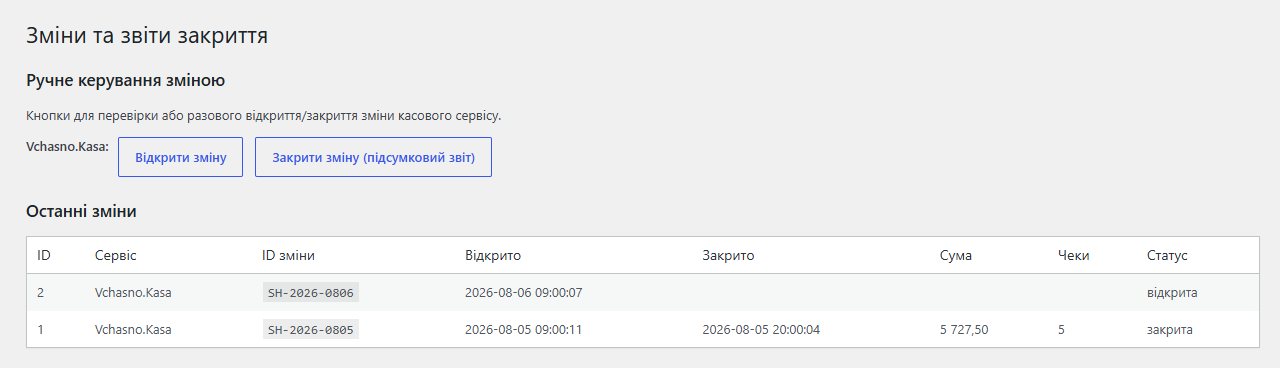
Автоматична фіскалізація чеків у WooCommerce через Вчасно.Касу і Checkbox з резервним перемиканням: чек за статусом замовлення, зміни за розкладом, лист і SMS покупцю, джерело KeyCRM. Базова версія безкоштовна; Pro додає чеки повернення для часткових повернень, повернення через API Вчасно, повтор чека з журналу і звірку змін із Z-звітом.
Безкоштовна версія працює без обмеження в часі. Pro додає решту функцій з таблиці.


З версії 0.5.0 плагін фіскалізує не лише замовлення WooCommerce: він тягне оплачені замовлення з KeyCRM (агрегатор Rozetka, Prom, Instagram і власних сайтів) і пробиває для них чеки через ті самі ПРРО-сервіси.

Магазин із точкою продажу й сайтом продає одну полицю двічі. Куртку пробили на касі годину тому, а сайт і далі показує її в наявності — власник дізнається про це, коли онлайн-покупець уже заплатив.

Свіжий інстал — безкоштовна версія, нічого не вмикається само. Кнопка «Спробувати Pro 7 днів» → e-mail → ключ одразу у вікні і листом.

Переносите магазин — відв’яжіть ліцензію на старому домені й активуйте на новому самі. Для студій — ключі на 5, 25 сайтів або без обмежень.
 WordPress 6.4+ / WooCommerce 6.0+ (HPOS-сумісність, протестовано до WC 10.7)PHP 7.4+Зареєстрований ПРРО у податковій — через кабінет обраного сервісу (Вчасно.Каса, Checkbox)API-ключ з кабінету ПРРО-сервісу і налаштована там ставка ПДВ
Виправлено збереження замовлення: з увімкненим модулем кнопка «Оновити» в картці замовлення WooCommerce не зберігала зміну статусу та інші правки.
Виправлено чек повернення через Вчасно.Каса (Pro).
Оновлення Pro-версії більше не приходять з wordpress.org: WordPress не запропонує замінити її безкоштовною копією з тією самою назвою плагіна.
Pro: офлайн-продажі з каси Checkbox списують залишки на сайті.
Зʼявився Pro-рівень, безкоштовна частина не змінилась.
Оновлення зі збірок до 1.0.0 тепер переносить журнал чеків, журнал змін і мапу замовлень KeyCRM у перейменовані таблиці.
Оновлений український переклад, статуси змін на екрані «Зміни» стали перекладними.
Перший публічний реліз у каталозі WordPress.org.
Екранування всього виводу: посилання на чек і додатковий текст у plain-text листі, згенеровані елементи форм і бейджі на сторінці налаштувань (wp_kses з явним переліком дозволених тегів).
Єдиний префікс catcodeprro_ для всіх опцій, хуків, мета-полів і таблиць.
Вбудоване джерело KeyCRM: фіскалізація оплачених замовлень з Rozetka/Prom/Instagram через KeyCRM Open API (меню «Каса → KeyCRM»).
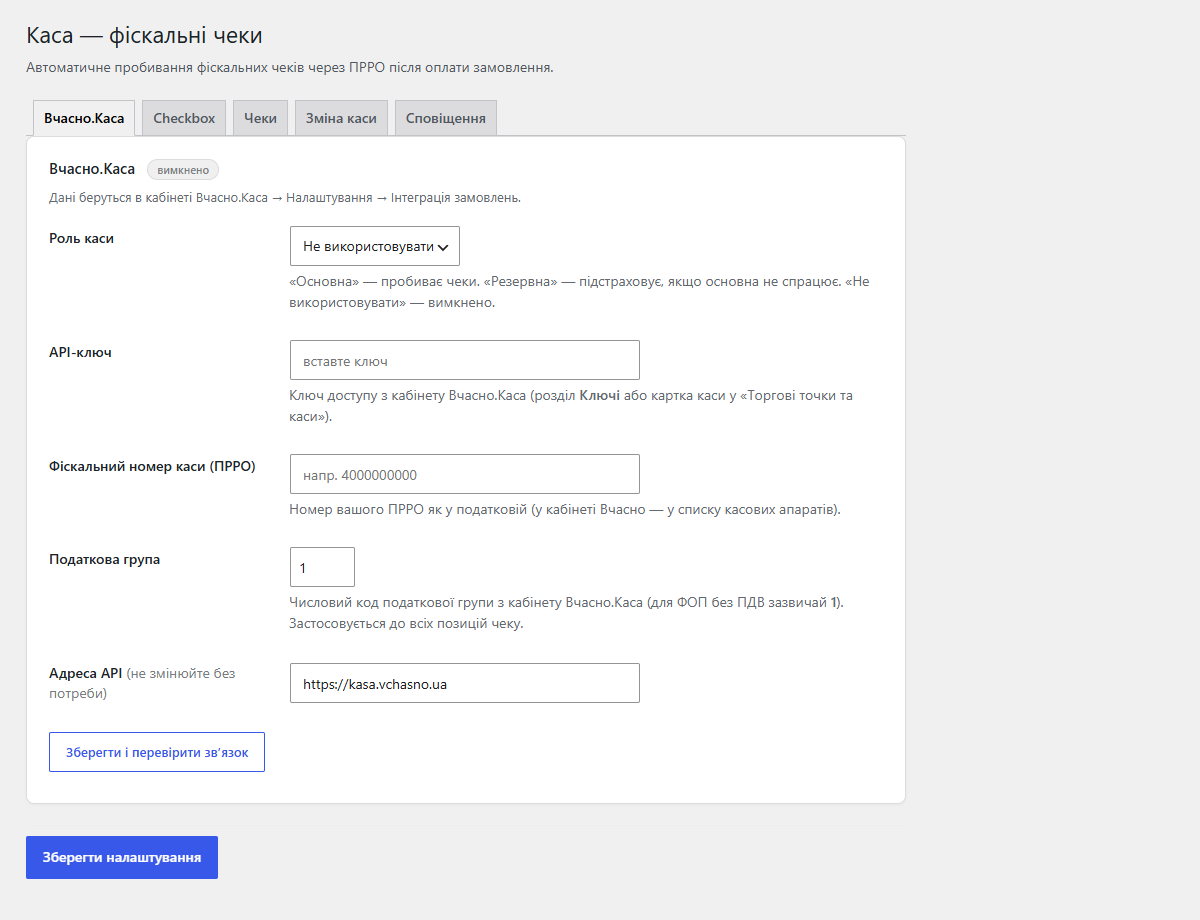
Новий екран налаштувань: один майстер замість вкладок, статус-блок «працює / потребує уваги», кнопка «Зберегти і перевірити зв’язок».
Автоматичне керування зміною каси за розкладом (cron двічі на добу), авто-відкриття зміни при чеку, ручні кнопки на сторінці «Зміни».
Реальні endpoint-и Вчасно.Каса, фікс купонів (sum(items) == total), захист від дублів чеків, УКТЗЕД-коди, нормалізація телефону, кнопка «Пробити чек», CSV-експорт, email-шаблон чека, TurboSMS.
4 адаптери ПРРО і базова автофіскалізація при зміні статусу замовлення.
4 модулі одним замовленням — на 40% дешевше, ніж окремо



Catcode PRRO Connector — плагін фіскалізації для WooCommerce, який зв’язує магазин з українськими програмними РРО і пробиває фіскальний чек автоматично, щойно замовлення переходить у заданий статус (наприклад, «processing» після оплати LiqPay чи Monobank). Один плагін покриває кілька ПРРО-сервісів з fallback між ними, керує зміною каси і сам надсилає чек покупцю на email та SMS.
Можна призначити основний сервіс і резервний (fallback): якщо основний не відповідає, чек автоматично йде через запасний.
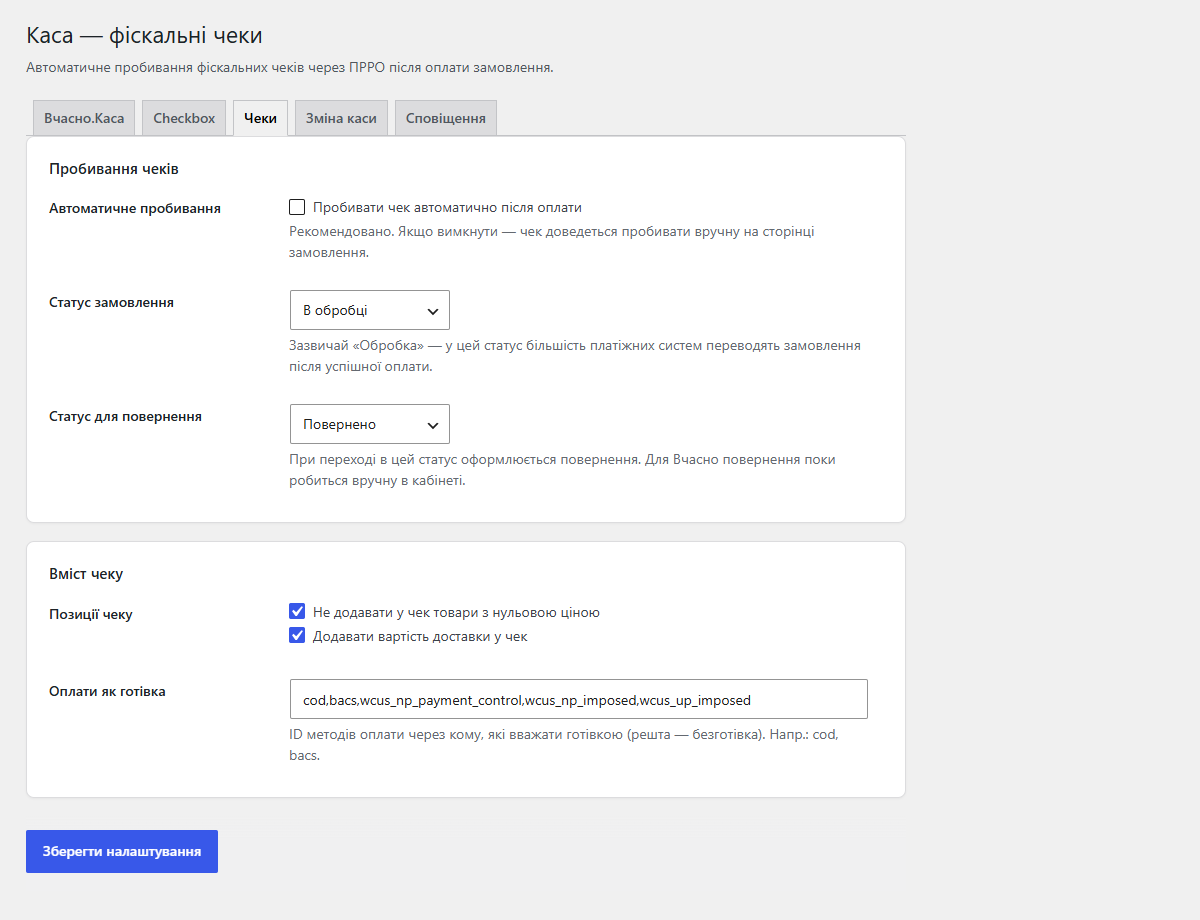
woocommerce_order_status_changed) і надсилає дані чека у ПРРО; якщо зміна каси закрита — спершу відкриває її і повторює чек.Окремо: кнопка «Пробити чек» на сторінці замовлення, список методів оплати, які фіскалізуються як готівка (післяплати Нової Пошти, Укрпошти), доставка у чеку, пропуск нульових позицій, УКТЗЕД-код на кожен товар + дефолтний код.
З версії 0.5.0 плагін фіскалізує не лише замовлення WooCommerce: він тягне оплачені замовлення з KeyCRM (агрегатор Rozetka, Prom, Instagram і власних сайтів) і пробиває для них чеки через ті самі ПРРО-сервіси. Меню «Каса → Замовлення KeyCRM»: API-ключ, інтервал опитування, тригер, журнал запусків, опційний запис посилання на чек назад у замовлення KeyCRM. Кожне замовлення фіскалізується рівно один раз.
Магазин із точкою продажу й сайтом продає одну полицю двічі. Куртку пробили на касі годину тому, а сайт і далі показує її в наявності — власник дізнається про це, коли онлайн-покупець уже заплатив. З версії 1.2.0 Pro закриває цю дірку: кожен фіскалізований чек на касі Checkbox у магазині списує той самий товар із залишку WooCommerce, а чек повернення повертає його назад.
Чеки, які сайт сам пробив для онлайн-замовлень, пропускаються — WooCommerce уже списав для них залишок. Checkbox повторює доставку кілька годин, але той самий чек вдруге нічого не змінює, навіть якщо копії прийшли одночасно. Товар, якого не знайдено, або товар без обліку залишку видно в журналі окремим рядком — одразу зрозуміло, який код у касі виправити.
catcodeprro_after_fiscalize — для власних інтеграцій після успішного чека.Не знайшли відповідь? Напишіть у Telegram — відповімо протягом робочого дня.
 @catcode_support
Налаштування, сумісність, активація
@catcode_support
Налаштування, сумісність, активація
Зареєструвати ПРРО у податковій через кабінет Вчасно, налаштувати ставку ПДВ (без ПДВ для ФОП на ЄП або 20% для платників) і відкрити зміну — без відкритої зміни API поверне помилку. Утім, плагін вміє й сам відкривати зміну за розкладом або на першому продажу.
Ні. Плагін працює лише в адмінці і на хуках замовлень — на вітрину й чекаут нічого не додає.
Так. У безкоштовній версії чек повернення на всю суму пробиває Checkbox, а для Вчасно замовлення зі статусом «повернено» отримує нагадування пробити чек у кабінеті. Pro пробиває чек повернення сам — у тому числі на часткове повернення (одна позиція, тільки доставка чи довільна сума) і для Вчасно через API.
Для Вчасно — кабінет ПРРО (у payload плагін ПДВ не передає). Для Checkbox/Cashalot можна вказати УКТЗЕД-код у редакторі товару.
Повна сума замовлення, як сплатив покупець. Це вимога ЗУ «Про РРО».
Замовлення WooCommerce не змінюються — фіскальні номери лишаються у нотатках замовлень, вже пробиті чеки живуть у кабінеті вашого ПРРО-сервісу.
Поки що жодного відгуку. Будьте першим.
Поки питань немає. Запитай — ми відповімо протягом 24 годин.
Робимо кастомні модулі під WordPress, WooCommerce, OpenCart і Shopify. Розкажіть про задачу — підготуємо оцінку.
Замовити кастомний модуль
—

Помічник CatCode
Щойно


Помічник CatCode
Онлайн

Допоможу із задачею по сайту
Опишіть задачу по сайту — підберу готовий модуль або передам розробнику з оцінкою. Модулі, доробки, верстка, інтеграції, швидкість, перенесення, технічне SEO.
