
WordPress
Audit Log — admin activity log for WooCommerce
Free + Pro
990 UAH/year
v1.1.0
 All Access4 990 ₴ / year
 Website auditA PDF report by email in 3 minutesCheck a website
Everyday tasks
Image compressorSize, quality and WebP in bulkQR generatorLink, Wi-Fi, payment to IBANVAT calculator20, 14, 7% and amount in wordsTransliterationOfficial Ukrainian standardWebsite checks
PHP and pluginsPHP version, WordPress, pluginsGoogle Merchant feedFields, prices, GTIN, imagesDomain emailSPF, DKIM, DMARC, blacklistsAI search readinessllms.txt, bots, markupAll 9 toolsEnter at least 2 characters

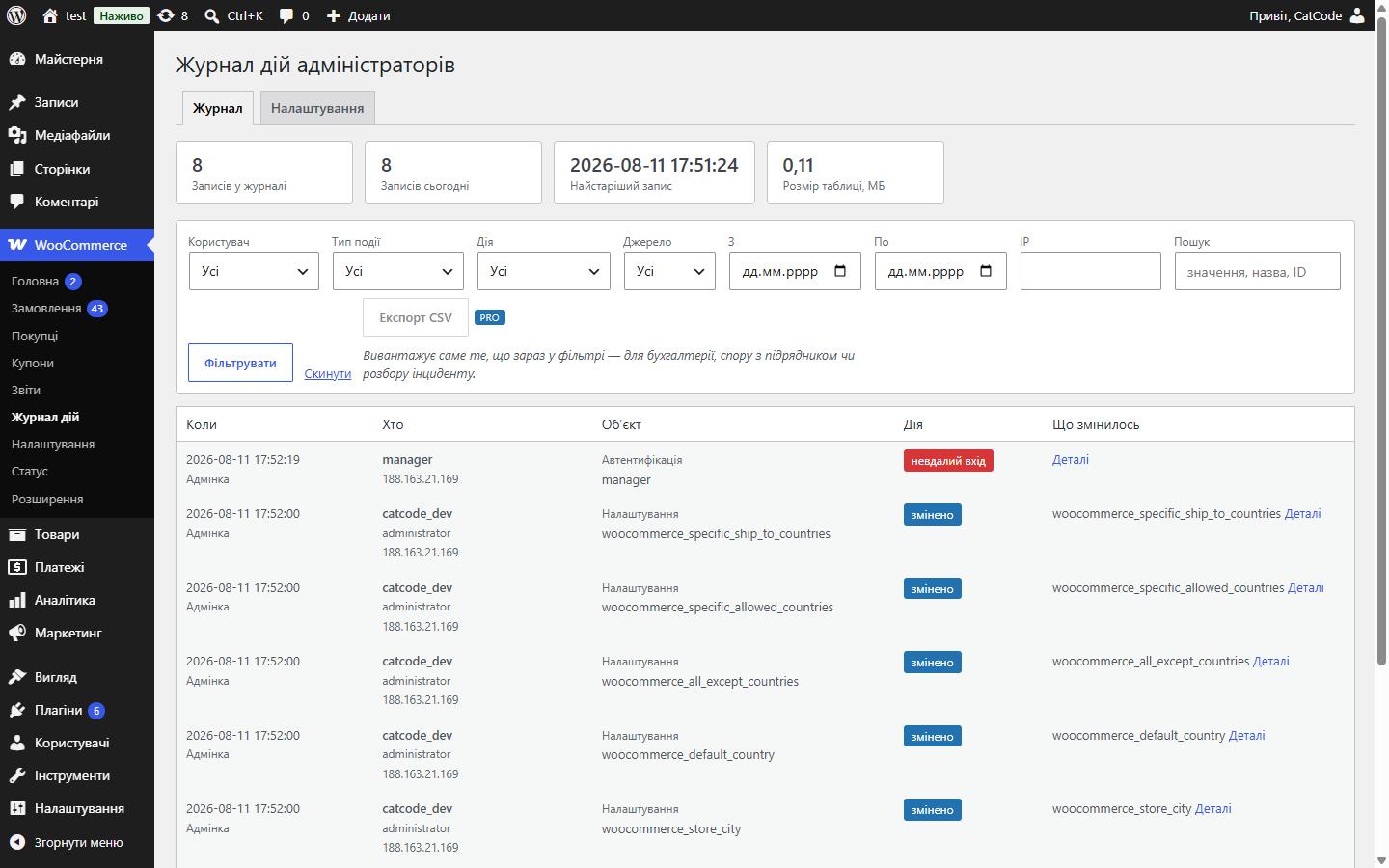
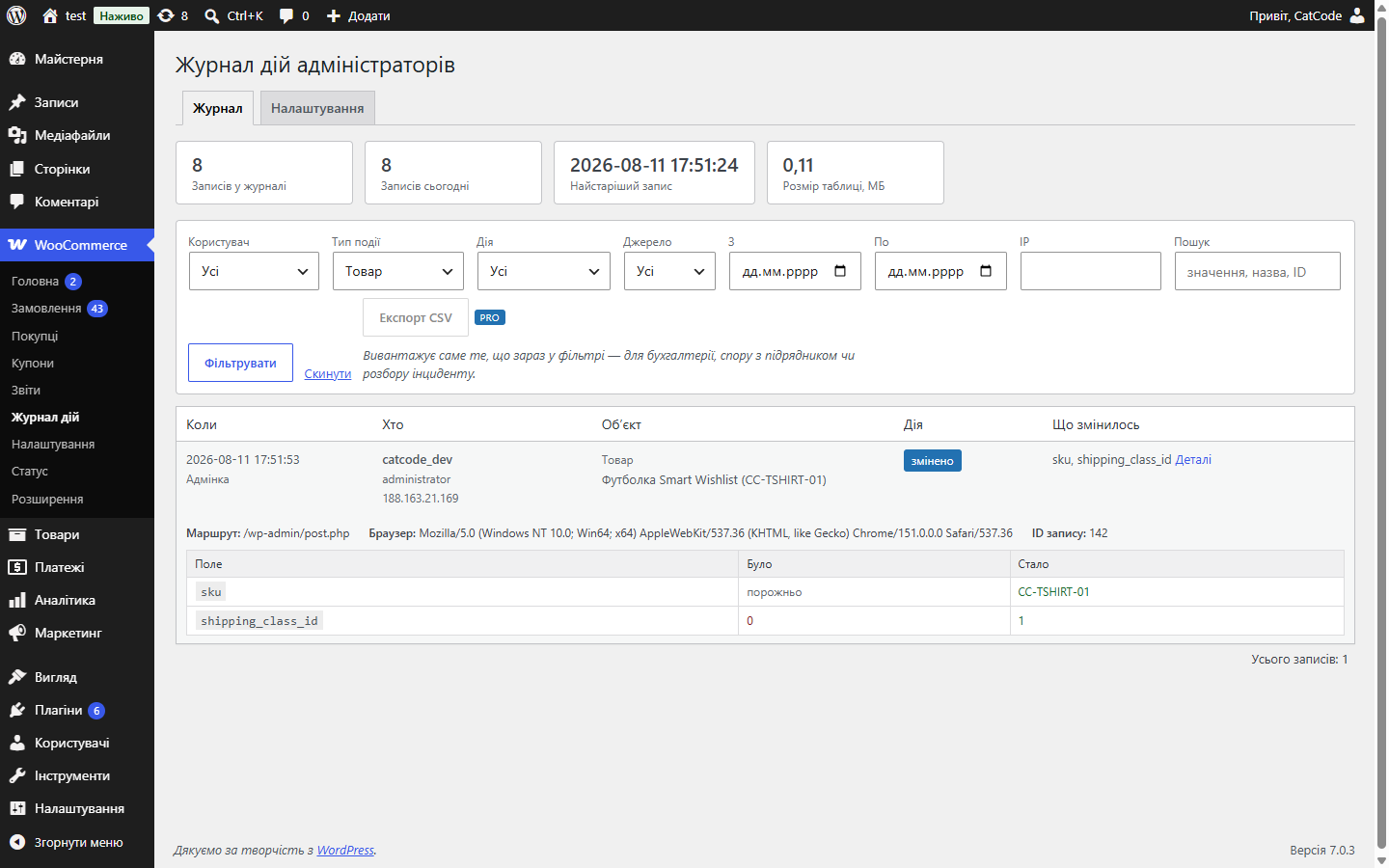
An activity log for the WooCommerce admin area: who changed what, when, in orders, products, settings and users — with a "field / before / after" table. CSV export.
Clear even without sound: Ukrainian subtitles
The free version works with no time limit. Pro adds the rest of the features in the table.


Every action becomes a separate entry: user, role, IP, time and a list of changed fields shown as “before → after”.

Entries can’t be edited from the interface — there is no button and no request to edit or delete a single row.

Passwords, tokens, API keys, card numbers and similar fields are masked before being recorded — they’re absent from the screen, the CSV export and the database dump alike.

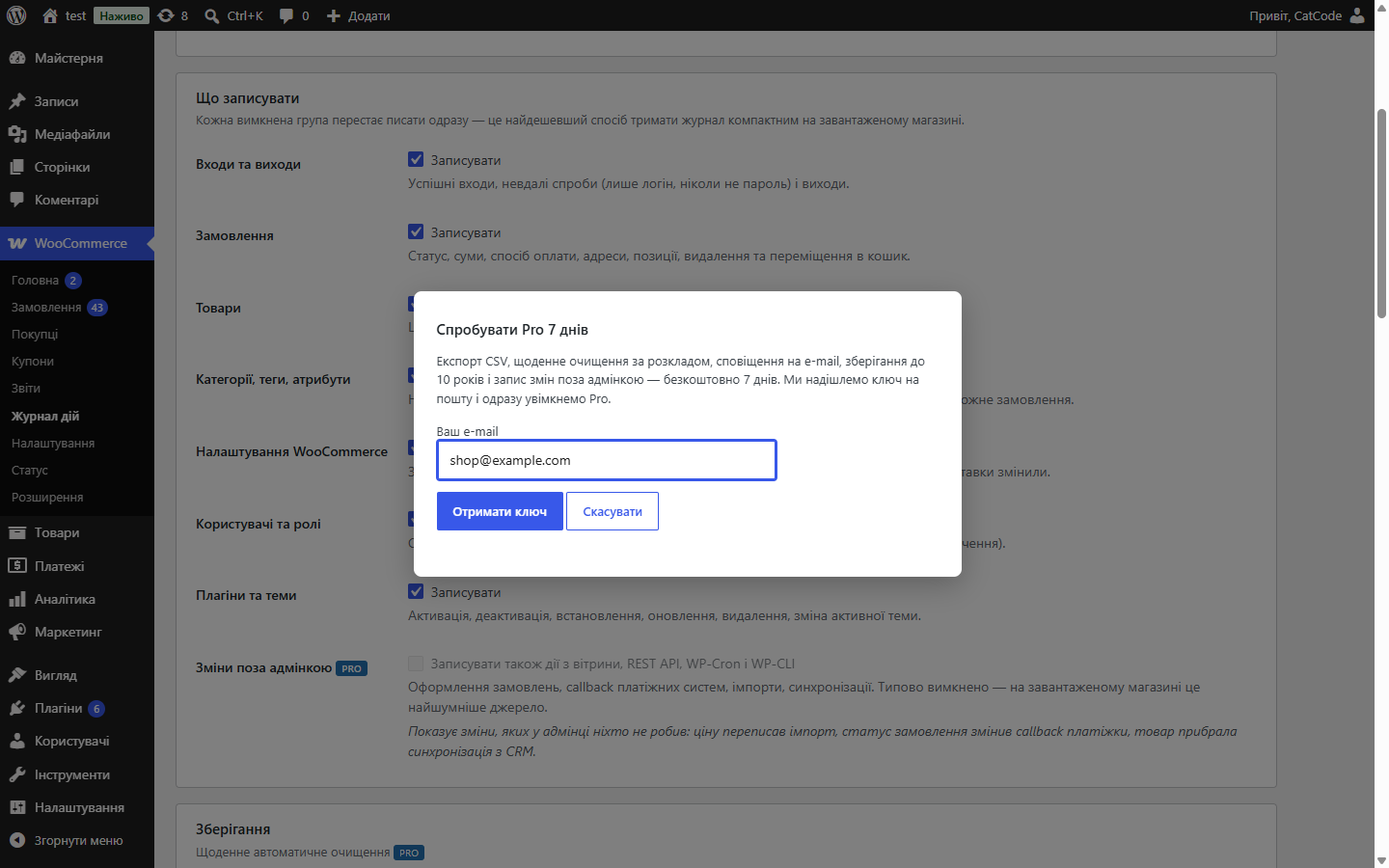
A fresh install is the free version, nothing switches on by itself. The “Try Pro for 7 days” button → e-mail → the key right in the window and by e-mail.

Moving the store? Unbind the licence on the old domain and activate it on the new one yourself. For studios — keys for 5 or 25 sites, or unlimited.
 WordPress 6.2 or newer, PHP 7.4+WooCommerce 7.0 or newer; HPOS (separate order tables) and classic storage work the same wayIts own log table; deactivating the plugin doesn’t delete it — a log that a stray click can wipe isn’t a logWordPress 7.1.1 · WooCommerce 10.7.0 · Storefront 4.6.2
Pro no longer switches on by itself: a fresh install is the free version until the owner starts a trial or activates a key.
Logging of orders, products, categories, settings, users, plugins and themes; “before → after” diffs, filters and search, secret masking, retention rules; Pro.
4 modules in one order — 40% cheaper than separately



Audit Log for WooCommerce keeps its own log: as soon as more than one person works in the store, questions come up — who changed the price, who cancelled the order, when the discount disappeared. WooCommerce doesn’t answer these: the order screen only shows status changes, and nothing else is recorded anywhere.
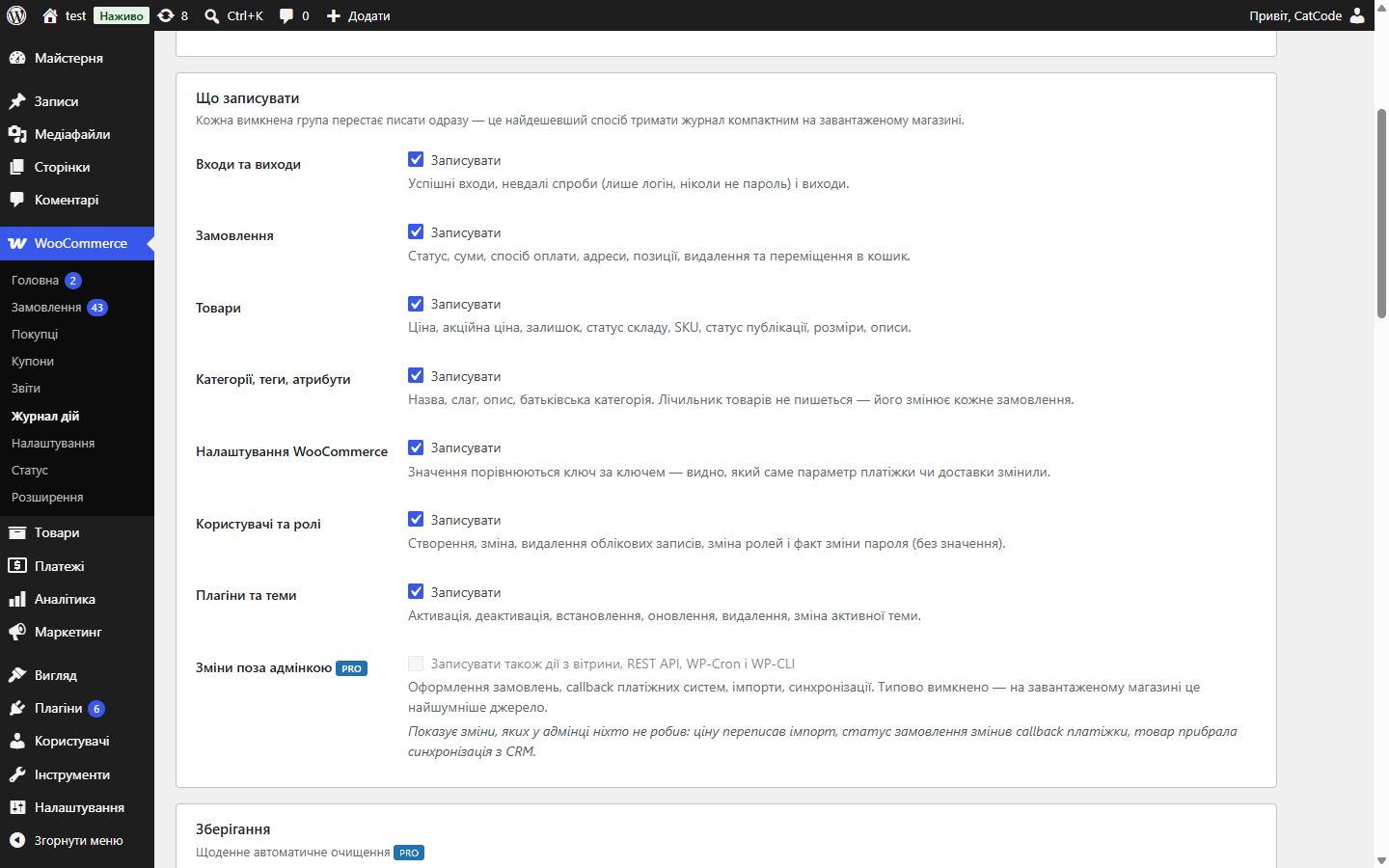
Every action becomes a separate entry: user, role, IP, time and a list of changed fields shown as “before → after”. Orders (status, totals, payment method, addresses, line items, deletion), products (price, sale price, stock, availability, SKU, status, dimensions, descriptions), categories, tags and attributes, WooCommerce settings compared key by key, users and roles, plugins and themes, plus logins, logouts and failed login attempts.
Entries can’t be edited from the interface — there is no button and no request to edit or delete a single row. Only clearing by retention rules and a full wipe are available, and both of those are logged too.
Passwords, tokens, API keys, card numbers and similar fields are masked before being recorded — they’re absent from the screen, the CSV export and the database dump alike. A password change is recorded as a fact, with no value and no hash. IP is taken only from REMOTE_ADDR, and storing the user agent can be switched off.
Retention rules work by age and by row count (in Free, 90 days and 50,000 entries), and each event group can be switched off. In Pro, retention goes up to 10 years with no row limit.
Once more than one person has admin access, sooner or later the question “who changed the price” or “where did the product go” comes up. Without a log there’s no answer — only guesswork and a strained team.
An activity log settles this with facts: who, when, exactly what changed, and from what value to what.
1. The module switches on and starts recording admin users’ actions.
2. Each entry is a user, a time, an object, and a “before → after” change.
3. The log can be filtered by user, action type and period.
4. Old entries are cleared after a set retention period — with a button, or daily and automatically in Pro — so the table doesn’t grow forever.
The log lives in its own table and doesn’t bloat wp_options. Recording happens synchronously with the action, so there are no “gaps” in the log from a failed cron run.
The module doesn’t log what it has no right to keep: passwords, tokens, API keys and card numbers are masked before the entry is written. Addresses and other order data do get logged — as part of the before → after changes.
1. Upload the archive via “Plugins → Add New → Upload Plugin” and activate it.
2. Set the retention period for entries.
3. Change something on a test product and check that an entry appeared.
Didn't find the answer? Message us on Telegram and we'll reply within a business day.
 @catcode_support
Setup, compatibility, activation
@catcode_support
Setup, compatibility, activation
No. The plugin has no button and no request for that. Only two actions are available on the log as a whole — clearing by retention rules and a full wipe — and both are logged too.
No. Masking happens at the point of recording, not display: the value of such a field is never stored at all. The fact that a key was changed is still visible — otherwise a token rotation would go unnoticed.
The free version logs actions in the admin area. Changes from the storefront, REST API, WP-Cron and WP-CLI are switched on separately in Pro — on a busy store that's the noisiest source.
No. Retention rules work by age and by row count, and each event group can be switched off individually. In Free the rules are applied with a button, in Pro with a daily task. Table size is shown on the log screen.
Only from REMOTE_ADDR — proxy headers can be spoofed by the visitor. Storing the user agent can be switched off if your data policy requires it.
No reviews yet. Be the first.
No questions yet. Ask one — we answer within 24 hours.
We build custom modules for WordPress, WooCommerce, OpenCart and Shopify. Tell us about the task and we'll prepare an estimate.
Order a custom module
—

CatCode assistant
Just now


CatCode assistant
Online

I’ll help with your website task
Describe your website task — I’ll find a ready-made module or pass it to a developer for an estimate. Modules, custom features, layout, integrations, speed, migration, technical SEO.
