

SalesDrive Sync — CRM для WooCommerce
Автоматична передача замовлень WooCommerce у CRM SalesDrive: заявка створюється одразу після checkout з покупцем, товарами, доставкою та коментарем. Дедуплікація, повторні спроби при збої, метабокс статусу й журнал синхронізації.
- Сумісність
- WordPress 6.2+, WooCommerce 6.0+
- PHP
- 7.4 і новіший
- Оновлено
- серпень 2026
Що вміє модуль

Як це виглядає
Технічні вимоги
 WordPress 6.2+ (тестовано до 7.0)
- WooCommerce 6.0 або новіше, включно з HPOS (custom order tables)
- PHP 7.4+
- Кабінет SalesDrive: домен виду yourshop.salesdrive.me та API-ключ бази заявок із правом «Заявки: додавання» (Установки → Загальні налаштування і інтеграції → Інші сервіси → API → API-ключі). Право «Заявки: читання» не обов’язкове, але бажане — з ним плагін після таймауту перевіряє, чи заявка вже створена, замість того щоб ризикувати дублем.
Історія версій
Кнопка «Відправити повторно» в метабоксі нарешті працює.
Перший публічний реліз: відправка замовлень у SalesDrive після checkout або за статусом-тригером, дедуплікація за externalId, повторні спроби через WP-Cron (3 спроби), метабокс у замовленні…
Повний опис модуля
SalesDrive Sync для WooCommerce — плагін, який автоматично передає кожне замовлення WooCommerce у CRM SalesDrive. Щойно покупець завершив checkout, у SalesDrive з’являється заявка з покупцем, товарами, доставкою та коментарем — менеджер працює у CRM, а не копіює дані з адмінки сайту вручну. Підтримуються і класичний чекаут, і нові Checkout Blocks.
Плагін повністю безкоштовний. Завантажити: catcode-order-sync-with-salesdrive-for-woocommerce-0.2.0.zip. Ліцензія GPLv2 — без ключів, без пробних періодів, без обмежень за кількістю замовлень.
Як це працює — крок за кроком
- Покупець оформлює замовлення у магазині — через класичний чекаут або Checkout Blocks.
- Плагін збирає payload: покупець (телефон нормалізується до формату +380), товари з SKU, ціною і кількістю, доставка, коментар. Для сплачених онлайн замовлень у коментар опційно додається позначка «Оплачено онлайн».
- Дані летять у SalesDrive через обробник заявок — POST /handler/ із заголовком X-Api-Key.
- SalesDrive повертає номер заявки — він зберігається у меті замовлення (_cc_salesdrive_order_id). Разом із локом на рівні БД це гарантує: одне замовлення — одна заявка.
- Якщо CRM тимчасово недоступна — плагін сам повторює відправку: 3 спроби з паузами 5 хв / 30 хв / 2 год через WP-Cron.
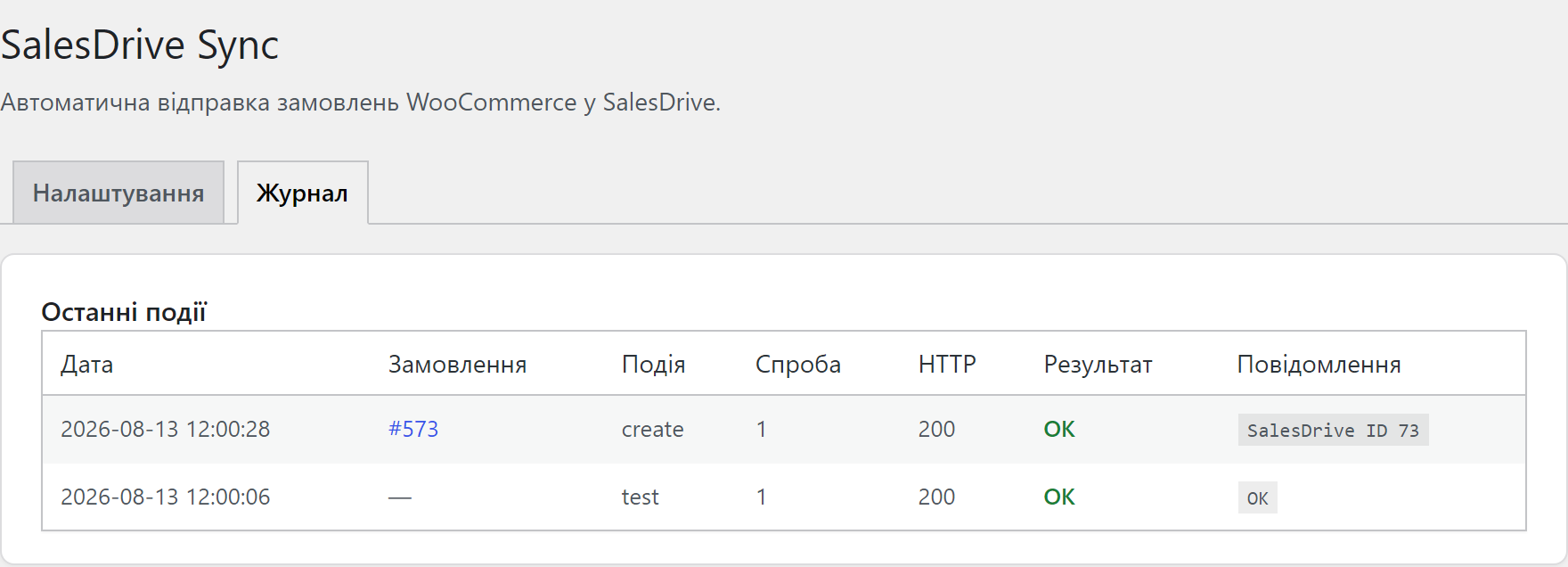
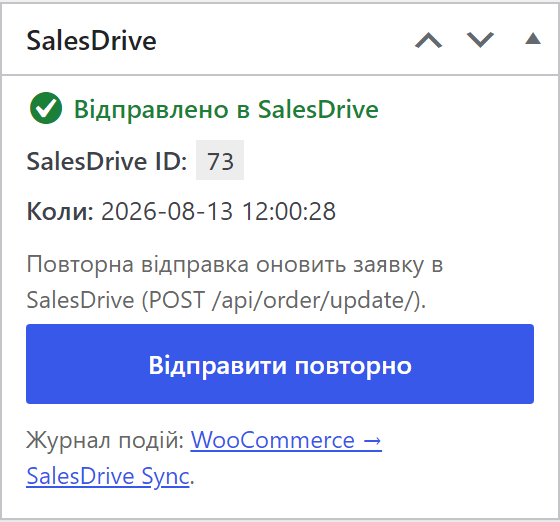
- Менеджер бачить результат у метабоксі замовлення та у вкладці «Журнал» на сторінці налаштувань.
Що під капотом
- API-ключ зашифрований у БД — libsodium із HMAC-фолбеком для хостингів без розширення sodium. У відкритому вигляді ключ у базі не лежить.
- Лок на рівні БД проти дубля: чекаут, зміна статусу і колбек платіжки можуть прилетіти одночасно — у роботу проходить рівно один запит, а замовлення перечитується повз кеш HPOS перед фінальною перевіркою.
- Перевірка за externalId після таймауту: обробник заявок SalesDrive НЕ дедуплікує (два POST з тим самим externalId дають дві заявки), тому перед повторною спробою плагін питає CRM через GET /api/order/list/, чи заявка вже є, і підхоплює її ID. Якщо ключ не має права на читання — замовлення позначається в метабоксі, щоб менеджер перевірив CRM вручну.
- HPOS-сумісність — уся робота з замовленнями йде тільки через WC_Order CRUD, без прямих запитів до постів.
- Нормалізація телефону покупця до E.164 (+380…) перед відправкою в CRM.
- Валюта: обробник заявок не має поля валюти, тому для замовлень не в гривні код валюти дописується в коментар заявки.
- Точки розширення для розробників: фільтр cc_salesdrive_order_payload (змінити тіло заявки) і хук cc_salesdrive_order_sent (реакція на успішну відправку).
Як встановити
- Завантажте
catcode-order-sync-with-salesdrive-for-woocommerce-0.2.0.zipі встановіть через Плагіни → Додати новий → Завантажити плагін. - Активуйте у меню «Плагіни».
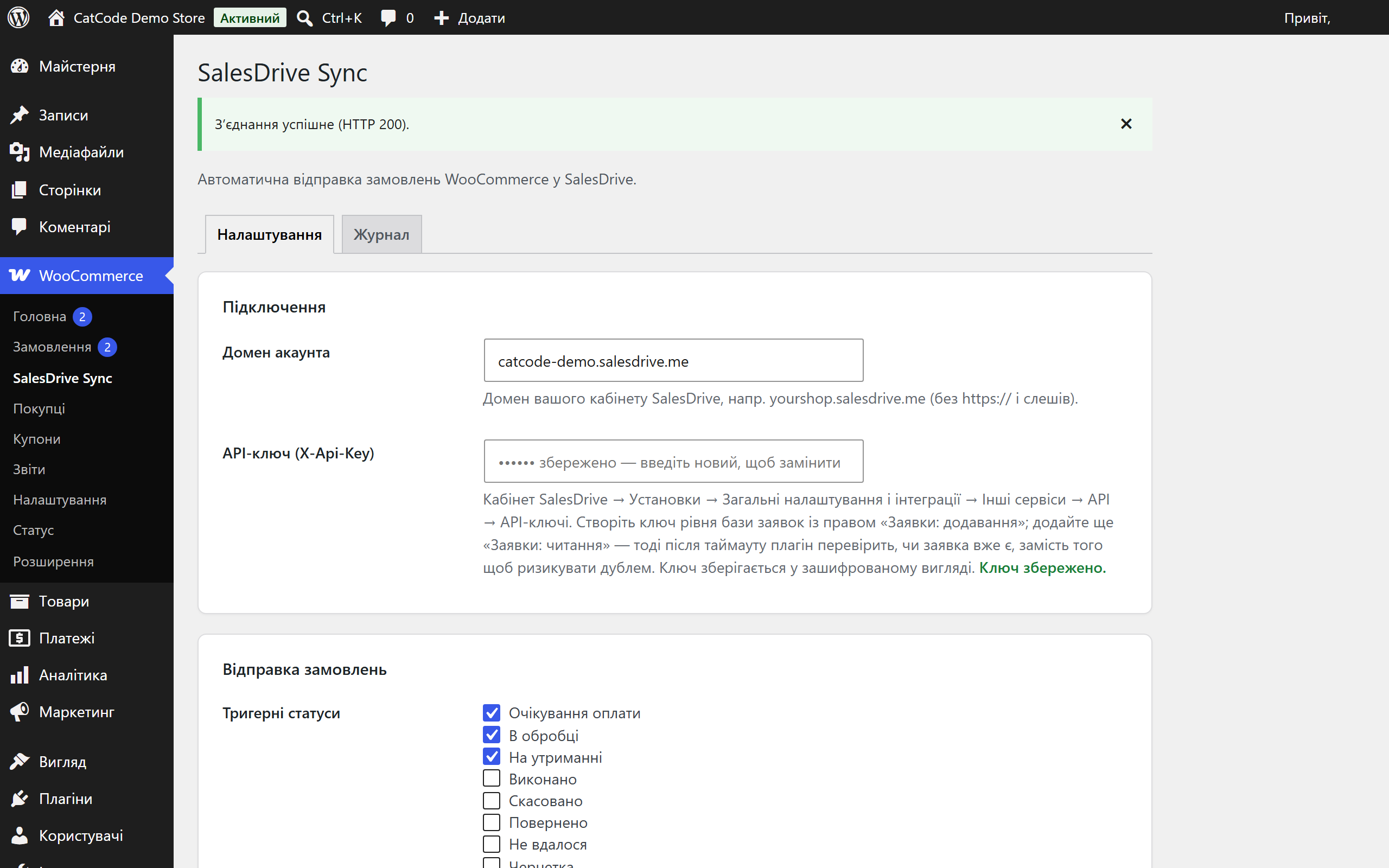
- Відкрийте WooCommerce → SalesDrive Sync, введіть домен кабінету та API-ключ.
- Натисніть «Перевірити з’єднання» — переконайтесь, що CRM відповідає.
- Оберіть, коли відправляти замовлення (одразу після checkout або при переході у вибрані статуси), збережіть налаштування.
Питання
про модуль
Не знайшли відповідь? Напишіть у Telegram — відповімо протягом робочого дня.
 @catcode_support
Налаштування, сумісність, активація
@catcode_support
Налаштування, сумісність, активація
Чи змінює плагін мій checkout або тему?
Ні. Плагін працює лише «за лаштунками»: слухає події створення замовлення і зміни статусу. Жодних змін у шаблонах чи чекауті.
Звідки взяти API-ключ SalesDrive?
Кабінет SalesDrive → Установки → Загальні налаштування і інтеграції → Інші сервіси → API → API-ключі. Потрібен ключ бази заявок із правом «Заявки: додавання»; додайте ще «Заявки: читання», щоб працювала перевірка дублів після таймауту.
Чи створяться дублі, якщо статус замовлення змінюється кілька разів?
Ні. Плагін зберігає SalesDrive ID у меті замовлення, а перед відправкою бере лок на рівні бази — навіть якщо чекаут, зміна статусу і колбек платіжки спрацюють одночасно, заявка створиться одна. Якщо відповідь від CRM взагалі не прийшла, плагін перед повтором перевіряє за externalId, чи заявка вже там.
Що робить кнопка «Відправити повторно»?
Якщо замовлення ще не в SalesDrive — створює заявку. Якщо вже відправлене — оновлює її актуальними даними через /api/order/update/. Результат показується повідомленням угорі сторінки замовлення.
Що буде після видалення плагіна?
Видалення (не деактивація) прибирає налаштування, зашифрований ключ і таблицю журналу. ID заявок на замовленнях лишаються навмисно — саме вони не дають при перевстановленні залити в CRM другу копію старого замовлення.
У якій валюті йдуть суми?
У валюті замовлення, звичайними числами: у обробника заявок SalesDrive немає поля валюти, тож суми потрапляють у ту валюту, в якій працює ваш кабінет. Для замовлень не в гривні плагін дописує код валюти в коментар заявки.
Чи працює з новим блоковим чекаутом WooCommerce?
Так, підтримуються і класичний чекаут, і Checkout Blocks.
Поки що жодного відгуку. Будьте першим.
Поки питань немає. Запитай — ми відповімо протягом 24 годин.
Не той варіант, що шукаєте?
Робимо кастомні модулі під WordPress, WooCommerce, OpenCart і Shopify. Розкажіть про задачу — підготуємо оцінку.
Замовити кастомний модуль
Купівля модуля
—



