OpenCart
CatCode SEO Pack — SEO-модуль для OpenCart 2.3, 3.x і 4.x
Free + Pro
1 290 грн
v2.0.4
 All Access4 990 ₴ на рік
 Аудит сайтуPDF-звіт на пошту за 3 хвилиниПеревірити сайт
Для щоденних задач
Стиснення фотоРозмір, якість і WebP пачкоюГенератор QRПосилання, Wi-Fi, оплата на IBANКалькулятор ПДВ20, 14, 7 % і сума прописомТранслітераціяЗа постановою КМУ № 55Перевірки сайту
PHP і плагіниВерсія PHP, WordPress, плагіниФід Google MerchantПоля, ціни, GTIN, фотоПошта доменуSPF, DKIM, DMARC, чорні спискиГотовність до AI-пошукуllms.txt, боти, розміткаУсі 9 інструментівВведіть щонайменше 2 символи
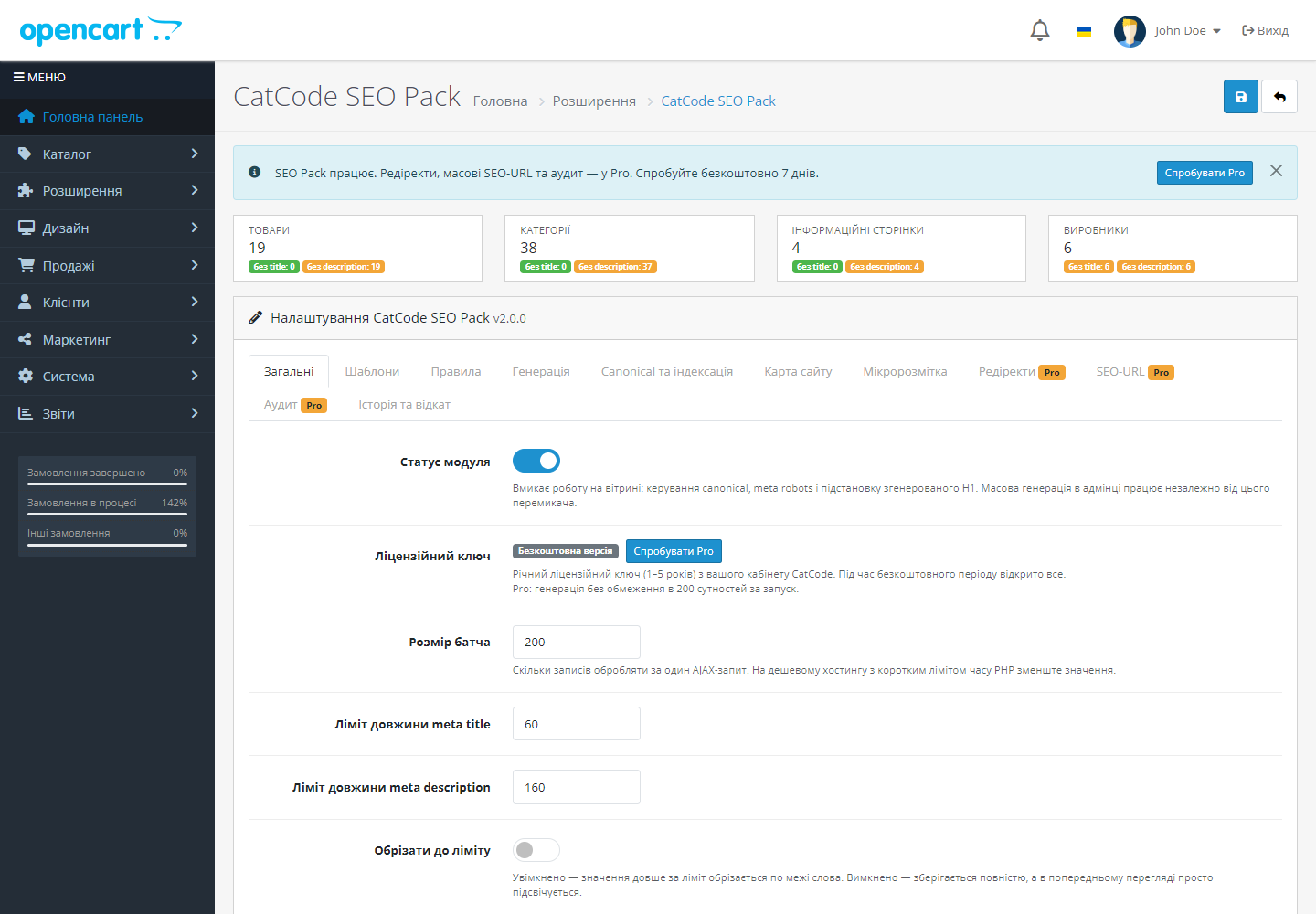
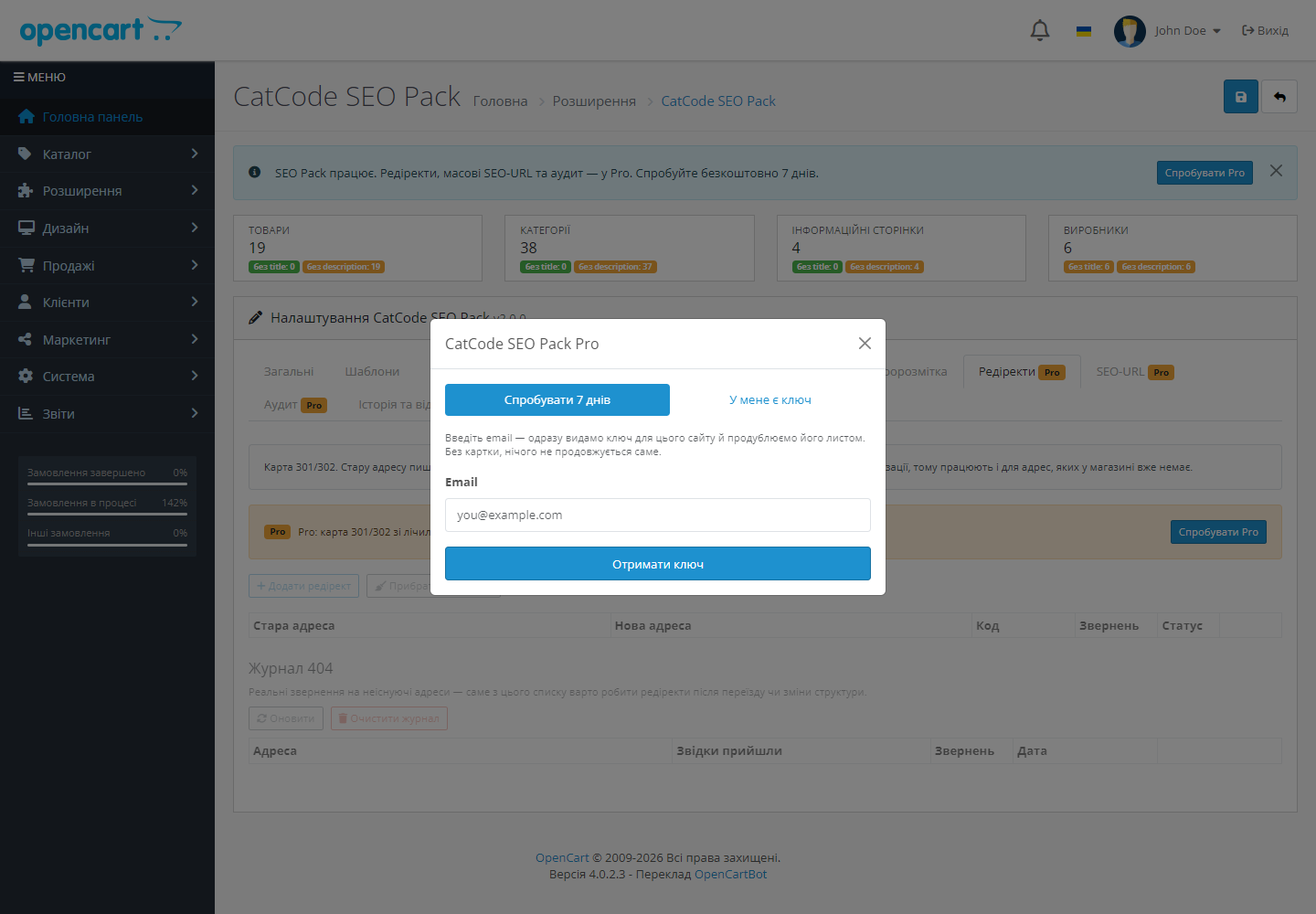
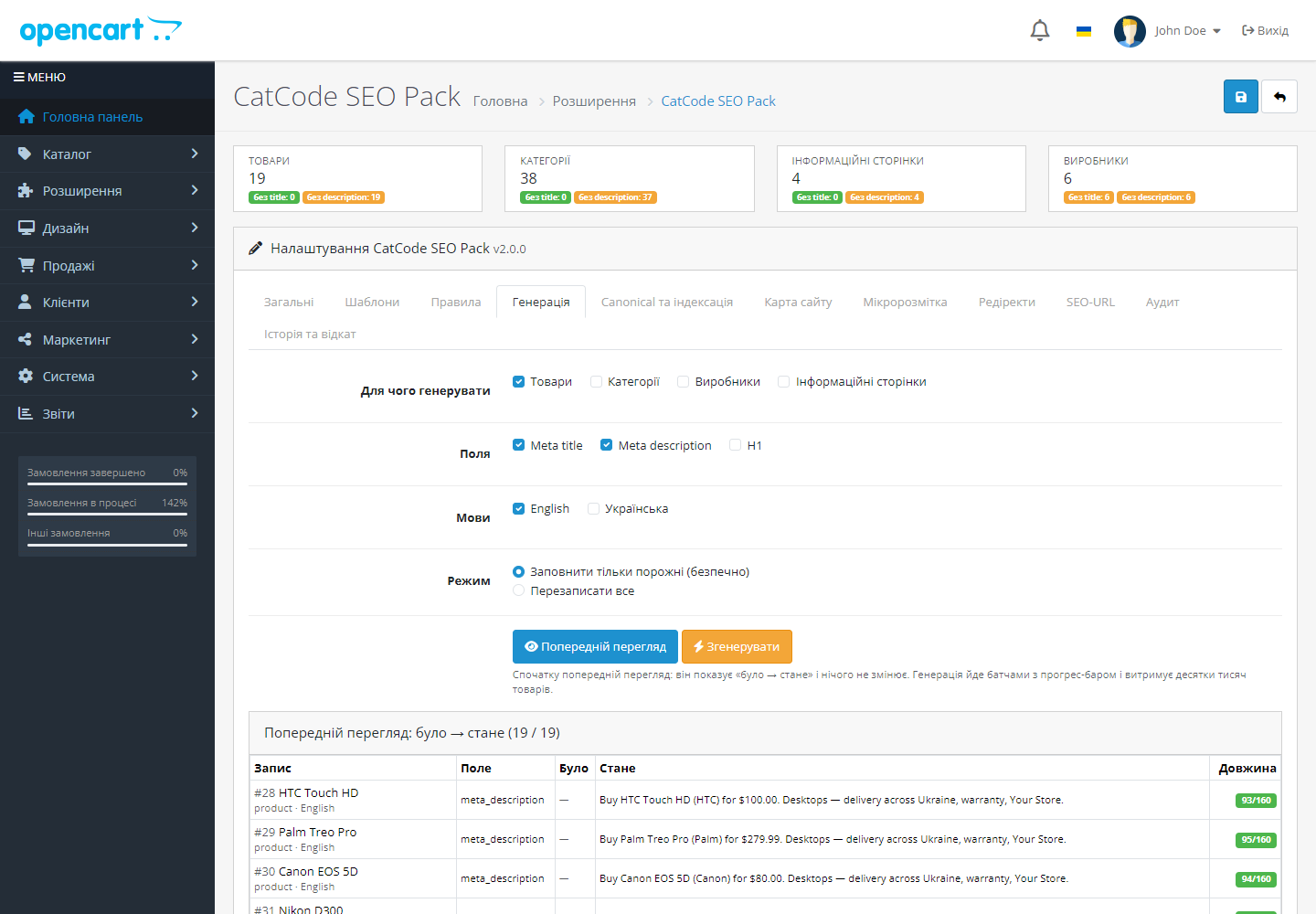
XML-карта, мікророзмітка, canonical, шаблони мета-тегів, редіректи з журналом 404, SEO-URL транслітом і аудит каталогу — в одному модулі.
Без звуку теж зрозуміло: субтитри українською
Безкоштовна версія працює без обмеження в часі. Pro додає решту функцій з таблиці.


Індекс плюс окремі файли по типах, з картинками товарів, а для мультимовних магазинів — ще й з hreflang-альтернативами (в OpenCart 3 і 2.3 — з версії 2.2.0, коли мова є в адресі сторінки).

JSON-LD із Product і Offer — назва, артикул, бренд, зображення і саме та ціна, яку бачить покупець: з акцією, у валюті вітрини, з наявністю зі складу.

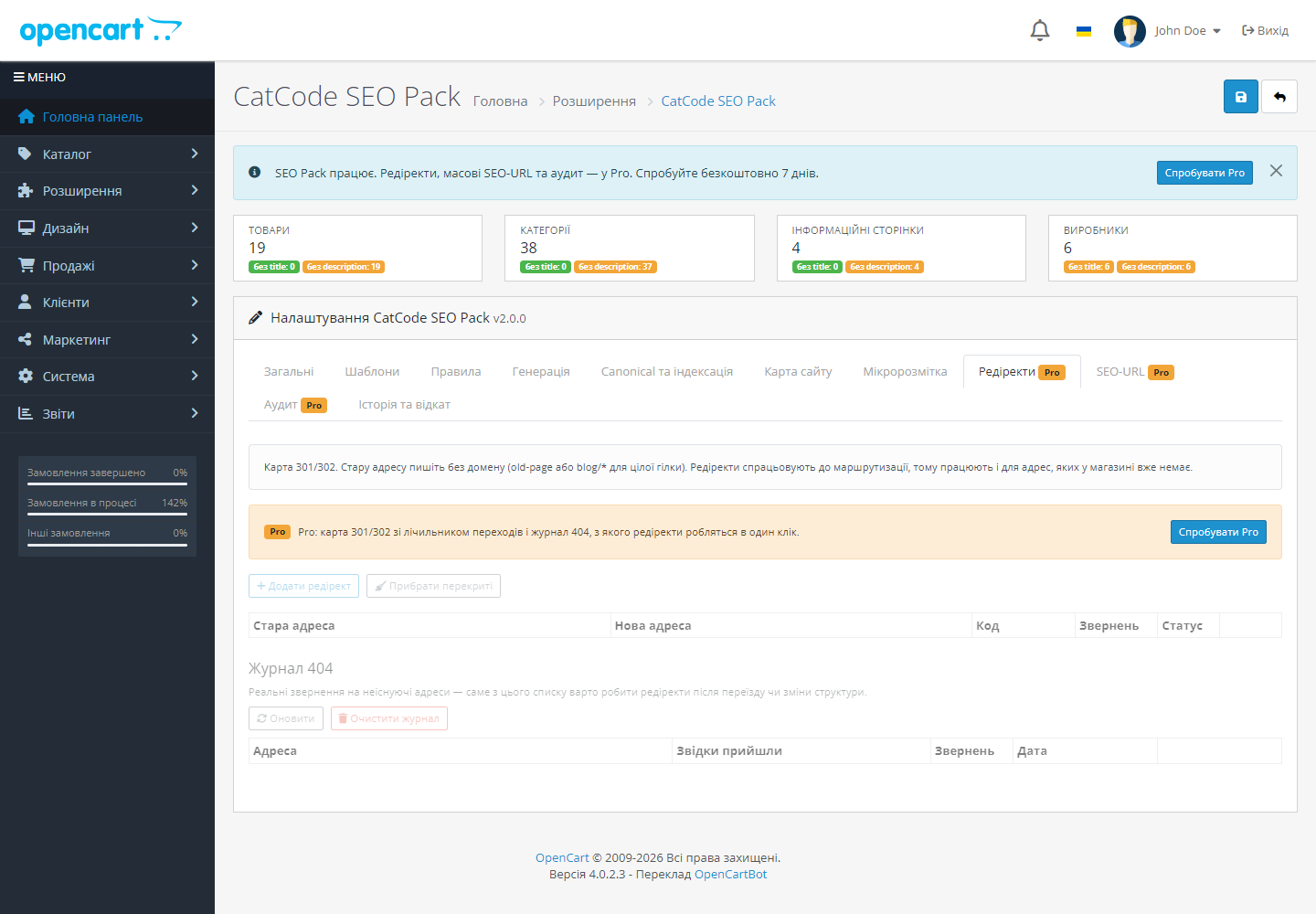
Кожна ненайдена адреса потрапляє в журнал разом із реферером і лічильником звернень — правила пишуться за фактами, а не навмання.

Свіжий інстал — безкоштовна версія, нічого не вмикається само. Кнопка «Спробувати Pro 7 днів» → e-mail → ключ одразу у вікні і листом.

Переносите магазин — відв’яжіть ліцензію на старому домені й активуйте на новому самі. Для студій — ключі на 5, 25 сайтів або без обмежень.
 OpenCart 2.3.0.x, 3.0.3 – 3.0.5.0 та 4.0.2 – 4.1.x
301-редиректи спрацьовують і для переходів з реклами та розсилок.
Мовні версії: якщо мова магазину є в адресі сторінки (ocStore SEO Pro, модуль мовного префікса /ru/), карта сайту містить кожну мовну версію з hreflang-альтернативами та x-default, а ті…
Ліцензія: кнопка «Зберегти» більше не скидає позначку купленої ліцензії, пробний період коректно завершується через 7 днів, а «Відв’язати ліцензію» знімає Pro з цього сайту.
XML-карта сайту, мікророзмітка для Google, редіректи і журнал 404, SEO-URL транслітерацією, шаблони мета-тегів, аудит каталогу; збірки під OpenCart 3 і OpenCart 4; робота без патчів ядра.
4 модулі одним замовленням — на 40% дешевше, ніж окремо



CatCode SEO Pack для OpenCart 2.3, 3.x і 4.x — усе SEO магазину в одному модулі: XML-карта сайту, мікророзмітка для Google, canonical на фільтрах, шаблони мета-тегів, редіректи з журналом 404, масова генерація SEO-URL транслітом і аудит каталогу.
Індекс плюс окремі файли по типах, з картинками товарів, а для мультимовних магазинів — ще й з hreflang-альтернативами (в OpenCart 3 і 2.3 — з версії 2.2.0, коли мова є в адресі сторінки). Рядки читаються посторінково, а карта ділиться на окремі файли-частини, тож каталог на 100 тисяч позицій не збирає 30-мегабайтний рядок у пам’яті. У карту потрапляє тільки те, що бачить покупець: увімкнені позиції поточного магазину з настанням дати доступності.
JSON-LD із Product і Offer — назва, артикул, бренд, зображення і саме та ціна, яку бачить покупець: з акцією, у валюті вітрини, з наявністю зі складу. AggregateRating додається лише за наявності схвалених відгуків: вигаданий рейтинг — найшвидший спосіб втратити розширений сніпет. Плюс BreadcrumbList, Organization із соцпрофілями і WebSite із рядком пошуку на головній.
Кожна ненайдена адреса потрапляє в журнал разом із реферером і лічильником звернень — правила пишуться за фактами, а не навмання. Рядок журналу перетворюється на редірект одним кліком, підтримуються маски на цілу гілку (blog/*). Відповідь віддається ще до того, як магазин почне будувати сторінку, тож правило працює і для адрес, яких у каталозі більше не існує.
Масова генерація ЧПУ за українським стандартом транслітерації КМУ 55/2010, окремо для кожної мови: українська сторінка отримує українське посилання, англійська — англійське. На OpenCart 2.3 платформа зберігає одне ключове слово на товар для всіх мов, тож там посилання одне. На OpenCart 4 прогон також створює службові route-рядки для мов, у яких їх немає — саме через них ЧПУ на другій мові зазвичай мовчки віддає головну сторінку.
Дублі title і description, порожні та задовгі описи, товари без ЧПУ, без зображення і з надто коротким описом — кожна проблема з кількістю та першою десяткою сторінок, які треба виправити.
Кожна версія OpenCart отримує свою збірку, а не «сумісний» компроміс. Функціонал однаковий, різниця лише там, де платформа інша: у стоковому OpenCart 3 і 2.3 мова зберігається в сесії, а не в адресі, тож усі мовні версії сторінки мають одну адресу, і карта сайту одномовна. Якщо мова є в адресі (в OpenCart 3 — ocStore SEO Pro або модуль мовного префікса на кшталт /ru/, в OpenCart 2.3 — модуль мовного префікса), модуль з версії 2.2.0 визначає це сам і додає hreflang з x-default у карту сайту та в <head> сторінок. Ключове слово ЧПУ в OpenCart 3 має бути унікальним у межах магазину, а не мови, а в OpenCart 2.3 — одне на всі мови. Редіректи в OpenCart 3 і 2.3 підключені через загальну подію контролерів, бо pre-actions цих версій подій не дають.
Мета-теги описуються формулою з плейсхолдерами — назва товару, категорія, виробник, модель, артикул, ціна, значення атрибута чи опції, назва магазину, рік, номер сторінки. У Pro правила можна звужувати за категорією, виробником і мовою з керованим пріоритетом. Генерація йде батчами з прогрес-баром (без ключа — до 200 рядків за прогін); у Pro кожен запуск зберігається в історії й відкочується одним кліком.
SEO для OpenCart зазвичай збирається з чотирьох-п’яти окремих модулів: карта сайту від одного автора, мікророзмітка від іншого, редіректи від третього. Вони конфліктують за одні й ті самі місця в шаблоні, а після оновлення магазину половина відвалюється.
Тут те саме зібрано в один модуль з однією точкою налаштувань — і, головне, з однією відповідальністю за сумісність.
1. Вмикаєте потрібні блоки: карта сайту, мікророзмітка, редіректи, шаблони мета-тегів, транслітерація URL.
2. Задаєте шаблони title і description зі змінних товару — на весь каталог одразу.
3. Запускаєте аудит каталогу (Pro): модуль показує порожні, задовгі й продубльовані мета-теги, товари без ЧПУ, без зображення й із надто коротким описом.
4. Виправляєте те, що знайшлось, і далі стежите за журналом 404 (Pro), щоб ставити редіректи на реальні втрати трафіку.
Модуль не патчить ядро — усе через штатні події OpenCart, тому оновлення магазину не затирає правки, а видалення не лишає слідів у файлах.
Карта сайту генерується на льоту при кожному запиті, а не статичним файлом, який треба перезбирати руками після кожної зміни каталогу.
1. Залийте архів через «Розширення → Установник розширень» і встановіть модуль.
2. Увімкніть потрібні блоки — не обов’язково всі одразу.
3. Запустіть аудит каталогу й подивіться список проблем.
4. Додайте карту сайту в Search Console.
Не знайшли відповідь? Напишіть у Telegram — відповімо протягом робочого дня.
 @catcode_support
Налаштування, сумісність, активація
@catcode_support
Налаштування, сумісність, активація
Карта сайту, мікророзмітка, canonical і robots, а також шаблони мета-тегів із лімітом 200 рядків за прогон. Pro знімає ліміт і додає правила, редіректи, генерацію ЧПУ та аудит.
Тільки якщо ви самі оберете режим «Перезаписати все». За замовчуванням заповнюються лише порожні поля, а кожен запуск можна відкотити.
Так, у документації є правило для Apache і nginx. Без нього карта працює за прямою адресою модуля — магазин без доступу до конфігурації сервера не лишається без карти.
OpenCart створює службові route-рядки лише для мови встановлення. Модуль додає їх для решти мов сам під час генерації.
Так. Генерація йде батчами з прогрес-баром, а карта сайту віддається потоком, без збирання всього XML у пам'яті.
Ні. Для OpenCart ліцензія назавжди: одна оплата, і Pro-функції лишаються з вами. Закінчується лише 7-денний тріал — після нього Pro вимикається, а безкоштовна версія працює далі.
Поки що жодного відгуку. Будьте першим.
Поки питань немає. Запитай — ми відповімо протягом 24 годин.
Робимо кастомні модулі під WordPress, WooCommerce, OpenCart і Shopify. Розкажіть про задачу — підготуємо оцінку.
Замовити кастомний модуль
—

Помічник CatCode
Щойно


Помічник CatCode
Онлайн

Допоможу із задачею по сайту
Опишіть задачу по сайту — підберу готовий модуль або передам розробнику з оцінкою. Модулі, доробки, верстка, інтеграції, швидкість, перенесення, технічне SEO.
