
OpenCart
UA-юрпакет — оферта, cookie-банер і згода в чекауті для OpenCart 2.3, 3.x і 4.x
Free + Pro
1 290 грн
v1.1.2
 All Access4 990 ₴ на рік
 Аудит сайтуPDF-звіт на пошту за 3 хвилиниПеревірити сайт
Для щоденних задач
Стиснення фотоРозмір, якість і WebP пачкоюГенератор QRПосилання, Wi-Fi, оплата на IBANКалькулятор ПДВ20, 14, 7 % і сума прописомТранслітераціяЗа постановою КМУ № 55Перевірки сайту
PHP і плагіниВерсія PHP, WordPress, плагіниФід Google MerchantПоля, ціни, GTIN, фотоПошта доменуSPF, DKIM, DMARC, чорні спискиГотовність до AI-пошукуllms.txt, боти, розміткаУсі 9 інструментівВведіть щонайменше 2 символи

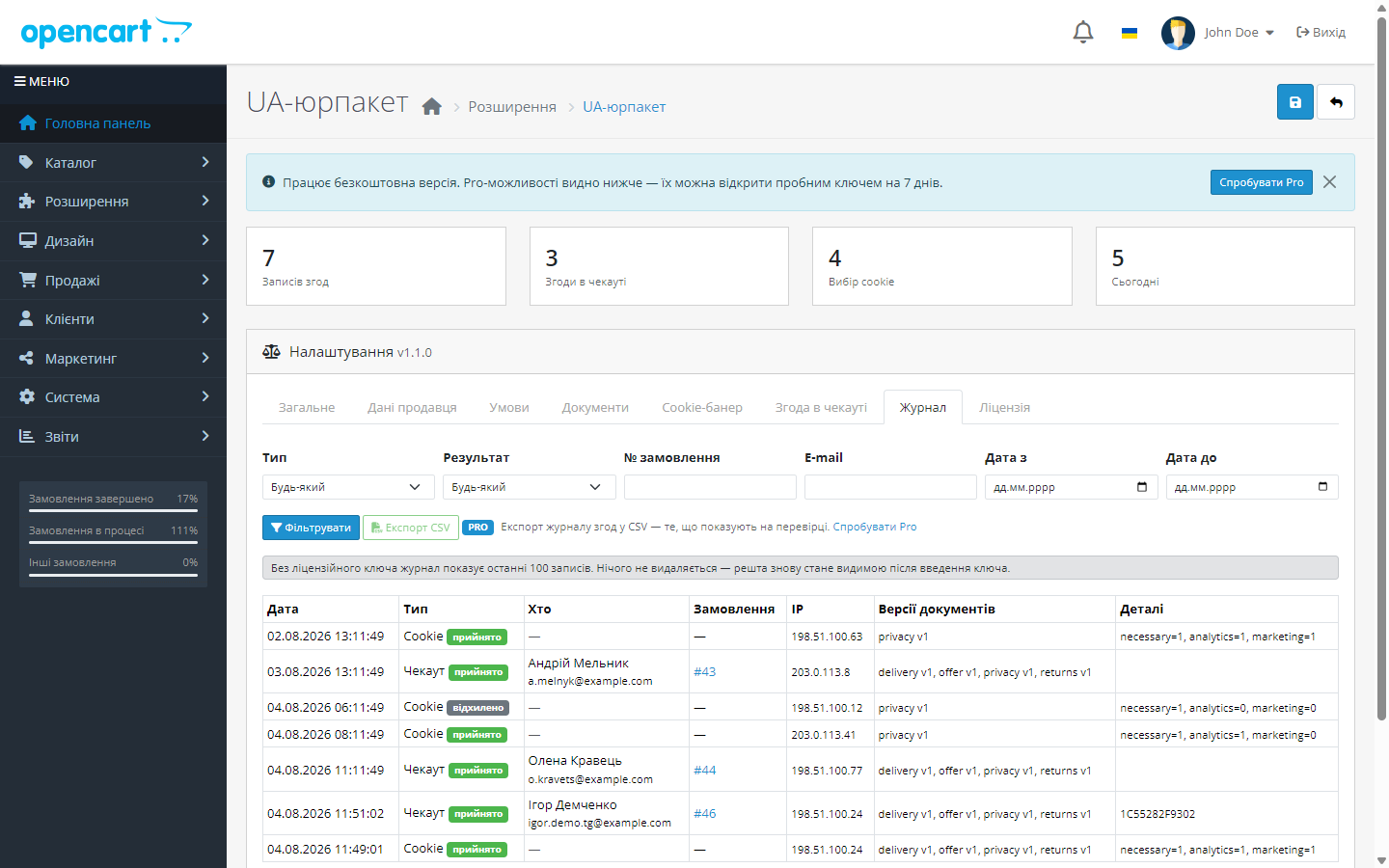
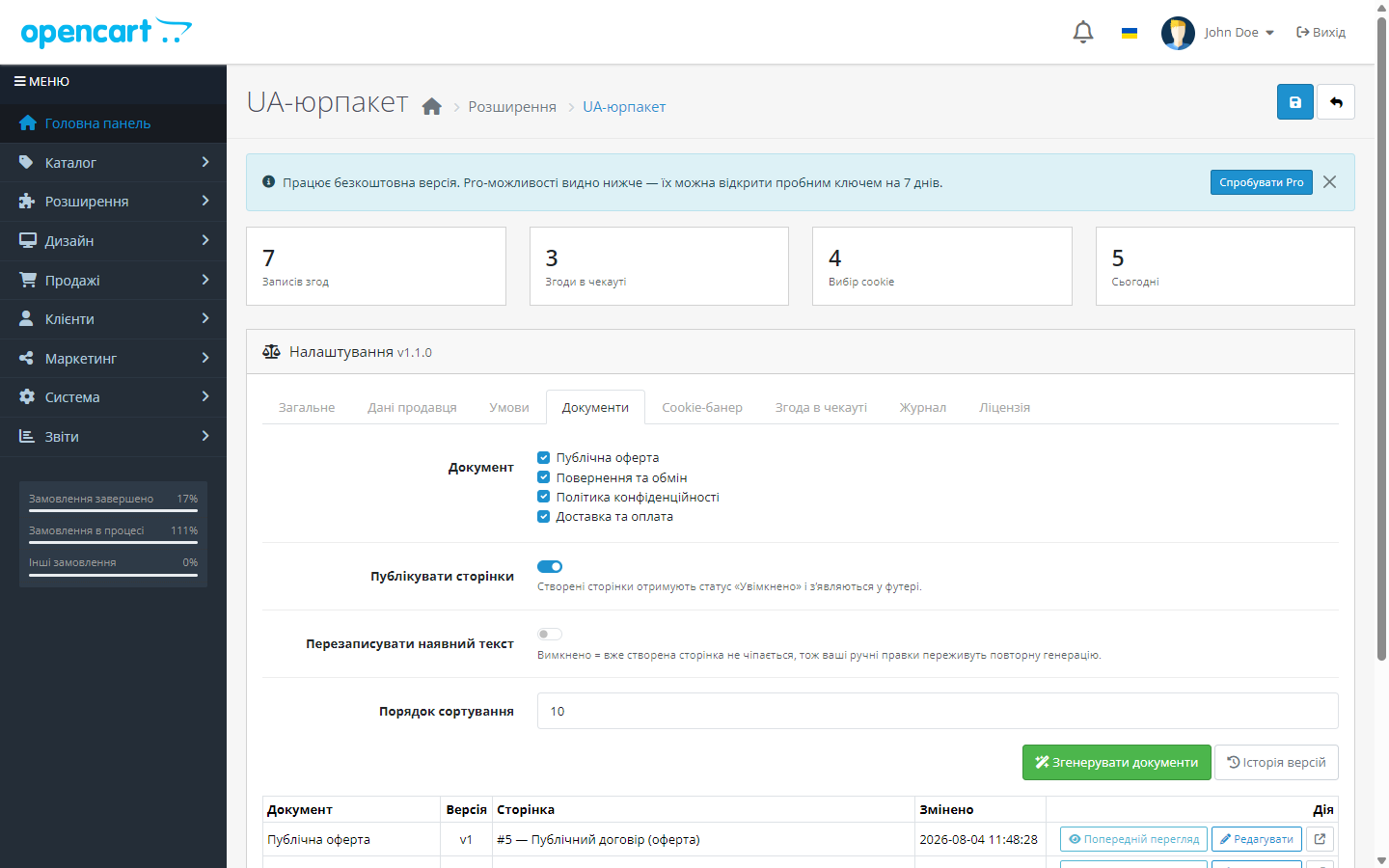
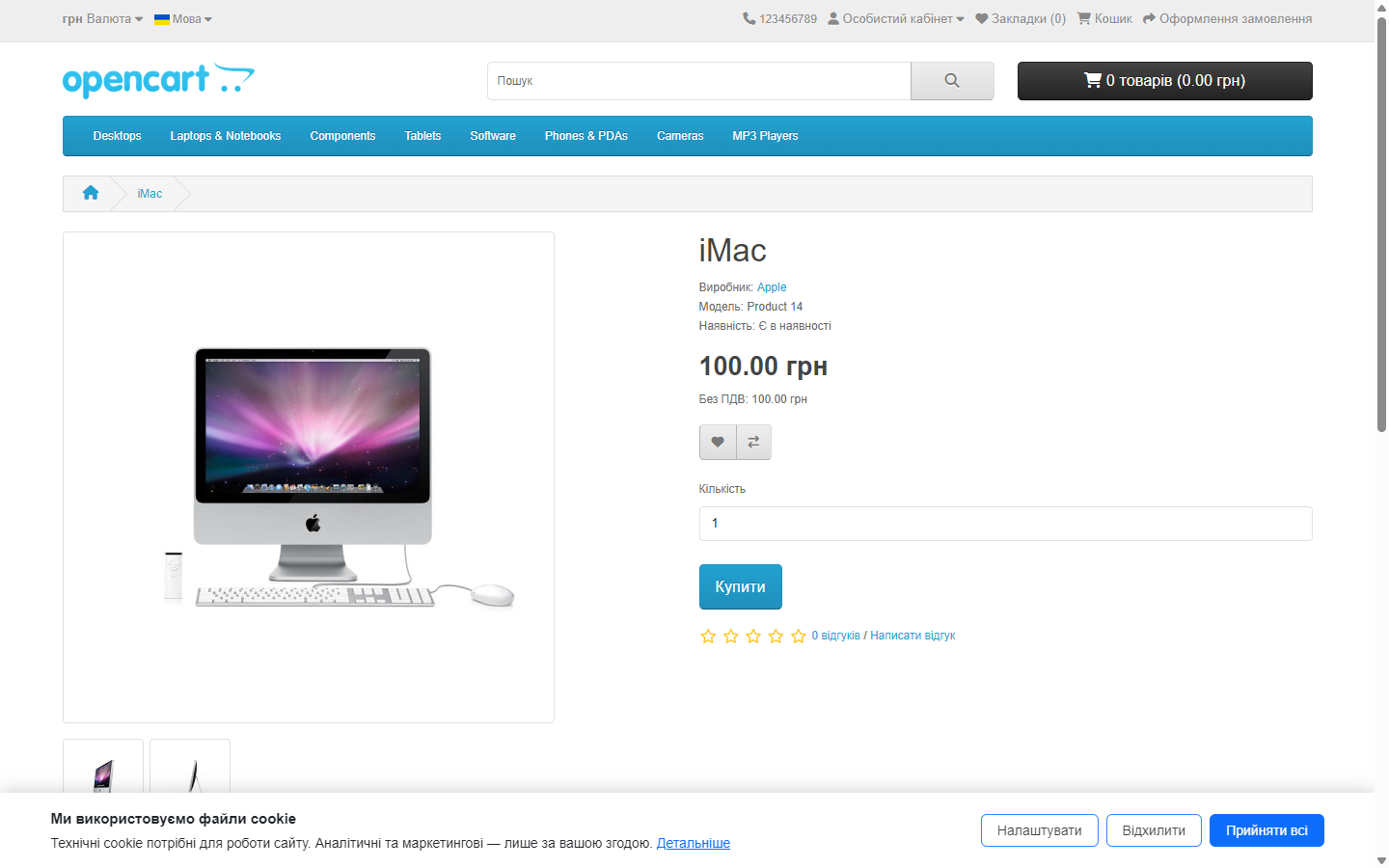
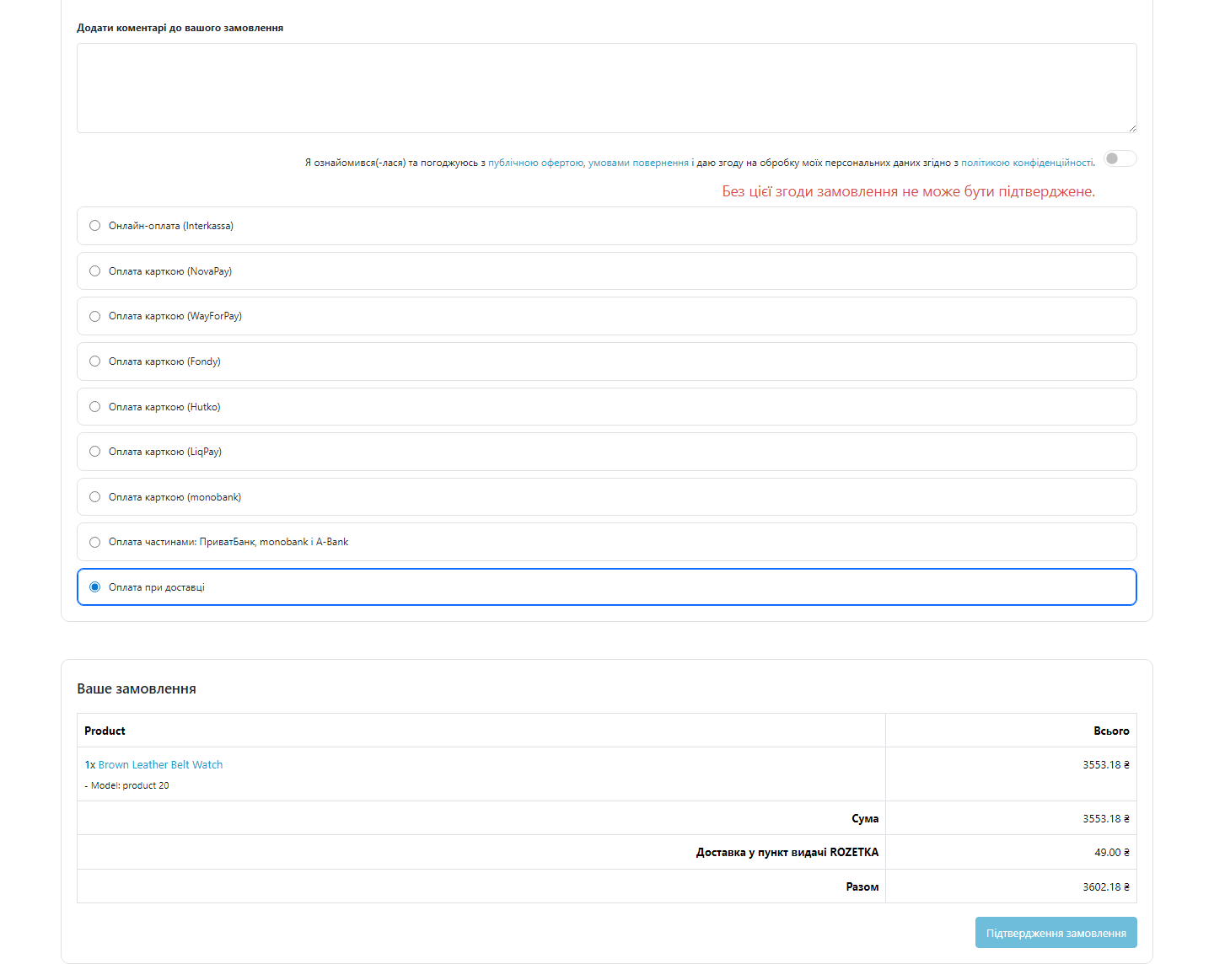
Оферта, умови повернення, політика конфіденційності, cookie-банер і чекбокс згоди в чекауті — з журналом згод, який і є юридичним доказом.
Без звуку теж зрозуміло: субтитри українською
Безкоштовна версія працює без обмеження в часі. Pro додає решту функцій з таблиці.


Ви заповнюєте анкету — назва ФОП або ТОВ, реєстраційні дані, адреса, контакти, способи доставки й оплати — і модуль створює чотири готові інформаційні сторінки: публічну оферту, умови повернення й обміну, політику конфіденційності та обробки персональних даних і правила доставки й оплати.

Банер із трьома категоріями cookie — обов’язкові, аналітика, маркетинг — і кнопками «Прийняти», «Відхилити» та «Налаштувати».

У чекаут додається обов’язковий чекбокс «Погоджуюсь з офертою та обробкою персональних даних» із живими посиланнями на згенеровані документи.

Свіжий інстал — безкоштовна версія, нічого не вмикається само. Кнопка «Спробувати Pro 7 днів» → e-mail → ключ одразу у вікні і листом.

Переносите магазин — відв’яжіть ліцензію на старому домені й активуйте на новому самі. Для студій — ключі на 5, 25 сайтів або без обмежень.
 OpenCart 2.3.0.x, 3.0.2 – 3.0.5.0 та 4.0.2 – 4.1.x
Куплена ліцензія для OpenCart працює безстроково.
23 вересня 2026.
Збірка для OpenCart 3.0.x переведена на серверну ліцензію.
Окрема збірка для OpenCart 2.3.0.x.
Виправлено помилку, через яку на OpenCart 4.0.x кожна сторінка вітрини віддавала фатальну помилку замість вмісту (обробники подій вимагали більше аргументів, ніж передає 4.0).
Перший випуск.
4 модулі одним замовленням — на 40% дешевше, ніж окремо



UA-юрпакет для OpenCart 2.3, 3.x і 4.x закриває набір юридичних вимог до українського інтернет-магазину, який зазвичай або відкладають, або замовляють окремо в юриста.
Ви заповнюєте анкету — назва ФОП або ТОВ, реєстраційні дані, адреса, контакти, способи доставки й оплати — і модуль створює чотири готові інформаційні сторінки: публічну оферту, умови повернення й обміну, політику конфіденційності та обробки персональних даних і правила доставки й оплати. Тексти українською, з урахуванням законів про захист прав споживачів, про електронну комерцію та про захист персональних даних. Після генерації сторінки залишаються звичайними сторінками OpenCart — їх можна вільно доредагувати.
Банер із трьома категоріями cookie — обов’язкові, аналітика, маркетинг — і кнопками «Прийняти», «Відхилити» та «Налаштувати». Головне: до отримання згоди скрипти аналітики й рекламних пікселів не виконуються, а не просто ховається плашка. Після згоди скрипти запускаються одразу, без перезавантаження сторінки. Вибір покупця запам’ятовується, текст, кольори й позиція налаштовуються, обидві мови підтримуються.
У чекаут додається обов’язковий чекбокс «Погоджуюсь з офертою та обробкою персональних даних» із живими посиланнями на згенеровані документи. Без згоди замовлення не створюється — перевірка стоїть на рівні підтвердження, тож обійти її неможливо.
Кожна згода записується в журнал: хто, коли, з якої IP-адреси, якою мовою і яку саме версію документа прийняв. Журнал фільтрується та експортується в CSV (Pro) — саме він і є доказовою базою у випадку скарги чи перевірки.
При зміні тексту оферти версія документа автоматично підвищується, а попередня редакція зберігається в архіві. Нові згоди фіксуються вже з новою версією — тому завжди видно, на що саме погоджувався конкретний покупець у конкретний день.
Пробний період — тільки за вашим кліком. Свіжий інстал — це чиста безкоштовна версія: нічого Pro не вмикається саме й не гасне через тиждень. Коли захочете подивитись Pro, натискаєте «Спробувати Pro», вказуєте e-mail — і отримуєте ключ на 7 днів.
Не знайшли відповідь? Напишіть у Telegram — відповімо протягом робочого дня.
 @catcode_support
Налаштування, сумісність, активація
@catcode_support
Налаштування, сумісність, активація
Так. Документи створюються як звичайні інформаційні сторінки OpenCart і доступні для правки.
Так. До згоди скрипти не виконуються, а не просто ховається плашка. Після згоди запускаються без перезавантаження.
Користувач, дата й час, IP-адреса, мова, номер замовлення та версія документа, яку було прийнято.
Версія документа підвищиться, стара редакція збережеться в архіві, а нові згоди писатимуться вже з новою версією.
Так, обов'язковість вмикається й вимикається в налаштуваннях.
Поки що жодного відгуку. Будьте першим.
Поки питань немає. Запитай — ми відповімо протягом 24 годин.
Робимо кастомні модулі під WordPress, WooCommerce, OpenCart і Shopify. Розкажіть про задачу — підготуємо оцінку.
Замовити кастомний модуль
—

Помічник CatCode
Щойно


Помічник CatCode
Онлайн

Допоможу із задачею по сайту
Опишіть задачу по сайту — підберу готовий модуль або передам розробнику з оцінкою. Модулі, доробки, верстка, інтеграції, швидкість, перенесення, технічне SEO.
