
WordPress
Розумний фільтр товарів для WooCommerce
Free + Pro
990 грн/рік
v1.0.6
 All Access4 990 ₴ на рік
 Аудит сайтуPDF-звіт на пошту за 3 хвилиниПеревірити сайт
Для щоденних задач
Стиснення фотоРозмір, якість і WebP пачкоюГенератор QRПосилання, Wi-Fi, оплата на IBANКалькулятор ПДВ20, 14, 7 % і сума прописомТранслітераціяЗа постановою КМУ № 55Перевірки сайту
PHP і плагіниВерсія PHP, WordPress, плагіниФід Google MerchantПоля, ціни, GTIN, фотоПошта доменуSPF, DKIM, DMARC, чорні спискиГотовність до AI-пошукуllms.txt, боти, розміткаУсі 9 інструментівВведіть щонайменше 2 символи
Фасетний фільтр товарів для WooCommerce: власний індекс замість запитів по атрибутах, чесні лічильники, злиття дублів значень, SEO-сторінки фільтра. 990 грн/рік.
Без звуку теж зрозуміло: субтитри українською
Безкоштовна версія працює без обмеження в часі. Pro додає решту функцій з таблиці.


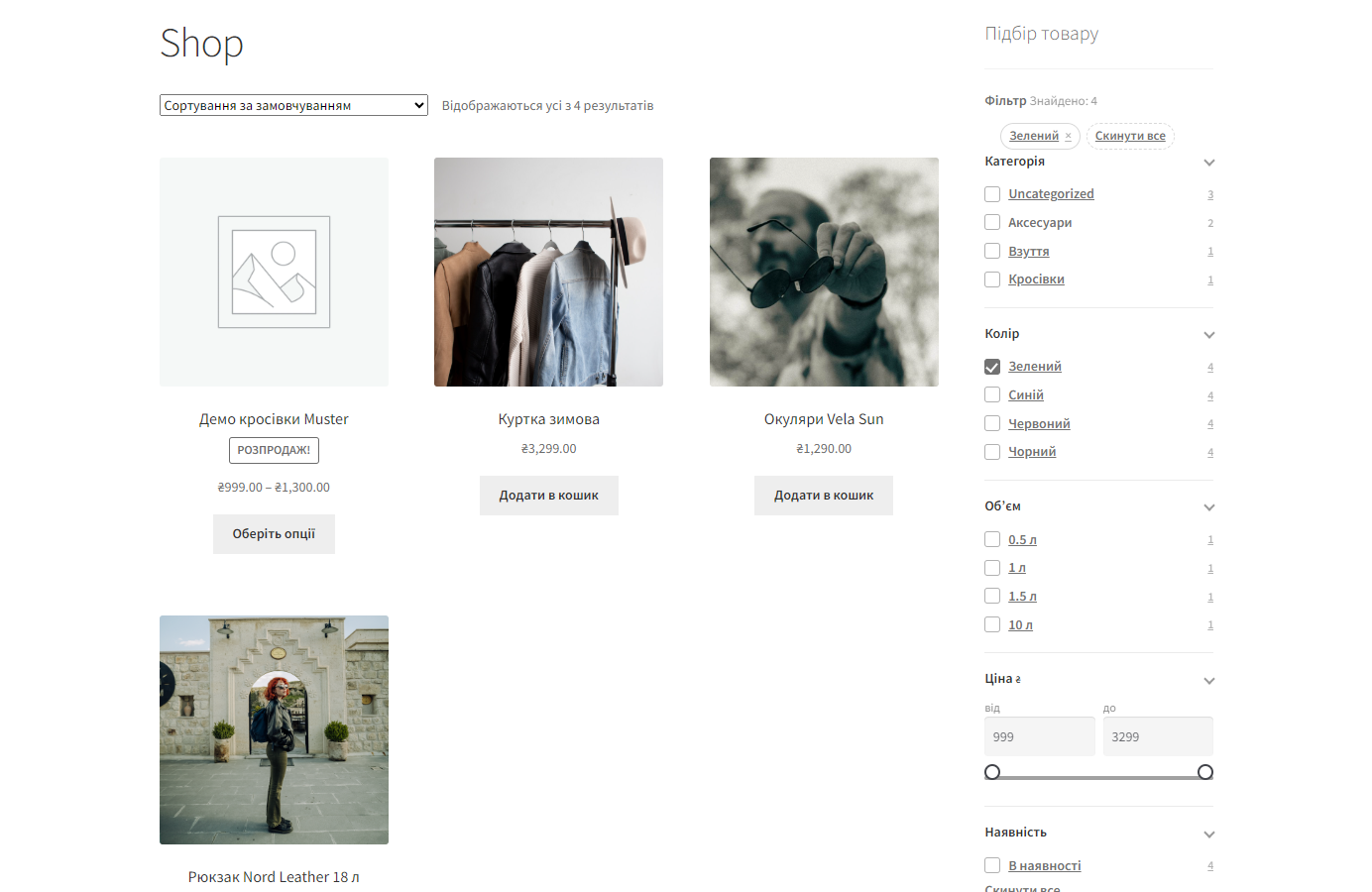
Біля кожного значення стоїть кількість товарів, яка враховує вже вибрані фільтри.

Прайси постачальників приносять «12 В», «12в» і «12 V» як три різні атрибути. У Pro їх зводять в одне значення в налаштуваннях фасета, тож покупець бачить один чекбокс, а не три.

Фільтр міняє видачу без перезавантаження сторінки й пише стан у URL, тому посилання можна надіслати або зберегти в закладки.

Свіжий інстал — безкоштовна версія, нічого не вмикається само. Кнопка «Спробувати Pro 7 днів» → e-mail → ключ одразу у вікні і листом.

Переносите магазин — відв’яжіть ліцензію на старому домені й активуйте на новому самі. Для студій — ключі на 5, 25 сайтів або без обмежень.
 WordPress 6.2 і новіший, WooCommerce 6.0 і новіший, PHP 7.4 і новіший. Працює з HPOS, класичними архівами категорій і сторінкою магазину.Окремих вимог до хостингу немає: індекс — це одна звичайна таблиця MySQL, вона не потребує ні Elasticsearch, ні Redis, ні окремого сервісу пошуку.
Polylang: лічильники, межі ціни й список значень рахуються лише з товарів мови сторінки.
Виправлено фатальну помилку під час активації ключа і запуску 7-денного тріалу.
23 вересня 2026.
23 вересня 2026.
23 вересня 2026.
Оновлення Pro-версії більше не приходять з wordpress.org: WordPress не запропонує замінити її безкоштовною копією з тією самою назвою плагіна.
Перший випуск.
4 модулі одним замовленням — на 40% дешевше, ніж окремо



Розумний фільтр товарів для WooCommerce — фасетний фільтр, який не гальмує на великому каталозі. Замість запитів по таблицях атрибутів і мета-полів модуль тримає власну плоску таблицю-індекс «товар → значення», тому додавання нових фасетів не сповільнює вибірку.
Біля кожного значення стоїть кількість товарів, яка враховує вже вибрані фільтри. Свій фасет при цьому не звужується: обравши «Зелений», покупець далі бачить, скільки є синіх і червоних, і може перемкнутись одним кліком замість того, щоб скидати все й починати спочатку.
Прайси постачальників приносять «12 В», «12в» і «12 V» як три різні атрибути. У Pro їх зводять в одне значення в налаштуваннях фасета, тож покупець бачить один чекбокс, а не три. Числові значення сортуються числами, а не рядками, і працюють діапазоном.
Ціна й наявність беруться з таблиці wc_product_meta_lookup, тобто з того самого джерела, що й сортування WooCommerce — без розбіжностей між фільтром і лістингом. Повзунок ціни підтягує реальні межі поточної вибірки.
Фільтр міняє видачу без перезавантаження сторінки й пише стан у URL, тому посилання можна надіслати або зберегти в закладки. На телефоні панель згортається в шухляду, щоб не з’їдати екран.
В індекс іде тільки те, що ви самі зробили SEO-сторінкою фільтра: власний H1, title і людський URL. Решта комбінацій віддає noindex,follow і канонікал на чисту категорію. Якщо на сайті працює Yoast або Rank Math, модуль передає свій канонікал і robots через їхні фільтри — на сторінці лишається один тег canonical, а не два.
Фасети складаються з того, що у вас уже є в каталозі: категорія, атрибути товарів, ціна, наявність, рейтинг. Нічого окремо описувати не треба — модуль бере атрибути WooCommerce як є.
Для кожного фасета налаштовується, як він виглядає покупцеві: чекбокси, радіокнопки, список, повзунок-діапазон для чисел, перемикачі, кольорові плашки або плашки-картинки. Порядок фасетів у панелі задаєте ви — те, чим у вашій категорії справді фільтрують, ставиться першим.
Індекс перебудовується сам, коли товар змінюється, і його можна перебудувати повністю однією кнопкою — це знадобиться раз, після першого імпорту великого прайсу.
Стандартна фільтрація WooCommerce збирає вибірку через wp_postmeta і таксономії атрибутів. Кожен доданий фасет — це ще один JOIN, і на каталозі в кілька десятків тисяч товарів запит перетворюється на кількасекундний.
Плоский індекс «товар → значення» цю проблему знімає в корені: фасетів може бути п’ять або п’ятнадцять, структура запиту не змінюється. Саме тому магазин з великим прайсом отримує від модуля найбільше — на каталозі в двісті товарів різницю ви не помітите.
Pro знімає обмеження на кількість фасетів, додає злиття дублів значень і SEO-сторінки фільтра: ви обираєте комбінацію фільтрів, яку варто просувати («жовті шафи», «ноутбуки до 30 000»), і вона отримує власний H1, title і людський URL. Решта комбінацій лишається під noindex,follow з каноніклом на чисту категорію.
Це і є головна відмінність від «фільтра з теми»: керована жменька посадкових сторінок під низькочастотні запити замість або мільйона сміттєвих URL в індексі, або повної відсутності фільтрових сторінок у пошуку.
Фільтрація вбудовується в головний запит товарів, а не підмінює його своїм. Через це модуль лишається сумісним із темами, які виводять стандартний цикл WooCommerce, і не конфліктує з пагінацією та сортуванням.
Ціна й наявність читаються з wc_product_meta_lookup — тієї самої таблиці, з якої WooCommerce сортує товари. Тому не буває ситуації, коли фільтр каже «є в наявності», а сортування за ціною показує інше.
Індекс оновлюється за подіями збереження товару, тобто вантажить сайт рівно в момент редагування, а не фоновим кроном раз на годину.
1. Завантажте архів у «Плагіни → Додати новий → Завантажити плагін» і активуйте.
2. Дочекайтесь побудови індексу — на першому запуску модуль пропонує зробити це однією кнопкою.
3. У налаштуваннях зберіть набір фасетів під свій каталог і задайте їхній порядок.
4. Поставте віджет фільтра у бічну колонку категорії або вставте шорткодом туди, де він потрібен.
5. Якщо купили Pro — додайте SEO-сторінки під ті комбінації фільтрів, які справді шукають.
Не знайшли відповідь? Напишіть у Telegram — відповімо протягом робочого дня.
 @catcode_support
Налаштування, сумісність, активація
@catcode_support
Налаштування, сумісність, активація
Ні. Фільтр вбудовується в головний запит товарів, тому працює з темами, які виводять стандартний цикл WooCommerce. Віджет ставиться у віджет-зону або шорткодом.
Умови фільтра йдуть по власній плоскій таблиці-індексу «товар → значення», а не по таблицях атрибутів і мета-полів, тому додавання нових фасетів не сповільнює вибірку.
Вони зливаються в одне значення: замість трьох чекбоксів «12 В», «12в» і «12 V» покупець бачить один.
Так. При цьому свій фасет не звужується — обравши «Зелений», покупець бачить, скільки є синіх і червоних, і перемикається одним кліком.
Ні. В індекс іде тільки те, що ви самі зробили SEO-сторінкою фільтра; решта комбінацій віддає noindex,follow і канонікал на категорію. Якщо працює Yoast, Rank Math чи AIOSEO — канонікал лишається за ними.
Один. Ліцензія річна: після закінчення модуль працює далі, припиняються лише оновлення й підтримка.
Поки що жодного відгуку. Будьте першим.
Поки питань немає. Запитай — ми відповімо протягом 24 годин.
Робимо кастомні модулі під WordPress, WooCommerce, OpenCart і Shopify. Розкажіть про задачу — підготуємо оцінку.
Замовити кастомний модуль
—

Помічник CatCode
Щойно


Помічник CatCode
Онлайн

Допоможу із задачею по сайту
Опишіть задачу по сайту — підберу готовий модуль або передам розробнику з оцінкою. Модулі, доробки, верстка, інтеграції, швидкість, перенесення, технічне SEO.
