
WordPress
Audit Log — журнал дій адміністраторів для WooCommerce
Free + Pro
990 грн/рік
v1.1.0
 All Access4 990 ₴ на рік
 Аудит сайтуPDF-звіт на пошту за 3 хвилиниПеревірити сайт
Для щоденних задач
Стиснення фотоРозмір, якість і WebP пачкоюГенератор QRПосилання, Wi-Fi, оплата на IBANКалькулятор ПДВ20, 14, 7 % і сума прописомТранслітераціяЗа постановою КМУ № 55Перевірки сайту
PHP і плагіниВерсія PHP, WordPress, плагіниФід Google MerchantПоля, ціни, GTIN, фотоПошта доменуSPF, DKIM, DMARC, чорні спискиГотовність до AI-пошукуllms.txt, боти, розміткаУсі 9 інструментівВведіть щонайменше 2 символи

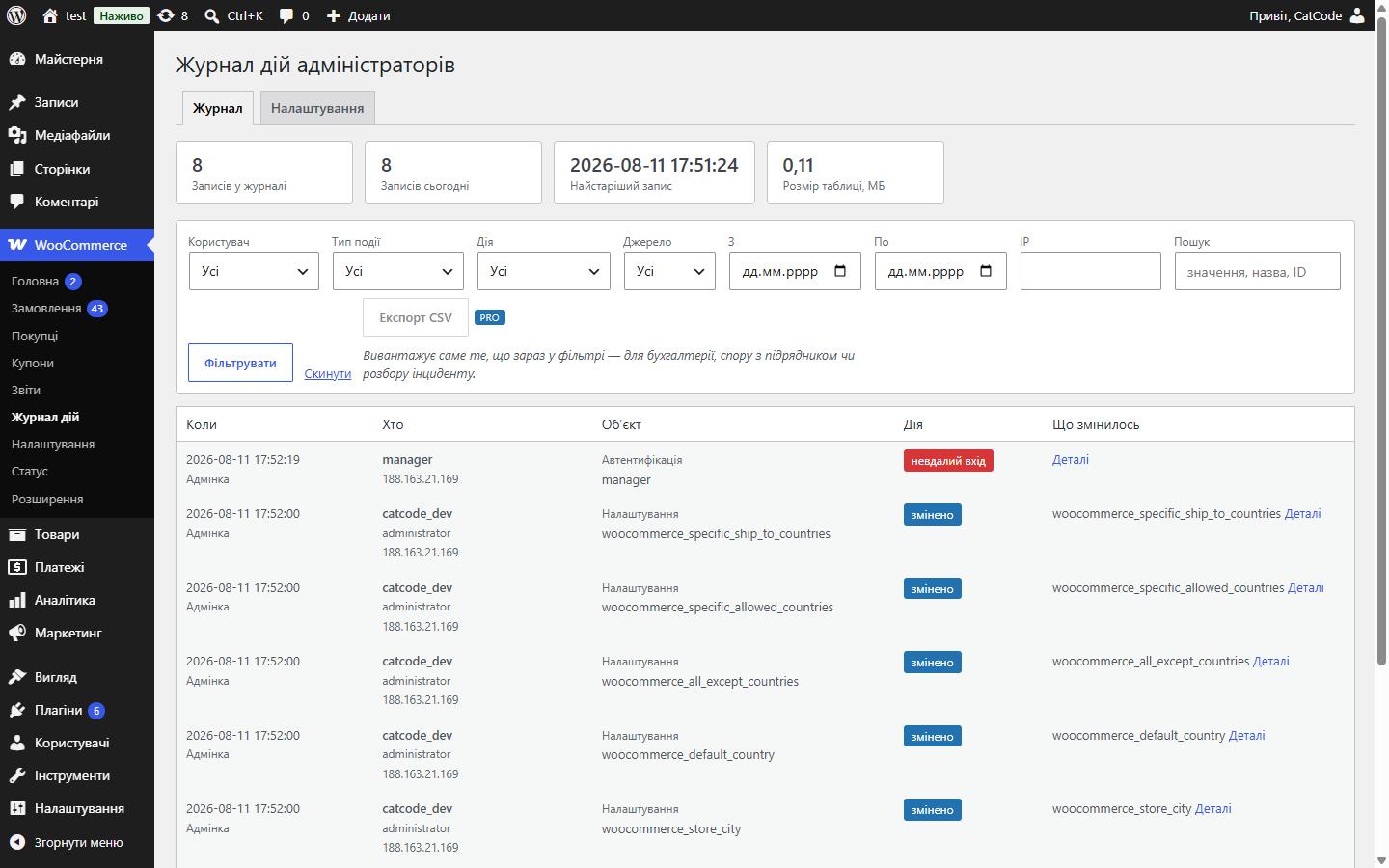
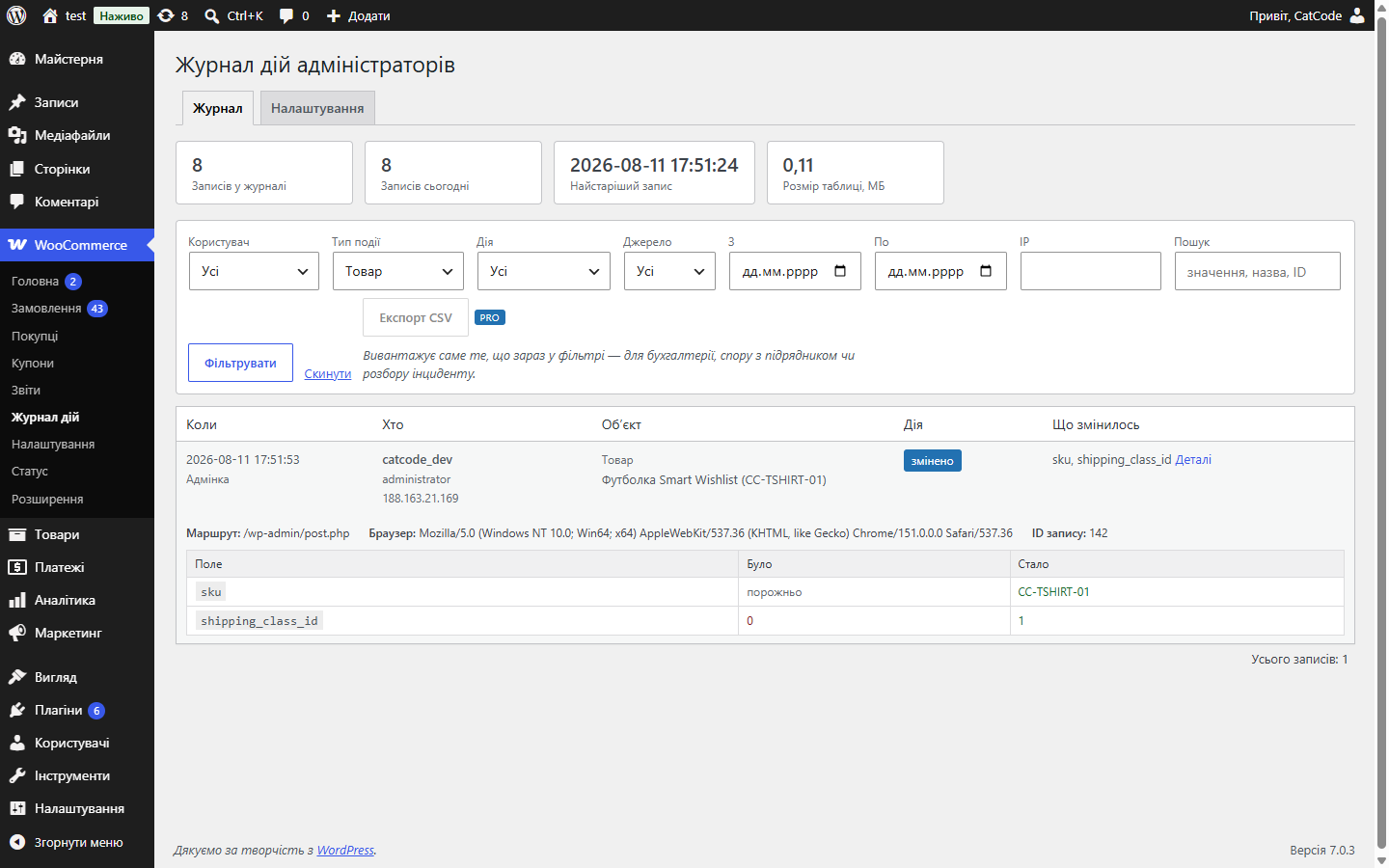
Журнал дій в адмінці WooCommerce: хто, коли і що змінив у замовленнях, товарах, налаштуваннях і користувачах — із таблицею «поле / було / стало». Паролі й ключі маскуються до запису.
Без звуку теж зрозуміло: субтитри українською
Безкоштовна версія працює без обмеження в часі. Pro додає решту функцій з таблиці.


Кожна дія стає окремим записом: користувач, роль, IP, час і список змінених полів у вигляді «було → стало».

Записи не редагуються з інтерфейсу — ні кнопки, ні запиту для правки чи видалення окремого рядка не існує.

Паролі, токени, API-ключі, номери карток і подібні поля маскуються до запису — їх немає ні на екрані, ні в CSV-експорті, ні в дампі бази.

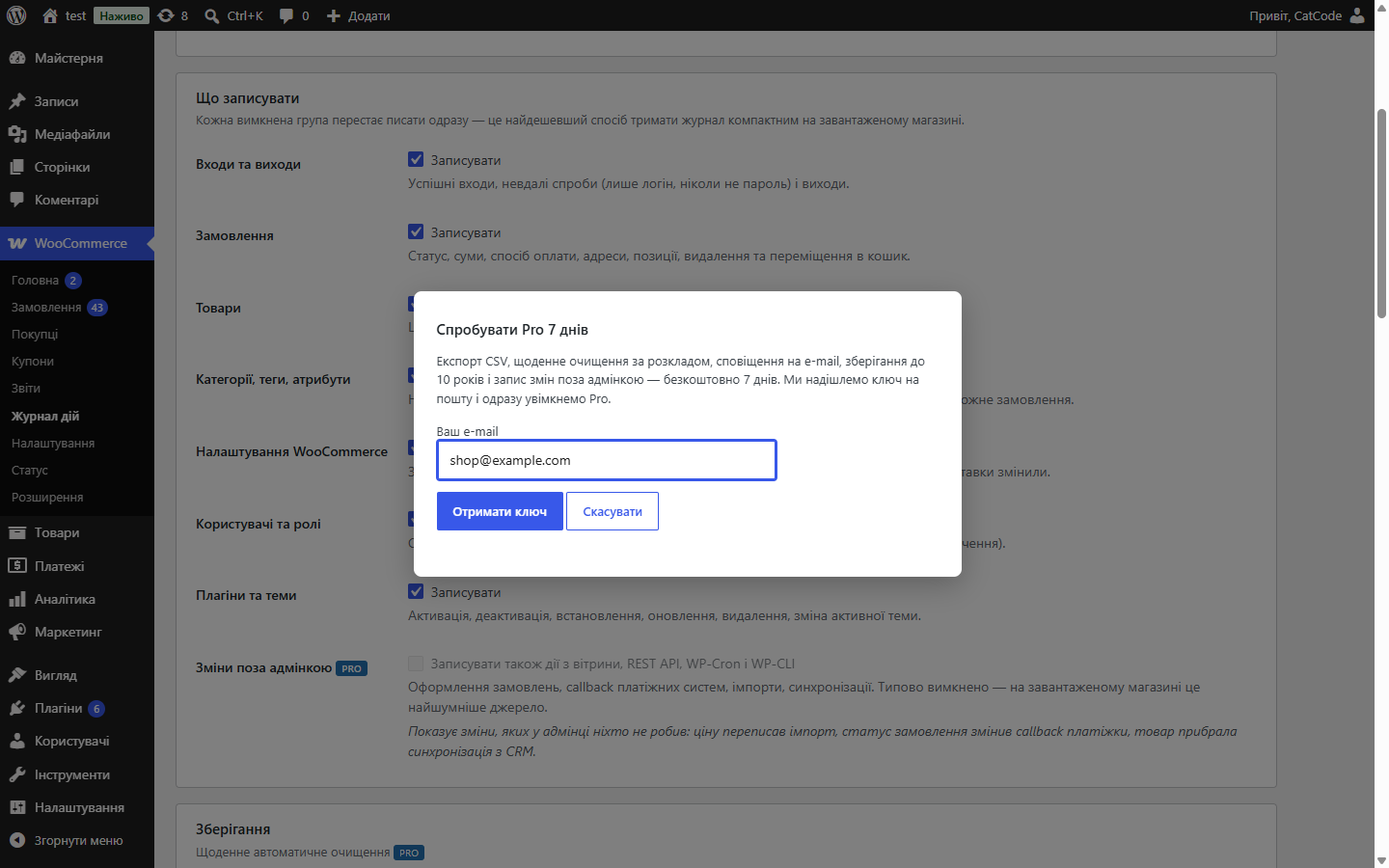
Свіжий інстал — безкоштовна версія, нічого не вмикається само. Кнопка «Спробувати Pro 7 днів» → e-mail → ключ одразу у вікні і листом.

Переносите магазин — відв’яжіть ліцензію на старому домені й активуйте на новому самі. Для студій — ключі на 5, 25 сайтів або без обмежень.
 WordPress 6.2 і новіший, PHP 7.4+WooCommerce 7.0 і новіший; HPOS (окремі таблиці замовлень) і класичне зберігання працюють однаковоВласна таблиця журналу; при деактивації плагіна вона не видаляється — журнал, який стирає випадковий клік, не є журналомWordPress 7.1.1 · WooCommerce 10.7.0 · Storefront 4.6.2
Pro більше не вмикається сам: свіжий інстал = безкоштовна версія, поки власник не запустить тріал або не активує ключ.
Журнал замовлень, товарів, категорій, налаштувань, користувачів, плагінів і тем; дифи «було → стало», фільтри й пошук, маскування секретів, правила зберігання; Pro.
4 модулі одним замовленням — на 40% дешевше, ніж окремо



Audit Log для WooCommerce веде власний журнал: щойно в магазині працює більше однієї людини, з’являються питання — хто змінив ціну, хто скасував замовлення, коли зникла знижка. WooCommerce на них не відповідає: екран замовлення показує лише зміни статусу, решта не фіксується ніде.
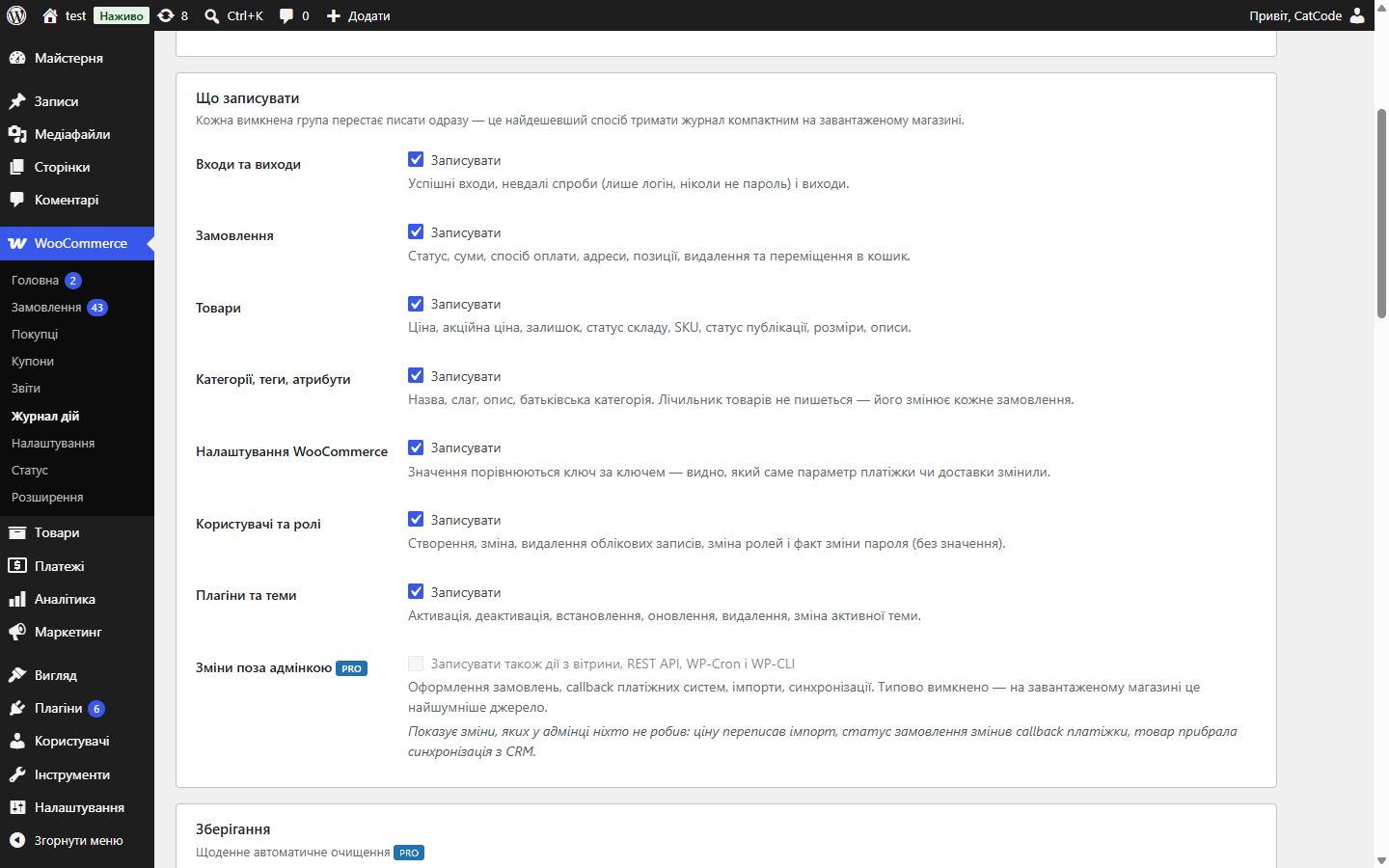
Кожна дія стає окремим записом: користувач, роль, IP, час і список змінених полів у вигляді «було → стало». Замовлення (статус, суми, метод оплати, адреси, позиції, видалення), товари (ціна, акційна ціна, залишок, наявність, артикул, статус, габарити, описи), категорії, теги й атрибути, налаштування WooCommerce з порівнянням ключ за ключем, користувачі й ролі, плагіни й теми, а також входи, виходи та невдалі спроби входу.
Записи не редагуються з інтерфейсу — ні кнопки, ні запиту для правки чи видалення окремого рядка не існує. Доступні лише очищення за правилами зберігання й повне очищення, і обидві дії теж потрапляють у журнал.
Паролі, токени, API-ключі, номери карток і подібні поля маскуються до запису — їх немає ні на екрані, ні в CSV-експорті, ні в дампі бази. Зміна пароля фіксується як факт, без значення й без хеша. IP береться тільки з REMOTE_ADDR, збереження user agent вимикається.
Правила зберігання діють за віком і за кількістю рядків (у Free — 90 днів і 50 000 записів), кожну групу подій можна вимкнути. У Pro зберігання — до 10 років і без ліміту рядків.
Коли в адмінці більше однієї людини, рано чи пізно виникає питання «хто змінив ціну» або «куди подівся товар». Без журналу відповіді немає — є лише припущення й зіпсовані стосунки в команді.
Журнал дій закриває це фактами: хто, коли, що саме змінив і з якого значення на яке.
1. Модуль вмикається і починає писати дії користувачів адмінки.
2. Кожен запис — це користувач, час, об’єкт і зміна «було → стало».
3. У журналі можна фільтрувати за користувачем, типом дії й періодом.
4. Старі записи прибираються за заданим строком зберігання — кнопкою, а в Pro щодня автоматично, — щоб таблиця не росла нескінченно.
Журнал лежить у власній таблиці й не роздуває wp_options. Запис іде синхронно з дією, тому не буває «дірок» у журналі через збій крона.
Модуль не пише в журнал те, чого не має права зберігати: паролі, токени, API-ключі й номери карток маскуються ще до запису. Адреси та інші дані замовлень у журнал потрапляють — як частина змін «було → стало».
1. Завантажте архів у «Плагіни → Додати новий → Завантажити плагін» і активуйте.
2. Задайте строк зберігання записів.
3. Змініть щось у тестовому товарі й перевірте, що запис з’явився.
Не знайшли відповідь? Напишіть у Telegram — відповімо протягом робочого дня.
 @catcode_support
Налаштування, сумісність, активація
@catcode_support
Налаштування, сумісність, активація
Ні. У плагіні немає ні кнопки, ні запиту для цього. Доступні лише дві дії над журналом у цілому — очищення за правилами зберігання й повне очищення, і обидві теж записуються в журнал.
Ні. Маскування працює на записі, а не на показі: значення такого поля не зберігається взагалі. Сам факт зміни ключа при цьому видно — інакше ротація токена пройшла б непоміченою.
Безкоштовна версія пише дії в адмінці. Зміни з вітрини, REST API, WP-Cron і WP-CLI вмикаються окремим перемикачем у Pro — на завантаженому магазині це найгаласливіше джерело.
Ні. Правила зберігання діють за віком і за кількістю рядків, кожну групу подій можна вимкнути окремо. У Free правила застосовуються кнопкою, у Pro — щоденним завданням. Розмір таблиці показано на екрані журналу.
Тільки з REMOTE_ADDR — проксі-заголовки відвідувач може підробити. Збереження user agent можна вимкнути, якщо цього вимагає ваша політика обробки даних.
Поки що жодного відгуку. Будьте першим.
Поки питань немає. Запитай — ми відповімо протягом 24 годин.
Робимо кастомні модулі під WordPress, WooCommerce, OpenCart і Shopify. Розкажіть про задачу — підготуємо оцінку.
Замовити кастомний модуль
—

Помічник CatCode
Щойно


Помічник CatCode
Онлайн

Допоможу із задачею по сайту
Опишіть задачу по сайту — підберу готовий модуль або передам розробнику з оцінкою. Модулі, доробки, верстка, інтеграції, швидкість, перенесення, технічне SEO.
