
WordPress
Telegram-сповіщення і Viber/SMS покупцям для WooCommerce
Free + Pro
990 грн/рік
v1.3.1
 All Access4 990 ₴ на рік
 Аудит сайтуPDF-звіт на пошту за 3 хвилиниПеревірити сайт
Для щоденних задач
Стиснення фотоРозмір, якість і WebP пачкоюГенератор QRПосилання, Wi-Fi, оплата на IBANКалькулятор ПДВ20, 14, 7 % і сума прописомТранслітераціяЗа постановою КМУ № 55Перевірки сайту
PHP і плагіниВерсія PHP, WordPress, плагіниФід Google MerchantПоля, ціни, GTIN, фотоПошта доменуSPF, DKIM, DMARC, чорні спискиГотовність до AI-пошукуllms.txt, боти, розміткаУсі 9 інструментівВведіть щонайменше 2 символи

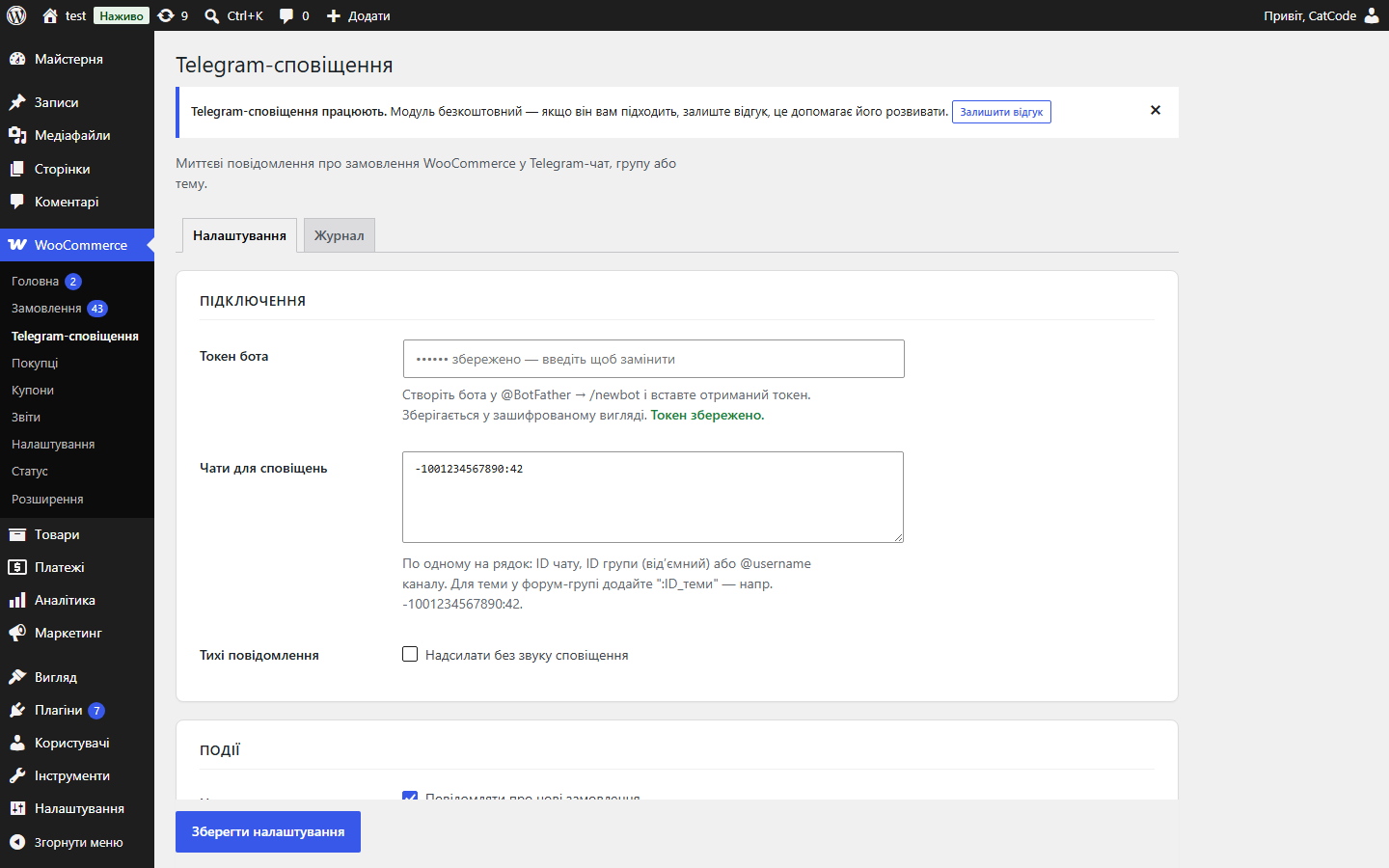
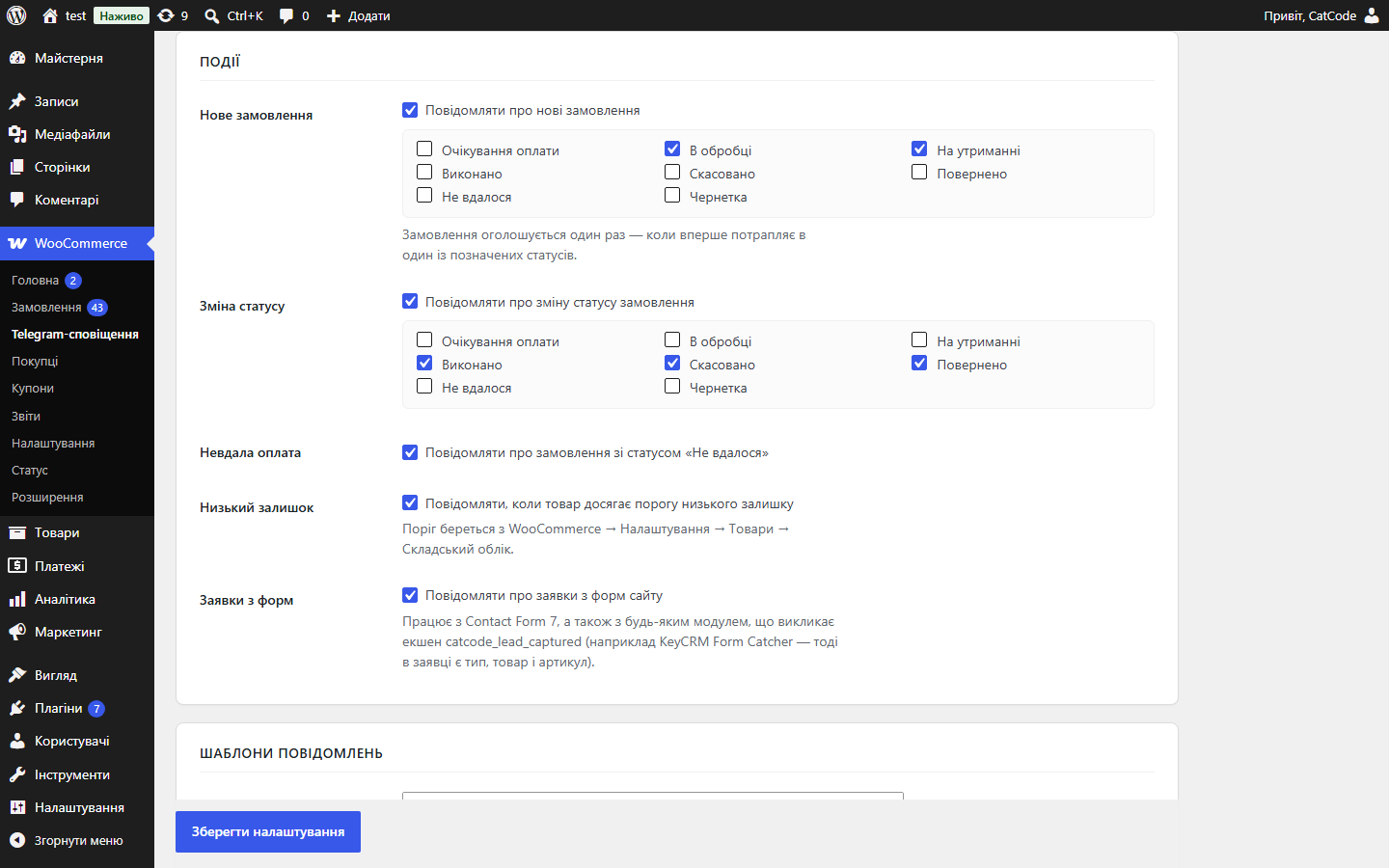
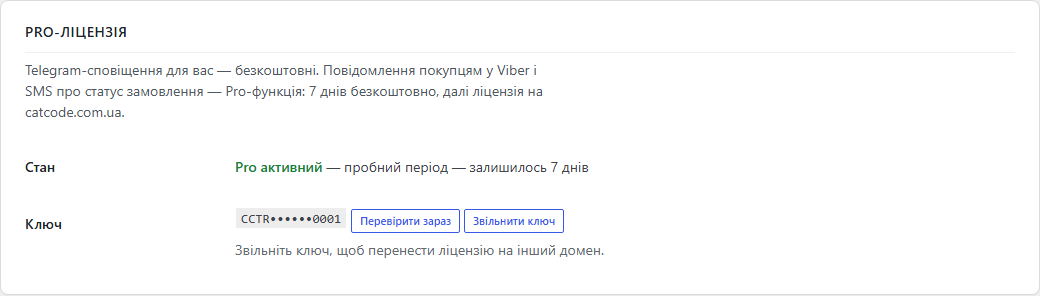
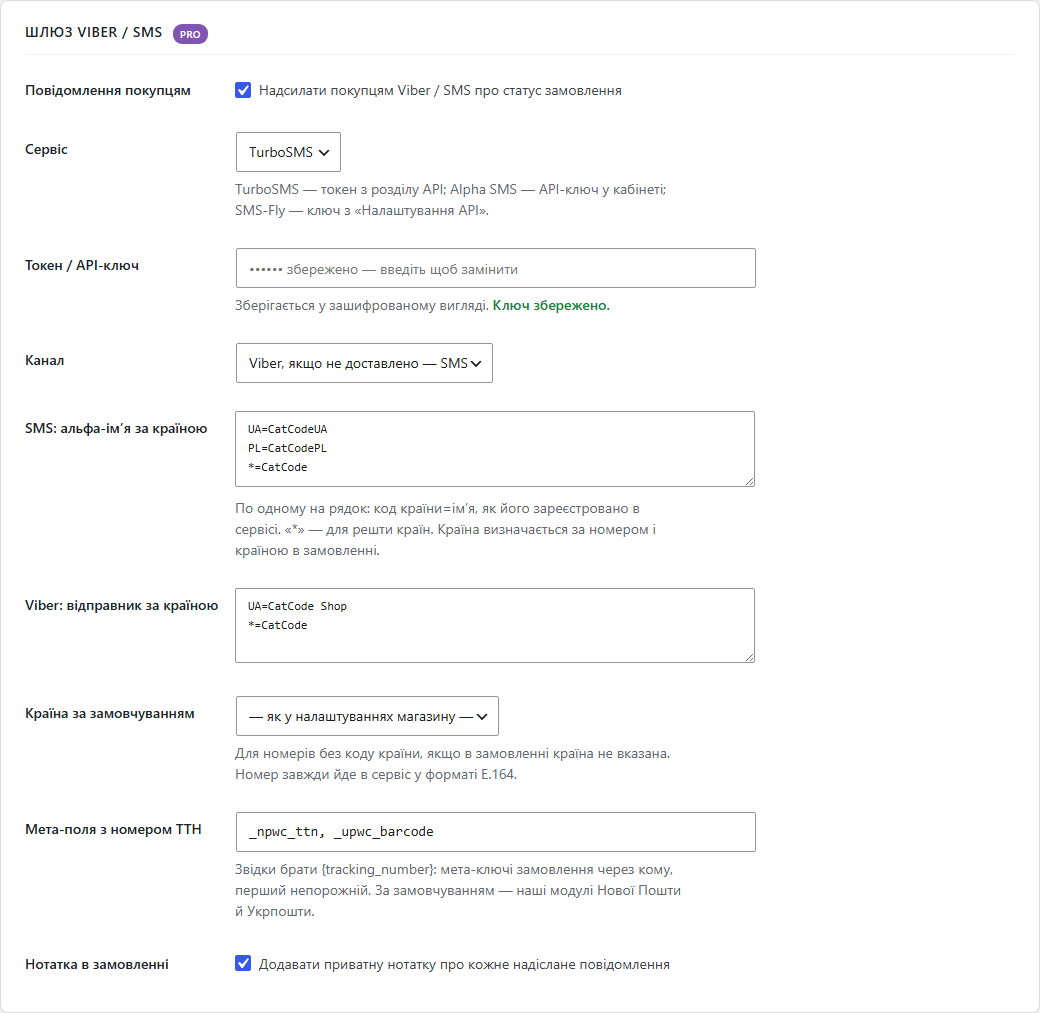
Сповіщення про замовлення WooCommerce у ваш Telegram — безкоштовно. Pro: повідомлення покупцям у Viber і SMS про статус замовлення через TurboSMS, Alpha SMS або SMS-Fly.
Без звуку теж зрозуміло: субтитри українською
Безкоштовна версія працює без обмеження в часі. Pro додає решту функцій з таблиці.



Свіжий інстал — безкоштовна версія, нічого не вмикається само. Кнопка «Спробувати Pro 7 днів» → e-mail → ключ одразу у вікні і листом.

Переносите магазин — відв’яжіть ліцензію на старому домені й активуйте на новому самі. Для студій — ключі на 5, 25 сайтів або без обмежень.
 WordPress 6.2+, WooCommerce 6.0+, PHP 7.4+Сумісний з HPOS і блоковим checkoutДля Viber / SMS: акаунт у TurboSMS, Alpha SMS або SMS-Fly із зареєстрованим альфа-іменем (для Viber — погоджений відправник)Вихідний доступ до api.telegram.org і до API вибраного SMS-сервісу
Поки поруч активна безкоштовна копія з WordPress.org і ця версія стоїть на паузі, WooCommerce більше не показує її як несумісну з HPOS (червоне повідомлення на всіх сторінках адмінки).
Pro: повідомлення покупцям у Viber і SMS про статус замовлення через TurboSMS, Alpha SMS або SMS-Fly.
WooCommerce більше не обовʼязковий: на сайті без магазину плагін надсилає в Telegram заявки з форм.
Нова подія — заявки з форм сайту (Contact Form 7 і екшен catcode_lead_captured).
Нові замовлення, зміна статусу, невдала оплата й низький залишок у Telegram; власні шаблони, кілька чатів і теми форум-груп, тихий режим, журнал, повторна спроба, зашифрований токен.
4 модулі одним замовленням — на 40% дешевше, ніж окремо


Плагін робить дві речі. Надсилає події магазину WooCommerce вам у Telegram — нове замовлення, зміну статусу, невдалу оплату, низький залишок, заявки з форм. І, з версії 1.3.0, повідомляє покупця у Viber або SMS, коли його замовлення змінює статус: «прийнято», «відправлено, ТТН 2045…», «скасовано».
Telegram-сповіщення для вас лишаються безкоштовними, як і раніше. Повідомлення покупцям у Viber і SMS — Pro-функція: вона працює через ваш акаунт у TurboSMS, Alpha SMS або SMS-Fly, а перші 7 днів Pro відкриваються кнопкою в налаштуваннях без оплати.
Покупець оформлює замовлення як завжди — на класичному чи блоковому checkout, нічого додаткового заповнювати не треба. Щойно замовлення потрапляє в статус, для якого ви ввімкнули повідомлення, покупець отримує у Viber від імені вашого магазину короткий текст. Якщо Viber на номері нема або повідомлення не доставлене за годину, сервіс сам надсилає той самий текст через SMS.
Кожен статус надсилається одному покупцю один раз: повторне збереження замовлення в адмінці чи подвійний виклик від платіжного шлюзу другого повідомлення не дають.
093 123 45 67 у замовленні з України стає 380931234567, +48 731 234 567 — польським номером, а 9 цифр без коду читаються як номер країни замовлення, а не вгадуються за першими цифрами.*=.message/send.json, гібрид Viber+SMS), Alpha SMS (JSON-протокол, тип viber+sms), SMS-Fly (REST API v2, канали ["viber","sms"], ttl у хвилинах).+38093***4567).cc_tgnotify_sms_countries (додати країну), cc_tgnotify_sms_tracking_number (ТТН з іншого джерела), cc_tgnotify_sms_api_url (тестовий стенд).UA=МійМагазин, *=МійМагазин).Не знайшли відповідь? Напишіть у Telegram — відповімо протягом робочого дня.
 @catcode_support
Налаштування, сумісність, активація
@catcode_support
Налаштування, сумісність, активація
За тарифом вашого сервісу (TurboSMS, Alpha SMS чи SMS-Fly). Плагін не бере комісії й не стоїть між вами та сервісом — запити йдуть напряму з вашим ключем.
У режимі «Viber, якщо не доставлено — SMS» сервіс сам надішле SMS з тим самим текстом.
Ні. Номер з кодом країни визначається за кодом, номер без коду читається як номер країни з адреси замовлення, а альфа-імʼя береться окремо для кожної країни.
Повідомлення покупцям зупиняться, Telegram-сповіщення для вас працюватимуть далі. Після покупки ліцензії Pro вмикається знову, налаштування не губляться.
Ні. Повідомлення надсилає ваш власний бот напряму в Telegram API. Між магазином і Telegram немає нашого сервера — ми не бачимо ані замовлень, ані токена.
Безкоштовно. Обмежень за кількістю повідомлень, чатів чи замовлень немає — ліміти лише ті, що діють у самого Telegram (близько 30 повідомлень за секунду на бота).
Впишіть кілька ID у поле «Чати для сповіщень» — по одному на рядок. Можна змішувати: особистий чат, група, канал. Для окремої теми у форум-групі додайте номер теми через двокрапку, наприклад -1001234567890:42.
Додайте бота в групу і надайте йому право надсилати повідомлення (для каналу — зробіть адміністратором). Далі напишіть у групі будь-яке повідомлення й натисніть «Знайти chat_id»: ID групи завжди від’ємний.
Означає, що в шаблоні є недозволений або незакритий тег. Telegram розуміє лише <b>, <i>, <u>, <s>, <code>, <pre> і <a href>. Перевірте шаблон і збережіть ще раз.
Так, увімкніть «Тихі повідомлення» — Telegram доставить їх без звукового сигналу, повідомлення все одно з’явиться у чаті.
Невдала спроба потрапляє в журнал із кодом відповіді, і модуль надсилає повідомлення повторно. Замовлення від цього не страждає — оформлення покупця ніколи не блокується.
Поки що жодного відгуку. Будьте першим.
Поки питань немає. Запитай — ми відповімо протягом 24 годин.
Робимо кастомні модулі під WordPress, WooCommerce, OpenCart і Shopify. Розкажіть про задачу — підготуємо оцінку.
Замовити кастомний модуль
—

Помічник CatCode
Щойно


Помічник CatCode
Онлайн

Допоможу із задачею по сайту
Опишіть задачу по сайту — підберу готовий модуль або передам розробнику з оцінкою. Модулі, доробки, верстка, інтеграції, швидкість, перенесення, технічне SEO.
