


OneBox Sync — CRM для OpenCart 2.3, 3.x і 4.x
Автоматична відправка замовлень OpenCart 2.3, 3.x і 4.x у OneBox OS: процес-замовлення з клієнтом і товарами створюється в CRM одразу після оформлення. Журнал синхронізації, cron-ретраї, зашифровані доступи.
- Сумісність
- OpenCart 2.3.0.0 – 2.3.0.2 · 3.0.2 – 3.0.5 · 4.0.2 – 4.1.x
- PHP
- 7.4 і новіший
- Версія
-
v1.1.1 (OpenCart 4)
v1.1.1 (OpenCart 3.x)
v1.0.0 (OpenCart 2.3) - Оновлено
- серпень 2026
Що вміє модуль

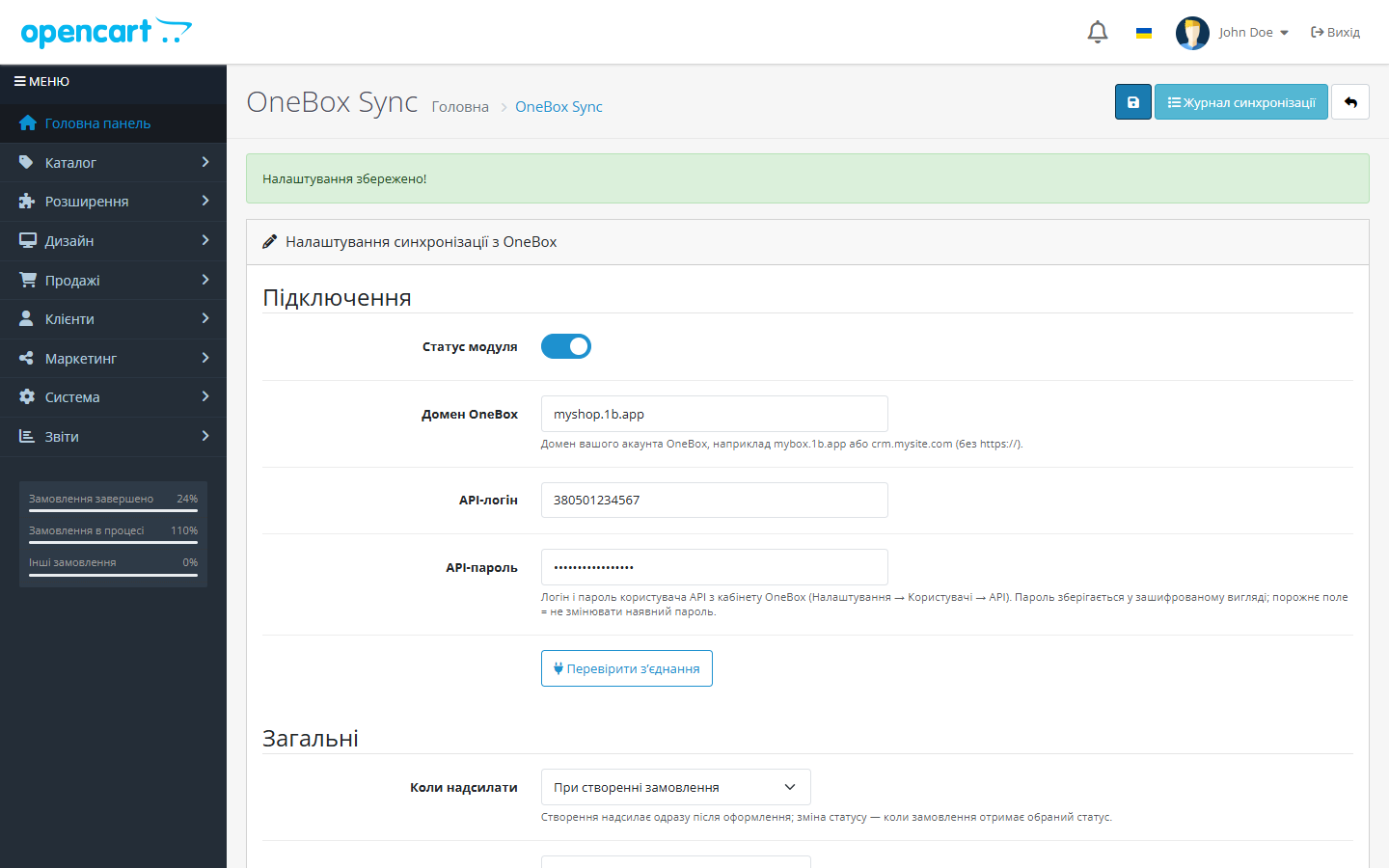
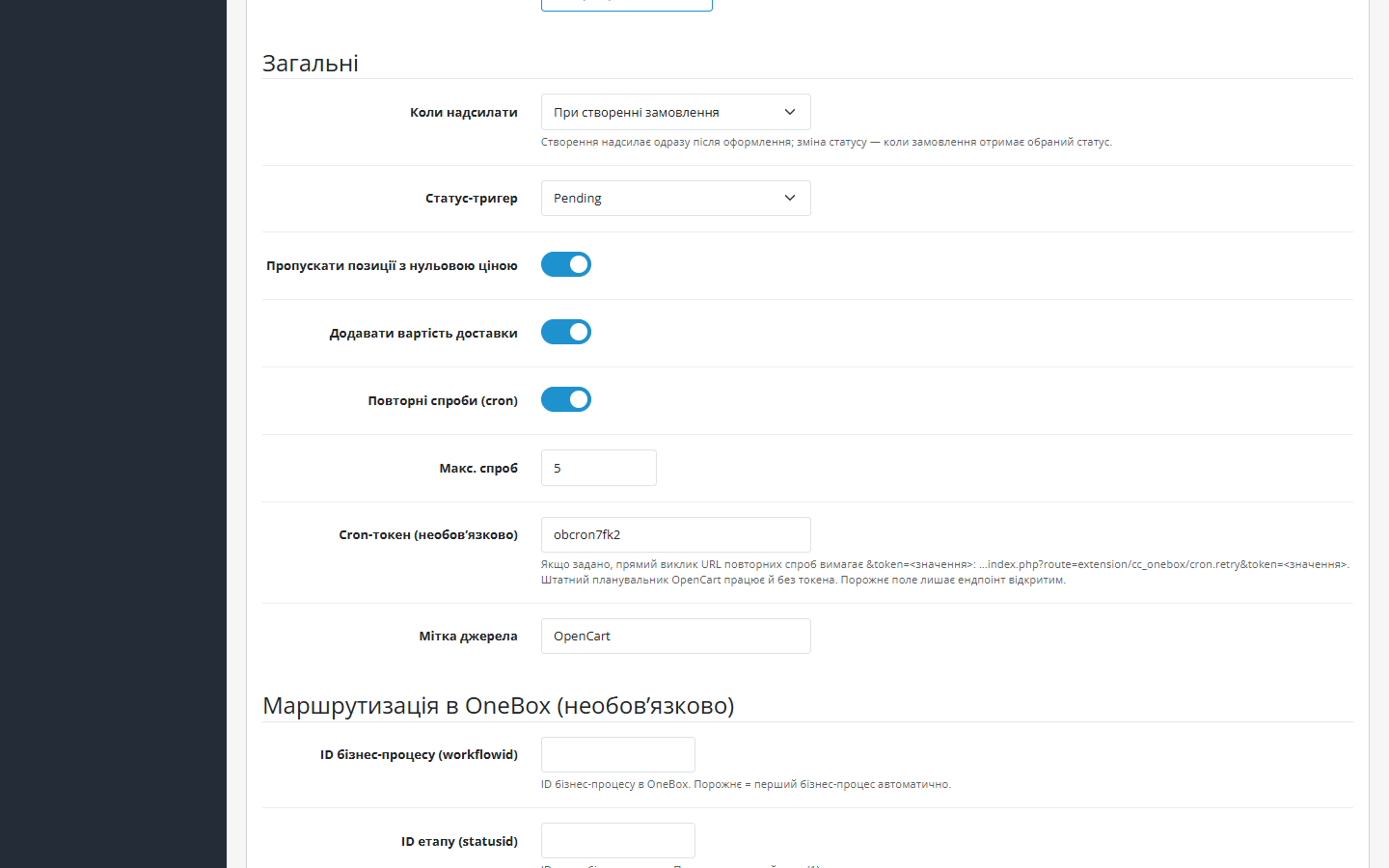
Як це виглядає
Технічні вимоги
 OpenCart 2.3.0.0 – 2.3.0.2, 3.0.2 – 3.0.5 і 4.0.2 – 4.1.x — три окремі збірки
- PHP 7.4+ для збірок OpenCart 3.x і 4.x; збірка для OpenCart 2.3 працює й на PHP 5.6 – 7.x
- OneBox OS з компонентом «API v2» (1b.app → Додатки → API-сервіси) та логіном/паролем співробітника для REST API
Історія версій
Суми в CRM більше не їдуть у базовій валюті магазину.
Окрема збірка під OpenCart 2.3.0.0–2.3.0.2 і PHP 5.6–7.x: класи без неймспейсів, шаблони Bootstrap 3, подія addOrderHistory через extension/event.
Подія замовлення реєструється як order*addHistory — на OpenCart 4.0.2.x роздільник методу інший, і з крапкою модуль не спрацьовував зовсім.
Усі версії (5)
Виправлено «тихий» тригер на OpenCart 4.0.2.x: подія додавання історії замовлення не спрацьовувала через роздільник методу.
Перший публічний реліз: відправка замовлень OpenCart 4.x у OneBox OS через API v2 (POST /order/set/ з токен-авторизацією), upsert за externalid + унікальний журнал синхронізації, мапінг…
Повний опис модуля
OneBox Sync для OpenCart — модуль, який зв’язує магазин на OpenCart 2.3, 3.x або 4.x із OneBox OS: кожне нове замовлення автоматично стає процесом-замовленням у CRM разом із клієнтом, телефоном, адресою доставки та товарами. Замість ручного перенесення даних менеджер одразу бачить заявку в OneBox і працює з нею за вашим бізнес-процесом.
Модуль повністю безкоштовний, код відкритий. Репозиторій на GitHub: github.com/catcodestudio/opencart-onebox-sync. Без ключів, підписок і лімітів на замовлення.
Як це працює — крок за кроком
- Покупець оформлює замовлення — модуль реагує на подію додавання історії замовлення, не втручаючись у checkout.
- Модуль авторизується у вашому OneBox: отримує токен через POST
/api/v2/token/get/і надсилає замовлення через POST/api/v2/order/set/. - Товари прив’язуються до каталогу OneBox: назва, артикул (SKU/модель), кількість і ціна — каталожні продукти знаходяться або створюються автоматично, без дублів у каталозі. Доставка передається окремим рядком, тому сума процесу сходиться із сумою замовлення.
- OneBox повертає ID процесу — він фіксується в журналі синхронізації; додатково передається externalid, тож повторне спрацювання не створить другий процес.
- Невдалі відправки повторює cron-ретрай — замовлення, які не пішли з першої спроби, доїжджають у CRM автоматично.
Що під капотом
- Події OpenCart — модуль підписується на додавання історії замовлення (
addHistoryв OpenCart 4,addOrderHistoryв 3.x і 2.3); файли ядра і теми не модифікуються. - Ідемпотентність: upsert за externalid на боці OneBox плюс унікальний журнал синхронізації в БД магазину — ні дубльованих процесів, ні дубльованих товарів у каталозі.
- Мапінг товарів, оплати й доставки у поля процесу OneBox; необов’язкова маршрутизація workflowid/statusid/sourceid (порожньо = перший бізнес-процес автоматично).
- Cron-черга повторів для замовлень, які не вдалося відправити з першого разу: підбираються і невдалі відправки, і ті, що зависли в стані «в процесі» понад годину (наприклад, якщо PHP обірвався посеред запиту).
- Cron-токен — публічний URL повторів можна закрити спільним секретом:
...&token=<значення>. Штатний планувальник OpenCart 4 працює й без токена, порожнє поле лишає ендпоінт відкритим. - API-пароль зберігається в БД у зашифрованому вигляді, а журнал синхронізації містить запит і відповідь API для діагностики.
Як встановити
- У OneBox встановіть компонент «API v2» (1b.app → Додатки → API-сервіси) і задайте співробітнику логін та пароль (Користувачі і співробітники → Логін, пароль, права доступу).
- Завантажте
cc_onebox.ocmod.zipчерез Розширення → Інсталятор в адмінці OpenCart. Для OpenCart 3.0.2–3.0.5 беріть окрему збірку — cc_onebox-oc3.ocmod.zip (після встановлення оновіть модифікації: Розширення → Модифікації → кнопка «Оновити»). - Для OpenCart 2.3.0.0–2.3.0.2 беріть збірку cc_onebox-oc2.ocmod.zip. ⚠️ Штатний інсталятор 2.3 копіює файли лише по FTP: якщо FTP не налаштовано, розпакуйте архів і залийте вміст теки
upload/у корінь магазину, далі Розширення → Модулі → OneBox Sync → «Встановити». - У Розширення → Модулі знайдіть OneBox Sync, натисніть «Встановити» й відкрийте налаштування.
- Вкажіть домен вашого OneBox, API-логін і API-пароль, натисніть «Перевірити з’єднання».
- За потреби заповніть ID бізнес-процесу, етапу і джерела (можна лишити порожніми — модуль візьме перший бізнес-процес) та збережіть.
- Оформіть тестове замовлення і перевірте процес у OneBox та рядок у журналі.
- В OpenCart 3.x і 2.3 планувальника немає — рядок повторів додається в crontab хостингу вручну (типово раз на 15 хвилин):
curl -s "https://SHOP/index.php?route=extension/module/cc_onebox_cron/retry&token=ТОКЕН"(у 3.x роут —extension/module/cc_onebox/cronRetry; готовий URL показано в налаштуваннях модуля)
Питання
про модуль
Не знайшли відповідь? Напишіть у Telegram — відповімо протягом робочого дня.
 @catcode_support
Налаштування, сумісність, активація
@catcode_support
Налаштування, сумісність, активація
Звідки взяти API-доступи OneBox?
З картки співробітника в застосунку «Користувачі та співробітники» вашого OneBox: логін співробітника і REST API пароль. Модуль сам обмінює їх на токен через /api/v2/token/get/.
Чи змінює модуль checkout або тему?
Ні. Модуль працює через події OpenCart на сервері — сторінка оформлення і шаблони залишаються як були, і після видалення модуля нічого відновлювати не треба.
Чи можуть задублюватися процеси або товари в OneBox?
Ні. Модуль передає externalid (OneBox оновлює знайдений процес замість створення нового) і веде унікальний журнал синхронізації; товари каталогу знаходяться за артикулом, а не створюються щоразу.
Що буде, якщо OneBox недоступний у момент замовлення?
Відправка потрапить у чергу повторів — cron-ретрай автоматично доправить замовлення, коли OneBox знову відповідатиме. Кількість спроб і помилки видно в журналі.
Куди в OneBox потрапляють замовлення?
У бізнес-процес, який ви вкажете в налаштуваннях (workflowid + statusid + sourceid). Якщо поля порожні — модуль автоматично використовує перший бізнес-процес вашого OneBox.
Що буде після видалення модуля?
Процеси в OneBox і замовлення в магазині залишаться недоторканими — модуль лише читає замовлення і веде власний журнал синхронізації.
Поки що жодного відгуку. Будьте першим.
Поки питань немає. Запитай — ми відповімо протягом 24 годин.
Не той варіант, що шукаєте?
Робимо кастомні модулі під WordPress, WooCommerce, OpenCart і Shopify. Розкажіть про задачу — підготуємо оцінку.
Замовити кастомний модуль
Купівля модуля
—



