
WordPress
Епіцентр: ціни й наявність для WooCommerce
Free + Pro
990 грн/рік
v1.2.0
 All Access4 990 ₴ на рік
 Аудит сайтуPDF-звіт на пошту за 3 хвилиниПеревірити сайт
Для щоденних задач
Стиснення фотоРозмір, якість і WebP пачкоюГенератор QRПосилання, Wi-Fi, оплата на IBANКалькулятор ПДВ20, 14, 7 % і сума прописомТранслітераціяЗа постановою КМУ № 55Перевірки сайту
PHP і плагіниВерсія PHP, WordPress, плагіниФід Google MerchantПоля, ціни, GTIN, фотоПошта доменуSPF, DKIM, DMARC, чорні спискиГотовність до AI-пошукуllms.txt, боти, розміткаУсі 9 інструментівВведіть щонайменше 2 символи

Плагін для WooCommerce надсилає ціну, стару ціну й наявність у кабінет Епіцентр Маркетплейс через API: варіації, лише змінені товари, статуси й журнал. Pro — автооновлення.
Без звуку теж зрозуміло: субтитри українською
Безкоштовна версія працює без обмеження в часі. Pro додає решту функцій з таблиці.


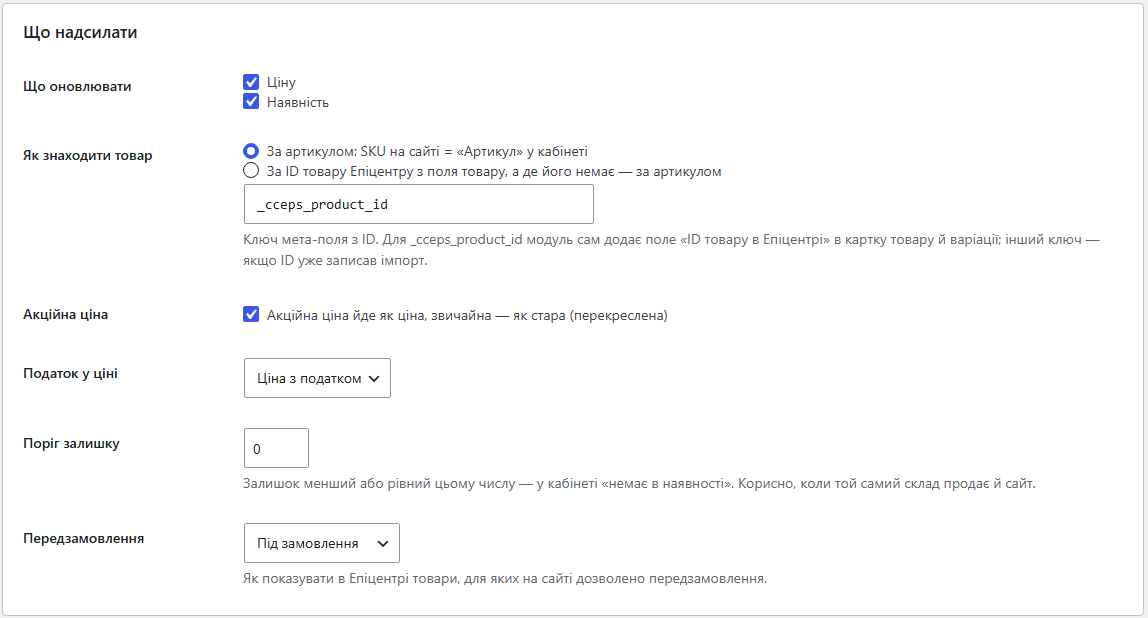
Сторінка налаштувань у меню WooCommerce: підключення, що надсилати, автоматика, синхронізація, список товарів, які не оновились, і журнал пакетів.

Ціна. Береться ціна товару з податком або без — як ви оберете, щоб збігалася з тим, що бачить покупець.

Кабінет не завжди приймає зміну, і причина важлива. Товару з таким артикулом у кабінеті немає — треба звірити коди.

Свіжий інстал — безкоштовна версія, нічого не вмикається само. Кнопка «Спробувати Pro 7 днів» → e-mail → ключ одразу у вікні і листом.

Переносите магазин — відв’яжіть ліцензію на старому домені й активуйте на новому самі. Для студій — ключі на 5, 25 сайтів або без обмежень.
 WordPress 6.2 і новіший, WooCommerce, PHP 7.4 і новіший. Плагін сумісний з HPOS — окремими таблицями замовлень WooCommerce. Потрібен вихідний HTTPS до API Епіцентру і валюта магазину UAH для надсилання цін.
Файл лише змінених товарів (Pro).
Токен кабінету шифрується AES-256-CBC з HMAC замість старого способу, через який антивіруси хостингів видаляли файл модуля.
XML-файл нових товарів з характеристиками для імпорту в кабінет.
Перший випуск.
4 модулі одним замовленням — на 40% дешевше, ніж окремо



Епіцентр: ціни й наявність — плагін для WooCommerce, який надсилає ціну, стару (закреслену) ціну й наявність товарів магазину в кабінет Епіцентр Маркетплейс через офіційне API. Змінили ціну, скінчився залишок, запустили розпродаж — кабінет отримує те саме, без вивантаження файлів і без ручного редагування карток.
Описи товарів, які вже є в кабінеті, плагін не міняє. Він оновлює те, що змінюється щодня: скільки коштує і чи є в наявності. Картки в кабінеті лишаються вашими, плагін лише тримає ціни й залишки в синхроні з WooCommerce.
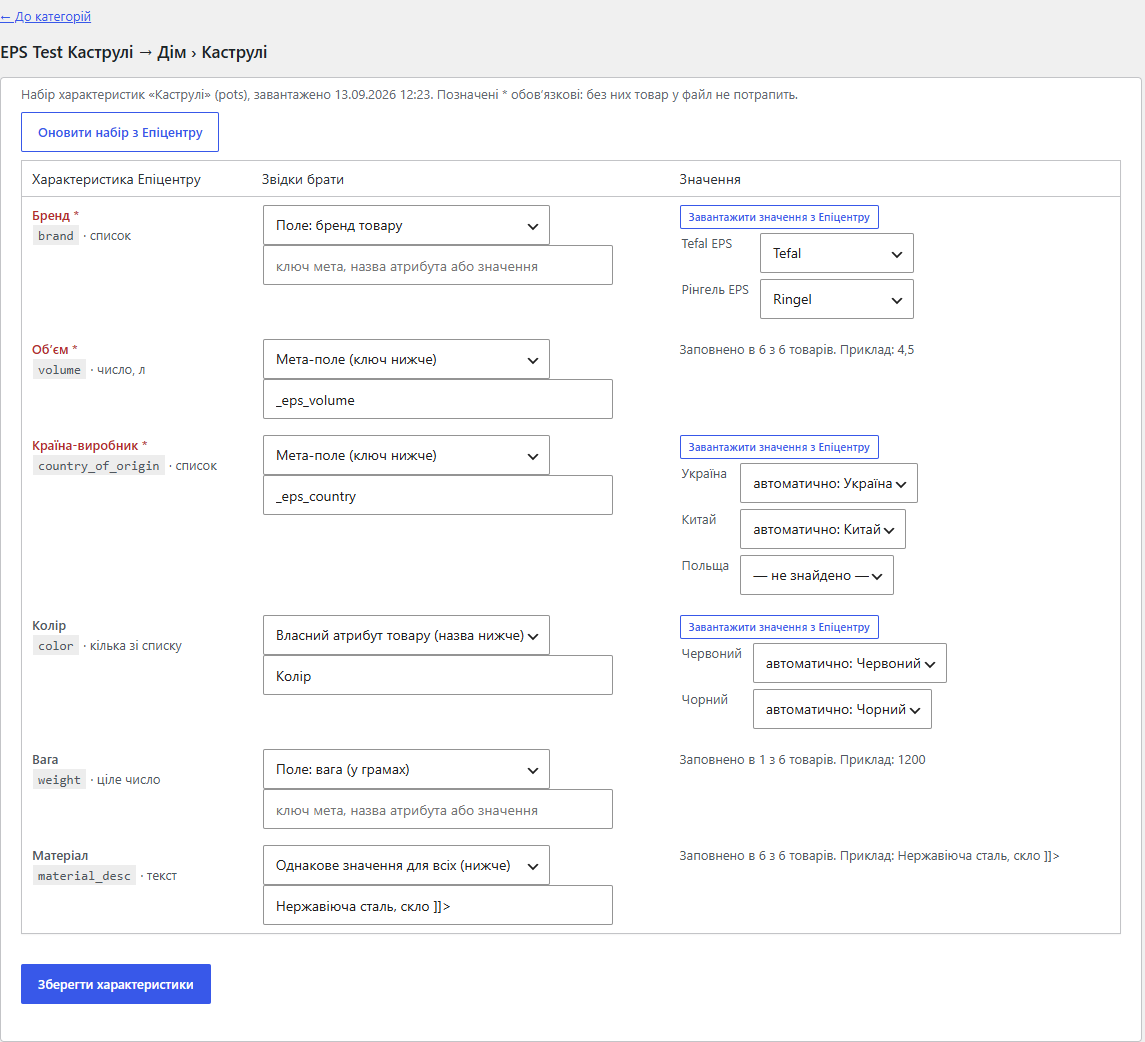
Нові товари плагін теж допомагає завести. Публічне API Епіцентру створювати товари не вміє, тож плагін збирає XML-файл для імпорту в кабінет: категорії й характеристики бере з довідника Епіцентру, значення — з ваших товарів, і показує, якої обовʼязкової характеристики бракує. Після модерації ціни й наявність цих товарів далі тримає синхронізація через API.
Продавець на Епіцентрі веде два каталоги: власний магазин і кабінет маркетплейсу. Ціну змінюють у WooCommerce, а в кабінеті вона лишається старою, поки хтось не дійде до неї руками. Товар закінчився у вас — на Епіцентрі його продовжують купувати, і замовлення доводиться скасовувати.
Кожне скасування б’є по рейтингу продавця, а ціна нижча, ніж на сайті, — по маржі. На кількох сотнях позицій ручна звірка не встигає за змінами, особливо коли той самий склад продає і сайт, і маркетплейс.
Плагін прибирає цю звірку: бачить, що в товарі змінилось, і надсилає в кабінет лише це.
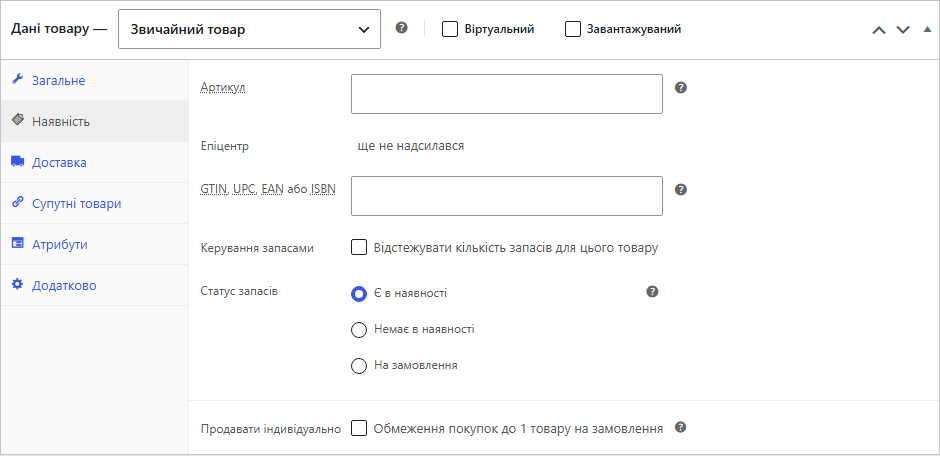
Сторінка налаштувань у меню WooCommerce: підключення, що надсилати, автоматика, синхронізація, список товарів, які не оновились, і журнал пакетів. У картці кожного товару й кожної варіації, поруч з артикулом, видно рядок «Епіцентр» — що з цим товаром відбулось востаннє.
Ціна. Береться ціна товару з податком або без — як ви оберете, щоб збігалася з тим, що бачить покупець. Ціни Епіцентр приймає лише в гривнях, тому ціну плагін надсилає, коли валюта магазину UAH; інакше йде тільки наявність.
Стара ціна. Якщо на товар діє акційна ціна WooCommerce, вона їде як ціна, а звичайна — як закреслена стара.
Наявність. «Є в наявності» — в наявності. Закінчився — «немає в наявності». Для товарів із дозволеним передзамовленням можна обрати, як показувати їх в Епіцентрі. Поріг залишку допомагає, коли той самий склад продає і сайт: залишок не більший за поріг уже вважається «немає».
Як знаходити товар. За артикулом: SKU на сайті має збігатися з «Артикулом» у кабінеті. Або за ID товару Епіцентру: плагін додає поле «ID товару в Епіцентрі» в картку товару й варіації, а якщо ID уже записав імпорт — можна вказати свій ключ мета-поля.
Варіації. Варіативний товар в Епіцентрі — це окремі позиції, тому надсилається кожна варіація зі своїм артикулом, ціною й залишком.
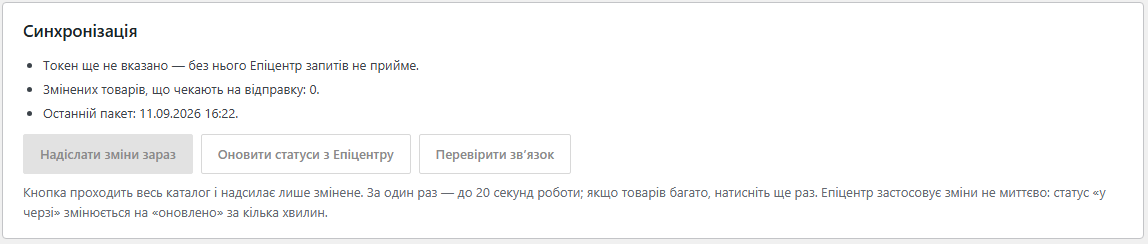
1. Ви вставляєте токен кабінету й натискаєте «Перевірити зв’язок». Токен береться в кабінеті: «Налаштування компанії» → вкладка «API».
2. Натискаєте «Надіслати зміни зараз». Плагін проходить каталог частинами до 20 секунд, щоб не впертися в таймаут хостингу; на великому каталозі кнопку натискають ще раз, і прохід продовжується з того місця.
3. Змінене збирається в пакети до 1000 товарів і йде в Епіцентр. Товари, у яких нічого не змінилось від попередньої відправки, пропускаються.
4. Епіцентр застосовує зміни не миттєво. «Оновити статуси з Епіцентру» добирає результат: що оновлено, що вже було таким самим, що відхилено.
5. Товари з проблемою потрапляють у список «Товари, які не оновились» з поясненням зрозумілими словами.
У Pro кроки 2–4 відбуваються самі: зміна товару чи залишку ставить його в чергу, а раз на 10 хвилин плагін відправляє чергу й добирає результати.
Кабінет не завжди приймає зміну, і причина важлива. Товару з таким артикулом у кабінеті немає — треба звірити коди. Товар бере участь в акції Епіцентру — ціну змінити не можна, поки акція триває. У товару немає артикула — його нема чим знайти.
Плагін показує це словами, а не кодом відповіді API. Той самий набір значень повторно не надсилається, поки ви не зміните товар, — кабінет не отримує одну й ту саму помилку кожні 10 хвилин.
Кожна відправка лягає в журнал: коли, кнопкою чи автоматично, скільки товарів і що з ними сталося. Пакет, який Епіцентр ще обробляє, чекає добору статусів, після чого закривається підсумком. Журнал можна очистити однією кнопкою.
Епіцентр приймає новий товар лише з обовʼязковими характеристиками зі свого довідника: бренд, країна, обʼєм — у кожної категорії свій набір і свої коди значень. Вручну це таблиця на сотні рядків. Плагін робить із цього три кроки:
Без Pro файл збирається для однієї категорії магазину, з Pro — для всіх і перезбирається сам щодоби.
Повний файл на кілька тисяч товарів кабінет обробляє довго, а за день у магазині змінюється десяток позицій. Тому кожне збирання тепер пише два файли: повний і файл лише змінених товарів. Плагін запамʼятовує відбиток кожного рядка <offer> і наступного разу порівнює з ним — у файл змінених потрапляють тільки ті товари, у яких справді щось інше: ціна, стара ціна, наявність, назва, фото чи характеристика.
Після збирання у звіті видно рядок «Змінених з минулого збирання: 12, без змін: 3 480», посилання на обидва файли й окремий блок «Зникли з файлу» — артикули, які були в минулому файлі, а тепер ні: товар вимкнули, прибрали з категорії або в нього загубився обовʼязковий реквізит. Імпорт такі товари з кабінету не прибирає, тож їх варто зняти там руками.
Файл змінених беруть так само, як повний: кнопкою на сторінці «Епіцентр: товари». Обидва файли лежать поруч у непублічній теці wp-content/uploads/cceps-epicentr, посилання на кожен — в адмінці.
Раніше про помилку у файлі ставало відомо вже в кабінеті: «Невідомий тег shop у рядку 3» — і імпорт зупинено. Тепер файл перевіряється до завантаження: кнопки «Перевірити файл» і «Перевірити файл змінених» читають готовий XML так само, як його читає Епіцентр, і називають проблему разом з номером рядка:
Окремою таблицею йдуть товари, які кабінет прийме, але з втратами: недосяжне фото (локальна адреса, формат не jpg/png/webp, пробіл в адресі), код категорії, якого немає в довіднику, обрізані назва (150 символів) і опис (12 160), стара ціна, яку кабінет проігнорує, бо після націнки й округлення вона вже не більша за поточну, битий GTIN за контрольною сумою і необовʼязкові характеристики, які тихо не потраплять у картку. Такі товари імпортуються — просто тепер видно, що саме з них зникне.
Файл змінених — можливість Pro; відбитки рахуються завжди, тому одразу після купівлі Pro перший файл змінених уже коректний. Перевірка файлу працює і в безкоштовній версії.
Плагін працює через офіційні ендпоінти Merchant API Епіцентру для оновлення цін і наявності — без парсингу кабінету й без імітації входу. Токен зберігається в базі в зашифрованому вигляді.
Що саме відправлено й що відповів кабінет, зберігається в мета-даних товару, тому плагін знає, що змінилось, і не шле зайвого. Черга змін живе в одній опції й обмежена за розміром, журнал тримає останні 30 пакетів. Автоматика працює на WP-Cron.
На вітрині плагін нічого не додає — покупець його не бачить і не може сповільнити.
1. Завантажте архів у «Плагіни → Додати новий → Завантажити плагін» і активуйте.
2. WooCommerce → «Епіцентр: ціни й наявність» — вставте токен кабінету й натисніть «Перевірити зв’язок».
3. Оберіть, як знаходити товар: за артикулом або за ID товару Епіцентру.
4. Натисніть «Надіслати зміни зараз», а за кілька хвилин — «Оновити статуси з Епіцентру».
Якщо вкладки «API» в кабінеті не видно, доступ до оновлення цін і наявності відкриває ваш категорійний менеджер Епіцентру.
Не знайшли відповідь? Напишіть у Telegram — відповімо протягом робочого дня.
 @catcode_support
Налаштування, сумісність, активація
@catcode_support
Налаштування, сумісність, активація
У кабінеті продавця: «Налаштування компанії» → вкладка «API». Якщо вкладки не видно або кабінет відповідає, що немає прав на дію, доступ до оновлення цін і наявності відкриває категорійний менеджер Епіцентру.
Ні. У Епіцентру немає пісочниці — API відкривається лише токеном живого кабінету. Кнопка «Перевірити зв'язок» показує, чи прийняв кабінет токен, ще до першої відправки.
Через API — ні: публічне API Епіцентру оновлює лише ціну й наявність. Нові товари плагін збирає в XML-файл з характеристиками з довідника Епіцентру, а ви завантажуєте його в кабінеті («Імпорт» → «Файл» → «Оновити все»). Після модерації ціни й наявність цих товарів далі веде синхронізація.
За артикулом: SKU на сайті має збігатися з «Артикулом» у кабінеті. Або за ID товару Епіцентру — для нього в картці товару й варіації з'являється окреме поле.
Кожна варіація надсилається окремо зі своїм артикулом, ціною й залишком — так само, як вона заведена в кабінеті Епіцентру.
Поки акція маркетплейсу триває, Епіцентр не дає міняти ціну. Плагін покаже це в списку проблемних товарів, а наявність при цьому оновлюватиметься як завжди.
Епіцентр приймає ціни лише в гривнях, тому з іншою валютою магазину плагін надсилатиме тільки наявність.
Поки що жодного відгуку. Будьте першим.
Поки питань немає. Запитай — ми відповімо протягом 24 годин.
Робимо кастомні модулі під WordPress, WooCommerce, OpenCart і Shopify. Розкажіть про задачу — підготуємо оцінку.
Замовити кастомний модуль
—

Помічник CatCode
Щойно


Помічник CatCode
Онлайн

Допоможу із задачею по сайту
Опишіть задачу по сайту — підберу готовий модуль або передам розробнику з оцінкою. Модулі, доробки, верстка, інтеграції, швидкість, перенесення, технічне SEO.
