KeyCRM Form Catcher — leads from any landing page into KeyCRM
Безкоштовний form-catcher: будь-яка HTML-форма лендінга шле заявки у KeyCRM з UTM-мітками, а для WordPress у комплекті плагін для Contact Form 7 з журналом заявок. API-ключ схований на сервері, є honeypot, rate-limit і захист від дубля.
What each licence includes
| Feature | Free |
|---|---|
| Any HTML form starts sending leads into KeyCRM | ✔ |
| A ready-made WordPress + Contact Form 7 plugin included | ✔ |
| The API key is stored on the server, never reaching the browser | ✔ |
| A copy of every lead by e-mail and Telegram | ✔ |
| UTM tags, product and SKU are passed automatically | ✔ |
| A duplicate click doesn't create a second lead in the CRM | ✔ |
| Free | ✔ |
KeyCRM Form Catcher is a lightweight form-catcher for sites and landing pages: any HTML form starts sending leads straight into KeyCRM. For a static landing page it’s three files — keycrm-catcher.php (a server-side relay that hides the API key), keycrm-core.php (the core) and keycrm-forms.js (binds to your forms) — no CMS, no composer dependencies, no jQuery. For WordPress, a ready-made plugin for Contact Form 7 is included, built on the same core, with settings in the admin panel and a lead log.
The tool is completely free. The code is open on GitHub: github.com/catcodestudio/keycrm-form-catcher. All you need is an API key from your KeyCRM account and hosting with PHP.
What the customer sees

How it works, step by step
- A visitor fills in the form on the landing page — just add the
data-keycrmattribute to the form, andkeycrm-forms.jsintercepts it automatically. In WordPress, nothing needs adding: the plugin listens for Contact Form 7 submissions. - The JS collects the data: the form fields plus
page_url, the referrer and all UTM tags — added automatically. - The request goes to the server-side relay,
keycrm-catcher.php— the API key lives only on the server and never appears on the front end. - The relay checks the submission: a honeypot against bots, IP rate-limiting, Origin checking, validation (either a phone or an email is required) and protection against a double submit.
- The lead is created in KeyCRM — either as an order (POST /order, works right away even on a trial) or as a lead card in a pipeline (POST /pipelines/cards). Standard UTMs go into KeyCRM’s analytics, while the referrer and page go into a comment for the manager.
- The visitor sees the result: a message from
data-successor a redirect fromdata-redirect; the form fireskeycrm:success/keycrm:errorevents — handy for hooking up analytics. - A copy of the lead is sent by e-mail and to Telegram, so the manager sees it without even opening the CRM.
WordPress + Contact Form 7
The archive contains a wordpress/catcode-form-leads-to-keycrm folder — a regular plugin: drop it into wp-content/plugins/ and activate it. It runs on the same core but takes its data from Contact Form 7 and requires no changes to your forms.
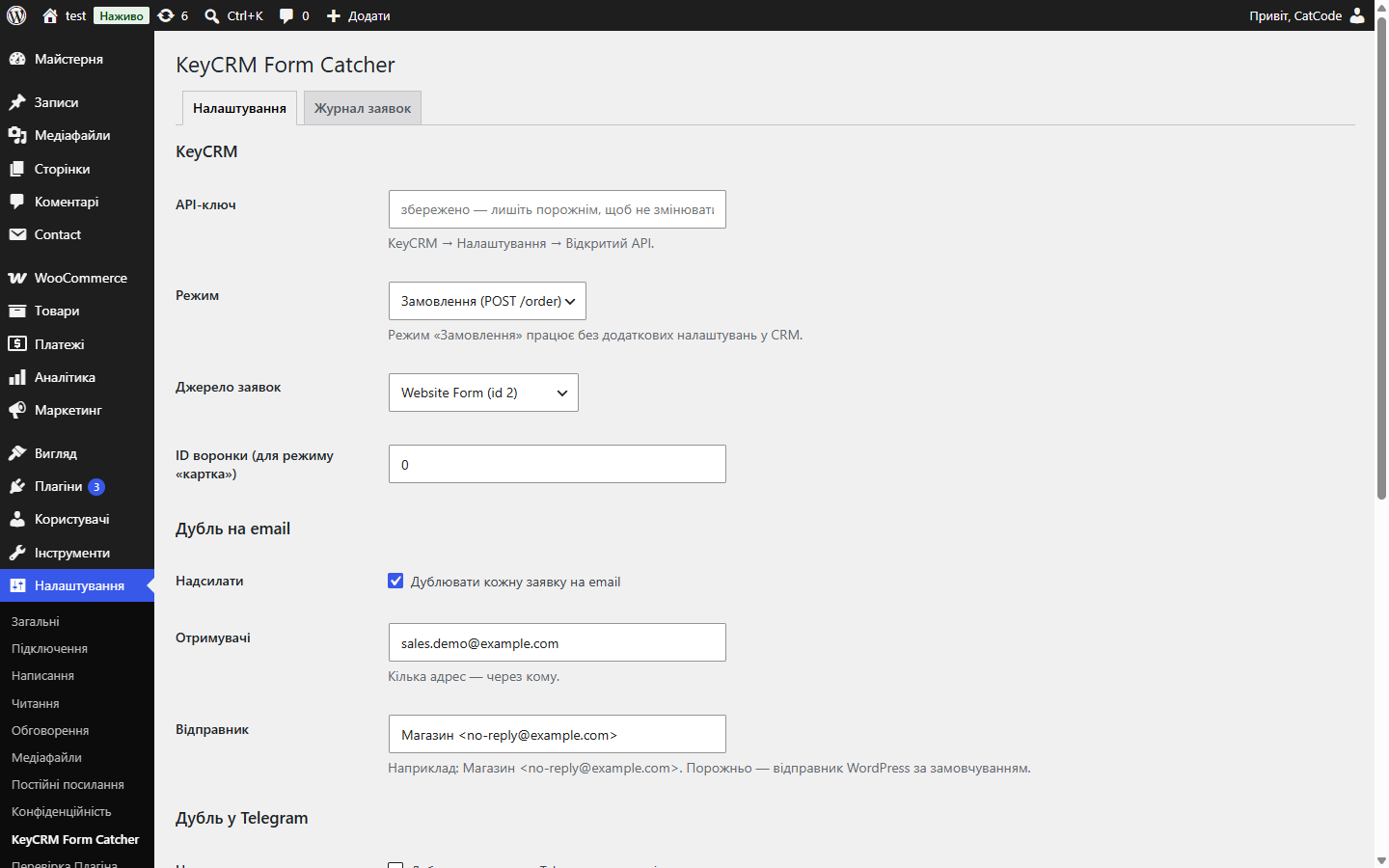
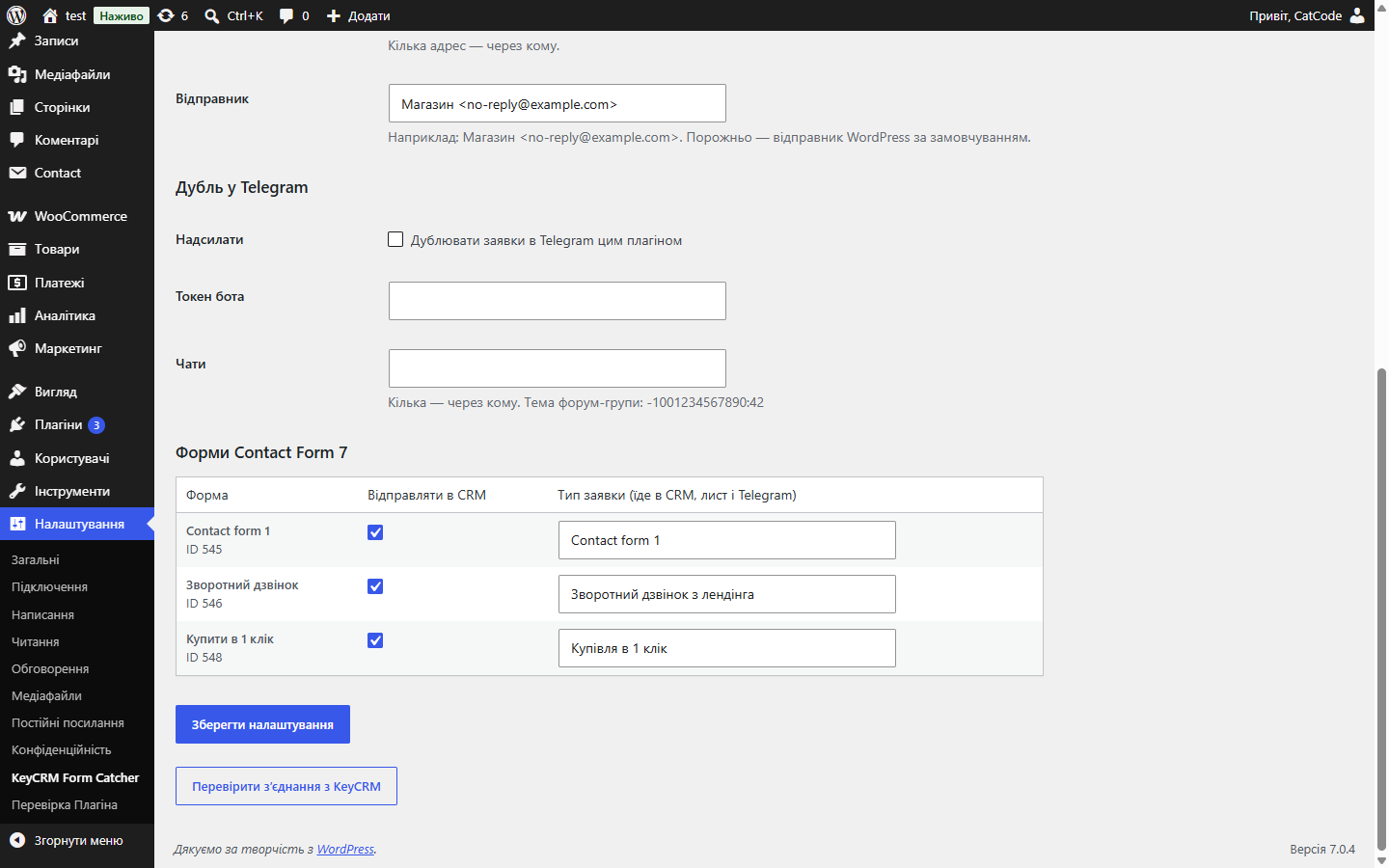
- Field roles are based on CF7 tag types, so auto-generated names like
text-32,tel-635,email-278that CF7 assigns itself work fine. - Field labels are taken from the form itself — the manager sees “City: Lviv”, not “your-city: Lviv”.
- Product and SKU are pulled from a
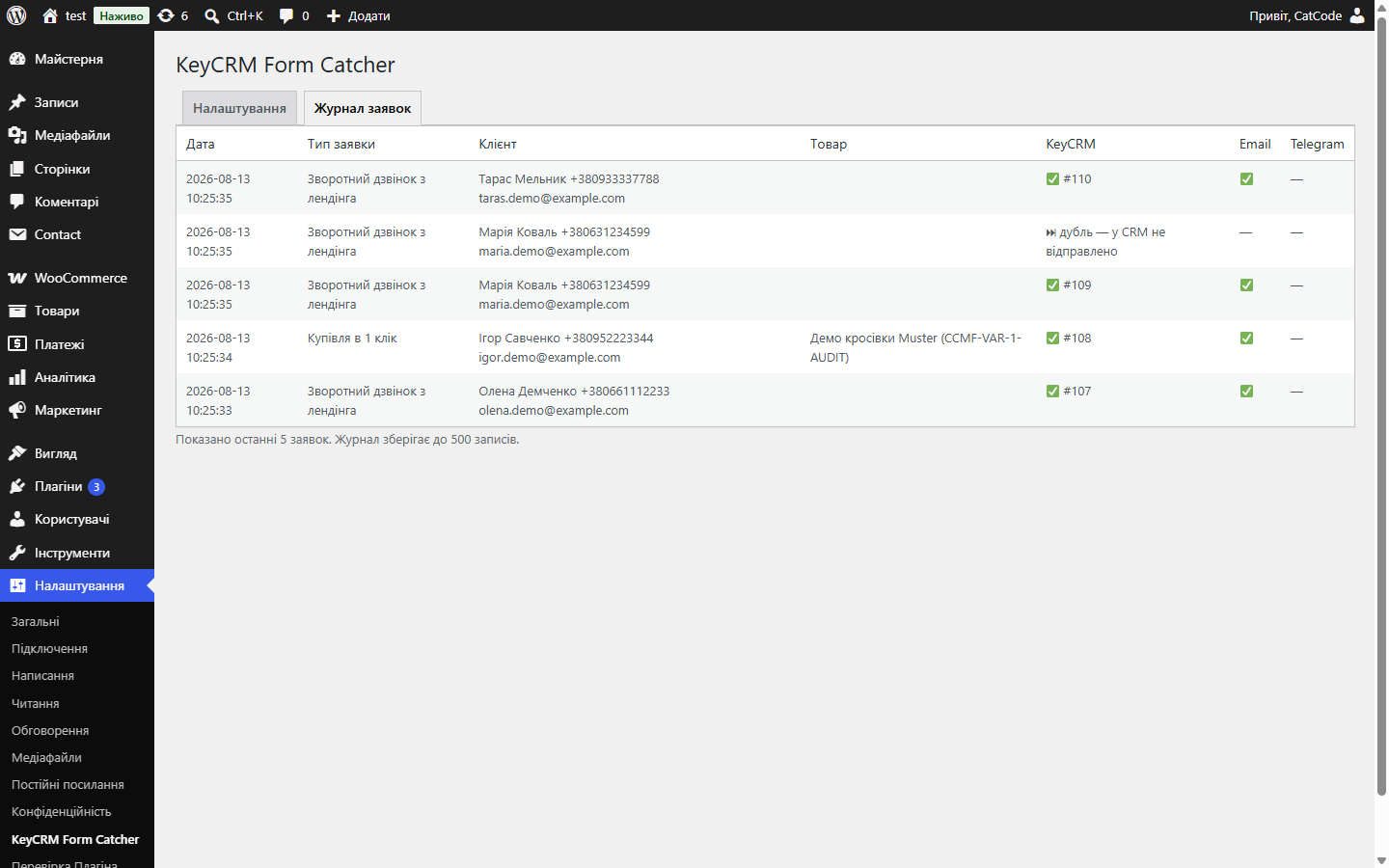
product-id/product-skufield or from the WooCommerce product page the form sits on. - A lead log in the admin panel: what went to the CRM, e-mail and Telegram.
- The
catcode_lead_capturedhook — our Telegram notifications plugin listens for it and sends a message using its own template.
Pricing
Free, open source. Download it from GitHub or the button on this page — no tariffs and no limit on the number of leads on the script’s side.
Technical requirements
- PHP 7.4+ with the cURL extension — any hosting will do
- Any HTML landing page — no CMS needed
- For the WordPress plugin — WordPress 6.2+ and Contact Form 7
- A KeyCRM API key — your KeyCRM account → Settings → API
- For lead-card mode — a pipeline created in KeyCRM (Leads → Pipelines) and its ID
Under the hood
- The API key stays on the server only — the front end talks to the relay, not directly to KeyCRM; the key cannot be extracted from the page’s code.
- A honeypot field: a human doesn’t see it, a bot fills it in. If it’s not empty, a silent fake success is returned — the bot never learns it was caught.
- IP rate-limiting — at most 10 submissions from one IP per hour (configurable via a constant), with counters kept in the system temp directory.
- Origin/CORS checking — list your domains in
KEYCRM_ALLOWED_ORIGINS, and the relay will reject requests from other sites. - Duplicate protection — a repeated submission with the same content within 5 minutes doesn’t create a second card in the CRM and doesn’t send a second e-mail. In WordPress the lock is atomic, so even several simultaneous submissions produce exactly one lead. If the CRM returns an error, the lock is released — the customer’s retry isn’t lost.
- The relay accepts a plain POST (form-encoded or JSON) — you can submit not only via
keycrm-forms.jsbut also from a custom fetch call or any other code.
How to install
- Download
keycrm-form-catcher-1.2.0.zipand unpack it. - For a landing page: drop
keycrm-catcher.php,keycrm-core.phpandkeycrm-forms.jsinto your site’s root (or any convenient folder). - In
keycrm-catcher.php, enter your API key in theKEYCRM_API_KEYconstant and your domains inKEYCRM_ALLOWED_ORIGINS. - Add
<script src="/keycrm-forms.js"></script>and give your form thedata-keycrmattribute. - For WordPress: copy the
wordpress/catcode-form-leads-to-keycrmfolder intowp-content/plugins/, activate the plugin, and fill in “Settings → KeyCRM Form Catcher”. - Send a test submission — it will appear in KeyCRM. A working example for landing pages is in the
example.htmlfile.
Version history
- 1.2.0 — August 2026
- Protection against double submits (in WordPress, an atomic lock — so even parallel requests produce one lead; the lock is released on a CRM error). The plugin no longer sends a lead to the CRM if another plugin interrupted the CF7 submission. Field labels are taken from the form itself, not from technical names. A clear error message when the API key isn’t set. The core has been split into a separate
keycrm-core.php, shared by the relay and the plugin. Removing the plugin cleans up the table and options. English interface with a Ukrainian translation. - 1.1.0 — July 2026
- A duplicate of the lead by e-mail and Telegram, a lead type for each form, the product SKU, a WordPress + Contact Form 7 plugin with a lead log in the admin panel.
- 1.0.0 — July 2026
- First public release: relay + JS widget, two modes (order / lead card), automatic UTM collection, honeypot, IP rate-limiting, Origin/CORS checking,
keycrm:success/keycrm:errorevents, anexample.htmlsample.
Frequently asked questions
Do I need to rebuild my form?
No. On a landing page, just add the data-keycrm attribute to an existing form — the script collects the name, phone, email, comment, product fields and any utm_* ones by itself. In WordPress, Contact Form 7 forms work as they are.
What's the difference between the "order" and "lead card" modes?
The order mode (default) creates an order and works right away with no CRM setup — the source is created automatically. The card mode creates a lead card in a pipeline — you need to create a pipeline in KeyCRM and enter its ID.
Could my API key be stolen?
No. The key is only stored on the server — in the relay's PHP file or in the WordPress settings. It never reaches the browser.
What about bot spam?
Three layers of protection: a honeypot field (the bot gets a fake success), IP rate-limiting and Origin checking. Plus validation: a submission without a phone or e-mail isn't accepted. In WordPress, anti-spam is still handled by Contact Form 7 and Akismet.
What if the customer clicks the button twice?
The second submission is recognised as a duplicate: the CRM isn't hit again, no second e-mail is sent, and the log row is marked "duplicate". The window is 5 minutes.
Can I send leads from Contact Form 7 or my own JS?
Yes. A ready-made plugin for Contact Form 7 is included. The relay also accepts a plain POST (form-encoded or JSON) from any source.
Will I see where the lead came from?
Yes. UTM tags are passed into the marketing field (visible in KeyCRM's analytics), and the page and referrer are added to a comment for the manager.
Questions about the module?
Message us on Telegram — we reply within the working day. We will help with setup, compatibility and key activation.
No reviews yet. Be the first — right below.
Leave a review
Reviews are moderated before publication, which usually takes up to 24 hours.
No questions yet. Ask one — we answer within 24 hours.
Ask a question
We usually reply within 24 hours during working hours.
Buying the module
—

